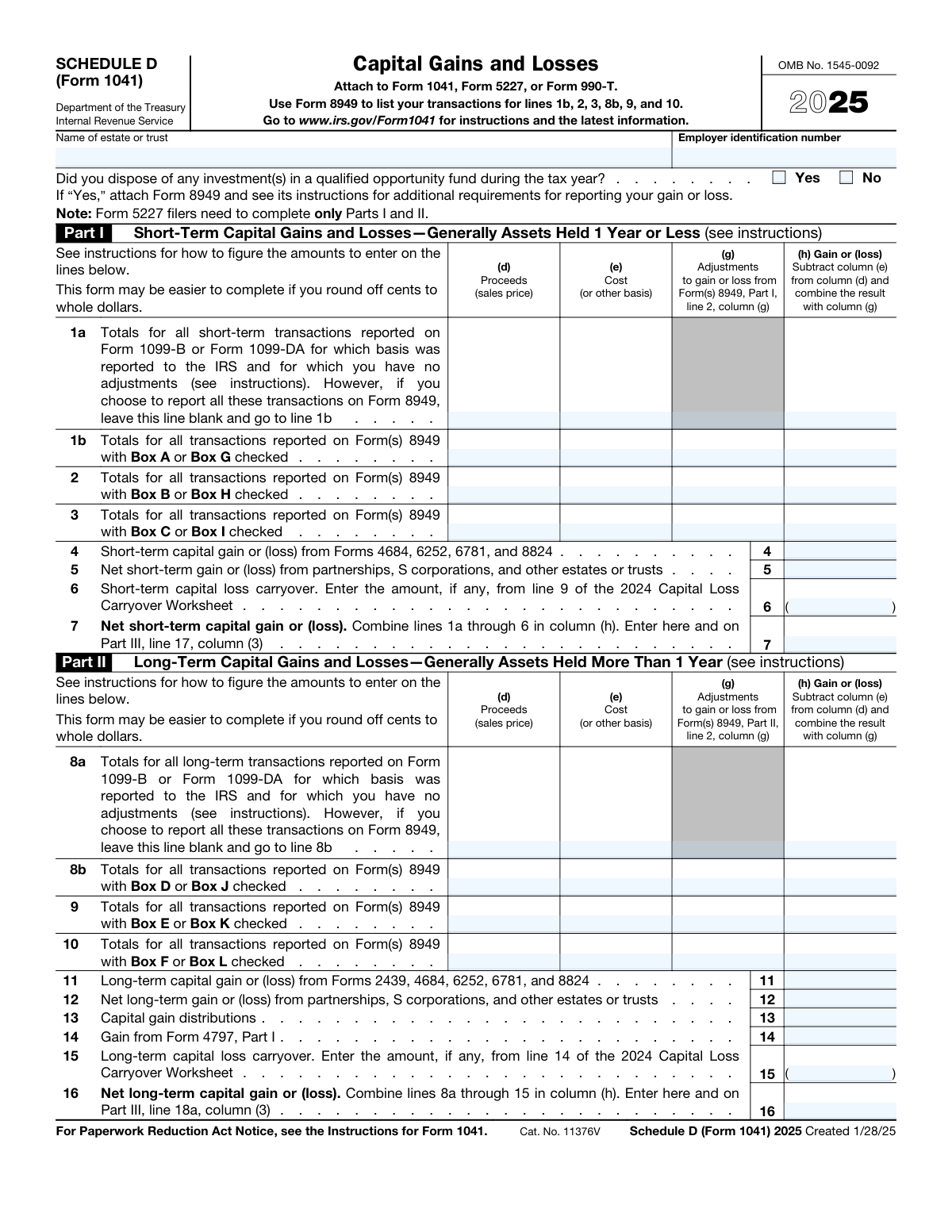
Yes! You can use AI to fill out Schedule D (Form 1041), Capital Gains and Losses
IRS Schedule D (Form 1041) is a tax form used by estates and trusts to report their capital gains and losses from the sale or exchange of assets. It is attached to Form 1041, Form 5227, or Form 990-T and is essential for calculating the tax liability on investment income and determining any capital loss carryovers. Today, this form can be filled out quickly and accurately using AI-powered services like Instafill.ai, which can also convert non-fillable PDF versions into interactive fillable forms.
Our AI automatically handles information lookup, data retrieval, formatting, and form filling.
It takes less than a minute to fill out Schedule D (Form 1041) using our AI form filling.
Securely upload your data. Information is encrypted in transit and deleted immediately after the form is filled out.
Form specifications
| Form name: | Schedule D (Form 1041), Capital Gains and Losses |
| Number of fields: | 87 |
| Number of pages: | 2 |
| Language: | English |
Instafill Demo: How to fill out PDF forms in seconds with AI
How to Fill Out Schedule D (Form 1041) Online for Free in 2026
Are you looking to fill out a SCHEDULE D (FORM 1041) form online quickly and accurately? Instafill.ai offers the #1 AI-powered PDF filling software of 2026, allowing you to complete your SCHEDULE D (FORM 1041) form in just 37 seconds or less.
Follow these steps to fill out your SCHEDULE D (FORM 1041) form online using Instafill.ai:
- 1 Navigate to Instafill.ai and upload your Schedule D (Form 1041) or select it from the form library.
- 2 Provide the basic information for the estate or trust, including its full name and Employer Identification Number (EIN).
- 3 Follow the AI-guided prompts to enter details for Part I (Short-Term Capital Gains and Losses) and Part II (Long-Term Capital Gains and Losses), referencing your Forms 8949 and 1099-B as needed.
- 4 The system will automatically populate Part III, summarizing the gains and losses and allocating them between the beneficiaries and the estate or trust.
- 5 Based on the net gain or loss, the AI will help you complete either Part IV (Capital Loss Limitation) or Part V (Tax Computation Using Maximum Capital Gains Rates).
- 6 Review all the information auto-filled by the AI for accuracy, including calculations for tax liability and carryover amounts.
- 7 Securely e-sign and download your completed Schedule D (Form 1041), ready to be attached to your main return.
Our AI-powered system ensures each field is filled out correctly, reducing errors and saving you time.
Why Choose Instafill.ai for Your Fillable Schedule D (Form 1041) Form?
Speed
Complete your Schedule D (Form 1041) in as little as 37 seconds.
Up-to-Date
Always use the latest 2026 Schedule D (Form 1041) form version.
Cost-effective
No need to hire expensive lawyers.
Accuracy
Our AI performs 10 compliance checks to ensure your form is error-free.
Security
Your personal information is protected with bank-level encryption.
Frequently Asked Questions About Form Schedule D (Form 1041)
Schedule D (Form 1041) is an IRS form used by estates and trusts to report capital gains and losses from the sale or exchange of assets. It summarizes these transactions to calculate the net gain or loss, which is then reported on Form 1041, Form 5227, or Form 990-T.
Fiduciaries for estates or trusts must file Schedule D if the entity has capital gains or losses to report for the tax year. This is required whenever the estate or trust sells or exchanges a capital asset, such as stocks, bonds, or real estate.
To complete Schedule D, you must first list the details of each transaction on Form 8949, Sales and Other Dispositions of Capital Assets. You will also need information from any Forms 1099-B or 1099-DA you received that report proceeds from asset sales.
Part I is used to report short-term capital gains and losses from assets held for one year or less. Part II is for reporting long-term capital gains and losses from assets held for more than one year.
Part III summarizes the net short-term and long-term gains or losses from the previous parts. It also allocates these amounts between the beneficiaries and the estate or trust itself, which is crucial for determining tax liability for each party.
If the estate or trust has a total net capital loss on line 19, you must complete Part IV, Capital Loss Limitation. The deductible loss is limited to $3,000 per year, and any excess loss can be carried over to future tax years.
If you disposed of an investment in a Qualified Opportunity Fund, you must check the 'Yes' box at the top of Schedule D. You are also required to attach Form 8949 and follow its specific instructions for reporting the gain or loss from that investment.
You should complete Part V only if the estate or trust has both a net long-term capital gain and taxable income. This part calculates the tax using the lower maximum capital gains rates instead of the ordinary income tax rates for estates and trusts.
Schedule D is not a standalone form and must be attached to the primary tax return for the entity. You will file it along with Form 1041 (U.S. Income Tax Return for Estates and Trusts), Form 5227, or Form 990-T.
Yes, services like Instafill.ai use AI to help you complete tax forms accurately and quickly. These tools can auto-fill form fields based on your data, which saves time and helps minimize errors.
You can use a service like Instafill.ai to easily complete your form online. Simply upload the Schedule D PDF, and the platform will make it an interactive, fillable form that you can type into directly.
If your PDF is a non-fillable or 'flat' image, you can use a tool like Instafill.ai to convert it into a fully interactive and fillable form. This allows you to type your information directly into the fields, save, and print without needing to fill it out by hand.
Line 1a is a summary line for transactions reported on Form 1099-B where basis was reported to the IRS and you have no adjustments. Line 1b is for summarizing transactions from Form 8949, which is required for more complex situations or if you choose to report all transactions there.
A capital loss carryover is the amount of net capital loss that exceeds the annual deduction limit ($3,000). This excess loss is not permanently lost; it can be 'carried over' to subsequent tax years to offset future capital gains.
Compliance Schedule D (Form 1041)
Validation Checks by Instafill.ai
1
EIN Format and Presence
This check verifies that the Employer Identification Number (EIN) is provided and adheres to the standard IRS format of XX-XXXXXXX. An invalid or missing EIN can lead to processing delays or rejection of the filing. If the validation fails, the system should flag the field and prevent submission until a correctly formatted nine-digit number is entered.
2
Qualified Opportunity Fund Disposal Logic
This validation checks for logical consistency based on the answer to the 'Qualified Opportunity Fund disposal' question. If 'Yes' is selected, the system should expect data in lines 1b, 2, 3, 8b, 9, and 10, as these are totals from the required Form 8949. If 'No' is selected, these lines should be empty. This prevents contradictory information and ensures all required data for QOF disposals is reported.
3
Part I Gain/Loss Calculation
This check validates the arithmetic on transaction lines, such as line 1a. It ensures the value in column (h) 'Gain or (loss)' correctly equals the result of column (d) 'Proceeds' minus column (e) 'Cost' plus or minus column (g) 'Adjustments'. Incorrect calculations at this level will cause all subsequent summary totals to be wrong, leading to an incorrect tax assessment. A failure would require the user to correct the input values.
4
Net Short-Term Gain/Loss Calculation (Line 7)
This validation confirms that the value on Line 7 is the correct sum of all amounts in column (h) for lines 1a through 6. This line is a critical subtotal for the entire form, representing the net short-term capital gain or loss. An error here would directly impact the total net gain/loss and the final tax calculation, so the system must flag any discrepancy for correction.
5
Capital Loss Carryover Value (Lines 6 & 15)
This check ensures that any amount entered on Line 6 (Short-term capital loss carryover) or Line 15 (Long-term capital loss carryover) is a negative number or zero. Since these fields represent losses being carried forward, they must decrease the total gain. The system should reject positive values in these fields to prevent incorrect inflation of capital gains.
6
Net Long-Term Gain/Loss Calculation (Line 16)
This validation verifies that the value on Line 16 is the correct sum of all amounts in column (h) for lines 8a through 15. This is the primary summary line for all long-term capital transactions. An incorrect total here would lead to miscalculation of the net long-term gain/loss and could affect which tax rates are applied in Part V.
7
Part I to Part III Data Transfer (Line 7 to Line 17)
This is a cross-reference validation to ensure the 'Net short-term capital gain or (loss)' from Line 7, column (h) is correctly transferred to Part III, Line 17, column (3). This maintains data integrity between different sections of the form. If the values do not match, it indicates a data entry or calculation error that must be resolved before proceeding.
8
Part II to Part III Data Transfer (Line 16 to Line 18a)
This check validates that the 'Net long-term capital gain or (loss)' from Line 16, column (h) is identical to the value in Part III, Line 18a, column (3). This is a crucial integrity check to ensure the summary in Part III accurately reflects the detailed calculations in Part II. A mismatch would invalidate the entire summary and subsequent tax computations.
9
Part III Columnar Summation
This validation verifies that for each relevant row in Part III (e.g., lines 17, 18a, 19), the value in column (3) 'Total' is the exact sum of column (1) 'Beneficiaries' and column (2) 'Estate's or trust's'. This ensures the allocation of gains and losses between the beneficiaries and the entity is mathematically correct. An imbalance would indicate an allocation error that needs to be fixed.
10
Total Net Gain/Loss Calculation (Line 19)
This check confirms that the value on Line 19 in each column is the sum of the values on Line 17 and Line 18a in the same column. Line 19 represents the total net gain or loss, which determines whether the filer completes Part IV or Part V. An error here has significant downstream consequences for the rest of the form.
11
Part IV Capital Loss Limitation (Line 20)
This validation ensures the amount on Line 20 is correctly calculated as the smaller of the absolute value of the loss on Line 19, column (3), or $3,000. This enforces the legal limit on the amount of capital loss that can be deducted against other income in a single year. An incorrect value could lead to an underpayment or overpayment of tax.
12
Part V Entry Condition
This is a logical check to ensure Part V is only completed if the specified conditions are met (e.g., 'both lines 18a and 19 in column (2) are gains'). Attempting to complete Part V when the conditions are not met can lead to incorrect tax calculations and filing errors. The system should guide the user to the correct part (e.g., the Schedule D Tax Worksheet or Part IV) if the conditions for Part V are not satisfied.
13
Part V Calculation (Line 26)
This check verifies that the value on Line 26 is the result of subtracting Line 25 from Line 24, and that the result is not less than zero. The form explicitly states to enter -0- if the result is zero or less. This validation enforces the floor value and ensures the calculation is performed correctly, as this value is used in multiple subsequent steps of the tax computation.
14
Part V Final Tax Calculation Logic (Line 45)
This validation confirms that the value entered on Line 45 is the smaller of the two tax calculations from Line 43 and Line 44. This step determines the final tax on taxable income using the maximum capital gains rates. An error in this comparison would result in the wrong tax liability being reported on the main Form 1041.
Common Mistakes in Completing Schedule D (Form 1041)
Filers often enter an abbreviated name for the estate or trust, or they transpose digits in the Employer Identification Number (EIN). The name and EIN must match the official IRS records exactly to prevent processing delays. This error can cause an e-filed return to be rejected or trigger correspondence from the IRS to verify the entity's identity. To avoid this, carefully copy the full legal name and EIN from the entity's formation documents or the IRS notice that assigned the EIN.
A frequent error is incorrectly categorizing an asset as short-term (held one year or less) or long-term (held more than one year). This often happens with assets purchased on different dates or when the holding period is close to the one-year mark. Since long-term capital gains are typically taxed at a lower rate, misclassification can lead to a significant overpayment or underpayment of tax. Always verify the exact purchase and sale dates from brokerage statements before entering a transaction in Part I or Part II.
Schedule D is a summary form, while Form 8949 details individual transactions. Filers often make the mistake of not using Form 8949 when required (e.g., for transactions with adjustments or when cost basis isn't reported to the IRS) or incorrectly transferring the totals to Schedule D. Forgetting to attach Form 8949 when the 'Yes' box for Qualified Opportunity Fund disposal is checked is a critical error. This can result in an incomplete return, processing delays, and IRS inquiries.
Filers often forget to apply a net capital loss carryover from a prior year, which is a valuable deduction. Conversely, they may miscalculate the amount of the current year's loss to be carried over to the next year. This results in overpaying taxes by not utilizing the full deduction allowed. To prevent this, always review the prior year's Schedule D and use the 'Capital Loss Carryover Worksheet' in the Form 1041 instructions to accurately calculate the amounts for lines 6 and 15.
Part III requires allocating capital gains and losses between the beneficiaries and the estate or trust itself. This is a complex area unique to fiduciary returns, and mistakes are common. The allocation depends on the terms of the trust or will and the distributions made during the year. An incorrect allocation results in the wrong tax liability for both the trust and the beneficiaries, potentially triggering audits for all parties involved.
A net capital loss can only be used to offset other income up to a maximum of $3,000 per year. A common mistake is to deduct the entire net loss on the tax return if it exceeds $3,000, rather than limiting it and carrying the remainder forward. This leads to an understatement of taxable income and an underpayment of tax, which can result in penalties and interest. Always ensure the amount on line 20 does not exceed the total loss or the $3,000 limit.
The form contains a critical 'Caution' box before Part V, instructing filers to skip the section and use a separate 'Schedule D Tax Worksheet' under certain conditions (e.g., if there is unrecaptured section 1250 gain). Many filers overlook this instruction and complete Part V anyway. This results in using the wrong tax rates and calculating a significantly incorrect tax liability. Always read all instructions, especially those in 'Caution' boxes, before completing a section.
Part V involves a complex, multi-step tax calculation with numerous fields requiring addition, subtraction, multiplication, and 'smaller of' logic. When filling the form manually, it is extremely easy to make an arithmetic error or transpose a number from a previous line. A single mistake can cascade through the rest of the calculation, leading to an incorrect tax amount and potential IRS notices. Using tax software or an AI-powered tool like Instafill.ai, which performs calculations automatically, can eliminate these errors.
The cost basis is not always the simple purchase price; it can be adjusted for commissions, reinvested dividends, or have special rules for inherited or gifted assets. Using an incorrect basis is a very common error that directly leads to reporting an incorrect gain or loss, and thus an incorrect tax liability. To avoid this, maintain meticulous records and understand the rules for basis adjustments. AI-powered form-filling tools like Instafill.ai can help by providing clear guidance and ensuring data is entered and calculated correctly.
Filers sometimes get confused by the option to report transactions on line 1a/8a (for simple transactions) or on Form 8949 (with totals flowing to lines 1b, 2, 3, etc.). A mistake is to list transactions on line 1a/8a and also include them in the Form 8949 totals. This inflates the proceeds and basis figures on the return, creating a mismatch with the 1099-B data reported to the IRS, which will likely trigger an automated notice. A filer must choose one method or the other for each transaction, not both.
Many IRS forms are only available as flat, non-fillable PDFs, forcing manual completion. This leads to errors such as illegible handwriting, transposing numbers when copying from a brokerage statement, or misaligning figures in the columns, which can cause calculation mistakes or processing rejections. The consequences range from simple processing delays to incorrect tax calculations. Tools like Instafill.ai can convert non-fillable PDFs into interactive, fillable forms, which helps prevent these manual entry mistakes and ensures the final document is clean and accurate.
Saved over 80 hours a year
“I was never sure if my IRS forms like W-9 were filled correctly. Now, I can complete the forms accurately without any external help.”
Kevin Martin Green
Your data stays secure with advanced protection from Instafill and our subprocessors

Robust compliance program
Transparent business model
You’re not the product. You always know where your data is and what it is processed for.
ISO 27001, HIPAA, and GDPR
Our subprocesses adhere to multiple compliance standards, including but not limited to ISO 27001, HIPAA, and GDPR.
Security & privacy by design
We consider security and privacy from the initial design phase of any new service or functionality. It’s not an afterthought, it’s built-in, including support for two-factor authentication (2FA) to further protect your account.
Fill out Schedule D (Form 1041) with Instafill.ai
Worried about filling PDFs wrong? Instafill securely fills schedule-d-form-1041-capital-gains-and-losses forms, ensuring each field is accurate.