Yes! You can use AI to fill out Standard Right-to-Know Law Request Form

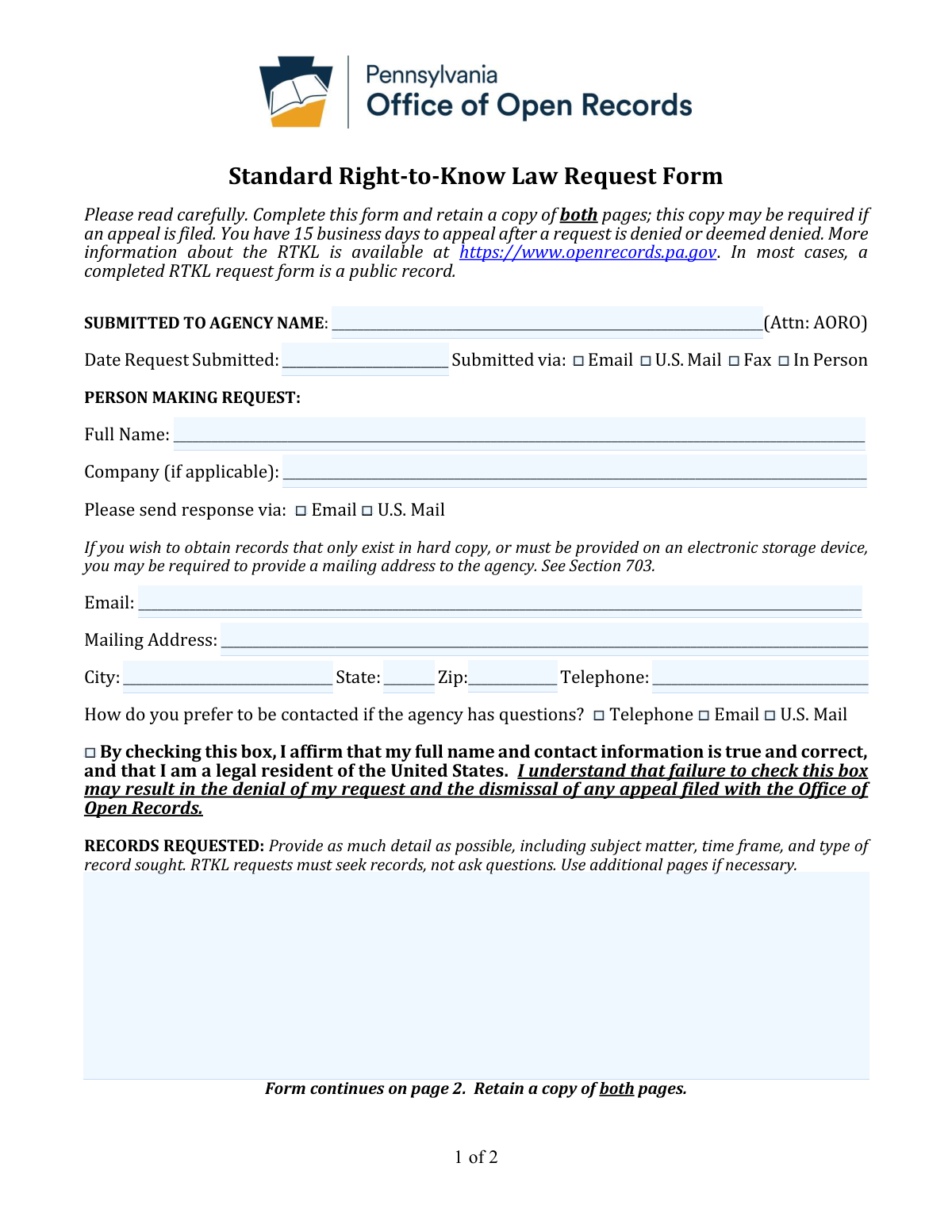
The Standard Right-to-Know Law Request Form is the official document used in Pennsylvania to request public records from state and local government agencies under the Right-to-Know Law (RTKL). Using this standardized form is important as it ensures the request is formally documented, contains all required information for the agency to process it, and serves as a basis for an appeal if the request is denied. Today, this form can be filled out quickly and accurately using AI-powered services like Instafill.ai, which can also convert non-fillable PDF versions into interactive fillable forms.
Our AI automatically handles information lookup, data retrieval, formatting, and form filling.
It takes less than a minute to fill out PA RTKL Request Form using our AI form filling.
Securely upload your data. Information is encrypted in transit and deleted immediately after the form is filled out.

Form specifications

Form name: Standard Right-to-Know Law Request Form
Number of fields: 42
Number of pages: 2
Language: English
main-image

Instafill Demo: How to fill out PDF forms in seconds with AI

How to Fill Out PA RTKL Request Form Online for Free in 2026

Are you looking to fill out a PA RTKL REQUEST FORM form online quickly and accurately? Instafill.ai offers the #1 AI-powered PDF filling software of 2026, allowing you to complete your PA RTKL REQUEST FORM form in just 37 seconds or less.
Follow these steps to fill out your PA RTKL REQUEST FORM form online using Instafill.ai:
  1. 1 Navigate to Instafill.ai and upload or select the Standard Right-to-Know Law Request Form.
  2. 2 Enter your personal details, including your full name, company (if applicable), and contact information.
  3. 3 Specify the name of the government agency you are submitting the request to and the submission date.
  4. 4 Clearly describe the records you are requesting with as much detail as possible, including subject matter and time frame.
  5. 5 Select your preferred format for the records (printed, electronic, or in-person inspection) and indicate if you want certified copies.
  6. 6 Set a fee notification threshold if desired, and check the box to certify your information and U.S. residency.
  7. 7 Review the completed form for accuracy, then download it to submit to the agency via your chosen method (email, mail, fax, or in-person).

Our AI-powered system ensures each field is filled out correctly, reducing errors and saving you time.

Why Choose Instafill.ai for Your Fillable PA RTKL Request Form Form?

Speed

Complete your PA RTKL Request Form in as little as 37 seconds.

Up-to-Date

Always use the latest 2026 PA RTKL Request Form form version.

Cost-effective

No need to hire expensive lawyers.

Accuracy

Our AI performs 10 compliance checks to ensure your form is error-free.

Security

Your personal information is protected with bank-level encryption.

Frequently Asked Questions About Form PA RTKL Request Form

This form is used to formally request access to public records from a government agency in Pennsylvania under the state's Right-to-Know Law (RTKL).

Any legal resident of the United States can use this form to request records. You must certify your U.S. residency by checking the designated box on the form.

Be as specific as possible in the 'RECORDS REQUESTED' section, including subject matter, date ranges, and the type of record sought. The form is for requesting existing records, not for asking general questions.

Failure to check the certification box may result in the denial of your request and the dismissal of any appeal. This step is mandatory to affirm your identity and residency status.

The agency generally has five business days to respond. However, they can take a 30-day extension for certain reasons, and they must notify you if they do so.

Yes, you may be charged fees for duplication, postage, or other costs based on the official RTKL Fee Schedule. You can set a cost limit on the form to be notified before fees exceed a certain amount.

You can submit the form to the agency's Open Records Officer (AORO) via email, U.S. Mail, fax, or in person. It is best to check with the specific agency for their preferred method.

If your request is denied, you have 15 business days from the denial date to file an appeal with the Pennsylvania Office of Open Records. It is important to keep a copy of your submitted form for your records.

Requesting copies means you will receive a physical or electronic duplicate of the record. An in-person inspection means you will schedule a time to view the original records at the agency's office without obtaining a copy.

Yes, services like Instafill.ai use AI to accurately auto-fill form fields from your saved profiles, which can save you time and help prevent errors on repetitive information like your name and contact details.

You can use a service like Instafill.ai to upload the form, which then becomes an interactive, fillable document. This allows you to type directly into the fields and then download the completed PDF for submission.

If you have a non-fillable or 'flat' PDF, you can upload it to a platform like Instafill.ai. The service can convert it into an interactive form, allowing you to easily type your information into the proper fields.

You may still be required to provide a mailing address if the records you requested only exist in hard copy or must be provided on an electronic storage device like a USB drive.

A certified copy is a duplicate of a document that is officially attested to be a true and correct copy by the agency. This is often needed for legal purposes and may involve an additional cost.

Compliance PA RTKL Request Form
Validation Checks by Instafill.ai

1
Ensures Request Date is Not in the Future
This validation checks if the 'Date Request Submitted' is on or before the current system date. Submitting a request with a future date is a logical impossibility and indicates a data entry error. If this validation fails, the form should be rejected, and the user prompted to enter a valid submission date to ensure accurate record-keeping.
2
Requires Requester Certification
This check validates that the 'Requester Certification' checkbox is marked. The form explicitly states that failure to check this box may result in the denial of the request and dismissal of any appeal. This check is critical for legal compliance and ensuring the requester affirms their identity and U.S. residency status.
3
Validates Conditional Email Requirement and Format
This ensures the 'Requester Email Address' field is not empty and contains a validly formatted email address if 'Send Response Via: Email' or 'Preferred Contact Method - Email' is selected. This is crucial for ensuring the agency can deliver the response or contact the requester as requested. A failure would prevent communication via the chosen channel and should prompt the user to provide a valid email.
4
Validates Conditional Mailing Address Completeness
This check ensures that the 'Requester Mailing Address', 'City', 'State', and 'Zip' fields are all completed if the requester selects 'U.S. Mail' for either response delivery or as a preferred contact method. An incomplete address would make it impossible for the agency to mail the response or correspondence. This validation prevents undeliverable mail and subsequent delays.
5
Verifies State Abbreviation Format
This confirms that the 'Requester State' field, when filled, contains a valid two-letter U.S. state or territory abbreviation. Using a standardized format ensures data consistency and proper mail routing for physical responses. An invalid entry could lead to processing errors or failed mail delivery and should be corrected by the user.
6
Verifies ZIP Code Format
This validation checks that the 'Requester ZIP Code' field contains a properly formatted 5-digit or 9-digit (ZIP+4) code. This is essential for the successful delivery of physical mail by the U.S. Postal Service. An incorrect format will likely result in returned mail and delays in fulfilling the request.
7
Ensures Record Request Description is Provided
This check verifies that the 'Records Requested Description' field is not empty. The entire purpose of the form is to request specific records, so this field is fundamental to the request's validity. An empty request is invalid and cannot be processed by the agency, so the user must be required to provide a description.
8
Enforces Single Selection for Copy Format
This validation ensures that exactly one option is selected in the 'DO YOU WANT COPIES?' section ('Yes, printed', 'Yes, electronic', or 'No, in-person inspection'). Selecting zero or multiple options creates ambiguity for the agency on how to fulfill the request. This check ensures the requester's intent is clear before submission.
9
Validates Conditional Fee Threshold Amount
This check ensures that the 'Fee Pre-Approval Threshold Amount' field contains a valid positive numeric value if the 'Notify me if fees exceed custom amount' option is selected. If the custom option is chosen without a corresponding amount, the agency does not have a clear spending limit. This validation prevents ambiguity in fee pre-approval.
10
Requires Requester Full Name
This validation ensures the 'Requester Full Name' field is not empty. The requester's name is a primary identifier for the request and is necessary for official correspondence and record-keeping. A missing name would render the request anonymous and likely invalid under the Right-to-Know Law.
11
Enforces Mutual Exclusivity of Fee Threshold Options
This check validates that the user has not selected both the standard '$100' fee threshold and the custom amount threshold simultaneously. These options are mutually exclusive, and selecting both creates a contradiction. The system should require the user to choose only one to provide clear instructions to the agency.
12
Validates Conditional Telephone Number Requirement
This ensures the 'Requester Telephone Number' field is not empty and contains a validly formatted phone number if 'Preferred Contact Method - Telephone' is selected. This is necessary for the agency to be able to contact the requester with questions as requested. Failure to provide a valid number would block this communication channel.
13
Requires Agency Name for Submission
This validation confirms that the 'Submitted To Agency Name' field is filled out. A request cannot be processed if it is not directed to a specific government agency. This check ensures the form is properly routed and prevents submissions that are addressed to no one.

Common Mistakes in Completing PA RTKL Request Form

Forgetting the Requester Certification Checkbox

Requesters often overlook the checkbox affirming their identity and U.S. residency. The form explicitly states that failure to check this box may result in the denial of the request and dismissal of any appeal. This is a simple oversight with severe consequences, as it gives the agency an immediate procedural reason to reject the entire submission. Always double-check that this critical box is ticked before submitting the form.

Writing a Question Instead of Requesting a Record

The form is for requesting existing records, not for asking questions. A request like 'Why was the permit denied?' is a question, whereas 'Please provide all documents related to the denial of permit #123' is a valid record request. Agencies will deny requests that are phrased as questions, forcing you to redraft and resubmit, thereby delaying the process. Be sure to phrase your request to seek specific, tangible records like reports, emails, or meeting minutes.

Providing a Vague or Overly Broad Record Description

Requests that are too vague (e.g., 'all records about the new park') or overly broad are often denied for lacking specificity. This happens when the requester is unsure what to ask for. The consequence is a denial or a request for clarification, which wastes time. To avoid this, be as specific as possible: include subject matter, a narrow time frame (e.g., 'January 1, 2024, to March 31, 2024'), and the type of record (e.g., 'emails,' 'invoices,' 'contracts').

Inconsistent Contact and Response Preferences

A common error is selecting a preferred response method without providing the necessary contact information. For example, checking 'Email' for the response but failing to write in an email address, or providing a full mailing address but not checking 'U.S. Mail'. This forces the agency to guess or halt processing to seek clarification, delaying your response. Ensure your contact details perfectly match your selected preferences for both responses and follow-up questions.

Inaccurate or Incomplete Contact Information

Simple typos in an email address, a forgotten apartment number, or an incorrect ZIP code are frequent mistakes. These small data entry errors can have big consequences, such as the agency's response bouncing back or physical records being sent to the wrong address. This could mean you never receive the records or the denial letter, potentially causing you to miss the 15-day appeal window. AI-powered tools like Instafill.ai can help prevent these errors by autocompleting and validating address and contact information.

Ignoring the Fee Pre-Approval Section

Requesters often leave the fee notification section blank, unsure of what to select. This can lead to two undesirable outcomes: the agency may stop processing the request and contact you for authorization if fees are expected, delaying the process, or you might receive an unexpectedly large bill. To avoid this, always indicate your preference, either by checking the default '$100' box or by specifying a custom amount you are comfortable with before requiring notification.

Failing to Specify the Agency Name Correctly

Submitting a request to a generic entity like 'The County' or 'Building Department' without specifying the full, correct agency name can cause it to be misrouted or lost. Large government bodies have many departments, and the request must be directed to the one with the correct Agency Open-Records Officer (AORO). This mistake leads to significant delays as the form is passed around internally. Research the exact agency name and AORO before submission to ensure it reaches the right person promptly.

Not Selecting a Desired Record Format

The form asks if you want printed copies, electronic copies, or to inspect records in person. If no option is selected, the agency will provide the records in the medium in which they exist, which may be inconvenient or costly for the requester (e.g., receiving hundreds of printed pages when an electronic file was preferred). Always check the box that corresponds to the format that is most useful and cost-effective for you.

Submitting a Future or Incorrect Submission Date

A surprising number of people accidentally write the wrong date, such as a future date or the date they filled out the form rather than the date they are submitting it. The submission date is legally significant as it starts the 5-business-day clock for the agency's response. An incorrect date can create confusion regarding deadlines and may impact your ability to file a timely appeal if the request is 'deemed denied' based on a faulty timeline.

Illegible Handwriting on a Scanned Form

When a form is only available as a non-fillable PDF, people often print it, fill it out by hand, and scan it. Poor handwriting can make names, addresses, and especially the detailed record request unreadable. An illegible request is grounds for denial. To prevent this, use clear block letters or, better yet, use a tool like Instafill.ai that can convert flat PDFs into fillable forms, allowing you to type directly into the fields for perfect clarity.
Saved over 80 hours a year

“I was never sure if my IRS forms like W-9 were filled correctly. Now, I can complete the forms accurately without any external help.”

Kevin Martin Green

Your data stays secure with advanced protection from Instafill and our subprocessors

Robust compliance program

Transparent business model

You’re not the product. You always know where your data is and what it is processed for.

ISO 27001, HIPAA, and GDPR

Our subprocesses adhere to multiple compliance standards, including but not limited to ISO 27001, HIPAA, and GDPR.

Security & privacy by design

We consider security and privacy from the initial design phase of any new service or functionality. It’s not an afterthought, it’s built-in, including support for two-factor authentication (2FA) to further protect your account.

Fill out PA RTKL Request Form with Instafill.ai

Worried about filling PDFs wrong? Instafill securely fills standard-right-to-know-law-request-form-1 forms, ensuring each field is accurate.