Yes! You can use AI to fill out Straight Bill of Lading
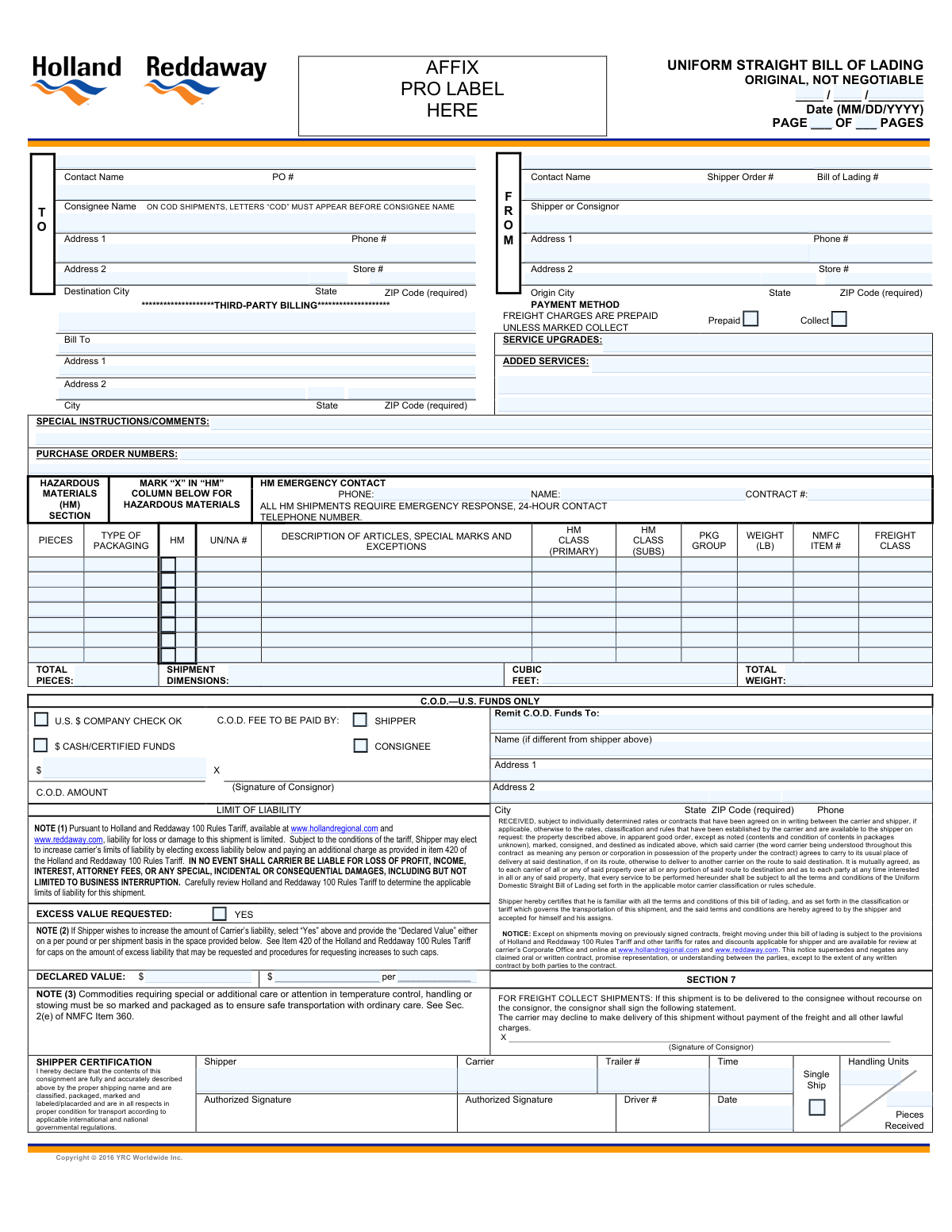
A Straight Bill of Lading (BOL) is a non-negotiable legal document that serves as a contract between a shipper and a carrier for the transportation of goods. It acts as a receipt for the freight, detailing the items shipped, their quantity, condition, and destination, and outlines the terms of the carriage. This document is vital for ensuring proper handling, billing, and delivery of shipments. Today, this form can be filled out quickly and accurately using AI-powered services like Instafill.ai, which can also convert non-fillable PDF versions into interactive fillable forms.
Our AI automatically handles information lookup, data retrieval, formatting, and form filling.
It takes less than a minute to fill out BOL using our AI form filling.
Securely upload your data. Information is encrypted in transit and deleted immediately after the form is filled out.
Form specifications
| Form name: | Straight Bill of Lading |
| Number of fields: | 449 |
| Number of pages: | 3 |
| Filled form examples: | Form BOL Examples |
| Language: | English |
Instafill Demo: How to fill out PDF forms in seconds with AI
How to Fill Out BOL Online for Free in 2026
Are you looking to fill out a BOL form online quickly and accurately? Instafill.ai offers the #1 AI-powered PDF filling software of 2026, allowing you to complete your BOL form in just 37 seconds or less.
Follow these steps to fill out your BOL form online using Instafill.ai:
- 1 Navigate to Instafill.ai and upload or select the Straight Bill of Lading form.
- 2 Use the AI assistant to accurately fill in the Shipper (sender) and Consignee (receiver) information, including names, addresses, and contact details.
- 3 Enter the shipment details for each item, specifying the number of pieces, packaging type, weight, and a complete description. If shipping hazardous materials, provide the required HM details like UN/NA number and class.
- 4 Specify the freight charge terms (Prepaid or Collect), add any special instructions for the carrier, and include relevant reference numbers like Purchase Orders (PO) or the Bill of Lading (BOL) number.
- 5 If applicable, complete the C.O.D. (Cash on Delivery) section with remittance details and indicate if you are declaring excess value for the shipment.
- 6 Review all the entered information for accuracy. The AI will highlight any missing fields. Once complete, provide the shipper's signature and name to finalize the document.
Our AI-powered system ensures each field is filled out correctly, reducing errors and saving you time.
Why Choose Instafill.ai for Your Fillable BOL Form?
Speed
Complete your BOL in as little as 37 seconds.
Up-to-Date
Always use the latest 2026 BOL form version.
Cost-effective
No need to hire expensive lawyers.
Accuracy
Our AI performs 10 compliance checks to ensure your form is error-free.
Security
Your personal information is protected with bank-level encryption.
Frequently Asked Questions About Form BOL
This form is a Bill of Lading (BOL), which serves as a legal contract between the shipper of goods and the transportation carrier. It details the type, quantity, and destination of the goods being carried.
The shipper, which is the person or company sending the goods, is responsible for accurately completing and signing the Bill of Lading before the carrier picks up the shipment.
The 'Shipper' is the originator of the shipment, while the 'Consignee' is the party who will be receiving the shipment at its final destination.
The National Motor Freight Classification (NMFC) number and Freight Class are codes used to classify shippable goods based on their density, stowability, handling, and liability. These classifications are crucial for determining shipping rates.
For each hazardous item, you must check the 'Hazardous Material' box for that line and provide the UN/NA Number, HM Class, and Packaging Group. You are also required to list a 24-hour emergency contact name and phone number in the designated section.
Selecting 'Prepaid' indicates that the shipper is paying for the freight charges. Selecting 'Collect' means the consignee (receiver) is responsible for paying the freight charges upon delivery.
Complete the 'Third-Party Billing' section only when a company that is neither the shipper nor the consignee is responsible for paying the transportation costs.
C.O.D. stands for 'Cash on Delivery.' This section should be filled out if the carrier needs to collect payment for the goods from the consignee at the time of delivery, and it specifies the amount and remittance details.
You should fill out the 'Declared Value' section if the value of your shipment exceeds the carrier's standard liability limit. Declaring a higher value may increase your shipping cost but provides greater coverage in case of loss or damage.
Before you begin, gather the full names and addresses for the shipper and consignee, a detailed list of all items including their weight and packaging type, and any relevant PO or reference numbers. If shipping hazardous materials, have all required HM documentation ready.
Yes, services like Instafill.ai use AI to auto-fill form fields accurately and save time. This is especially useful for entering recurring information like shipper and consignee details or complex item descriptions.
You can use a platform like Instafill.ai to fill out this form online. Simply upload the document, and the service will make it an interactive, fillable form that you can complete, save, and print from your browser.
If you have a flat, non-fillable PDF, you can use a tool like Instafill.ai to solve this problem. It can convert the static PDF into an interactive, fillable form that you can easily complete and save electronically.
Compliance BOL
Validation Checks by Instafill.ai
1
Hazardous Material Data Integrity
This check ensures that if any 'Hazardous Material' checkbox is marked for a shipment item, the corresponding mandatory fields like 'UN/NA Number', 'Primary HM Class', and 'Packaging Group' are also filled. This is critical for regulatory compliance and safety, as missing information can lead to legal penalties and improper handling of dangerous goods. A failure would flag the specific item row for completion before submission.
2
Emergency Contact for Hazardous Shipments
Validates that if any item on the Bill of Lading is marked as hazardous, the 'HM Emergency Contact' section, including 'HM Name' and 'HM Phone', is fully populated. This is a legal requirement under transportation regulations to ensure first responders can get critical information in an emergency. If this information is missing on a hazardous shipment, the form submission will be rejected.
3
Total Weight Consistency Check
This validation cross-references the sum of all individual item 'Weight' fields against the 'Total Weight' field in the shipment totals section. This ensures the declared total weight is accurate and prevents billing discrepancies or load planning errors. If the sum of item weights does not match the total weight, an alert is raised for manual review and correction.
4
Total Pieces Consistency Check
Verifies that the 'Total Pcs' field in the shipment summary is equal to the sum of the 'Pieces' fields from all individual line items. This is essential for accurate inventory tracking and to ensure the entire shipment is accounted for at pickup and delivery. A mismatch would trigger an error, prompting the user to reconcile the piece counts.
5
Mutually Exclusive Freight Charges
Ensures that only one of the 'Prepaid Freight Charges' and 'Collect Freight Charges' checkboxes can be selected at a time. A shipment's payment terms cannot be both prepaid and collect. This validation prevents ambiguity in billing responsibility and avoids future payment disputes between the shipper, consignee, and carrier.
6
Conditional Declared Value Requirement
This check is triggered if the 'Excess Value Requested Yes' box is checked. It validates that the 'Declared Value Amount' field contains a positive, non-zero monetary value. This is important for correctly calculating additional insurance or liability charges and ensuring the shipment is covered for the requested value. If the value is missing or invalid, the submission is blocked until a proper amount is entered.
7
C.O.D. Information Completeness
If a value is entered into the 'C.O.D. Amount' field, this validation ensures that the 'Remit To' section is complete, including 'Remit To Name', 'Remit To Address 1', 'Remit To City', 'Remit To State', and 'Remit To ZIP Code'. This is crucial for ensuring the collected funds can be correctly and promptly sent to the intended recipient. An incomplete 'Remit To' section will prevent form submission when a C.O.D. amount is specified.
8
ZIP Code Format Validation
This check examines all ZIP code fields (Shipper, Consignee, Third-Party, Remit To) to ensure they conform to a valid 5-digit or 9-digit (ZIP+4) format. Correctly formatted ZIP codes are essential for automated sorting, routing, and timely delivery of the shipment. An invalid format will prompt the user for correction to prevent potential delivery delays or misrouting.
9
State Abbreviation Validation
Verifies that all 'State' fields contain a valid two-letter US state or Canadian province abbreviation from a predefined list. This prevents typographical errors and ensures the address data is standardized and accurate for carrier systems. An invalid entry would be flagged, requiring the user to select or enter a valid abbreviation.
10
Logical Page Numbering
This validation confirms that the 'Current Page Number' is a positive integer and is not greater than the 'Total Pages'. This simple check helps maintain document integrity and ensures that a complete, correctly ordered document is being processed. If 'Current Page Number' exceeds 'Total Pages', an error is flagged to indicate a potential document assembly or data entry error.
11
Shipper and Consignee Address Completeness
Ensures that the minimum required address fields ('Company Name', 'Address 1', 'City', 'State', 'ZIP') are populated for both the Shipper and the Consignee. This is the most fundamental information for a shipment, as it defines the origin and destination. Missing any of these core fields would make the shipment impossible to execute and will result in a validation failure.
12
UN/NA Number Format
When a 'UN/NA Number' field is populated for a hazardous material, this check validates that the entry follows the correct format, which is 'UN' or 'NA' followed by exactly four digits (e.g., UN1234). This specific format is an international standard for identifying hazardous substances. Incorrect formatting can lead to compliance failures and safety risks during transport.
Common Mistakes in Completing BOL
Users often fill out hazardous material details like the UN/NA Number and HM Class but forget to check the corresponding 'Hazardous Material' checkbox for that line item, or vice-versa. This creates a compliance conflict, as all related fields must be completed consistently for any hazardous item. Such an oversight can lead to severe penalties, shipment rejection by the carrier, and significant safety risks during transport. To avoid this, always perform a final check to ensure the HM checkbox is ticked for every line item that has HM data entered. AI-powered tools like Instafill.ai can prevent this by enforcing conditional logic, automatically requiring HM details only when the checkbox is selected.
The National Motor Freight Classification (NMFC) number and its corresponding Freight Class are specialized codes that many shippers do not know or look up correctly. People often guess, leave the fields blank, or reuse an old code for a new product, leading to errors. Incorrect classification is a primary cause of billing adjustments, as carriers will perform inspections and apply the correct, often more expensive, class. To prevent this, use the carrier's or a third-party's classification tool to find the correct codes for your specific items before filling out the form.
This form requires users to manually sum the 'Pieces' and 'Weight' from numerous line items to populate the 'Total Pcs' and 'Total Weight' fields. With potentially dozens of entries, simple arithmetic errors are extremely common. These miscalculations lead to billing disputes, carrier re-weigh fees, and delays if the documented weight doesn't match the actual scale weight. To avoid this, use a calculator or spreadsheet to sum the columns carefully. Advanced form-filling tools like Instafill.ai can eliminate this risk by automatically calculating the totals as you enter line item data.
Shippers frequently omit crucial details in the Shipper and Consignee address blocks, such as suite numbers, dock doors, or building names in 'Address Line 2'. Using an incorrect ZIP code or a generic company address for a large facility can also cause problems. These errors are a leading cause of failed delivery attempts, which result in costly re-delivery fees, transit delays, and frustrated customers. Always verify the complete and most specific address possible for both pickup and delivery locations. AI tools can help by using address validation and auto-completion to ensure every address is accurate and deliverable.
When a shipment contains hazardous materials, federal regulations require a 24-hour emergency contact name and phone number to be listed on the Bill of Lading. Shippers sometimes overlook the 'HM Emergency Contact' section, especially if it's located away from the line item details. Failure to provide this information is a serious compliance violation that can result in immediate shipment refusal by the carrier and substantial fines. To avoid this, make it a standard practice to complete the emergency contact section whenever any item on the shipment is marked as hazardous.
The form provides separate checkboxes for 'Prepaid Freight Charges' (paid by shipper) and 'Collect Freight Charges' (paid by consignee). A common mistake is to check both boxes, or neither, creating confusion over who is responsible for payment. This ambiguity can halt a shipment at origin or destination while the carrier seeks clarification, leading to delays and strained business relationships. To prevent this, confirm the payment terms in your agreement with the other party and clearly check only one of the two boxes.
Users often enter generic terms like 'General Merchandise' or 'Parts' in the item description field. These descriptions are insufficient for carriers to verify the freight class, assess handling needs, or comply with security screenings. Vague descriptions can trigger a manual inspection, leading to delays and re-classification fees if the actual items don't match the freight class provided. Always provide a clear, specific description of the goods, including the material they are made of (e.g., 'Wooden Chairs' instead of 'Furniture').
For shipments requiring Cash on Delivery (C.O.D.), accuracy in the 'Remit To' section is critical. Simple typos in the C.O.D. amount, recipient name, or address can cause the collected funds to be lost, sent to the wrong party, or delayed for weeks. This can lead to significant financial loss and disputes with the carrier and consignee. Before submitting, triple-check every detail in the C.O.D. section, including the payment amount and the full name and address for remittance.
Many shippers assume the carrier is liable for the full value of their goods, but standard liability is often very limited (e.g., a few dollars per pound). If a high-value shipment is damaged or lost, the shipper may only recover a fraction of its worth unless they declared a higher value. People often forget to check the 'Excess Value Requested' box and enter the 'Declared Value Amount', thereby forfeiting the option for increased coverage. To avoid this, always assess your shipment's value and complete this section if it exceeds the carrier's standard liability limit.
The form asks for the number of 'Pieces' for each item, but shippers sometimes enter the number of handling units instead. For example, they might list '1' piece for a pallet that actually contains 50 boxes. This discrepancy causes confusion during loading and unloading, makes tracking individual items impossible, and can lead to disputes if part of the shipment is lost. To avoid this, the 'Pieces' field should reflect the total count of the smallest individual items, while the 'Type of Packaging' field should describe the handling unit (e.g., 'Pallet', 'Cartons').
Saved over 80 hours a year
“I was never sure if my IRS forms like W-9 were filled correctly. Now, I can complete the forms accurately without any external help.”
Kevin Martin Green
Your data stays secure with advanced protection from Instafill and our subprocessors

Robust compliance program
Transparent business model
You’re not the product. You always know where your data is and what it is processed for.
ISO 27001, HIPAA, and GDPR
Our subprocesses adhere to multiple compliance standards, including but not limited to ISO 27001, HIPAA, and GDPR.
Security & privacy by design
We consider security and privacy from the initial design phase of any new service or functionality. It’s not an afterthought, it’s built-in, including support for two-factor authentication (2FA) to further protect your account.
Fill out BOL with Instafill.ai
Worried about filling PDFs wrong? Instafill securely fills straight-bill-of-lading-1 forms, ensuring each field is accurate.



