Fill out IRS retirement forms
with AI.
IRS retirement forms are essential documents for managing the tax-advantaged accounts that provide financial security in later life. These forms govern how money moves into and out of retirement plans, ensuring that every transaction complies with federal regulations and ERISA standards. Proper documentation is critical because it determines how distributions are taxed, whether penalties apply, and how assets can be rolled over to maintain their tax-deferred status.
By continuing, you acknowledge Instafill's Privacy Policy and agree to get occasional product update and promotional emails.
About IRS retirement forms
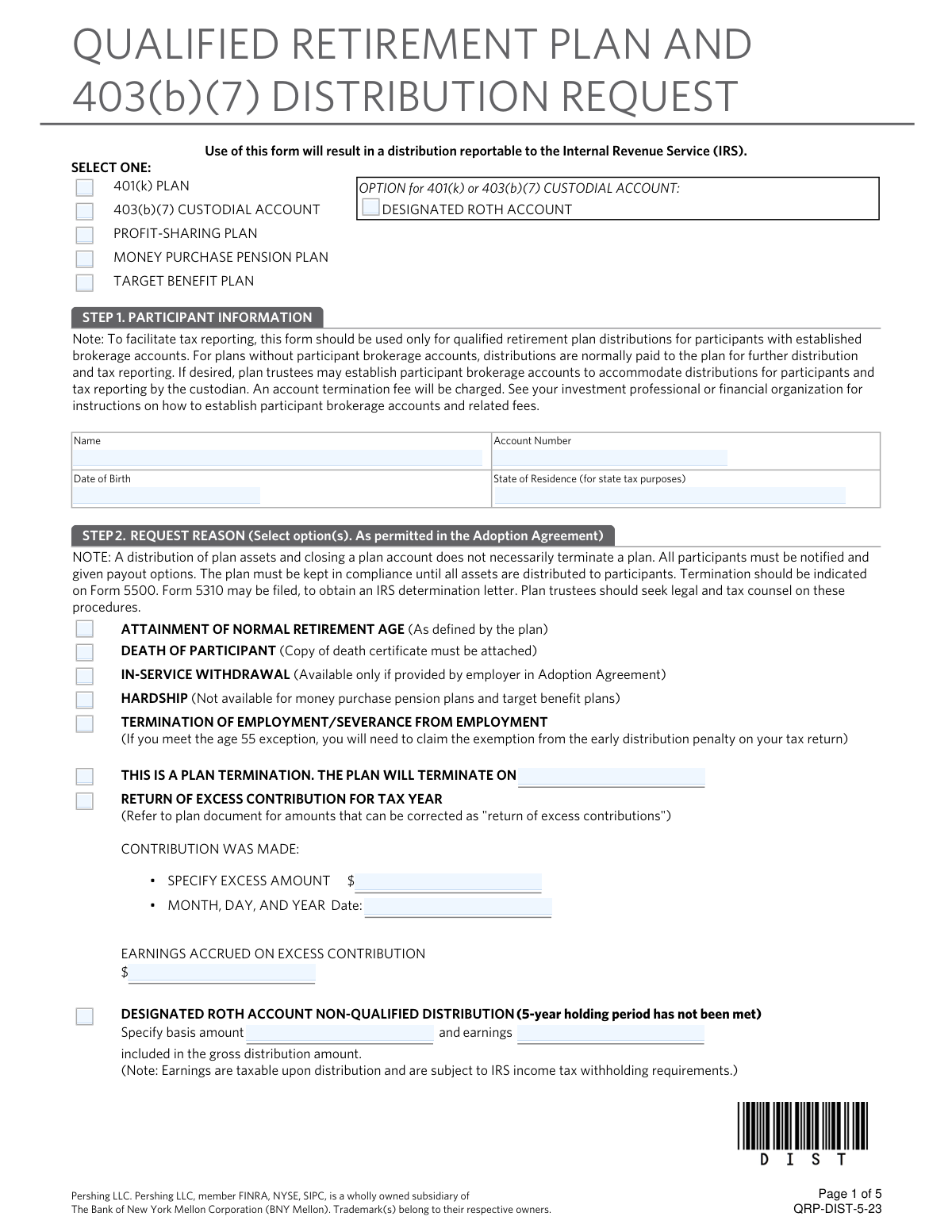
Typically, these forms are used by employees and plan participants who are reaching retirement age, changing jobs, or facing financial hardships that require an early withdrawal. For instance, if you are looking to move funds from a 403(b)(7) custodial account or a qualified retirement plan, you must provide specific instructions to your plan administrator. Completing these documents correctly is vital to avoid unexpected tax liabilities or delays in receiving your funds.
Navigating the complex fields of retirement plan forms can be daunting, but tools like Instafill.ai use AI to fill these forms in under 30 seconds with high accuracy and security. By automating the data entry process, you can ensure that your distribution requests and tax elections are handled precisely, allowing you to focus on your financial future rather than paperwork.
Every form on this page can be completed without typing. Instafill is form filling software that reads a PDF and fills it for you — including flat and scanned documents that carry no fillable fields at all.
Forms in This Category
The forms in this category have a median Form Complexity Index of 59/100 (Moderate), measured across 1 forms by field count, input difficulty, length, conditional logic and structure. See how it is calculated.
| Form Name | Pages | FCI | |
|---|---|---|---|
| 1. | Qualified Retirement Plan and 403(b)(7) Custodial Account Distribution Request Form | 1 | Moderate 59 |
- Enterprise-grade security & data encryption
- 99%+ accuracy powered by AI
- 1,000+ forms from all industries
- Complete forms in under 60 seconds
How to Choose the Right Form
Navigating retirement plan distributions requires careful attention to tax regulations and plan-specific rules. Whether you are changing jobs, retiring, or managing a legacy account, choosing the correct documentation is essential to avoid unexpected tax hits or processing delays.
When to Use the Qualified Retirement Plan Distribution Form
The primary document in this category is the Qualified Retirement Plan and 403(b)(7) Custodial Account Distribution Request Form. You should select this form if you meet the following criteria:
- Plan Type: You are a participant in a qualified retirement plan—such as a 401(k), 401(a), or profit-sharing plan—or a 403(b)(7) custodial account typically offered by non-profits or schools.
- Triggering Event: You have reached a milestone that allows for a distribution, such as reaching age 59½, separation from service (resignation or termination), total disability, or plan termination.
- Purpose: You need to provide formal instructions to the plan administrator on how to handle your vested balance.
Identifying Your Distribution Strategy
Before filling out the Qualified Retirement Plan and 403(b)(7) Custodial Account Distribution Request Form, determine which path you intend to take, as the form will ask for specific instructions for each:
- Direct Rollover: Select this if you want to transfer your funds directly to a Traditional IRA, Roth IRA, or a new employer's retirement plan. This is generally the most tax-efficient method.
- Lump-Sum Cash Out: Use this if you need the funds paid directly to you. Note that this usually triggers mandatory federal tax withholding and potential early-withdrawal penalties if you are under age 59½.
- Partial Distribution: Some participants use this form to withdraw only a portion of their balance while leaving the remainder in the plan.
Why Accuracy Matters
Because these distributions are reported to the IRS, errors on the Qualified Retirement Plan and 403(b)(7) Custodial Account Distribution Request Form can lead to rejected requests or incorrect tax reporting. Using Instafill.ai ensures that your data is captured accurately and that all required fields for ERISA compliance are addressed before you submit the document to your plan custodian.
Form Comparison
| Form | Purpose | Who Files It | Key Features |
|---|---|---|---|
| Qualified Retirement Plan and 403(b)(7) Custodial Account Distribution Request Form | Requests distribution or rollover of funds from qualified retirement accounts. | Plan participants or account holders seeking to withdraw retirement funds. | Details payout options, tax implications, and rollover instructions for compliance. |
Tips for IRS retirement forms
AI-powered tools like Instafill.ai can complete these complex retirement forms in under 30 seconds with high accuracy, ensuring your data stays secure during the process. This is a significant time-saver for those managing multiple distribution requests or transitioning between different retirement accounts.
A single digit error in your bank information can lead to significant delays or lost funds during the distribution process. Always double-check your direct deposit details against an official bank statement to ensure the funds reach the correct destination.
IRS retirement forms often require you to select a specific percentage for federal and state tax withholding. Review your current tax bracket or consult a professional to ensure you are withholding enough to avoid unexpected penalties during tax season.
When moving funds to another qualified plan, choosing a direct rollover prevents the mandatory 20% federal income tax withholding. This approach ensures your full balance continues to grow tax-deferred without the risk of unintended tax liabilities.
Many qualified retirement plans require a spouse's signature to waive certain survivor benefits before a distribution can be processed. Review the form instructions early to determine if you need a notary or a plan representative to witness these signatures.
Always save a completed copy of your distribution request for your personal financial records. Having these documents organized digitally makes it much easier to cross-reference with the 1099-R forms you will receive for your annual tax filing.
Frequently Asked Questions
These forms facilitate the movement of funds from tax-advantaged accounts like 401(k)s or 403(b)s. They ensure that distributions are documented for tax purposes and that participants understand their options for rollovers, cash payments, or custodial transfers.
Any individual looking to withdraw or transfer funds from a qualified retirement plan or a 403(b)(7) custodial account must complete these forms. This typically includes participants who have reached retirement age, changed employers, or are experiencing a qualifying life event like a hardship withdrawal.
A direct rollover moves funds directly to another eligible retirement plan or IRA, which typically avoids immediate taxation. A direct payment is sent to the participant, which usually triggers mandatory federal income tax withholding and potential early withdrawal penalties if the participant is under age 59½.
Yes, distributions from qualified plans are generally subject to federal income tax and may incur an additional 10% tax for early withdrawals. It is important to review the Special Tax Notice provided with the forms to understand how different payout options affect your specific tax liability.
Yes, AI tools like Instafill.ai can fill out these complex retirement forms in under 30 seconds. The technology accurately extracts data from your source documents and places it into the correct fields, significantly reducing the risk of manual entry errors.
While manual entry can take 20 to 30 minutes due to the detailed financial information required, AI-powered platforms can automate the process. You can generate a completed, ready-to-sign PDF in a matter of seconds by allowing the AI to map your data to the form fields.
Completed forms are typically submitted to your plan administrator or the financial institution managing the custodial account rather than directly to the IRS. You should check the specific instructions on your form or contact your HR department to confirm the correct submission method, such as a secure portal or mailing address.
You will generally need your account number, Social Security number, and details regarding the receiving institution if you are performing a rollover. Having your most recent account statement and the exact name of the successor plan will help ensure the data is accurate.
These forms ensure compliance with ERISA and IRS regulations governing tax-sheltered annuities and custodial accounts. They protect both the participant and the plan sponsor by documenting that the participant was fully informed of their payout rights and the subsequent tax implications.
Once a distribution is processed by the plan administrator, it is often difficult to reverse. However, if you receive a check directly and realize you wanted a rollover, you generally have 60 days to deposit those funds into another qualified account to maintain their tax-deferred status.
Glossary
- Form Complexity Index
- Instafill’s 0–100 measure of how much effort a form takes to complete, calculated deterministically from the form’s own structure rather than estimated. It combines the number of fillable fields (the largest factor), how difficult those fields are to complete based on their type, the number of pages that contain fields, the amount of conditional “fill-only-if” logic, and how many sections the form is divided into, then adds modifiers for tables and repeating lists, bundled instruction pages, and dense page layouts. A higher score means the form is harder to fill out by hand. The forms in this category have a median Form Complexity Index of 59/100 (Moderate). See exactly how it is calculated.
- Distribution
- The withdrawal of funds from a retirement account, which can be taken as a lump sum, periodic payments, or a rollover to another account.
- Rollover
- The process of moving retirement savings from one plan or account to another, typically to avoid immediate taxes and penalties.
- Qualified Retirement Plan
- A retirement plan that meets specific IRS requirements, such as a 401(k) or profit-sharing plan, allowing for tax-deferred growth of contributions.
- 403(b)(7) Custodial Account
- A specific type of retirement account for employees of public schools and certain tax-exempt organizations that is invested in mutual funds.
- Mandatory Withholding
- A federal requirement where 20% of a retirement distribution is withheld for taxes if the funds are paid directly to the participant instead of being rolled over.
- ERISA (Employee Retirement Income Security Act)
- A federal law that establishes minimum standards for retirement plans in private industry to protect the interests of plan participants and beneficiaries.
- Direct Rollover
- A transfer where retirement funds are sent directly from one plan administrator to another, preventing the participant from being taxed on the amount during the move.
- Custodial Account
- A financial account managed by a bank or financial institution (the custodian) on behalf of a plan participant.