Fill out Nest 529 forms
with AI.
The Nest 529 forms category includes the essential documents required to manage and update a Nebraska Educational Savings Trust account. These forms are vital for maintaining the tax-advantaged status of your education savings and ensuring that all administrative changes are recorded correctly with the plan administrator. Whether you are adjusting account details or managing distributions, having the correct paperwork is the first step in protecting your family's financial future and educational goals.
By continuing, you acknowledge Instafill's Privacy Policy and agree to get occasional product update and promotional emails.
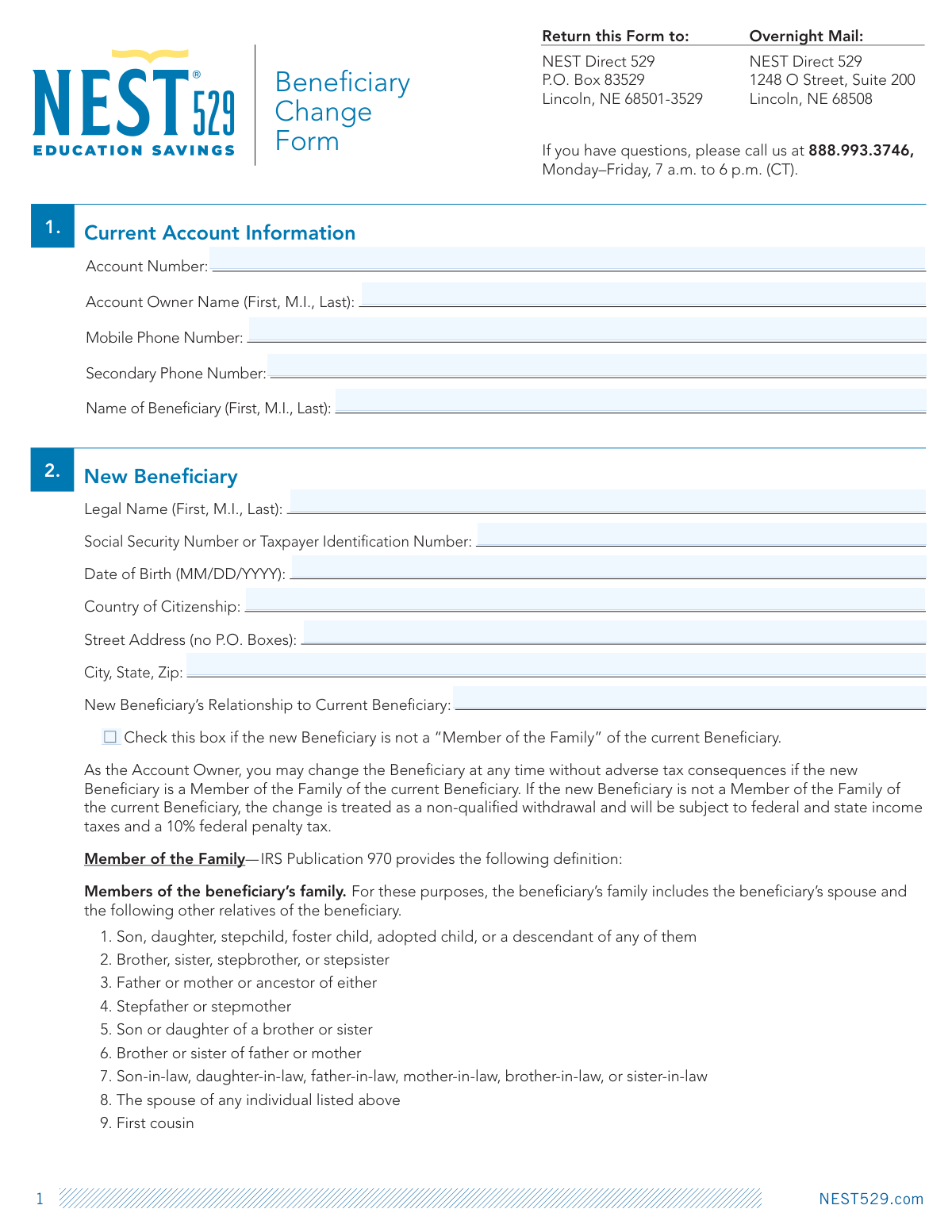
About Nest 529 forms
Account owners, such as parents or grandparents, typically need these forms during significant life transitions. For instance, if a student completes their education with remaining funds, the account owner may need to submit a Beneficiary Change Form to transfer the assets to another family member. Because specific actions—like naming a beneficiary who is not a qualifying family member—can trigger tax penalties, it is crucial that every field is completed with precision. These forms provide the formal paper trail necessary to navigate the complexities of 529 plan regulations and IRS requirements.
Managing your college savings should be a straightforward process rather than a clerical burden. Tools like Instafill.ai use AI to fill these forms in under 30 seconds, handling your data accurately and securely to ensure your submissions are professional and error-free. This modern approach to paperwork allows you to spend less time on administrative tasks and more time planning for your student's success.
Every form on this page can be completed without typing. Instafill is form filling software that reads a PDF and fills it for you — including flat and scanned documents that carry no fillable fields at all.
Forms in This Category
The forms in this category have a median Form Complexity Index of 40/100 (Basic), measured across 1 forms by field count, input difficulty, length, conditional logic and structure. See how it is calculated.
| Form Name | Pages | FCI | |
|---|---|---|---|
| 1. | Nest 529 Beneficiary Change Form | 1 | Basic 40 |
- Enterprise-grade security & data encryption
- 99%+ accuracy powered by AI
- 1,000+ forms from all industries
- Complete forms in under 60 seconds
How to Choose the Right Form
Managing Your NEST 529 Savings Plan
When managing a NEST 529 college savings plan, choosing the correct documentation is vital to maintaining the tax-advantaged status of your account. While various administrative tasks exist, the most common requirement for account holders is updating the person designated to use the funds.
When to Use the Beneficiary Change Form
The Nest 529 Beneficiary Change Form is the specific document you need if the original student (the beneficiary) no longer requires the funds in the account. Common scenarios for using this form include:
- Graduation: The original student has finished their education with funds remaining.
- Scholarships: The student received financial aid, leaving a surplus in the 529 account.
- Change in Plans: The original beneficiary has decided not to pursue higher education.
- Family Transitions: You wish to pass the educational savings down to a younger sibling or relative.
Important Tax and Eligibility Checks
Before completing the Nest 529 Beneficiary Change Form, ensure that the new beneficiary qualifies as a "Member of the Family" according to IRS guidelines. If the new beneficiary is not a qualified family member, the change could be treated as a non-qualified withdrawal, potentially triggering income taxes and a 10% penalty on the earnings portion of the account.
Qualified family members typically include siblings, children, first cousins, and even the account owner themselves. Using a tool like Instafill.ai can help you quickly process this form accurately, ensuring that all required fields—including Social Security numbers for the new beneficiary—are correctly placed to avoid processing delays with the plan administrator.
Other NEST 529 Requirements
If your goal is not to change the student, but rather to move money out of the account for tuition payments, you should look for a Withdrawal Request Form instead. For updates to your monthly contribution amounts or bank information, look for the Investment Change or Account Maintenance forms.
Form Comparison
| Form | Primary Purpose | Who Submits It | Key Requirement | Tax Consideration |
|---|---|---|---|---|
| Nest 529 Beneficiary Change Form | Updates the designated student beneficiary for an existing NEST 529 college savings account. | The account owner or authorized legal representative managing the plan assets. | Requires personal identification and Social Security numbers for the current and new beneficiary. | Switching to a non-family member may result in federal income tax and penalties. |
Tips for Nest 529 forms
Before changing a beneficiary, ensure the new individual qualifies as a 'Member of the Family' of the current beneficiary under IRS rules. Making a change to someone outside this definition can trigger adverse tax consequences and penalties, as it may be treated as a non-qualified withdrawal.
To complete the form accurately, you will need the new beneficiary's full legal name, Social Security number, and date of birth. Having these details ready before you start prevents session timeouts and ensures the form is processed without administrative delays.
AI-powered tools like Instafill.ai can complete these forms in under 30 seconds with high accuracy, significantly reducing the manual effort required. Your data stays secure during the process, providing a fast and safe way to manage your 529 plan updates.
One of the most common mistakes is entering an incorrect account number, which leads to immediate rejection by the plan administrator. Cross-reference the account number on the form with your most recent NEST 529 statement to ensure a match.
When updating beneficiary information, it is a best practice to also review your successor owner designation. Ensuring this information is current protects the account's future management should something happen to the primary account owner.
Always save a finalized, timestamped PDF copy of your completed form for your personal financial records. This documentation is essential for tracking changes to your college savings strategy and provides proof of submission if there are ever discrepancies with the plan provider.
Frequently Asked Questions
These forms are used to manage and update your Nebraska Educational Savings Trust (NEST) account details. Common tasks include changing beneficiaries, updating account owner information, and managing distribution settings to ensure the plan remains compliant with tax regulations.
You should use this form when you want to transfer the funds in a NEST 529 account to a different student, such as when the original beneficiary finishes school with remaining funds. It is also used if you decide to redirect the savings to another family member before the original beneficiary starts college.
Generally, a 'Member of the Family' includes the beneficiary's spouse, children, siblings, parents, cousins, and certain in-laws. Changing the beneficiary to someone within this definition usually avoids federal income taxes and penalties on the transfer.
If the new beneficiary is not considered a family member under IRS rules, the change may be treated as a non-qualified withdrawal. This can result in federal and state income taxes on the earnings portion of the account, plus a 10% federal penalty.
Yes, AI tools like Instafill.ai can be used to fill out Nest 529 forms in under 30 seconds. The AI accurately extracts data from your source documents and places it directly into the required fields on the PDF form.
While manual entry can take 15 to 20 minutes, using an AI-powered service allows you to complete the forms in less than a minute. These services can also convert static PDF forms into interactive, fillable documents for easier processing.
Completed forms should typically be mailed to the NEST 529 Plan administrator at the address provided on the form's instructions. Some updates may be processed through an online portal, but official forms often require a physical signature and mailing.
There is generally no limit on the number of times you can change a beneficiary, but you should consult the plan's program disclosure for any specific frequency restrictions. Most plans allow for one beneficiary change per year per account without penalty, provided the new beneficiary is a family member.
You will typically need the new beneficiary's full name, date of birth, and Social Security number or Taxpayer Identification Number. You may also need to specify their relationship to the current beneficiary to ensure the transfer is tax-free.
Some beneficiary changes or large account updates may require a Medallion Signature Guarantee to verify the account owner's identity. You should check the specific form instructions to see if this level of authentication is required by the plan administrator.
Glossary
- Form Complexity Index
- Instafill’s 0–100 measure of how much effort a form takes to complete, calculated deterministically from the form’s own structure rather than estimated. It combines the number of fillable fields (the largest factor), how difficult those fields are to complete based on their type, the number of pages that contain fields, the amount of conditional “fill-only-if” logic, and how many sections the form is divided into, then adds modifiers for tables and repeating lists, bundled instruction pages, and dense page layouts. A higher score means the form is harder to fill out by hand. The forms in this category have a median Form Complexity Index of 40/100 (Basic). See exactly how it is calculated.
- NEST 529 Plan
- Nebraska's state-sponsored, tax-advantaged savings plan designed to help families save for future higher education and K-12 tuition costs.
- Beneficiary
- The individual designated on the account whose education expenses will be paid for using the funds, often a child or grandchild.
- Account Owner
- The person who opens the account and maintains full control over investment decisions, beneficiary changes, and withdrawals.
- Member of the Family
- An IRS-defined list of relatives including siblings, parents, and cousins that allows the account owner to change the beneficiary without triggering taxes or penalties.
- Non-Qualified Withdrawal
- A distribution from the account used for purposes other than approved education expenses, which is generally subject to income tax and a 10% penalty.
- Successor Account Owner
- The person named to take over the management and ownership of the 529 account in the event the original owner passes away.
- Qualified Higher Education Expenses (QHEE)
- IRS-approved costs such as tuition, fees, books, and room and board that can be paid for with 529 funds tax-free.
- Medallion Signature Guarantee
- A security certification provided by a bank or financial institution that confirms the signature on a form is genuine, often required for account ownership changes.