Yes! You can use AI to fill out ACORD 90, Personal Auto Application
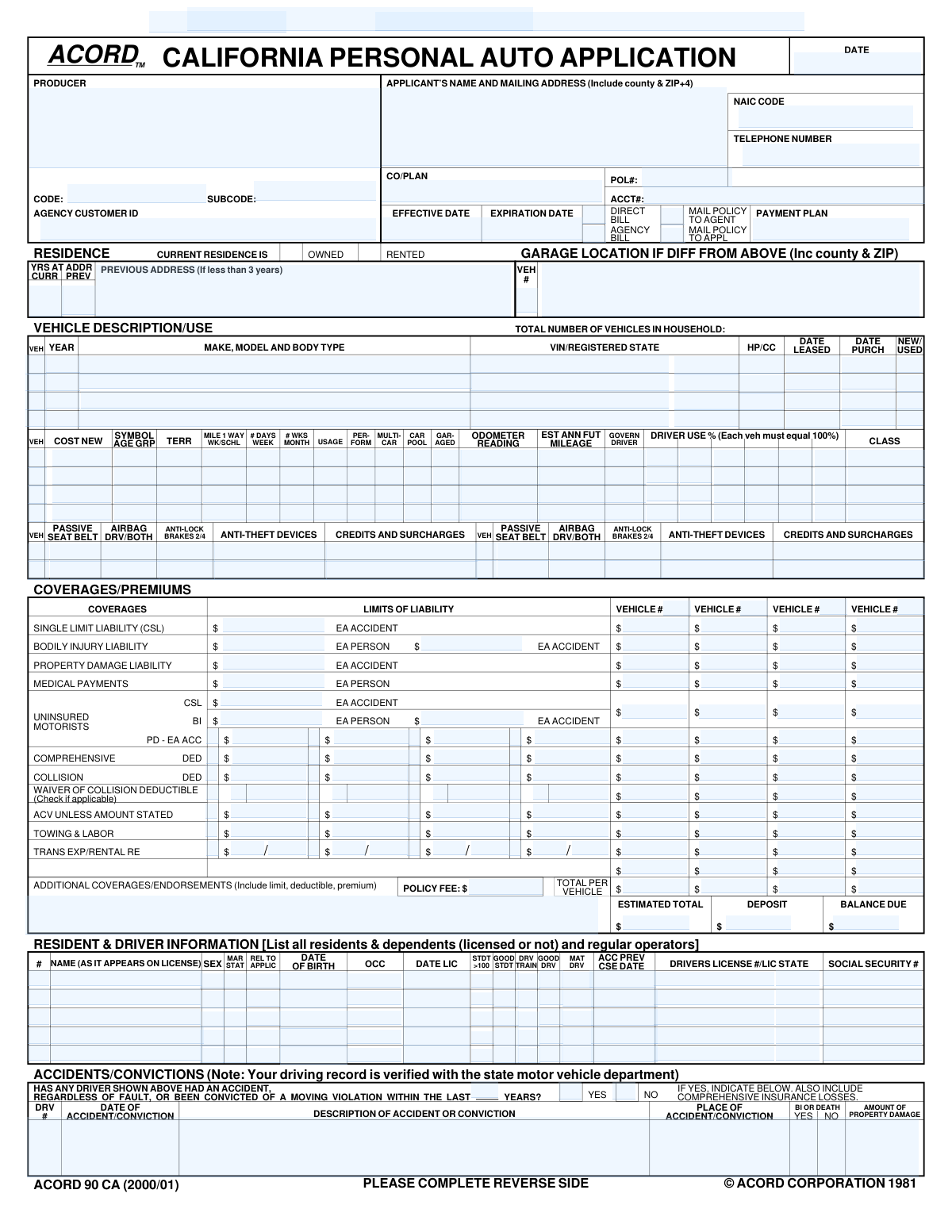
The ACORD 90, Personal Auto Application, is a standardized document used by insurance agents and carriers to gather essential information for underwriting a personal vehicle insurance policy. It captures detailed data about the applicant, all household drivers, the vehicles to be insured, desired coverage limits, and driving history. Completing this form accurately is crucial for obtaining an appropriate and correctly priced insurance quote. Today, this form can be filled out quickly and accurately using AI-powered services like Instafill.ai, which can also convert non-fillable PDF versions into interactive fillable forms.
Our AI automatically handles information lookup, data retrieval, formatting, and form filling.
It takes less than a minute to fill out ACORD 90 using our AI form filling.
Securely upload your data. Information is encrypted in transit and deleted immediately after the form is filled out.
Form specifications
| Form name: | ACORD 90, Personal Auto Application |
| Number of fields: | 478 |
| Number of pages: | 2 |
| Language: | English |
Instafill Demo: How to fill out PDF forms in seconds with AI
How to Fill Out ACORD 90 Online for Free in 2026
Are you looking to fill out a ACORD 90 form online quickly and accurately? Instafill.ai offers the #1 AI-powered PDF filling software of 2026, allowing you to complete your ACORD 90 form in just 37 seconds or less.
Follow these steps to fill out your ACORD 90 form online using Instafill.ai:
- 1 Navigate to Instafill.ai and upload or select the ACORD 90 Personal Auto Application form.
- 2 Use the AI assistant to fill in the producer/agency information and the primary applicant's personal and contact details.
- 3 Enter detailed information for each vehicle to be insured, including make, model, year, VIN, usage, garaging address, and safety features.
- 4 Provide complete information for all drivers in the household, including their name, date of birth, driver's license number, driving history, and any qualifying discounts.
- 5 Select the desired insurance coverages (e.g., liability, collision, comprehensive) and their limits for each vehicle, and add any additional interests like lienholders.
- 6 Answer all questions in the General Information and Prior Coverage sections to provide a complete risk profile.
- 7 Carefully review all entered information for accuracy, then use the platform to electronically sign and date the application to finalize it.
Our AI-powered system ensures each field is filled out correctly, reducing errors and saving you time.
Why Choose Instafill.ai for Your Fillable ACORD 90 Form?
Speed
Complete your ACORD 90 in as little as 37 seconds.
Up-to-Date
Always use the latest 2026 ACORD 90 form version.
Cost-effective
No need to hire expensive lawyers.
Accuracy
Our AI performs 10 compliance checks to ensure your form is error-free.
Security
Your personal information is protected with bank-level encryption.
Frequently Asked Questions About Form ACORD 90
This form is a comprehensive application for personal automobile insurance. It is used to gather detailed information about the applicant, drivers, vehicles, and desired coverages to generate an insurance policy quote.
This application should be completed by any individual seeking a new personal auto insurance policy. It is typically filled out by the applicant, often with the assistance of their insurance producer or agent.
Choosing 'Direct Bill' means the insurance company will bill you directly for your premium. Selecting 'Agency Bill' means the bill is sent to your insurance agency, which then collects the payment from you.
A Loss Payee or Additional Interest is typically the bank or leasing company that financed your vehicle. They are listed on the policy to ensure they are notified of any claims or policy changes related to the vehicle they have a financial stake in.
You only need to complete the 'Garage Location Address' section if your vehicle is kept at a different address than your primary residence. If it's garaged at your home, you can leave this section blank.
For each vehicle, estimate the percentage of time each listed driver operates it. The total percentage for all drivers assigned to a single vehicle should add up to 100%.
The 'Remarks' section is used to provide more details for any 'YES' answers in the 'General Information' section. For example, if you answered 'Yes' to a vehicle having modifications, you would describe them here.
You may need to attach documents such as a Bill of Sale for new vehicles, certificates for anti-theft devices, or proof of a completed driver training course to qualify for certain discounts.
After submission, the insurance company will review your information to determine eligibility and calculate your final premium. If approved, they will issue an insurance binder as temporary proof of coverage, followed by your official policy documents.
This form has dedicated sections for up to four vehicles and five drivers. If you need to insure more, you will likely need to complete an additional application or an overflow sheet provided by your agent.
Discount qualifications vary by company, but a 'Good Student' discount usually requires a certain GPA, while a 'Mature Driver' discount may require being over a certain age and completing an approved defensive driving course. Ask your agent for the specific requirements.
Yes, services like Instafill.ai use AI to auto-fill form fields accurately and save time. This is especially useful for long, detailed forms like this auto insurance application.
You can use a service like Instafill.ai to easily complete your form online. Simply upload the PDF, and the platform will make it fillable so you can type your information, add signatures, and securely share it.
If you have a non-fillable or 'flat' PDF, tools like Instafill.ai can help. They can convert flat PDFs into interactive, fillable forms that you can complete on your computer or mobile device.
Compliance ACORD 90
Validation Checks by Instafill.ai
1
Validates Vehicle Identification Number (VIN) Format
This check ensures that the 'Vehicle Identification Number (VIN)' field contains exactly 17 alphanumeric characters, excluding 'I', 'O', and 'Q'. The VIN is a unique, standardized code used to identify individual motor vehicles, and its correctness is critical for accurate vehicle history reports, registration, and rating. If the VIN is invalid, the system cannot correctly identify the vehicle, leading to potential rating errors and coverage issues.
2
Ensures Logical Policy Period Dates
This validation confirms that the 'Effective Date' of the policy is on or before the 'Expiration Date'. This is a fundamental logical check to ensure the policy period is valid and makes chronological sense. A failed validation would indicate a data entry error that makes the policy term nonsensical and would prevent the policy from being issued correctly.
3
Verifies Driver's Age at Time of Licensing
This check compares a driver's 'Date of Birth' with their 'Date Licensed' to ensure they were of legal driving age (e.g., 15 years or older, depending on state law) when they first received their license. This is important for verifying driver history and eligibility, as an illogical date combination suggests a data entry error. A failure would require the user to correct the dates before the driver can be rated.
4
Confirms Driver Usage Percentages Total 100%
For each vehicle, this validation sums the values entered in all 'Driver Use %' fields to ensure they total exactly 100%. This is crucial for accurately assigning risk and calculating premiums based on which driver uses the vehicle most often. If the total is not 100%, it indicates an incomplete or incorrect allocation of usage, and the submission should be flagged for correction.
5
Enforces Mutually Exclusive Billing Method
This check ensures that only one of the 'Direct Bill' or 'Agency Bill' checkboxes is selected. A policy can only have one primary billing method, either billed to the insured or the agency. Allowing both to be selected would create ambiguity and errors in the billing and accounting systems, so the form should enforce a single choice.
6
Requires Remarks for 'Yes' Answers in General Information
This validation checks that if any 'Yes' option is selected in the 'General Information' section (e.g., 'Car Modified/Special Equipment - Yes'), the 'Remarks' field must not be empty. These questions often pertain to increased risk factors that require manual review and explanation from the applicant or producer. A missing explanation for a 'Yes' answer would result in an incomplete application and require follow-up.
7
Validates Vehicle Acquisition Date
This check ensures that the 'Date Purchased' or 'Date Leased' for any vehicle is not in the future and occurs on or before the 'Application Date'. It is logically impossible to insure a vehicle that has not yet been acquired by the applicant. This validation prevents data entry errors and ensures the insurable interest existed at the time of application.
8
Validates Social Security Number (SSN) Format
This check verifies that all 'Social Security Number' fields are entered as a 9-digit numeric value, without dashes or spaces. The SSN is a critical piece of personally identifiable information used for identity verification and running reports. An incorrectly formatted SSN will cause failures in downstream systems and must be corrected at the point of entry.
9
Verifies Registered State Abbreviation
This validation ensures that the 'Registered State' field contains a valid two-letter US state abbreviation (e.g., 'CA', 'NY', 'TX'). Using a standardized state code is essential for correct rating, compliance with state-specific regulations, and data integrity. An invalid entry would cause lookup failures and require correction.
10
Checks Multi-Car Discount Eligibility Logic
This rule validates that if 'Multi-Car Discount Eligibility' is checked for any vehicle, there are indeed two or more vehicles listed on the application. Applying a multi-car discount requires the presence of multiple vehicles on the same policy. This check prevents the erroneous application of a discount, which would lead to an incorrect premium calculation.
11
Verifies Age for Mature Driver Discount
This check confirms that if the 'Mature Driver' box is checked for a driver, their 'Date of Birth' indicates they meet the minimum age requirement for the discount (e.g., 50 or 55 years old). This validation ensures that discounts are only applied to eligible individuals, maintaining rating accuracy. If the driver's age does not qualify, the selection should be rejected or flagged.
12
Validates Conditional Binder Information
This check ensures that the 'Effective Date', 'Expiration Date', and 'Effective Time' fields within the 'Insurance Binder Details' section are only populated if coverage is bound. This is typically indicated by a field like 'CoverageNotBound' being unchecked or set to 'No'. This prevents the creation of a binder document with effective dates when no coverage has actually been confirmed, avoiding legal and E&O exposure.
13
Cross-Validates Vehicle Status and Purchase Date
This validation checks that if a vehicle's 'New or Used' status is marked as 'New', its 'Vehicle Year' is the current or next model year and the 'Date Purchased' is recent. This provides a sanity check on the vehicle's condition and age, which are significant rating factors. A discrepancy, such as a 5-year-old vehicle being marked 'New', would indicate a data error requiring correction.
14
Enforces Loan Number for Additional Interest
This rule ensures that if an 'Additional Interest Name and Address' is provided, the corresponding 'Loan Number' field must also be filled. When a lienholder or loss payee is added to a policy, the loan number is a required identifier for associating the policy with the correct financial interest. Missing this information makes the endorsement incomplete and can cause issues during a claim.
15
Validates Liability Coverage Selection
This check ensures that for any given vehicle, the applicant has selected either a 'Single Limit Liability (CSL)' amount or split liability limits ('Bodily Injury' and 'Property Damage'), but not both. These are mutually exclusive ways of defining liability coverage. Allowing both to be entered would create ambiguity in the policy contract and must be prevented.
Common Mistakes in Completing ACORD 90
The 17-digit VIN is unique to each vehicle and prone to transcription errors. This mistake often happens due to misreading a character (e.g., 'O' for '0') or transposing numbers. An incorrect VIN leads to rating the wrong vehicle, potential denial of claims, and significant delays as the application must be corrected and resubmitted. To avoid this, carefully double-check the VIN against the vehicle's registration and the number plate on the dashboard. AI-powered tools like Instafill.ai can help by validating the VIN's format and checksum digit automatically.
The form requires detailed explanations in the 'Remarks' section for any 'Yes' answers in the General Information section (e.g., vehicle modifications, prior cancellations). Applicants often check 'Yes' but forget to provide the mandatory context. This renders the application incomplete, forcing an underwriter to halt processing and request the missing information, which delays policy issuance. Always review the General Information questions and provide a clear, concise explanation for every 'Yes' response in the designated remarks area.
Applicants frequently assume their mailing address is the same as the vehicle's primary garage location and leave the 'Garage Location Address' field blank, even when it differs. Insurance premiums are heavily influenced by the territory where a vehicle is garaged, so this error can lead to incorrect rates or even policy cancellation for misrepresentation. If a vehicle is kept at a different location, such as a student's apartment or a second home, you must provide that full address. If the form is a non-fillable PDF, tools like Instafill.ai can make it interactive, reducing the chance of skipping such crucial fields.
When a vehicle is financed or leased, the financial institution must be listed as a 'Loss Payee' or 'Additional Interest'. People often forget this step, especially if they are filling out the form without their loan documents handy. Failing to list the lienholder can violate the terms of the auto loan and cause major issues if the vehicle is totaled, as the insurance payout may not go directly to the lender. Always have your loan or lease agreement available and accurately enter the financial institution's name, address, and loan number.
For each vehicle, the form asks for the percentage of use assigned to each driver, but users often estimate these figures without ensuring they add up to exactly 100%. This mathematical error makes it impossible for the insurer to accurately calculate the risk and premium associated with the vehicle. The application will be flagged and returned for correction, causing delays. To prevent this, calculate and then double-check that the sum of all 'Driver Use %' fields for a single vehicle equals 100%.
Applicants often provide vague information for their 'Prior Carrier', 'Prior Policy Number', and 'Expiration Date', or they leave it blank. Insurers use this data to verify continuous coverage, which is a major factor for determining eligibility and discounts. Inaccurate information prevents this verification, potentially leading to significantly higher premiums or even rejection. To avoid this, refer directly to your previous policy's declarations page for the exact carrier name and policy details.
The form has separate fields for 'Date Purchased' and 'Date Leased', as well as 'New or Used' status. A common error is to fill in conflicting information, such as entering both a purchase and a lease date for the same vehicle. This creates ambiguity for the underwriter and suggests a lack of attention to detail, requiring clarification and delaying the quoting process. Ensure you only enter the relevant date (purchase or lease) and that it logically aligns with the vehicle's 'New' or 'Used' status.
Simple typos in a driver's license number, state, or date of birth are frequent yet critical errors. This information is used to pull a Motor Vehicle Report (MVR), which is essential for verifying driving history and calculating an accurate premium. An incorrect entry will result in a failed MVR lookup, halting the underwriting process until the applicant provides the correct data. Always transcribe this information directly from the physical driver's license to ensure accuracy. Using a tool like Instafill.ai can help by pre-filling this data from a saved profile, reducing manual entry errors.
The policy details section contains checkboxes for billing ('Direct Bill' vs. 'Agency Bill') and policy delivery ('Mail Policy to Agent' vs. 'Mail Policy to Applicant'). Applicants sometimes mistakenly check both options in a category out of confusion. This creates an administrative conflict that must be resolved before the policy can be correctly set up and issued. To avoid this, carefully choose only one option for billing and one for policy delivery based on your preference.
When asked to list 'Anti-Theft Devices', many people simply write 'Alarm' or check a box without providing specifics. Insurers offer different discount amounts for different types of systems (e.g., passive disabling alarms, VIN etching, GPS tracking systems). Vague information prevents the underwriter from applying the maximum eligible discount, resulting in a higher premium. Be as specific as possible by listing the type of system installed on the vehicle to ensure you receive all applicable credits.
Saved over 80 hours a year
“I was never sure if my IRS forms like W-9 were filled correctly. Now, I can complete the forms accurately without any external help.”
Kevin Martin Green
Your data stays secure with advanced protection from Instafill and our subprocessors




Robust compliance program
Transparent business model
You’re not the product. You always know where your data is and what it is processed for.
ISO 27001, HIPAA, and GDPR
Our subprocesses adhere to multiple compliance standards, including but not limited to ISO 27001, HIPAA, and GDPR.
Security & privacy by design
We consider security and privacy from the initial design phase of any new service or functionality. It’s not an afterthought, it’s built-in, including support for two-factor authentication (2FA) to further protect your account.
Fill out ACORD 90 with Instafill.ai
Worried about filling PDFs wrong? Instafill securely fills acord-90-personal-auto-application-1 forms, ensuring each field is accurate.
