Yes! You can use AI to fill out ACORD 90, Personal Auto Application
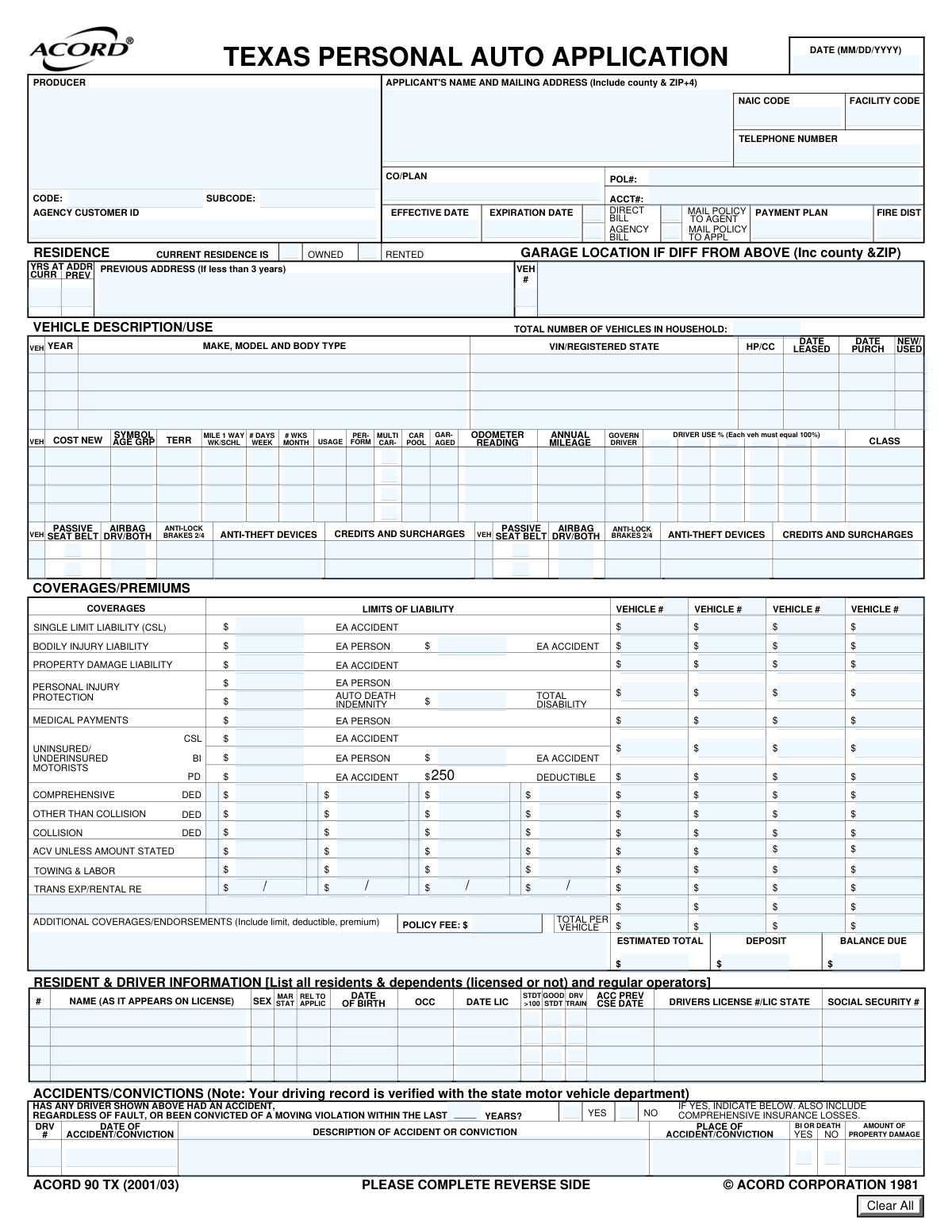
The ACORD 90, Personal Auto Application, is a detailed form used to apply for personal automobile insurance, collecting essential data on the applicant, drivers, vehicles, and desired coverages. This information is crucial for insurance underwriters to assess risk, calculate premiums, and issue a policy. Today, this comprehensive form can be filled out quickly and accurately using AI-powered services like Instafill.ai, which can also convert non-fillable PDF versions into interactive fillable forms.
Our AI automatically handles information lookup, data retrieval, formatting, and form filling.
It takes less than a minute to fill out ACORD 90 using our AI form filling.
Securely upload your data. Information is encrypted in transit and deleted immediately after the form is filled out.
Form specifications
| Form name: | ACORD 90, Personal Auto Application |
| Number of fields: | 466 |
| Number of pages: | 2 |
| Language: | English |
Instafill Demo: How to fill out PDF forms in seconds with AI
How to Fill Out ACORD 90 Online for Free in 2026
Are you looking to fill out a ACORD 90 form online quickly and accurately? Instafill.ai offers the #1 AI-powered PDF filling software of 2026, allowing you to complete your ACORD 90 form in just 37 seconds or less.
Follow these steps to fill out your ACORD 90 form online using Instafill.ai:
- 1 Navigate to Instafill.ai and upload or select the ACORD 90, Personal Auto Application form.
- 2 Allow the AI to scan and identify all the fields on the form, including applicant details, vehicle information, and coverage sections.
- 3 Provide your personal and producer information, including names, addresses, and contact details, by answering simple questions.
- 4 Enter detailed information for each vehicle you wish to insure, such as make, model, VIN, and usage details.
- 5 List all drivers in the household, providing their personal details, license information, and any accident or conviction history.
- 6 Select the desired insurance coverages, limits, and deductibles for liability, collision, comprehensive, and other options.
- 7 Review the auto-populated form for accuracy, make any necessary corrections, and then download or submit the completed ACORD 90 application.
Our AI-powered system ensures each field is filled out correctly, reducing errors and saving you time.
Why Choose Instafill.ai for Your Fillable ACORD 90 Form?
Speed
Complete your ACORD 90 in as little as 37 seconds.
Up-to-Date
Always use the latest 2026 ACORD 90 form version.
Cost-effective
No need to hire expensive lawyers.
Accuracy
Our AI performs 10 compliance checks to ensure your form is error-free.
Security
Your personal information is protected with bank-level encryption.
Frequently Asked Questions About Form ACORD 90
This is a personal auto insurance application. It must be completed by individuals seeking to obtain a new auto insurance policy for their vehicles and household drivers.
You will need personal information for all drivers, including full names, dates of birth, and driver's license numbers. You will also need detailed information for each vehicle, such as the Vehicle Identification Number (VIN), make, model, year, and current odometer reading.
A 'Loss Payee' is the entity, typically a lender, that is entitled to insurance payments for a loss to the vehicle. An 'Additional Interest' is another party with a financial stake in the vehicle, but the 'Loss Payee' has primary rights to the claim payment.
For each vehicle, estimate the percentage of time each listed driver operates it. The total use percentages for a single vehicle must add up to 100%.
Use the 'Garage Location' section to provide the full address where your vehicle is primarily kept. This is important for calculating accurate insurance rates.
You must enter the specific legal name of the insurance company that will issue the policy, not the name of the parent corporation or group. Your agent can provide the exact company name to use.
You may need to attach documents like a Driver Training Certificate, Good Student Certificate for discounts, an Anti-Theft Device Certificate, or a Bill of Sale for a new vehicle. The 'Attachments' section lists potential documents you may need to include.
Use the 'Remarks' section to explain any 'Yes' answers in the 'General Information' section or to provide details for any unusual situations. For example, you can explain why a vehicle is registered in a different state than where it is garaged.
After submission, the insurance company will review your application, verify your information, and calculate your premium. An agent will then contact you to finalize the policy and payment details.
Yes, if you have a loan, you must list your lender in the 'Additional Interest Details' section as a 'Loss Payee'. You will need to provide their name, address, and your loan number.
Yes, services like Instafill.ai use AI to auto-fill form fields accurately and save time. This can help you complete the application more efficiently and with fewer errors.
You can use a service like Instafill.ai to complete this form online. Simply upload the document, and the platform will make it interactive, allowing you to type your information directly into the fields.
If you have a non-fillable or 'flat' PDF, you can use a tool like Instafill.ai to convert it into an interactive, fillable form. This allows you to easily type in your information without needing to print and fill it out by hand.
Compliance ACORD 90
Validation Checks by Instafill.ai
1
Policy Term Chronology
This check ensures that the 'Expiration Date' of the policy is chronologically after the 'Effective Date'. A policy cannot expire before it starts. This is critical for defining a valid coverage period and preventing logical errors in policy administration systems. If this validation fails, the user should be prompted to correct one or both of the dates before submission.
2
Driver Usage Percentage Summation
Validates that the sum of all 'Driver Use Percentage' fields for a single vehicle equals exactly 100%. This is crucial for accurately assigning risk and calculating premiums based on which driver uses the vehicle most often. If the total is not 100%, the form should display an error and require the user to adjust the percentages until they sum correctly.
3
Conditional Previous Address Requirement
This validation enforces the rule that the 'Previous Address' field must be completed if the value in 'Years at Current Address' is less than 3. This information is often required for underwriting and background checks to assess stability and risk. If the condition is met and the address is missing, the submission should be blocked until the previous address is provided.
4
Vehicle Identification Number (VIN) Format
This check verifies that the 'Vehicle identification number' (VIN) is in the standard 17-character alphanumeric format, excluding the letters I, O, and Q. A valid VIN is essential for correctly identifying the vehicle's make, model, year, and history for rating and coverage purposes. An invalid VIN will prevent the system from retrieving vehicle data and should halt the submission until a valid VIN is entered.
5
Accident History Detail Requirement
Ensures that if the 'Accident/Conviction History Question' is answered 'YES', then at least one 'Accident/Conviction' detail section is filled out. A 'YES' answer without a corresponding explanation is incomplete and prevents proper risk assessment. The system should flag this as a missing information error and require the user to provide details of the incident.
6
Mutually Exclusive Policy Directives
This check confirms that for each pair of mutually exclusive options, only one is selected. Specifically, the user can select either 'Direct Bill' or 'Agency Bill', but not both, and either 'Mail Policy to Agent' or 'Mail Policy to Applicant', but not both. This prevents ambiguity in billing and communication instructions. If both options in a pair are selected, an error should be shown, forcing the user to choose only one.
7
Driver Licensing Age Logic
Validates that a driver's 'Date Licensed' is reasonably later than their 'Date of Birth'. The check calculates the driver's age when they were licensed and flags it if it's below a plausible minimum, such as 14 years. This helps catch data entry errors like swapped dates or typos. A failure would require the user to review and correct the driver's birth and licensing dates.
8
Vehicle Count Consistency
This validation cross-references the 'Total Number of Vehicles in Household' field with the number of vehicle information sections that have been completed. The numbers must match to ensure the application accurately reflects all vehicles to be insured. A mismatch indicates either a data entry error or incomplete information, and the user must correct the count or add/remove vehicle details.
9
Conditional Remarks Field Explanation
Checks that the 'Remarks' field is not empty if any of the 'General Information' questions (e.g., 'License Suspended/Revoked - Yes', 'Existing Damage Yes') are answered in the affirmative. These questions are designed to flag risks that require manual review, and the explanation is mandatory for underwriting. If a 'Yes' is checked without a corresponding remark, the form should be considered incomplete.
10
Total Premium Calculation Verification
This check verifies that the 'Estimated Total Premium' field correctly equals the sum of the individual vehicle total premiums, the 'Policy Fee', and the 'Additional Coverages/Endorsements Premium'. This ensures mathematical accuracy and transparency in the final quoted price. If the sum does not match the total, the system should flag a calculation error, which may require system-level correction or user review of the premium components.
11
Attachment Requirement for Discounts
Ensures that if a discount is claimed (e.g., 'Good Driver Discount', 'Student In Training'), the corresponding attachment checkbox (e.g., 'Good Student Certificate Attachment', 'Driver Training Certificate') is also checked. This confirms that the applicant intends to provide the required proof for the discount. If a discount is selected without the corresponding attachment indicated, the user should be warned that proof is required and prompted to check the attachment box.
12
Binder Information Dependency
This validation ensures that if the 'Coverage Is Not Bound' checkbox is left unchecked, then the 'Effective Date', 'Expiration Date', and 'Effective Time' fields in the 'Insurance Binder Details' section are all filled out. A binder is a legal agreement, and its term must be clearly defined. If coverage is bound, these fields are mandatory and the submission will fail without them.
13
Bodily Injury Limit Hierarchy
This check validates that the 'Bodily Injury Liability Per Accident' limit is greater than or equal to the 'Bodily Injury Liability Per Person' limit. It is logically impossible for the per-person limit to exceed the total per-accident limit. This validation prevents a common data entry error that would create an invalid coverage structure. If the per-person limit is higher, the user must correct the values.
14
Applicant Address Format
This validation checks that the applicant's mailing address includes a ZIP code in a valid format, preferably ZIP+4 as requested (e.g., NNNNN-NNNN or NNNNN). An accurate and complete address is fundamental for mailing policy documents, bills, and other legal notices. If the ZIP code is missing or malformed, the system should prompt the user to enter a valid postal code.
Common Mistakes in Completing ACORD 90
The form specifically asks for the actual name of the underwriting company, not the group name (e.g., 'Progressive Casualty Insurance Company' instead of just 'Progressive'). Applicants often use the common brand name they know, which can cause the application to be routed incorrectly or delayed. To avoid this, applicants should verify the exact legal name of the insurance company they are applying to. This information is usually available on the quote or from the insurance agent.
The 17-character VIN is unique to each vehicle, and even a single-digit typo will invalidate it, halting the application process. This mistake is common due to the length and complexity of the number. An incorrect VIN prevents the insurer from verifying the vehicle's history, specifications, and eligibility for coverage. To prevent this, double-check the VIN from the vehicle's registration or title certificate. AI-powered tools like Instafill.ai can automatically validate the VIN's format and checksum to catch errors instantly.
Applicants frequently misclassify their vehicle's primary use, particularly confusing a daily commute with 'Business' use. The form clarifies that driving to and from a principal place of work is considered 'Pleasure' use, while 'Business' use involves using the vehicle as part of one's job. This error can lead to incorrect premium calculations and potential claim disputes. Carefully read the definitions provided and select the appropriate category (Pleasure, Business, or Farm).
The form requires disclosure of all accidents, 'regardless of fault,' and moving violations within a specified period. Applicants may forget minor incidents or assume they don't need to report an accident where they weren't at fault. Omission of this information can be considered misrepresentation and may lead to policy cancellation or denial of a future claim. It is crucial to provide a complete and honest history for all listed drivers.
The form requires that the usage percentages for all drivers assigned to a single vehicle must total 100%. Applicants often make simple math errors, causing the sum to be over or under 100%, which leads to processing delays. This information is critical for rating the policy correctly. Before submitting, add up the percentages for each vehicle to ensure they equal exactly 100%.
This form contains many fields that are only required if a certain condition is met, such as providing a 'Previous Address' only if the applicant has lived at the current address for less than 3 years. People often miss these instructions, either by providing unnecessary information or, more critically, by omitting required details. This results in an incomplete application that requires follow-up. Reading each instruction carefully is key to avoiding this. If the form is a non-fillable PDF, a tool like Instafill.ai can convert it to a smart, fillable version that can help guide users through this conditional logic.
When asked for the 'Date Licensed,' applicants sometimes enter the issue date or expiration date of their current driver's license. The form is actually asking for the date the driver was first licensed to drive, as this is used to determine their years of driving experience for rating purposes. Providing the wrong date can negatively impact the premium calculation. Applicants should refer to their driving record or make their best estimate of the year they first received any type of driver's license.
Throughout the form, there are 'Yes/No' questions about topics like existing vehicle damage, license suspensions, or special equipment. A 'Yes' answer almost always requires a detailed explanation in the 'Remarks' section. A common mistake is to check 'Yes' but fail to provide the corresponding details. This leaves the application incomplete and requires the insurance company to contact the applicant for clarification, delaying the underwriting process.
Applicants may indicate they are eligible for discounts like 'Good Student' or 'Anti-Theft Device' but forget to attach the required proof, such as a certificate or report card. Without the supporting documentation, the insurance company cannot apply the discount, resulting in a higher premium. To avoid this, create a checklist of all claimed discounts and ensure the corresponding certificates are included with the application. AI-powered form fillers like Instafill.ai can help by reminding users to attach necessary documents based on their answers.
The form requests the applicant's full mailing address, including the county and ZIP+4 code. It's common for applicants to omit the county or the extended ZIP+4, as this information is not always top-of-mind. While it may seem minor, this data is used for precise territory rating and ensuring mail deliverability. Incomplete addresses can cause rating errors or communication delays. Using an address validation tool or looking up the full ZIP+4 can help ensure accuracy.
Saved over 80 hours a year
“I was never sure if my IRS forms like W-9 were filled correctly. Now, I can complete the forms accurately without any external help.”
Kevin Martin Green
Your data stays secure with advanced protection from Instafill and our subprocessors




Robust compliance program
Transparent business model
You’re not the product. You always know where your data is and what it is processed for.
ISO 27001, HIPAA, and GDPR
Our subprocesses adhere to multiple compliance standards, including but not limited to ISO 27001, HIPAA, and GDPR.
Security & privacy by design
We consider security and privacy from the initial design phase of any new service or functionality. It’s not an afterthought, it’s built-in, including support for two-factor authentication (2FA) to further protect your account.
Fill out ACORD 90 with Instafill.ai
Worried about filling PDFs wrong? Instafill securely fills acord-90-personal-auto-application-2 forms, ensuring each field is accurate.
