Yes! You can use AI to fill out Form SA472, Advice of death
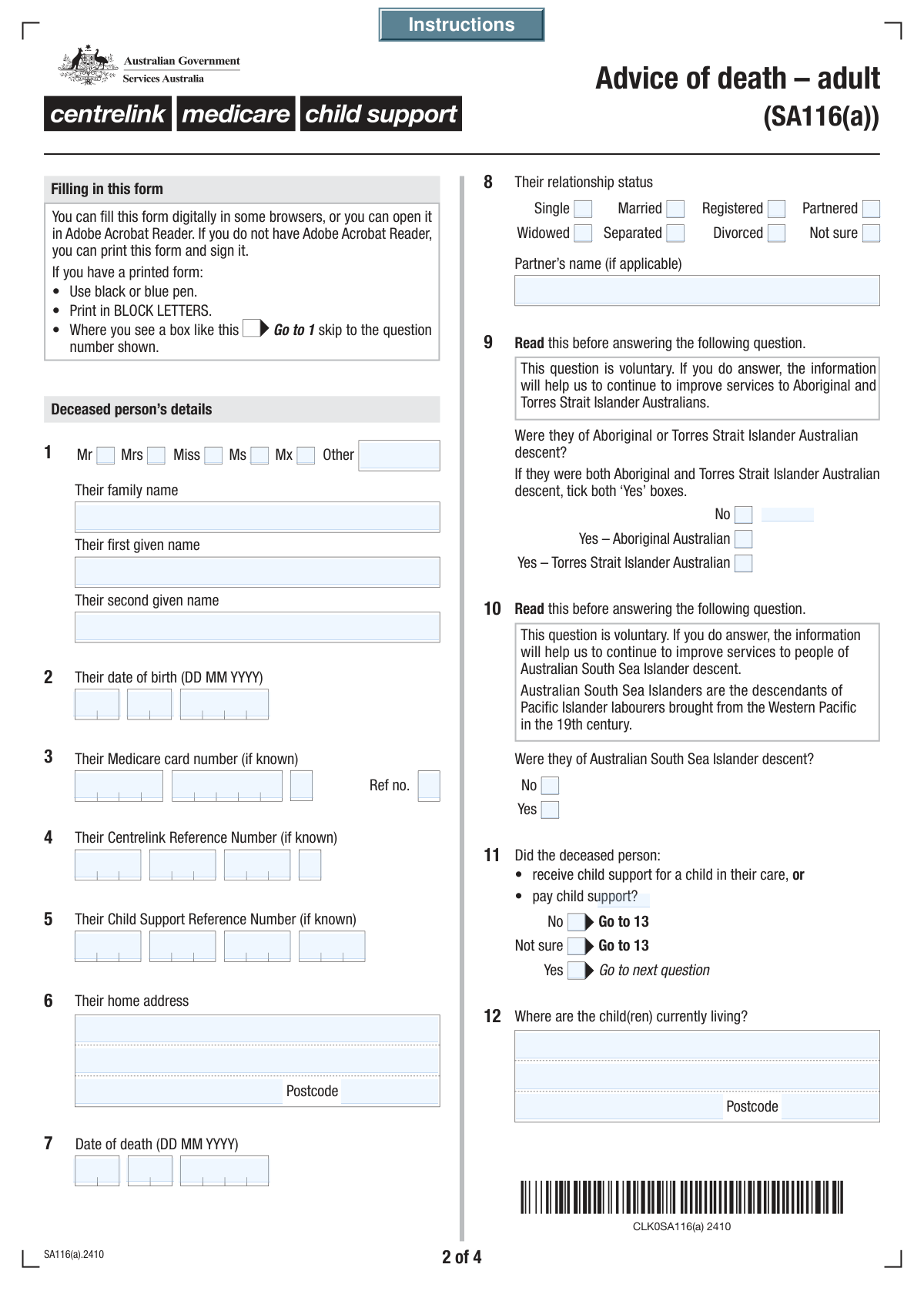
Form SA472, Advice of death, is a crucial document used to notify Services Australia (which includes Centrelink, Medicare, and Child Support) when someone has passed away. Submitting this form helps to stop payments, prevent overpayments, and begin the process of settling the deceased person's affairs with these government agencies. Today, this form can be filled out quickly and accurately using AI-powered services like Instafill.ai, which can also convert non-fillable PDF versions into interactive fillable forms.
Our AI automatically handles information lookup, data retrieval, formatting, and form filling.
It takes less than a minute to fill out SA472 using our AI form filling.
Securely upload your data. Information is encrypted in transit and deleted immediately after the form is filled out.
Form specifications
| Form name: | Form SA472, Advice of death |
| Number of fields: | 144 |
| Number of pages: | 4 |
| Filled form examples: | Form SA472 Examples |
| Language: | English |
Instafill Demo: How to fill out PDF forms in seconds with AI
How to Fill Out SA472 Online for Free in 2026
Are you looking to fill out a SA472 form online quickly and accurately? Instafill.ai offers the #1 AI-powered PDF filling software of 2026, allowing you to complete your SA472 form in just 37 seconds or less.
Follow these steps to fill out your SA472 form online using Instafill.ai:
- 1 Navigate to Instafill.ai and upload or select the Form SA472, Advice of death.
- 2 Provide the deceased person's personal details, including their full name, date of birth, date of death, and last known address.
- 3 Enter the deceased's identification numbers, such as their Medicare, Centrelink, or Child Support reference numbers, if available.
- 4 Fill in the details of the hospital, funeral director, executor/administrator, and next of kin, if these are known.
- 5 Complete the section with your own details as the notifier, including your name, contact information, and relationship to the deceased.
- 6 Review all the information for accuracy, then sign and date the declaration section to certify that the details provided are correct.
- 7 Download, print, or submit your completed Form SA472 as instructed by Services Australia.
Our AI-powered system ensures each field is filled out correctly, reducing errors and saving you time.
Why Choose Instafill.ai for Your Fillable SA472 Form?
Speed
Complete your SA472 in as little as 37 seconds.
Up-to-Date
Always use the latest 2026 SA472 form version.
Cost-effective
No need to hire expensive lawyers.
Accuracy
Our AI performs 10 compliance checks to ensure your form is error-free.
Security
Your personal information is protected with bank-level encryption.
Frequently Asked Questions About Form SA472
This form is used to officially notify government agencies, like Services Australia, about a person's death. This helps ensure records for Medicare, Centrelink, and Child Support are updated correctly.
This form should be completed by the executor or administrator of the estate, the next of kin, or another person assisting with the deceased's affairs, such as a funeral director.
You should have the deceased's full name, date of birth, date of death, and last known address. If possible, also gather their Medicare card number, Centrelink Reference Number, and details of the executor or next of kin.
It is okay if you don't have these numbers. Fill in all the other information you have, as this will still help the agency identify the deceased person's records.
The 'Notifier' is you—the person completing and submitting this form. You will need to provide your name, contact details, and your relationship to the person who has passed away.
The form includes sections to indicate if these details are not known. Simply check the 'No' or 'Not sure' box for that section and continue with the rest of the form.
The Executor or Administrator is the person legally appointed to manage the deceased's estate, while the Next of Kin is their closest living relative. You should provide details for both if they are known.
The form provides a 'Not sure' option in the 'Relationship Details' section. It is best to select this if you are uncertain to ensure all information provided is accurate.
After submission, the relevant government agencies will process the notification to update the deceased's records and cease any payments. The executor or next of kin may be contacted if more information is needed.
Yes, services like Instafill.ai use AI to auto-fill form fields accurately and save time. This can be especially helpful when dealing with complex forms during a difficult time.
You can upload the form to the Instafill.ai platform, which will make the fields interactive. You can then use its features to auto-fill your information, sign electronically, and download the completed document.
Services like Instafill.ai can convert flat, non-fillable PDFs into interactive forms you can type directly into. This saves you the trouble of printing, handwriting, and scanning the document.
You only need to fill in the child(ren)'s address details if you answered 'Yes' to the question about whether the deceased received or paid child support. Otherwise, you can skip that section.
Compliance SA472
Validation Checks by Instafill.ai
1
Date of Death Chronology vs Date of Birth
This validation ensures that the entered 'Date of Death' is on or after the entered 'Date of Birth'. It is logically impossible for a person to die before they are born. If this check fails, the system should flag an error and require the user to correct one or both of the dates before submission, preventing fundamentally incorrect data from entering the system.
2
Future Date of Death Prevention
This check verifies that the 'Date of Death' is not a date in the future. This is a critical data integrity check to prevent typographical errors or fraudulent entries. If a future date is entered, the form should display an error message and prevent submission until the date is corrected to be today or a past date.
3
Deceased Person's Name Completeness
This validation ensures that the 'Deceased Person's Family Name' and 'Deceased Person's First Given Name' fields are not empty. These fields are fundamental for identifying the individual and are required for all subsequent processing and record-matching. Failure to provide this information would render the form submission useless, so the system must block submission until they are filled.
4
Conditional Partner's Name Requirement
This check enforces that the 'Partner's Name' field is only filled if the deceased's relationship status is 'Married', 'Registered', 'Partnered', 'Widowed', or 'Separated'. This prevents inconsistent data, such as providing a partner's name for someone listed as 'Single'. If the status is one that implies a partner, this field could be made mandatory; otherwise, it should be disabled or cleared.
5
Valid Date of Birth Composition
This validation checks that the 'Day of Birth', 'Month of Birth', and 'Year of Birth' fields combine to form a valid calendar date (e.g., prevents '31 April'). This is essential for accurate age calculation and identity verification. If the date is invalid, the system should prompt the user to correct the entry, ensuring data quality from the point of capture.
6
Australian Postcode Format
This check validates that all postcode fields ('Postcode (Deceased Person's Home Address)', 'Hospital Postcode', etc.) contain a 4-digit number. This is crucial for mail delivery, address verification, and data standardization across Australian government systems. An invalid format should trigger an error message, guiding the user to enter a correct 4-digit postcode.
7
Conditional Child's Address Requirement
This validation ensures that if the 'Child Support Status' is marked as 'Yes', then the 'Address Line 1', 'Suburb/Town/City', and 'Postcode' for the child(ren) become mandatory fields. This rule ensures that necessary follow-up information is captured when a relevant condition is met. If 'Yes' is selected but the address is missing, the submission should be blocked until the required address details are provided.
8
Conditional Hospital Details Requirement
This check verifies that if the user selects 'Yes' for 'Hospital Details Known', then the 'Hospital Name' field must be filled out. This ensures that when a user indicates information is available, it is actually provided. If 'Yes' is checked but the hospital name is left blank, the system should prompt the user to either provide the name or change their selection to 'No' or 'Not applicable'.
9
Notifier Information Completeness
This validation confirms that the 'Notifier's Family Name', 'Notifier's First Given Name', and 'Contact Phone Number' are all provided. The notifier is the primary contact for any questions or clarifications regarding the submission. Without this information, it is impossible to follow up, so these fields must be mandatory for the form to be accepted.
10
Declaration Date Chronology
This check ensures the 'Declaration Date' is on or after the 'Date of Death'. It is impossible to declare that a death has occurred before the event itself. This logical check prevents erroneous data entry and ensures the timeline of events is valid. If the declaration date precedes the date of death, an error must be shown, requiring the user to correct the dates.
11
Exclusive Relationship Status Selection
This validation ensures that only one of the relationship status checkboxes ('Single', 'Married', 'Widowed', etc.) can be selected at a time. A person cannot have multiple statuses simultaneously, so enforcing a single choice is crucial for data integrity. If the form allows multiple checks, the system should reject it or force the user to select only one option.
12
Conditional Executor Details Requirement
This check ensures that if 'Yes (Executor/Administrator Details Known)' is selected, then the 'Executor Family Name' and 'Executor First Given Name' fields are mandatory. This rule prevents a user from stating they know the details without providing them. If the check fails, the system should halt submission and prompt the user to enter the executor's name or change the selection to 'No'.
13
Conditional Next of Kin Details Requirement
This validation verifies that if 'Yes (Are Next of Kin Details Known)' is selected, then 'Relationship to Deceased Person', 'Family Name', and 'First Given Name' for the next of kin are all provided. This ensures that when next of kin information is available, it is fully captured for communication purposes. A failure should block submission until the required fields are completed.
14
Medicare Number Component Validation
This check validates the structural format of the Medicare card number components. It should verify that 'Part 1' is 8 digits, 'Part 2' is 1 digit, and 'Part 3' is 1 digit, and that all parts contain only numbers. This ensures the number is entered correctly and increases the likelihood of a successful match in government systems. An incorrectly formatted number should be flagged immediately.
Common Mistakes in Completing SA472
The Medicare, Centrelink, and Child Support numbers are long, segmented, and prone to human error. People often transpose digits, miss a number, or confuse the main card number with the individual reference number (the number next to a person's name on a Medicare card). These errors cause identity verification failures and significant processing delays, requiring manual follow-up. To avoid this, carefully cross-reference the numbers with the physical cards and double-check each segment before submission.
The form requires additional details if 'Yes' is selected for questions about child support, hospital stays, or known funeral/executor details. A common mistake is checking 'Yes' but then leaving the corresponding address or contact fields blank, often due to oversight. This incomplete submission cannot be processed and will be returned or delayed pending clarification. Always ensure that if you answer 'Yes' to a question, you provide all the subsequent information requested in that section.
Applicants often mistakenly enter the family name in the first name field or vice-versa, especially when rushing through the form. Omitting a second given name that appears on official documents is also a frequent error. These mistakes can cause mismatches with official government records, leading to the form's rejection and delaying the notification process. It is crucial to enter the deceased's name exactly as it appears on official identification like a birth certificate or passport.
With date fields split into Day, Month, and Year, it is easy to make a typo or enter a logically impossible date, such as a declaration date that is earlier than the date of death. Such errors can invalidate the form or cause significant confusion in the deceased's official record, requiring correction. Carefully review all dates for accuracy and logical consistency before signing the declaration to prevent processing holds.
People frequently forget to include a postcode or suburb, or they try to cram the entire address, including the unit number and suburb, into the first address line. This can lead to returned mail and communication breakdowns with the estate's representatives. Ensure the street number and name are on Line 1, the apartment/unit on Line 2, and the Suburb/City and Postcode are in their designated fields for all address sections.
The distinctions between 'Married', 'Registered', and 'Partnered' can be confusing, leading to incorrect selections based on personal interpretation rather than legal definition. Furthermore, after selecting a status like 'Married' or 'Partnered', people often forget to fill in the required 'Partner's Name' field. This omission makes the information incomplete and requires clarification, delaying any processes related to the surviving partner.
After carefully filling out extensive details about the deceased, the person completing the form (the notifier) sometimes forgets to provide their own complete contact information at the end. This is a critical error, as it leaves the agency with no way to contact the notifier for clarifications or updates. Always double-check that the 'Notifier's Name', 'Notifier's Postal Address', and 'Notifier's Contact Phone Number' sections are filled out completely.
An unsigned or undated form is legally invalid and will be rejected immediately, halting the entire process until a properly signed copy is received. This is often a simple oversight made at the very end of what can be a long and emotionally taxing task. Always perform a final check to ensure the 'Declarer's Signature' field is signed and the 'Declaration Date' is correctly filled out.
The roles of Executor (named in a will), Administrator (appointed by a court), and Next of Kin have specific legal meanings, but people often use them interchangeably or are unsure who holds which role. Providing details for the wrong person in a section can cause legal and administrative complications for the estate. If unsure, it is best to consult the deceased's will or seek legal advice before completing these sections. Using an AI-powered tool like Instafill.ai can help by providing contextual guidance for such fields.
A person might check 'No' for 'Are Next of Kin Details Known' but then proceed to fill in the next of kin's name and address. This happens when users change their minds or get confused by the form's flow, creating contradictory data that requires manual intervention. This type of error can be prevented by using smart form-filling tools like Instafill.ai, which can convert flat PDFs into fillable versions with conditional logic that automatically hides or reveals sections based on your answers, ensuring consistency.
Saved over 80 hours a year
“I was never sure if my IRS forms like W-9 were filled correctly. Now, I can complete the forms accurately without any external help.”
Kevin Martin Green
Your data stays secure with advanced protection from Instafill and our subprocessors

Robust compliance program
Transparent business model
You’re not the product. You always know where your data is and what it is processed for.
ISO 27001, HIPAA, and GDPR
Our subprocesses adhere to multiple compliance standards, including but not limited to ISO 27001, HIPAA, and GDPR.
Security & privacy by design
We consider security and privacy from the initial design phase of any new service or functionality. It’s not an afterthought, it’s built-in, including support for two-factor authentication (2FA) to further protect your account.
Fill out SA472 with Instafill.ai
Worried about filling PDFs wrong? Instafill securely fills form-sa472-advice-of-death forms, ensuring each field is accurate.



