Yes! You can use AI to fill out VM AutoFinance Pte Ltd Auto Financing Application Form

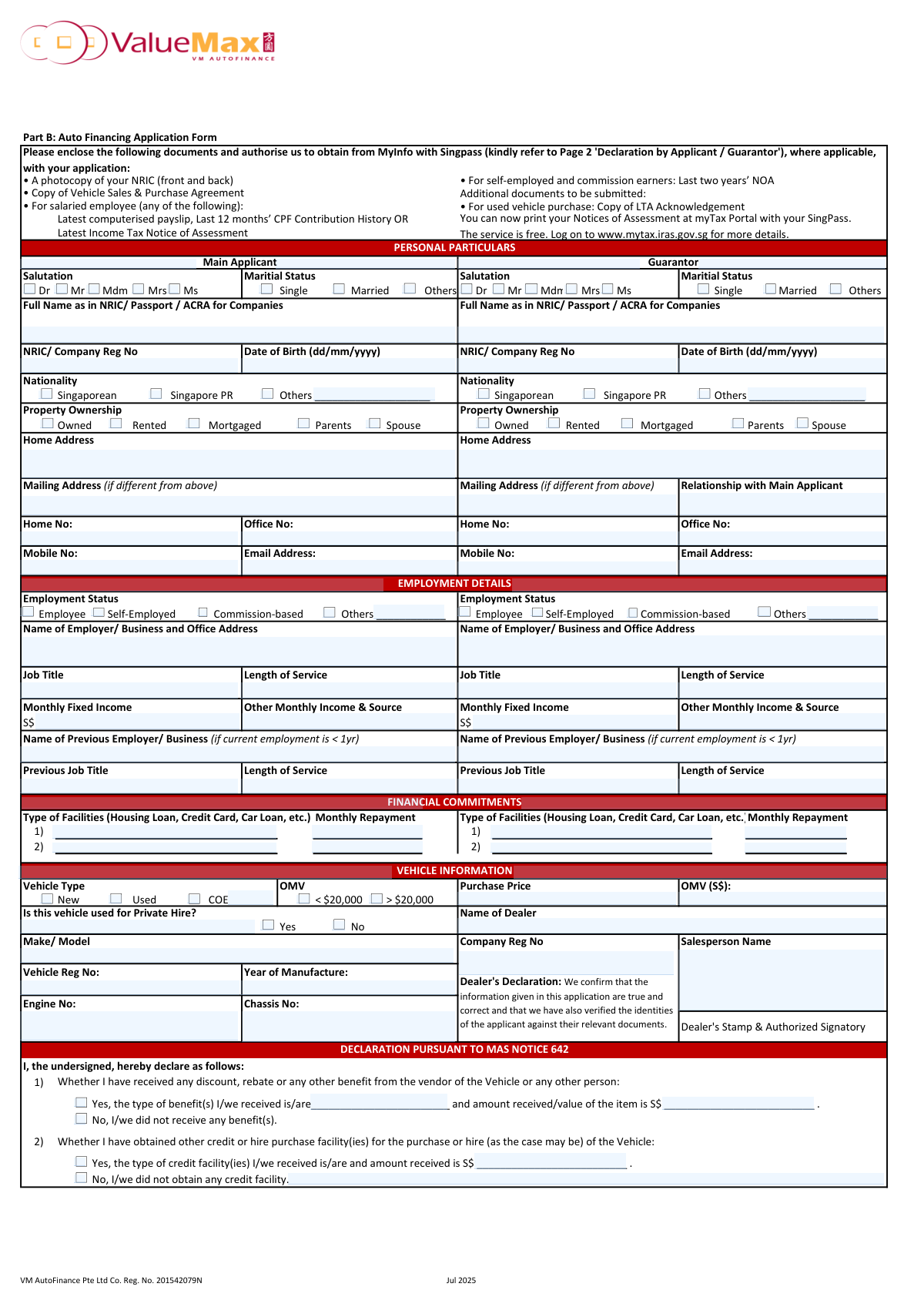
This is an application form used by individuals and companies to apply for financing from VM AutoFinance Pte Ltd for the purchase of a new or used vehicle in Singapore. The form requires detailed information about the applicant, any co-applicant or guarantor, including personal particulars, employment history, income, and existing financial commitments. Today, this form can be filled out quickly and accurately using AI-powered services like Instafill.ai, which can also convert non-fillable PDF versions into interactive fillable forms.
Our AI automatically handles information lookup, data retrieval, formatting, and form filling.
It takes less than a minute to fill out VM AutoFinance Application using our AI form filling.
Securely upload your data. Information is encrypted in transit and deleted immediately after the form is filled out.

Form specifications

Form name: VM AutoFinance Pte Ltd Auto Financing Application Form
Number of pages: 2
Language: English
main-image

Instafill Demo: How to fill out PDF forms in seconds with AI

How to Fill Out VM AutoFinance Application Online for Free in 2026

Are you looking to fill out a VM AUTOFINANCE APPLICATION form online quickly and accurately? Instafill.ai offers the #1 AI-powered PDF filling software of 2026, allowing you to complete your VM AUTOFINANCE APPLICATION form in just 37 seconds or less.
Follow these steps to fill out your VM AUTOFINANCE APPLICATION form online using Instafill.ai:
  1. 1 Navigate to Instafill.ai and upload or select the VM AutoFinance Auto Financing Application Form.
  2. 2 Use the AI assistant to automatically populate personal details for the main applicant, co-applicant, and guarantor, including name, NRIC, address, and contact information.
  3. 3 Provide employment and income details for all relevant parties, such as employer name, job title, and monthly income.
  4. 4 List all current financial commitments, including housing loans, credit cards, and other car loans, in the designated section.
  5. 5 Enter the specific details of the vehicle being purchased, such as make, model, purchase price, and dealer information.
  6. 6 Complete the necessary declarations regarding benefits received and other credit facilities as required by MAS Notice 642.
  7. 7 Review all the information populated by the AI for accuracy, then digitally sign and date the application before submitting it with the required supporting documents.

Our AI-powered system ensures each field is filled out correctly, reducing errors and saving you time.

Why Choose Instafill.ai for Your Fillable VM AutoFinance Application Form?

Speed

Complete your VM AutoFinance Application in as little as 37 seconds.

Up-to-Date

Always use the latest 2026 VM AutoFinance Application form version.

Cost-effective

No need to hire expensive lawyers.

Accuracy

Our AI performs 10 compliance checks to ensure your form is error-free.

Security

Your personal information is protected with bank-level encryption.

Frequently Asked Questions About Form VM AutoFinance Application

This form is used to apply for a loan from VM AutoFinance Pte Ltd to finance the purchase of a new or used vehicle. It gathers essential personal, employment, and financial information from the applicant.

The main person purchasing the vehicle and applying for the loan (Main Applicant) must fill out this form. A Guarantor may also need to provide their details if required to support the loan application.

You must submit a photocopy of your NRIC (front and back), the Vehicle Sales & Purchase Agreement, and either your latest payslip, last 12 months' CPF Contribution History, or latest Income Tax Notice of Assessment.

If you are self-employed or a commission earner, you need to provide your last two years' Notice of Assessment (NOA) from IRAS. These can be downloaded from the myTax Portal using your SingPass.

Yes, if you are purchasing a used vehicle, you must also submit a copy of the LTA Acknowledgement along with the other standard application documents.

You only need to provide information about your previous employer if your length of service at your current job is less than one year. This helps the finance company assess your employment stability.

In this section, you must list all your existing financial liabilities, such as housing loans, credit card debt, and other car loans. You need to specify the type of facility and the monthly repayment amount for each.

This is a mandatory declaration where you must state if you have received any discounts or rebates on the vehicle's price or if you have obtained other financing for the same vehicle. It ensures transparency as required by the Monetary Authority of Singapore.

According to the form's declaration, you will be liable to pay cancellation fees and any out-of-pocket expenses incurred by the finance company if you cancel the application after approval.

A guarantor may be required to strengthen a loan application, typically if the main applicant's income or credit history does not fully meet the lender's criteria. The guarantor legally agrees to repay the loan if the applicant defaults.

Yes, you can use services like Instafill.ai, which leverage AI to accurately auto-fill form fields. This can help you complete the application faster and with fewer errors.

To fill this form online, upload the PDF to the Instafill.ai platform. The AI will make the fields interactive, allowing you to type in your information, use auto-fill features, and then download the completed document.

If you have a non-fillable or 'flat' PDF, you can use a tool like Instafill.ai to convert it into an interactive, fillable form. This allows you to easily type your details directly into the fields on your computer.

Compliance VM AutoFinance Application
Validation Checks by Instafill.ai

1
NRIC / Company Registration Number Format Validation
This check ensures that the NRIC or Company Registration Number for both the main applicant and co-applicant adheres to the official Singaporean format (e.g., SxxxxxxxX for NRICs issued before 2000, TxxxxxxxX for those after, or a valid ACRA UEN format). Correct identification is critical for credit checks with bureaus and for legal compliance. If the format is invalid, the application cannot be processed as the individual or company cannot be uniquely and accurately identified.
2
Applicant Age Verification
This validation calculates the applicant's age based on the 'Date of Birth' provided and verifies that they are of legal contracting age (e.g., 18 or 21 years old, depending on jurisdiction). This is a fundamental legal requirement to ensure the financing agreement is enforceable. An application from an underage individual would be automatically rejected.
3
Conditional Previous Employment History
This check is triggered if the applicant's 'Length of Service' at their current employment is less than one year. It verifies that the 'Name of Previous Employer/Business', 'Previous Job Title', and previous 'Length of Service' fields are all filled. This information is crucial for assessing employment stability and income consistency, which are key factors in credit risk evaluation.
4
Completeness of 'Others' Specification Fields
For categorical fields such as 'Nationality', 'Marital Status', and 'Employment Status', if the 'Others' option is selected, this validation ensures the corresponding text field for clarification is not empty. Capturing this specific information is necessary for accurate profiling and risk assessment. Failure to provide details results in incomplete data and may require manual follow-up or rejection.
5
Financial Request Calculation Consistency
This validation checks the logical integrity of the financial figures in the 'FINANCIAL REQUEST' section. It ensures that the 'Amount Required' plus the 'Deposit Paid' is reasonably close to the 'Net Purchase Price'. This prevents data entry errors and confirms that the financing amount requested aligns with the vehicle's cost, which is essential for calculating the loan-to-value ratio.
6
MAS Declaration Consistency for Benefits
According to MAS Notice 642, if an applicant declares 'Yes' to receiving any discount, rebate, or benefit, they must provide details. This check verifies that if the 'Yes' option is selected for receiving benefits, the 'Benefit type' and 'Benefit amount (S$)' fields are mandatory and completed. This is a regulatory requirement for transparency in vehicle financing.
7
MAS Declaration Consistency for Other Credit Facilities
This validation ensures that if an applicant answers 'Yes' to having obtained other credit facilities for the vehicle purchase, the 'type of credit facility' and 'amount received' fields are filled. This is a critical declaration for assessing the applicant's total leverage and adherence to MAS financing restrictions. An incomplete declaration can lead to application rejection or legal issues.
8
Contact Information Format Validation
This check verifies that the 'Email Address' is in a valid format (e.g., [email protected]) and that the 'Mobile No' contains a plausible sequence of digits for a phone number. Accurate contact information is essential for all communication regarding the application, including requests for more information, notifications of approval or rejection, and sending loan documents. Invalid contact details can halt the entire application process.
9
Main Applicant Core Information Completeness
This validation ensures that all fundamental fields for the Main Applicant are filled, including 'Full Name', 'NRIC', 'Date of Birth', 'Home Address', 'Mobile No', and key 'Employment Details' like income. These fields represent the minimum information required to begin a credit assessment and identity verification. An application missing any of this core data is considered incomplete and cannot be processed.
10
Vehicle Year of Manufacture Logical Check
This check validates that the 'Year of Manufacture' is a valid 4-digit year that is not in the future. It also cross-references this with the 'New' or 'Used' vehicle status; a 'New' vehicle should typically have a manufacture year of the current or previous calendar year. This ensures the vehicle information is accurate, which affects its valuation and the applicable loan terms.
11
Financial Data Type and Value Validation
This check ensures that all fields intended to capture monetary values (e.g., 'Monthly Fixed Income', 'Purchase Price', 'Monthly Repayment') contain only positive, numeric data. It prevents non-numeric characters or negative values from being entered, which would cause calculation errors in the system. This maintains data integrity for all financial assessments.
12
Signature and Date Presence
This validation confirms that the 'Signature of Main Applicant & Date' field is not empty. The signature and date are legal proof that the applicant has read, understood, and agreed to all declarations and terms in the application. An unsigned application is legally non-binding and will be rejected immediately.

Common Mistakes in Completing VM AutoFinance Application

Confusing Fixed and Other Monthly Income

Applicants often incorrectly include variable income like commissions, overtime, or bonuses in the 'Monthly Fixed Income' field. This happens due to a misunderstanding of 'fixed' versus 'variable' pay and can lead to a miscalculation of the applicant's debt-servicing ratio, potentially causing rejection during verification. To avoid this, list only your basic salary under 'Fixed Income' and all other variable earnings under 'Other Monthly Income & Source' to provide a clear financial picture.

Omitting Existing Financial Commitments

A frequent and serious error is forgetting to list all existing financial obligations, such as credit card balances, personal loans, or other hire-purchase agreements. This oversight is often discovered during credit checks and can be viewed as a non-disclosure of material facts, leading to significant processing delays or outright rejection. To prevent this, carefully review your credit reports and bank statements to list every single monthly repayment obligation accurately.

Forgetting Previous Employer Details When Required

The form requires details of a previous employer if current employment is less than one year, a condition many applicants overlook. Leaving this section blank prevents the lender from assessing employment stability, which is a key risk factor, and will halt the application until the information is provided. Always double-check your 'Length of Service'; if it's under one year, you must complete the 'Name of Previous Employer/Business' section.

Incorrect Calculation of Amount Required

Applicants often make simple arithmetic errors when calculating the 'Amount Required' for the loan. The correct calculation is 'Net Purchase Price' minus 'Deposit Paid', but mistakes are common, leading to inconsistencies that must be clarified by the lender, thus delaying the process. To avoid this, double-check your math before submitting, ensuring the figures in the 'Vehicle Information' and 'Financial Request' sections match perfectly.

Misinterpreting the Declaration on Benefits/Rebates

Under the MAS Notice 642 declaration, applicants often fail to declare non-cash benefits from the dealer, such as free insurance, servicing packages, or accessories, and incorrectly check 'No'. This is a serious compliance issue, as these benefits affect the vehicle's true price and the maximum loan quantum, and failure to declare them can have legal consequences. You must declare any and all benefits, cash or otherwise, received from the dealer or any other party.

Submitting Incomplete or Incorrect Supporting Documents

The application requires a specific set of documents (e.g., latest payslip, 12 months' CPF history, latest NOA). A primary cause for delay is submitting outdated documents, an incomplete set, or the wrong type of document for one's employment status. Carefully review the document checklist on the form and ensure you have the correct, most recent versions of all required paperwork before submission to avoid having your application stalled.

Entering Date of Birth in the Wrong Format

The form specifies the date format as (dd/mm/yyyy), but applicants accustomed to other conventions (like mm/dd/yyyy) often enter it incorrectly. This simple data entry error can cause failures in automated data processing and identity verification, requiring manual correction and causing delays. Always check the required format next to the field. AI-powered form filling tools like Instafill.ai can help prevent this by automatically validating and formatting data correctly.

Full Name Does Not Match Official Documents

Applicants sometimes enter a nickname or an abbreviated version of their name instead of the full legal name as it appears on their NRIC, Passport, or ACRA records. This discrepancy causes an immediate failure during identity verification against official databases, flagging the application for correction. To ensure a smooth process, transcribe your name exactly as it is written on your official identification documents.

Forgetting the Dealer's Stamp and Signature

The 'Dealer's Declaration' section requires a stamp and signature from the vehicle dealer to verify the transaction. Applicants often submit the form without getting this completed, assuming it's not their responsibility. An application without this verification is considered incomplete and cannot be processed. Ensure the dealer stamps and signs your application form before you submit it. Since this form is a non-fillable PDF, a tool like Instafill.ai can convert it into a fillable version to handle other fields, but this physical step must still be completed.

Incomplete Address Information

Applicants sometimes provide an incomplete home address, missing details like the unit number or postal code. Furthermore, they may fill in the 'Mailing Address' field with the same address as their home, which is unnecessary and can create confusion. An incomplete address can delay correspondence and verification checks. Ensure your full residential address is entered correctly, and only use the mailing address field if mail is actually received at a different location.
Saved over 80 hours a year

“I was never sure if my IRS forms like W-9 were filled correctly. Now, I can complete the forms accurately without any external help.”

Kevin Martin Green

Your data stays secure with advanced protection from Instafill and our subprocessors

Robust compliance program

Transparent business model

You’re not the product. You always know where your data is and what it is processed for.

ISO 27001, HIPAA, and GDPR

Our subprocesses adhere to multiple compliance standards, including but not limited to ISO 27001, HIPAA, and GDPR.

Security & privacy by design

We consider security and privacy from the initial design phase of any new service or functionality. It’s not an afterthought, it’s built-in, including support for two-factor authentication (2FA) to further protect your account.

Fill out VM AutoFinance Application with Instafill.ai

Worried about filling PDFs wrong? Instafill securely fills vm-autofinance-pte-ltd-auto-financing-application-form forms, ensuring each field is accurate.