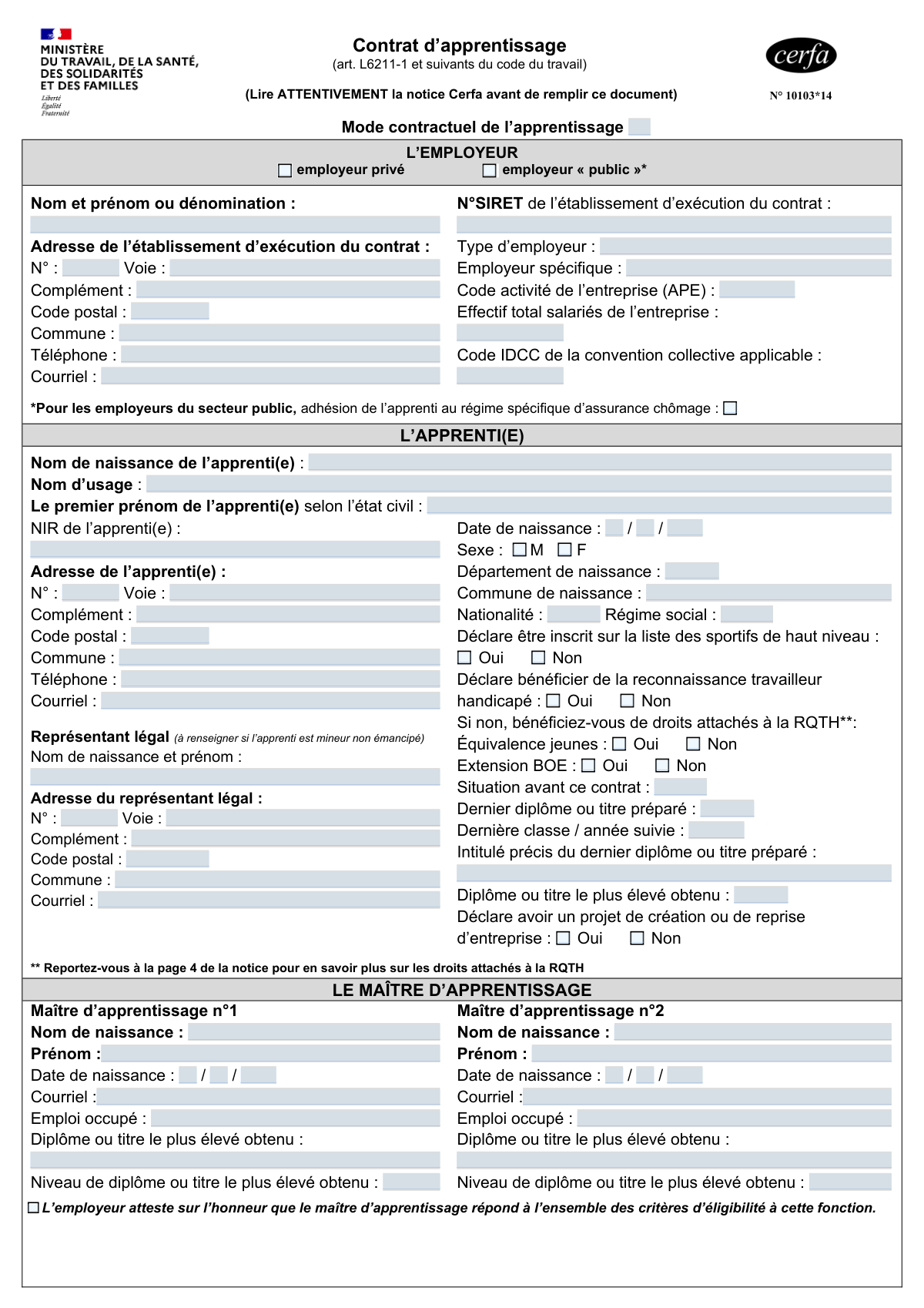
Yes! You can use AI to fill out Cerfa N° 10103*14 - Contrat d’apprentissage

The Contrat d’apprentissage, Cerfa form N° 10103*14, is the official legal document required in France to formalize an apprenticeship agreement. It outlines the key details of the work-study relationship, including information about the employer, the apprentice, the training program, and the contract terms, making it essential for legal compliance and registration. This comprehensive form ensures that all parties' rights and responsibilities are clearly defined and recorded. Today, this form can be filled out quickly and accurately using AI-powered services like Instafill.ai, which can also convert non-fillable PDF versions into interactive fillable forms.
Our AI automatically handles information lookup, data retrieval, formatting, and form filling.
It takes less than a minute to fill out Cerfa 10103*14 using our AI form filling.
Securely upload your data. Information is encrypted in transit and deleted immediately after the form is filled out.

Form specifications

Form name: Cerfa N° 10103*14 - Contrat d’apprentissage
Number of fields: 216
Number of pages: 2
Language: English
Categories: Cerfa forms, SSA forms
main-image

Instafill Demo: How to fill out PDF forms in seconds with AI

How to Fill Out Cerfa 10103*14 Online for Free in 2026

Are you looking to fill out a CERFA 10103*14 form online quickly and accurately? Instafill.ai offers the #1 AI-powered PDF filling software of 2026, allowing you to complete your CERFA 10103*14 form in just 37 seconds or less.
Follow these steps to fill out your CERFA 10103*14 form online using Instafill.ai:
  1. 1 Navigate to Instafill.ai and upload your Contrat d’apprentissage (Cerfa 10103*14) or select it from the template library.
  2. 2 Use the AI to automatically populate the 'L'EMPLOYEUR' section with the company's details, including its SIRET number, address, and applicable collective agreement code (IDCC).
  3. 3 Complete the 'L'APPRENTI(E)' section by providing the apprentice's personal information, social security number (NIR), and details of their legal guardian if they are a minor.
  4. 4 Fill in the 'LE MAÎTRE D’APPRENTISSAGE' section with the supervisor's details and the 'LE CONTRAT' section with the terms, dates, and remuneration structure.
  5. 5 Enter the training details in the 'LA FORMATION' section, specifying the training center (CFA), the diploma being pursued, and the training duration.
  6. 6 Carefully review all auto-filled and manually entered data across the employer, apprentice, contract, and training sections to ensure accuracy.
  7. 7 Once verified, have all parties (employer, apprentice, and legal guardian if applicable) sign the document electronically, then download the final contract for official submission.

Our AI-powered system ensures each field is filled out correctly, reducing errors and saving you time.

Why Choose Instafill.ai for Your Fillable Cerfa 10103*14 Form?

Speed

Complete your Cerfa 10103*14 in as little as 37 seconds.

Up-to-Date

Always use the latest 2026 Cerfa 10103*14 form version.

Cost-effective

No need to hire expensive lawyers.

Accuracy

Our AI performs 10 compliance checks to ensure your form is error-free.

Security

Your personal information is protected with bank-level encryption.

Frequently Asked Questions About Form Cerfa 10103*14

This form is the official document used in France to establish a formal apprenticeship agreement. It legally binds the employer, the apprentice, and the apprentice training center (CFA), outlining the terms of the employment and training.

The employer is primarily responsible for completing the form with information from the apprentice and the CFA. It must be signed by the employer and the apprentice; if the apprentice is a minor, their legal guardian must also sign.

You will need the employer's SIRET number, the apprentice's social security number (NIR), and details for the training center (CFA), including its UAI and SIRET numbers. Information about the apprentice's prior education and the apprenticeship master's qualifications are also required.

No, you are only required to designate one apprenticeship master. The form provides space for a second master if the company chooses to assign two mentors to the apprentice, but this is optional.

In this section, you must specify the apprentice's salary as a percentage of the minimum wage (SMIC) or the collective agreement's minimum (SMC). You need to detail the percentage and the corresponding dates for each year of the contract, as the rate typically increases over time.

The 'Date de conclusion' is the date the contract is signed by all parties. The 'Date de début d'exécution' is the apprentice's official first day of work, which can be the same day or a future date.

If the apprentice has 'Reconnaissance de la Qualité de Travailleur Handicapé' (RQTH) status, you should check the 'Oui' box in the corresponding section. This can provide access to specific aids and accommodations for both the apprentice and the employer.

The employer must submit the completed and signed contract to their designated skills operator (Opérateur de Compétences - OPCO). The OPCO is responsible for reviewing, registering, and financing the apprenticeship.

Yes, services like Instafill.ai use AI to auto-fill form fields accurately and save time. This is particularly useful for complex, multi-section forms like the 'Contrat d’apprentissage'.

Simply upload the 'Contrat d’apprentissage' PDF to the Instafill.ai platform. The AI will identify all the fields, allowing you to enter your information once and have it populate the entire document automatically and accurately.

If you have a flat, non-fillable PDF, you can use a service like Instafill.ai. It can convert the static PDF into an interactive, fillable form online, making it easy to complete, sign, and submit digitally.

The apprentice's training center (Centre de Formation d'Apprentis - CFA) is required to provide you with their official administrative numbers. Contact the CFA's administrative office to obtain the correct UAI and SIRET numbers needed for the contract.

This section must be completed only if the apprentice is a minor who is not legally emancipated. You need to provide the full name, address, and contact email of the apprentice's parent or legal guardian.

Compliance Cerfa 10103*14
Validation Checks by Instafill.ai

1
Validates Employer and CFA SIRET Number Format
Checks that the 'N° SIRET de l'établissement d'exécution du contrat' and 'N° SIRET CFA' fields contain a valid 14-digit French business identifier. This validation ensures the number is correctly formatted and passes the Luhn algorithm checksum, which helps prevent typos and identifies the correct legal entity. An invalid SIRET will lead to rejection by administrative bodies and delays in processing the contract.
2
Verifies Apprentice's Age at Contract Start
Calculates the apprentice's age using their 'Date de naissance' and the 'Date de dĂ©but d’exĂ©cution du contrat'. This check ensures the apprentice meets the legal age requirements for an apprenticeship (typically 16-29 years old, with exceptions). This is a critical legal compliance check; a contract with an ineligible apprentice is void.
3
Ensures Legal Representative Information for Minor Apprentice
This validation checks if the apprentice is a minor (under 18) based on their 'Date de naissance' relative to the 'Date de conclusion'. If the apprentice is a minor, it verifies that the entire 'Représentant légal' section (name, address, etc.) is completely filled out. This is a legal requirement to ensure the contract is validly entered into on behalf of the minor, and failure to provide this information will render the contract legally unenforceable.
4
Validates Chronological Order of Contract Dates
This check ensures the key contract dates are in a logical sequence: 'Date de conclusion' must be on or before 'Date de dĂ©but d’exĂ©cution du contrat', which in turn must be on or before the 'Date de fin du contrat'. This maintains the logical and legal integrity of the contract timeline. An illogical sequence of dates would make the contract's terms nonsensical and lead to immediate rejection.
5
Validates French Social Security Number (NIR) Format
This check verifies that the 'NIR de l'apprenti(e)' field conforms to the standard French social security number format (13 digits + 2-digit key). It should validate the structure and the checksum to ensure accuracy. A correct NIR is essential for social security declarations, health insurance, and retirement contributions, and an error can cause significant administrative problems for the apprentice.
6
Requires Previous Contract Number for Amendments
This validation checks the value of 'Type de contrat ou d’avenant'. If the type is identified as an 'avenant' (amendment), it ensures that the 'NumĂ©ro du contrat prĂ©cĂ©dent...' field is not empty. This is crucial for linking the amendment to the original contract it modifies. Without this link, the amendment is meaningless and cannot be processed correctly.
7
Checks Consistency of Remuneration Periods with Contract Duration
This validation verifies that the start and end dates for all specified remuneration periods (1Ăšre annĂ©e, 2Ăšme annĂ©e, etc.) fall within the overall 'Date de dĂ©but d’exĂ©cution du contrat' and 'Date de fin du contrat'. It also checks that the periods are contiguous and do not overlap. This ensures the salary progression is correctly defined for the entire duration of the apprenticeship, preventing payroll errors and disputes.
8
Validates Remote Training Hours against Total Training Hours
This check ensures that the value entered for 'Heures de formation à distance' is less than or equal to the value in 'Durée de la formation' (total hours). It is logically impossible for remote training hours to exceed the total training hours. This simple cross-field check prevents data entry errors and ensures the reported training structure is coherent.
9
Manages Alternate Training Location Field Requirements
This validation enforces a rule based on the 'CFA responsable est le lieu de formation principal' checkbox. If the box is unchecked, the fields for the alternate training location (Dénomination, N° UAI, N° SIRET, Adresse) become mandatory. This ensures that if the main CFA is not the training site, the actual location is properly identified, which is essential for regulatory oversight and apprentice logistics.
10
Validates Conditional Logic for Disability-Related Declarations
This check enforces the dependency for the 'Équivalence jeunes' and 'Extension BOE' fields. These fields should only be available and require an answer if the apprentice has first declared 'Non' to 'DĂ©clare bĂ©nĂ©ficier de la reconnaissance travailleur handicapĂ©'. This ensures the form flow is logical and prevents contradictory data from being entered regarding the apprentice's disability status and related rights.
11
Confirms Master Apprentice Information is Complete
While the form relies on an employer attestation, a system validation should check that if a 'MaĂźtre d’apprentissage' is listed, all their required fields (Nom, PrĂ©nom, Date de naissance, Emploi occupĂ©, DiplĂŽme) are filled. This is crucial because the eligibility of the master apprentice is a key legal condition for the validity of the contract. Incomplete information would prevent verification of their qualifications and experience.
12
Validates French Postal Code and City Coherence
This check validates that the 'Code postal' and 'Commune' fields are consistent for the employer, apprentice, and CFA addresses. Using a reference database, it verifies that the entered 5-digit postal code corresponds to the entered city name. This validation improves address data quality, which is critical for mailings, official registration, and location-based statistics.
13
Ensures Exclusive Selection of Employer Status
This validation ensures that only one of the two checkboxes, 'employeur privé' or 'employeur « public »', is selected. An employer cannot be both private and public simultaneously. This check prevents ambiguous or invalid data submission, which is fundamental for determining the applicable legal framework and regulations for the contract.
14
Requires Effective Date for Contract Amendments ('Avenant')
This validation checks if the 'Type de contrat ou d’avenant' is an 'avenant'. If it is, the 'Date d’effet de l’avenant' field becomes mandatory. This date is critical as it specifies when the changes described in the amendment take effect, which may differ from the contract's original start date. Missing this date would make the amendment's application timing unclear and legally problematic.

Common Mistakes in Completing Cerfa 10103*14

Using an Incorrect SIRET Number for the Employer

Users often enter the SIRET number of the company's headquarters instead of the specific establishment where the apprentice will actually work ('Ă©tablissement d’exĂ©cution du contrat'). This mistake occurs because the headquarters' SIRET is more commonly known. This can lead to the contract being rejected by the registration body (OPCO) and delays in securing funding, as the registration is tied to the physical location of the apprenticeship. To avoid this, always verify the 14-digit SIRET of the exact work location on official documents or government business directories.

Inconsistent or Illogical Contract Dates

A frequent error is entering dates that are not logical in sequence, such as the contract execution start date being before the contract conclusion (signing) date. People may also confuse the 'Date de dĂ©but d’exĂ©cution du contrat' (work start date) with the 'Date de dĂ©but de formation en CFA' (school start date). These inconsistencies will cause the form to be rejected by administrative bodies, delaying the entire process. It is crucial to ensure the conclusion date is on or before the execution start date, and all dates align with the official training calendar.

Incorrectly Calculating Apprentice Remuneration

The remuneration section is highly complex and prone to errors, such as applying the wrong percentage based on the apprentice's age and year of contract, or failing to specify if the base is the SMIC or the higher SMC (salaire minimum conventionnel). Users also forget to create separate entries for periods when the salary changes, for instance, on the apprentice's birthday. These errors can lead to underpayment, legal disputes, and contract rejection. Using a tool that automatically calculates the correct rates based on current regulations can prevent these mistakes.

Entering an Invalid Apprentice Social Security Number (NIR)

Typographical errors in the 15-digit French social security number (NIR) are extremely common and have significant consequences. An incorrect NIR will block the employer's monthly social declarations (DSN), preventing the proper allocation of social security contributions and pension rights for the apprentice. To prevent this, the number should be double-checked against the apprentice's official 'carte Vitale' or social security certificate. AI-powered form fillers like Instafill.ai can help by using validation algorithms to check the number's structure and checksum digit.

Vague Information on Apprentice's Prior Education

Fields like 'Situation avant ce contrat' and 'Dernier diplÎme ou titre préparé' are often filled with vague terms like 'Student' or 'Bac'. This lack of precision prevents the administration from correctly determining the apprentice's starting salary level and the appropriate contract duration. This can result in incorrect pay and potential contract invalidation. The exact, official title of the last diploma obtained or prepared and the last class attended must be provided as per official school records.

Incorrect Training Center (CFA) and Diploma Codes

The form requires specific codes like the CFA's UAI and SIRET numbers, and the diploma's 'Code du diplĂŽme' and 'Code RNCP'. Users often leave these blank or enter incorrect information found online. This is a critical error, as these codes are used to route the contract to the correct training institution for validation and to verify the eligibility of the training for public funding. The CFA is the only reliable source for this exact information and must provide it to the employer and apprentice.

Forgetting Legal Representative Details for Minors

If the apprentice is a minor (under 18) and not legally emancipated, the 'Représentant légal' section is mandatory. Employers or apprentices often overlook this section, leading to an incomplete and legally invalid contract. The contract cannot be legally formed without the signature of a parent or legal guardian. It is essential to complete all fields in this section, including the representative's name, address, and signature, for the contract to be valid.

Misunderstanding the Disability Status (RQTH) Declaration

The section for 'reconnaissance travailleur handicapĂ©' (RQTH) and its related questions ('Équivalence jeunes', 'Extension BOE') is often misunderstood. Apprentices may not be aware of their eligibility or may be hesitant to declare their status, while employers may not understand the follow-up questions. An incorrect declaration can cause both the apprentice and the employer to miss out on significant financial aid, adapted work arrangements, and extended support. It is vital to consult the official notice (notice Cerfa) or an advisor to understand these specific rights.

Using the Wrong Collective Agreement Code (IDCC)

Employers, especially in small businesses, may not know their applicable 'Code IDCC' (Identifiant de la Convention Collective) or may enter an incorrect one. This code is crucial as it determines whether a higher minimum wage (SMC) applies, as well as other specific rights and obligations. An error here can lead to incorrect remuneration and non-compliance with labor law. This code can be found on the employer's payroll slips or by searching official government databases.

Appointing an Ineligible Apprenticeship Supervisor

The form requires the employer to attest that the 'maütre d’apprentissage' meets eligibility criteria, which relate to their diplomas and professional experience. A common mistake is to appoint a supervisor who does not have the required years of experience or a diploma level relevant to the training. If an audit reveals the supervisor is ineligible, the contract can be invalidated, and the employer may have to repay any financial aid received. The employer must carefully verify the supervisor's qualifications against the legal requirements before signing the contract.

Incomplete or Inaccurate Address Fields

Across the form, address fields for the employer, apprentice, and CFA are frequently left incomplete, for example, by omitting the 'Complément' (e.g., building, floor) or using an informal street name. While seemingly minor, this can cause official mail to be misdirected and create ambiguity about the legal place of work or residence. For a complex document like this, which is often provided as a non-fillable PDF, using a tool like Instafill.ai can convert it into a fillable version and help ensure all address components are entered accurately and completely.
Saved over 80 hours a year

“I was never sure if my IRS forms like W-9 were filled correctly. Now, I can complete the forms accurately without any external help.”

Kevin Martin Green

Your data stays secure with advanced protection from Instafill and our subprocessors

Robust compliance program

Transparent business model

You’re not the product. You always know where your data is and what it is processed for.

ISO 27001, HIPAA, and GDPR

Our subprocesses adhere to multiple compliance standards, including but not limited to ISO 27001, HIPAA, and GDPR.

Security & privacy by design

We consider security and privacy from the initial design phase of any new service or functionality. It’s not an afterthought, it’s built-in, including support for two-factor authentication (2FA) to further protect your account.

Fill out Cerfa 10103*14 with Instafill.ai

Worried about filling PDFs wrong? Instafill securely fills cerfa-n-1010314-contrat-dapprentissage forms, ensuring each field is accurate.