Yes! You can use AI to fill out CMS Project Application Form

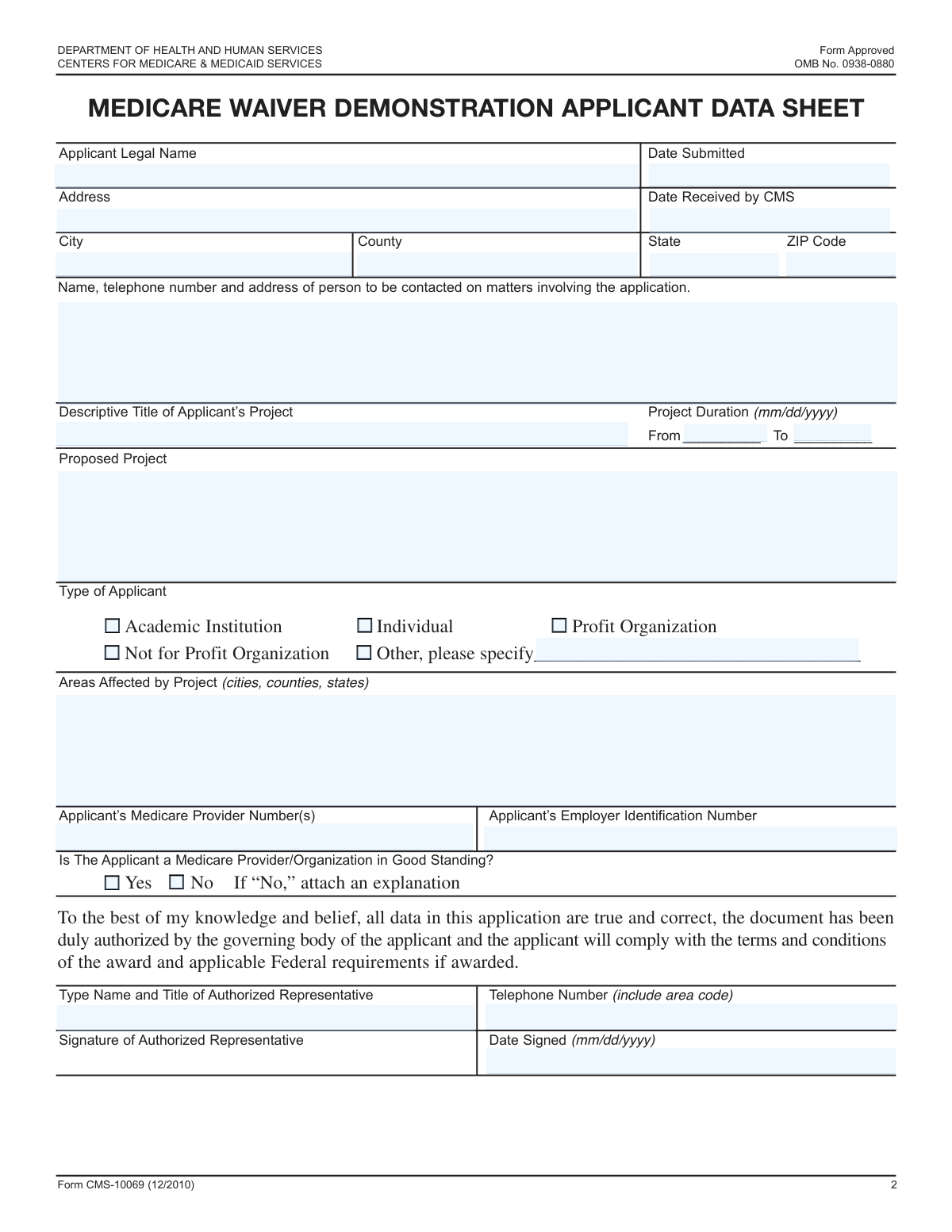
The CMS Project Application Form is a document submitted to the Centers for Medicare & Medicaid Services (CMS) to propose a new project, such as research or a demonstration initiative. This application is crucial for obtaining the necessary approvals and ensuring the project aligns with CMS guidelines and objectives. Today, this form can be filled out quickly and accurately using AI-powered services like Instafill.ai, which can also convert non-fillable PDF versions into interactive fillable forms.
Our AI automatically handles information lookup, data retrieval, formatting, and form filling.
It takes less than a minute to fill out CMS Project Application using our AI form filling.
Securely upload your data. Information is encrypted in transit and deleted immediately after the form is filled out.

Form specifications

Form name: CMS Project Application Form
Number of fields: 27
Number of pages: 5
Language: English
Categories: CMS forms
main-image

Instafill Demo: How to fill out PDF forms in seconds with AI

How to Fill Out CMS Project Application Online for Free in 2026

Are you looking to fill out a CMS PROJECT APPLICATION form online quickly and accurately? Instafill.ai offers the #1 AI-powered PDF filling software of 2026, allowing you to complete your CMS PROJECT APPLICATION form in just 37 seconds or less.
Follow these steps to fill out your CMS PROJECT APPLICATION form online using Instafill.ai:
  1. 1 Navigate to Instafill.ai and upload or select the CMS Project Application Form.
  2. 2 Use the AI assistant to automatically fill in applicant details, including legal name, address, and contact information.
  3. 3 Enter your organization's identification numbers, such as the Employer Identification Number (EIN) and Medicare Provider Number.
  4. 4 Provide comprehensive project details, including the project title, duration, a detailed description, and the affected areas.
  5. 5 Select the correct applicant type by checking the appropriate box (e.g., Academic Institution, Not for Profit Organization).
  6. 6 Designate an authorized representative to review the application, provide their details, and sign and date the form.
  7. 7 Securely download, print, or share the completed CMS application directly from the platform for submission.

Our AI-powered system ensures each field is filled out correctly, reducing errors and saving you time.

Why Choose Instafill.ai for Your Fillable CMS Project Application Form?

Speed

Complete your CMS Project Application in as little as 37 seconds.

Up-to-Date

Always use the latest 2026 CMS Project Application form version.

Cost-effective

No need to hire expensive lawyers.

Accuracy

Our AI performs 10 compliance checks to ensure your form is error-free.

Security

Your personal information is protected with bank-level encryption.

Frequently Asked Questions About Form CMS Project Application

This form is an application for a proposed project that needs to be reviewed by the Centers for Medicare & Medicaid Services (CMS). It gathers essential details about the applicant, the project, and legal authorization.

Any individual, academic institution, or organization (profit or not-for-profit) proposing a project that requires CMS approval or oversight should complete this application.

You will need to provide your organization's Employer Identification Number (EIN). If you are a Medicare provider, you must also include your Medicare Provider Number(s).

You should enter the date you are submitting the application in the 'Date Submitted' field. The 'Date Received by CMS' field should be left blank, as it will be filled in by CMS upon receipt.

If your organization type is not 'Academic Institution', 'Profit Organization', or 'Not for Profit Organization', you should check the 'Other' box. Then, specify your applicant type in the 'Other Applicant Type' field.

The Authorized Representative is the person who has the legal authority to sign documents and make binding commitments on behalf of the applicant. This is often a senior executive, director, or officer of the organization.

The 'Contact Person' is the primary point of contact for any questions about the application details. The 'Authorized Representative' is the individual with the legal authority to sign for the applicant; they may be the same person, but they don't have to be.

This means your organization currently meets all the necessary requirements and is in compliance with the rules for participating in the Medicare program. If you are unsure, you should verify your status before completing the form.

If you are not a Medicare Provider in good standing, you must check the 'No' box. You are also required to attach a separate document with a detailed explanation of your status.

Provide a clear and detailed summary of your project in this section. Include the project's goals, methods, and expected outcomes to give reviewers a complete understanding of your proposal.

Yes, services like Instafill.ai use AI to auto-fill form fields accurately with your saved information. This can help you complete the application faster and with fewer errors.

You can easily complete this form online by uploading it to a platform like Instafill.ai. The service allows you to type directly into the fields, add your signature, and securely save or download the completed document.

If your PDF is flat or non-fillable, you can use a tool like Instafill.ai to convert it into an interactive form. Simply upload the document, and the platform will automatically make the fields fillable online.

Compliance CMS Project Application
Validation Checks by Instafill.ai

1
Validates Employer Identification Number (EIN) Format
This check ensures the Employer Identification Number (EIN) is entered in the standard nine-digit format with a hyphen after the second digit (e.g., XX-XXXXXXX). The EIN is a critical unique identifier for business entities for tax and legal purposes. An incorrectly formatted EIN will fail verification against federal databases and cause the application to be rejected.
2
Ensures Project End Date is After Project Start Date
This validation confirms that the 'Project Duration To Date' is chronologically after the 'Project Duration From Date'. A project's end date cannot precede its start date, as this represents a logical impossibility. If this check fails, it indicates a data entry error that must be corrected to define a valid project timeline for review and funding consideration.
3
Validates CMS Receipt Date is On or After Submission Date
This check ensures the 'Date Received by CMS' is not earlier than the 'Date Submitted'. This maintains the logical chronological order of the application's lifecycle for tracking and processing purposes. An invalid sequence suggests a data entry error and would require correction to establish an accurate processing timeline.
4
Ensures Exactly One Applicant Type is Selected
This validation verifies that the user has selected one and only one applicant type from the available checkboxes (e.g., 'Individual', 'Profit Organization'). The applicant's classification is fundamental for determining eligibility and applying the correct review criteria. Selecting zero or multiple types creates ambiguity and will result in an incomplete application until a single choice is made.
5
Requires Specification for 'Other' Applicant Type
This check is triggered if the 'Other' applicant type checkbox is selected, ensuring the corresponding 'Other Applicant Type' text field is not empty. The form requires a specific description when a standard category is not chosen. Failure to provide this specification makes it impossible for reviewers to properly categorize the applicant, leading to an incomplete application.
6
Validates ZIP Code Format
This validation ensures the 'ZIP Code' field contains either a 5-digit code or a 9-digit ZIP+4 code in a valid format (e.g., 12345 or 12345-6789). A correct ZIP code is essential for mail delivery and for correctly identifying the geographic location of the applicant. An invalid format will cause address verification to fail and may delay or prevent important communications.
7
Validates State Field Entry
This check verifies that the 'State' field contains a valid, recognized US state name or its official two-letter abbreviation. This is critical for address validation and for determining regional jurisdiction or project relevance. An invalid entry like a typo or a non-existent state would render the address incomplete and halt the application process.
8
Validates Authorized Representative Signature Date
This check ensures the 'Authorized Representative Date Signed' is a valid date that is not in the future. The signature date legally attests to the accuracy of the information at the time of signing, so it must be chronologically sound and should not precede the application submission date. An invalid date would call the attestation's validity into question.
9
Validates Authorized Representative Telephone Number Format
This validation checks that the 'Authorized Representative Telephone Number' is in a recognizable 10-digit format, with or without common separators. A valid phone number is critical for ensuring reviewers can contact the representative with questions or notifications. An invalid or incomplete number would create a communication barrier and significantly delay the application review.
10
Validates Medicare Provider Number Format
This check verifies that the 'Medicare Provider Number' adheres to its expected format, which is typically a 6-digit number. This number is a key identifier within the CMS system, and an incorrect format would prevent the system from linking the application to the correct provider record. This failure would require immediate correction to verify the applicant's standing and eligibility.
11
Ensures 'Other Applicant Type' Field is Empty if Not Applicable
This validation ensures the 'Other Applicant Type' text field is empty if the 'Other' checkbox is not selected. This rule prevents stray, irrelevant data from being submitted, which could cause confusion during automated processing or manual review. A failure would prompt the user to clear the unnecessary information before submission.
12
Ensures Proposed Project Description is Provided
This validation checks that the 'Proposed Project Description' field is not empty and ideally meets a minimum character count. The project description is the core of the application, providing the essential details for reviewers to assess merit and feasibility. An empty or insufficient description would result in an automatic rejection for being incomplete.
13
Ensures Applicant Legal Name is Provided
This is a fundamental completeness check to ensure the 'Applicant Legal Name' field is not left blank. The applicant's name is the primary identifier for the entire application and is absolutely mandatory for processing. Without it, the application has no subject and cannot be filed or reviewed.
14
Ensures All Date Fields Use a Valid Format
This check validates that all date-related fields are entered in a consistent and recognizable format, such as MM/DD/YYYY. Inconsistent or invalid date formats (e.g., 'Feb 30, 2023') can cause system errors, break logical comparisons, and lead to incorrect data interpretation. The form should not be submittable until all dates are correctly formatted.

Common Mistakes in Completing CMS Project Application

Using a Nickname or DBA Instead of the Full Legal Name

Applicants often enter a commonly used business name (DBA) or a personal nickname instead of the official legal name registered with the government. This causes a mismatch with tax and Medicare records, leading to verification failures and significant processing delays or rejection. To avoid this, always reference official documents like articles of incorporation or tax filings to find the exact legal name.

Inconsistent or Ambiguous Date Formatting

The form requests multiple dates (submission, project duration, signature) without specifying a format, leading users to enter dates like 'Oct 5, 2023', '10/05/23', or '05-10-2023' inconsistently. This ambiguity can cause data entry errors and misinterpretation of the timeline, especially with international formats. Always use a consistent, unambiguous format like MM/DD/YYYY for all date fields to prevent confusion.

Omitting Apartment or Suite Number in Address

When filling out the street address, it's easy to forget to include a suite, unit, or apartment number, especially for business locations in large office buildings. This omission can result in important correspondence being returned as undeliverable, causing missed deadlines and communication gaps. Always double-check that the full address, including any secondary unit designators, is entered correctly.

Transposing Digits in Identification Numbers

The Employer Identification Number (EIN) and Medicare Provider Number are long and prone to typographical errors, such as transposing digits. An incorrect ID number makes it impossible for CMS to verify the applicant's identity and standing, which is a critical step. This error often leads to outright rejection, requiring the applicant to start over. Carefully copy these numbers directly from official source documents to ensure accuracy.

Selecting 'Other' Applicant Type Without Specification

A frequent mistake is checking the 'Other' box for applicant type but failing to fill in the corresponding 'Other, please specify' text field. This leaves the reviewer without essential information about the applicant's organizational structure, rendering the application incomplete. If you select 'Other', always ensure you provide a clear description in the associated text field to avoid processing holds.

Reversing Project Start and End Dates

Applicants sometimes inadvertently swap the 'Project Duration From Date' and 'Project Duration To Date'. This creates a logical impossibility where the project's end date is before its start date, which immediately flags the application for review and requires clarification. To prevent this, carefully read each field label and confirm that the dates are in chronological order before submitting.

Confusing the 'Contact Person' with the 'Authorized Representative'

These two roles are often confused, with applicants listing a day-to-day contact who lacks the legal authority to sign on behalf of the organization in the 'Authorized Representative' field. This can invalidate the entire application, as the signature is not legally binding. Ensure the Authorized Representative is a person with legal signing authority (e.g., CEO, President), while the Contact Person is the best point of contact for routine questions.

Failing to Attach Required Explanations

The form instructs applicants who check 'No' for being a 'Medicare Provider in good standing' to attach an explanation. Many applicants check the box but overlook this instruction, submitting an incomplete application. This halts the review process until the missing documentation is provided. Always read the fine print associated with any checkbox, especially those indicating a non-standard status, and prepare all required attachments.

Providing a Vague or Incomplete Project Description

Applicants may provide a project description that is too brief or lacks sufficient detail for a reviewer to understand the project's scope, objectives, and impact. This forces the reviewer to request additional information, delaying the evaluation. Your description should be written clearly and comprehensively, assuming the reader has no prior knowledge of your project.

Entering an Incorrect or Incomplete ZIP Code

Simple typos in the 5-digit ZIP code or omitting the +4 digits can lead to mail delivery failures and incorrect geographic classification of the project. This can delay communication and affect how the project's location is analyzed. Using a USPS-verified ZIP code is crucial for accuracy. AI-powered tools like Instafill.ai can help prevent this by validating addresses and automatically formatting them correctly, and can also make flat PDFs fillable to reduce data entry errors.
Saved over 80 hours a year

“I was never sure if my IRS forms like W-9 were filled correctly. Now, I can complete the forms accurately without any external help.”

Kevin Martin Green

Your data stays secure with advanced protection from Instafill and our subprocessors

Robust compliance program

Transparent business model

You’re not the product. You always know where your data is and what it is processed for.

ISO 27001, HIPAA, and GDPR

Our subprocesses adhere to multiple compliance standards, including but not limited to ISO 27001, HIPAA, and GDPR.

Security & privacy by design

We consider security and privacy from the initial design phase of any new service or functionality. It’s not an afterthought, it’s built-in, including support for two-factor authentication (2FA) to further protect your account.

Fill out CMS Project Application with Instafill.ai

Worried about filling PDFs wrong? Instafill securely fills cms-project-application-form forms, ensuring each field is accurate.