Yes! You can use AI to fill out Form 635, Receipt of Funds Record

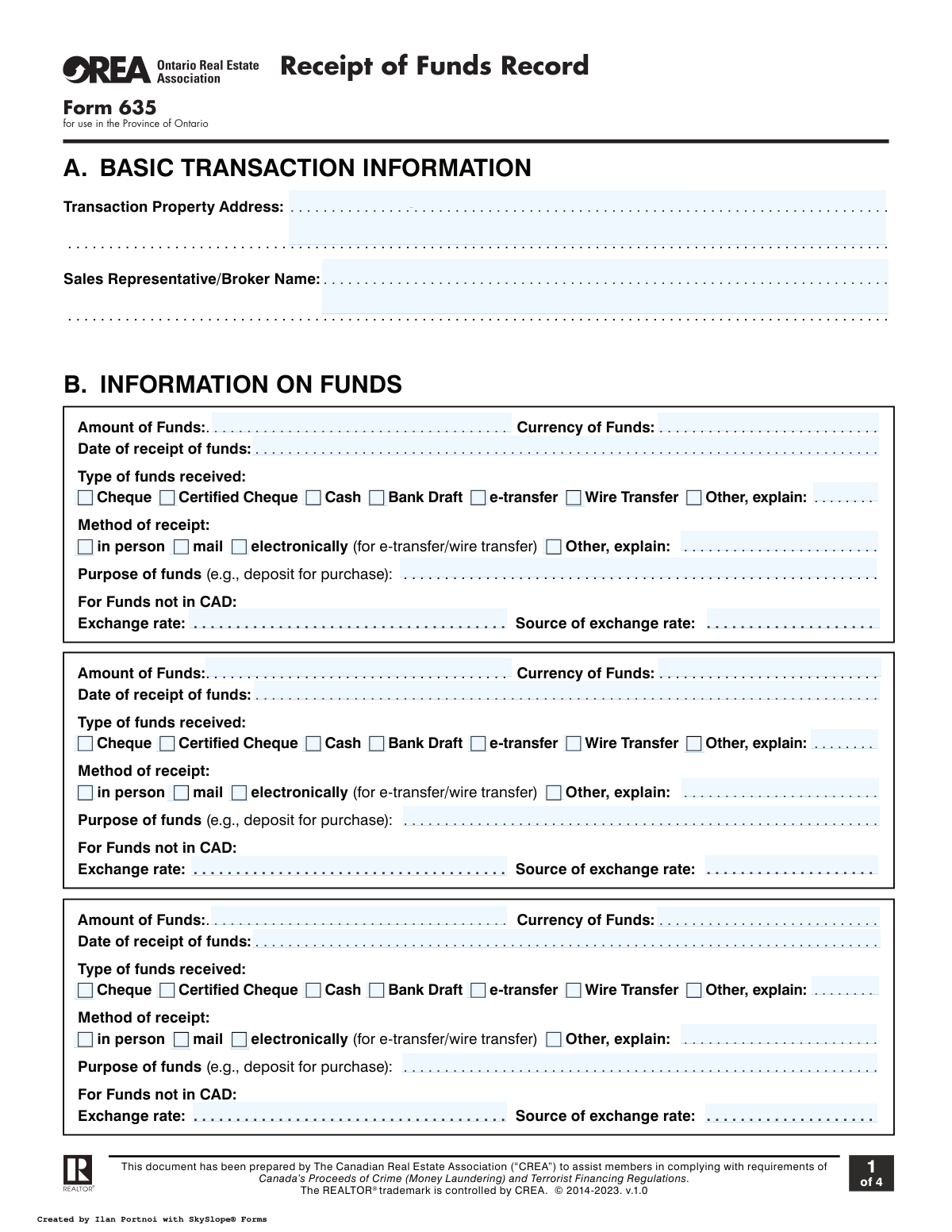
Form 635, Receipt of Funds Record, is a document created by the Canadian Real Estate Association (CREA) for use in Ontario. It is essential for real estate professionals to record detailed information about funds received in a transaction, helping them comply with Canada’s Proceeds of Crime (Money Laundering) and Terrorist Financing Act (FINTRAC) regulations. Today, this form can be filled out quickly and accurately using AI-powered services like Instafill.ai, which can also convert non-fillable PDF versions into interactive fillable forms.
Our AI automatically handles information lookup, data retrieval, formatting, and form filling.
It takes less than a minute to fill out Form 635 using our AI form filling.
Securely upload your data. Information is encrypted in transit and deleted immediately after the form is filled out.

Form specifications

Form name: Form 635, Receipt of Funds Record
Number of fields: 133
Number of pages: 4
Filled form examples: Form Form 635 Examples
Language: English
main-image

Instafill Demo: How to fill out PDF forms in seconds with AI

How to Fill Out Form 635 Online for Free in 2026

Are you looking to fill out a FORM 635 form online quickly and accurately? Instafill.ai offers the #1 AI-powered PDF filling software of 2026, allowing you to complete your FORM 635 form in just 37 seconds or less.
Follow these steps to fill out your FORM 635 form online using Instafill.ai:
  1. 1 Navigate to Instafill.ai and upload or select the Receipt of Funds Record, Form 635.
  2. 2 Provide the basic transaction information, including the property address and the sales representative's name in Section A.
  3. 3 Enter detailed information about the funds received in Section B, such as the amount, currency, date, type, and method of receipt.
  4. 4 Complete Section C with account-related information if an account was affected by the transaction.
  5. 5 Fill out Section D with the required verification details for the individual or entity providing the funds, following the specified identification methods.
  6. 6 Use the AI-powered tool to review all entered information for accuracy and completeness, ensuring all mandatory fields are filled.
  7. 7 Finalize, sign (if required), and download or share the completed Form 635.

Our AI-powered system ensures each field is filled out correctly, reducing errors and saving you time.

Why Choose Instafill.ai for Your Fillable Form 635 Form?

Speed

Complete your Form 635 in as little as 37 seconds.

Up-to-Date

Always use the latest 2026 Form 635 form version.

Cost-effective

No need to hire expensive lawyers.

Accuracy

Our AI performs 10 compliance checks to ensure your form is error-free.

Security

Your personal information is protected with bank-level encryption.

Frequently Asked Questions About Form Form 635

Form 635 is used by real estate professionals in Ontario to document the receipt of funds in a property transaction. It is a mandatory record-keeping tool to comply with Canada's Proceeds of Crime (Money Laundering) and Terrorist Financing Act (FINTRAC) regulations.

The buyer's agent is responsible for completing the Receipt of Funds Record. This responsibility remains with the buyer's agent even if the funds are deposited directly into the listing agent's trust account.

You must record the amount, currency, date of receipt, type of funds (e.g., cheque, e-transfer), method of receipt, and the purpose of the funds. If the currency is not Canadian dollars, you also need to record the exchange rate and its source.

As the buyer's agent, you must take reasonable measures to obtain the necessary information from the listing brokerage, such as their reference numbers and any affected client account details. You are not required to record the listing agent's trust account number itself.

Section D.1 provides three methods: using a valid government-issued photo ID while the person is present, using the credit file method by checking a Canadian credit file, or using the dual ID process with two independent, reliable sources.

Yes, you can verify identity remotely using the Credit File Method or the Dual ID Process Method. The Government-Issued Photo ID method can only be used remotely if you have technology that can assess the document's authenticity.

You must complete Section D.2, which requires the corporation's name, address, nature of business, and verification records. You also need to list the directors' names and attach corporate records showing the authority to bind the corporation.

If a third party provides the funds, you must record their information in Section E. You should also speak to your brokerage’s Compliance Officer and consider if this seems unusual enough to warrant a suspicious transaction report.

This form is for your internal record-keeping to ensure FINTRAC compliance. It should be retained with all other transaction documents according to your brokerage's policies and procedures.

An account is 'affected' when funds are drawn from it for the transaction, such as when a deposit is paid by a personal cheque or a bank draft purchased from that account. You must record the details of any such account in Section C.2.

If you have a non-fillable or 'flat' PDF, you can use a service like Instafill.ai. It can convert the document into an interactive, fillable form that you can complete easily online.

Yes, services like Instafill.ai use AI to auto-fill form fields accurately and save time. This is especially helpful for entering repetitive information like names and addresses across multiple transaction documents.

To fill out Form 635 online, simply upload the document to the Instafill.ai platform. The service will make the form interactive, allowing you to type in your information and select checkboxes before downloading the completed document.

Compliance Form 635
Validation Checks by Instafill.ai

1
Ensures Basic Transaction Information is Complete
This check verifies that the 'Transaction Property Address' and 'Sales Representative/Broker Name' fields in Section A are not empty. These fields are fundamental for identifying the specific transaction and the responsible agent. A failure would render the record incomplete and difficult to associate with a specific property sale.
2
Validates Date of Receipt of Funds
This validation ensures that the 'Date of receipt of funds' in Section B is a validly formatted date and is not set in the future. This is critical for creating an accurate and legally compliant timeline of events for anti-money laundering (AML) purposes. An invalid or future date would compromise the integrity of the transaction record.
3
Requires Foreign Currency Exchange Details
This check enforces that if the 'Currency of Funds' in Section B is specified as anything other than 'CAD', the 'Exchange rate' and 'Source of exchange rate' fields must be filled. This is essential for accurately recording the value of the transaction in the local currency for reporting and auditing. Failure to provide these details results in an incomplete financial record.
4
Enforces 'Other' Explanation Field Completion
This validation ensures that if the 'Other' checkbox is selected for either 'Type of funds received' or 'Method of receipt', the corresponding explanation text field must be filled out. This provides necessary clarification for non-standard fund types or methods, which is crucial for transparency and compliance. An empty explanation field would leave a critical ambiguity in the record.
5
Mandates Exclusive Selection of Funds Provider Type
This check verifies that information is provided for either an individual (Section D.1) or a corporation/entity (Section D.2), but not both. This ensures the form correctly captures the single source of the funds as either a person or an entity, preventing contradictory or ambiguous data entry. A failure would indicate a fundamental misunderstanding of the form's structure and purpose.
6
Validates Selection of a Single Individual ID Method
This rule ensures that when identifying an individual in Section D.1, exactly one of the three methods (Government-Issued Photo ID, Credit File Method, or Dual ID Process Method) is fully completed. This is a strict requirement for FINTRAC compliance to ensure a valid and non-redundant identification process was followed. Completing none, or more than one, would invalidate the identity verification step.
7
Verifies Government-Issued Photo ID is Not Expired
This check validates that the 'Document Expiry Date' entered in Section D.1.1 is a valid date and is not in the past. As per the form's instructions and regulatory requirements, identification must be current and valid at the time of verification. Using an expired document is a compliance failure and invalidates the identity verification.
8
Ensures Dual ID Process is Correctly Completed
This validation confirms that if the Dual ID Process Method (D.1.3) is used, exactly two of the three sub-options are checked and their corresponding 'Name of Source' and 'Account Number' fields are filled. This method requires corroboration from two independent sources. Failure to provide information for exactly two sources makes the verification incomplete and non-compliant.
9
Checks for Completeness of Corporation Details
This rule ensures that when a corporation is providing funds (Section D.2.1), the 'Name(s) of Directors', 'Registration number', and the attachment confirmation checkbox are all completed. This information is vital for corporate due diligence and AML screening. Missing any of these fields results in an incomplete and non-compliant record.
10
Triggers Account Information Requirement
This logical check ensures that if the 'Type of funds received' (Section B) is 'Cheque', 'Certified Cheque', or 'Bank Draft', then the 'Account-Related Information' in Section C.2 must be completed for at least one account. These payment types directly affect a bank account, and capturing the account details is a key part of the funds-tracing process. The form is incomplete without this linked information.
11
Validates Date of Birth Plausibility
This check verifies that the 'Date of Birth' in Section D.1 is a valid date and corresponds to an individual who is of legal age (e.g., 18 years or older). This is important for ensuring the individual providing funds has the legal capacity to engage in the transaction. An invalid or implausible date of birth would require immediate clarification and correction.
12
Ensures Logical Consistency Between Fund Type and Method
This validation cross-references the 'Type of funds received' with the 'Method of receipt' in Section B for logical consistency. For example, if the type is 'e-transfer' or 'Wire Transfer', the method must be 'electronically'. This prevents illogical combinations and ensures the data accurately reflects the nature of the fund transfer, improving data quality and auditability.
13
Validates Amount of Funds Format
This check ensures that the 'Amount of Funds' entered in Section B is a positive numerical value, formatted correctly as currency. It should reject any non-numeric characters (except for a decimal point) and negative numbers. This is a fundamental check to ensure the core financial data of the transaction is accurate and usable for accounting and reporting.
14
Verifies Attachment of Corporate Authority Documents
This validation ensures that if the fund provider is a corporation (Section D.2.1), the checkbox confirming that 'corporate records showing authority to bind corporation' are attached is ticked. This is a critical compliance step to confirm that the transaction is properly authorized by the corporation. An unchecked box indicates a missing piece of essential due diligence documentation.

Common Mistakes in Completing Form 635

Incomplete or Vague Property Address

Users often enter a partial property address, omitting the unit number, postal code, or even the city. This typically happens when rushing or assuming a street name is sufficient for identification. An incomplete address can lead to ambiguity in record-keeping and create compliance issues, as it fails to uniquely identify the transaction for regulatory bodies like FINTRAC. To avoid this, always enter the complete address as it appears on the official Agreement of Purchase and Sale.

Confusing the Provider of Funds with the Buyer

A frequent error is filling out Section D with the buyer's information when the funds were provided by a third party, such as a parent or a corporation. This occurs because the agent focuses on their client rather than the actual source of the money. This misrepresentation is a serious compliance failure, as the form's purpose is to track the origin of funds. Always identify and record the details of the person or entity whose account the funds came from, not necessarily the person buying the property.

Ignoring the 'Affected Account' Section

Many filers leave Section C.2 (Account-Related Information) blank, especially when funds are received via cheque or bank draft. This happens due to a misunderstanding of what constitutes an 'affected account'. The consequence is an incomplete record, as FINTRAC requires information on the account from which funds are drawn. To prevent this, if you receive a cheque or bank draft, you must record the account number, holder name, and account type from the instrument in Section C.2.

Using an Expired Identification Document

In Section D.1.1, agents sometimes record information from a driver's license or passport without checking the expiry date. This mistake renders the entire identification process invalid according to anti-money laundering regulations, creating a significant compliance risk for the brokerage. Before recording the ID details, always verify that the document is current and has not expired, as explicitly required by the form's instructions.

Providing a Vague Occupation Description

When filling out the 'Nature of Principal Business or Occupation' field, people often use generic terms like 'Business Owner', 'Self-Employed', or 'Consultant'. Regulators consider these terms insufficient for assessing risk profiles. This can trigger further inquiries during an audit. To avoid this, provide a more descriptive occupation, such as 'Owner of a retail clothing store' or 'IT Security Consultant for financial institutions'.

Mismatched Fund Type and Receipt Method

Users may incorrectly select checkboxes that contradict each other, such as marking the 'Type of funds' as 'e-transfer' but the 'Method of receipt' as 'in person'. This confusion arises from not distinguishing between the financial instrument and its delivery method. Such inconsistencies undermine the credibility of the record and can be flagged as suspicious. Ensure the 'Type' (e.g., Cheque, Wire) and 'Method' (e.g., Mail, Electronically) logically correspond to how the funds were handled.

Omitting Foreign Currency Exchange Details

When funds are received in a currency other than Canadian dollars (CAD), filers often forget to complete the mandatory 'For Funds not in CAD' section. They may mentally convert the amount but fail to document the exchange rate and its source on the form. This is a direct violation of FINTRAC requirements and results in an incomplete and non-compliant record. If funds are not in CAD, you must record the exchange rate used on the date of receipt and the source of that rate (e.g., 'Bank of Canada daily rate').

Incorrectly Applying the Dual ID Process Method

The Dual ID method in Section D.1.3 is complex and often completed incorrectly. Common errors include using two sources that are not independent (e.g., two statements from the same bank) or failing to check two of the three required boxes. This invalidates the client identification process. To comply, you must refer to information from two separate, reliable sources (like a government-issued T4 slip and a utility bill) and tick the two corresponding checkboxes.

Forgetting to Attach Corporate Authority Documents

When a corporation provides funds (Section D.2), agents often fail to attach the required documents proving the individual's authority to act on the corporation's behalf. They might view the documents but forget to make and keep a copy with the record, and neglect to check the 'Check this box when attached' field. This creates a major gap in the audit trail. Always obtain and attach a copy of the articles of incorporation or similar document and check the box to confirm it's in the file.

Illegible Handwriting on a Printed Form

Since this form is often a non-fillable PDF, it is frequently printed and completed by hand, leading to illegible entries. Rushed or poor handwriting can make critical information like names, dates, and account numbers impossible to read accurately. This can cause data entry errors in the brokerage's systems and may lead auditors to deem the record insufficient. To prevent this, it is best to use a fillable version of the form. AI-powered tools like Instafill.ai can convert non-fillable PDFs into fillable versions, ensuring all entries are clear, legible, and correctly formatted.
Saved over 80 hours a year

“I was never sure if my IRS forms like W-9 were filled correctly. Now, I can complete the forms accurately without any external help.”

Kevin Martin Green

Your data stays secure with advanced protection from Instafill and our subprocessors

Robust compliance program

Transparent business model

You’re not the product. You always know where your data is and what it is processed for.

ISO 27001, HIPAA, and GDPR

Our subprocesses adhere to multiple compliance standards, including but not limited to ISO 27001, HIPAA, and GDPR.

Security & privacy by design

We consider security and privacy from the initial design phase of any new service or functionality. It’s not an afterthought, it’s built-in, including support for two-factor authentication (2FA) to further protect your account.

Fill out Form 635 with Instafill.ai

Worried about filling PDFs wrong? Instafill securely fills form-635-receipt-of-funds-record forms, ensuring each field is accurate.