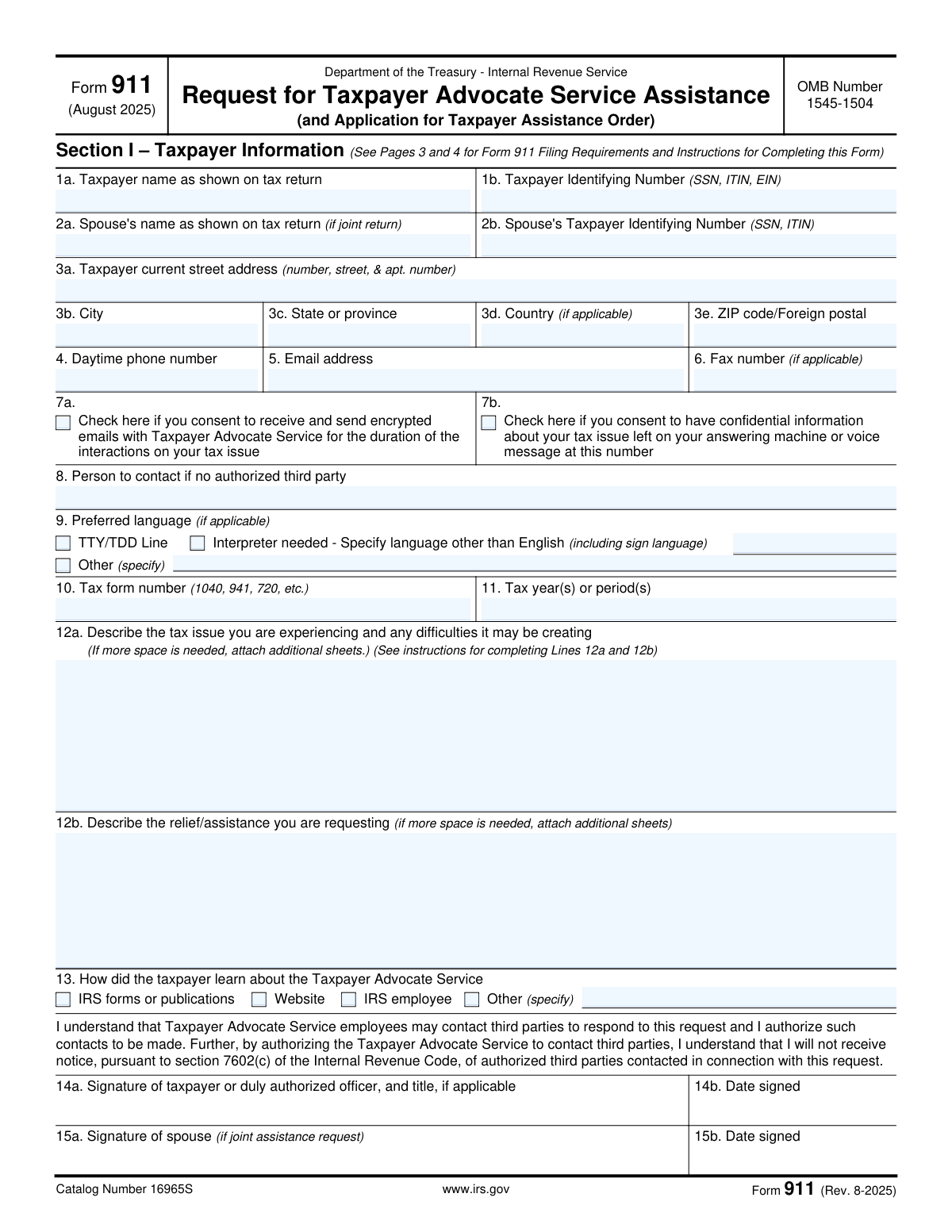
Yes! You can use AI to fill out Form 911, Request for Taxpayer Advocate Service Assistance (and Application for Taxpayer Assistance Order)

Form 911, Request for Taxpayer Advocate Service Assistance, is an official IRS document used to apply for help from the Taxpayer Advocate Service (TAS), an independent organization within the IRS. It's crucial for taxpayers who are experiencing significant hardship due to an IRS issue, have been unable to resolve their problem through normal channels, or believe an IRS system is not working correctly. Filing this form can provide a dedicated advocate to help navigate and resolve complex tax disputes. Today, this form can be filled out quickly and accurately using AI-powered services like Instafill.ai, which can also convert non-fillable PDF versions into interactive fillable forms.
Our AI automatically handles information lookup, data retrieval, formatting, and form filling.
It takes less than a minute to fill out Form 911 using our AI form filling.
Securely upload your data. Information is encrypted in transit and deleted immediately after the form is filled out.

Form specifications

Form name: Form 911, Request for Taxpayer Advocate Service Assistance (and Application for Taxpayer Assistance Order)
Number of fields: 54
Number of pages: 4
Language: English
Categories: tax forms, taxpayer assistance forms
main-image

Instafill Demo: How to fill out PDF forms in seconds with AI

How to Fill Out Form 911 Online for Free in 2026

Are you looking to fill out a FORM 911 form online quickly and accurately? Instafill.ai offers the #1 AI-powered PDF filling software of 2026, allowing you to complete your FORM 911 form in just 37 seconds or less.
Follow these steps to fill out your FORM 911 form online using Instafill.ai:
  1. 1 Navigate to Instafill.ai and upload or select IRS Form 911.
  2. 2 Provide your personal information in Section I, including your name, Taxpayer Identification Number (TIN), and contact details, letting the AI guide you to the correct fields.
  3. 3 In Section I, Line 12a, clearly describe the tax issue you are facing and the difficulties it is creating. In Line 12b, specify the relief or assistance you are requesting.
  4. 4 If a third party is representing you, complete Section II with their information and attach a copy of Form 2848 or Form 8821.
  5. 5 Review all the information entered by the AI across the form to ensure it is complete and accurate.
  6. 6 Sign and date the form in Section I. If it is a joint request, your spouse must also sign and date the form.
  7. 7 Download the completed Form 911 and submit it to the IRS via mail, fax, or email as instructed on the form.

Our AI-powered system ensures each field is filled out correctly, reducing errors and saving you time.

Why Choose Instafill.ai for Your Fillable Form 911 Form?

Speed

Complete your Form 911 in as little as 37 seconds.

Up-to-Date

Always use the latest 2026 Form 911 form version.

Cost-effective

No need to hire expensive lawyers.

Accuracy

Our AI performs 10 compliance checks to ensure your form is error-free.

Security

Your personal information is protected with bank-level encryption.

Frequently Asked Questions About Form Form 911

Form 911 is a 'Request for Taxpayer Advocate Service Assistance.' You should file it if you are experiencing a significant hardship from a tax problem, have been unable to resolve an issue with the IRS, or believe an IRS system or procedure is not working as it should.

No, if you qualify for assistance from the Taxpayer Advocate Service, their help is always free.

You will need your personal details (name, address, TIN), the tax form number (e.g., 1040) and tax year(s) in question, and a clear description of your problem. It is also highly recommended to attach any relevant documents, such as IRS notices or correspondence.

In section 12a, you should clearly describe the tax issue you are facing, explain the difficulties it is creating for you, and detail the actions the IRS has already taken (or not taken) to resolve it.

You can submit Form 911 by mail, fax, or email to the specific addresses and numbers provided in the form's instructions. Note that the form states email submissions are not encrypted for security.

The Taxpayer Advocate Service will review your request and contact you. If you do not receive a response within 30 days of submitting your form, you should call TAS at 877-777-4778 for assistance.

If the request for assistance is for a joint issue and both spouses are seeking help, then yes, both of you must sign the form. If only one spouse is requesting assistance, only that spouse needs to sign.

Yes, an authorized representative with a valid Form 2848, Power of Attorney, can complete and sign Form 911 for you. They must complete Section II and attach a copy of the Form 2848.

Box 7a gives consent for TAS to communicate with you via encrypted email once a case is created. Box 7b gives TAS permission to leave confidential information about your tax issue on your voicemail.

No, signing and submitting Form 911 does not suspend any legal or administrative deadlines. You must still meet deadlines for actions like petitioning the Tax Court or requesting a Collection Due Process hearing.

Yes, services like Instafill.ai use AI to accurately auto-fill form fields from your saved profile, which can save you time and help avoid errors on your personal information.

Simply upload the Form 911 PDF to the Instafill.ai platform. The service will make it fillable, allowing you to use AI to populate your personal data before you type in the description of your tax issue.

You can use a service like Instafill.ai, which is designed to convert flat, non-fillable PDFs into interactive forms. This allows you to easily type your information directly into the fields online.

Compliance Form 911
Validation Checks by Instafill.ai

1
Validates Taxpayer Identifying Number Format
Checks if the 'Taxpayer Identifying Number' (1b) conforms to the structure of a Social Security Number (SSN), Individual Taxpayer Identification Number (ITIN) (XXX-XX-XXXX), or an Employer Identification Number (EIN) (XX-XXXXXXX). This is critical for the IRS to accurately locate the taxpayer's account. An invalid or improperly formatted TIN will prevent the request from being processed and lead to rejection or significant delays.
2
Verifies Required Signature Presence
Confirms that the form has a valid signature from either the taxpayer (14a) or an authorized third-party representative (Section II, Block 6), and that a date is provided for the signature. A submission is legally invalid without a dated signature. This check ensures that the request is properly authorized before it is accepted for processing, preventing unauthorized requests.
3
Ensures Core Taxpayer Information is Complete
Verifies that essential fields in Section I, such as 'Taxpayer name' (1a), 'Taxpayer Identifying Number' (1b), a full address (3a-e), and the 'Tax Issue Description' (12a) are not empty. These fields are the minimum required information for the Taxpayer Advocate Service to initiate a case. Failure to provide this information makes the submission unusable and will result in its rejection.
4
Validates Consistency of Joint Filer Information
This check ensures that if a 'Spouse's name' (2a) is provided for a joint request, the corresponding 'Spouse's Taxpayer Identifying Number' (2b) is also present and correctly formatted. This is important for issues related to joint returns to ensure the IRS can access the correct shared account information. Incomplete spouse information can delay the resolution of joint tax issues.
5
Enforces 'Specify' Field Completion for 'Other' Selections
This validation checks that if a user selects an 'Other (specify)' checkbox, such as in 'Source of TAS Awareness' (13) or 'Language and Accessibility Preferences' (9), the associated text field is filled out. This prevents incomplete data where the user's intent is ambiguous. Submissions with a checked 'Other' box but no explanation require manual follow-up, causing delays.
6
Validates Tax Year or Period Format
This check ensures the 'Tax year(s) or period(s)' field (11) is entered in a recognized format, such as a four-digit year (e.g., 2022), a range (e.g., 2020-2021), or a quarterly period. Correctly formatted periods are essential for TAS to locate the specific tax records in question. An ambiguous or incorrectly formatted period will require clarification and delay the investigation.
7
Ensures Signature Date is Valid and Not in the Future
Verifies that the date fields associated with signatures (14b, 15b, Section II-7) contain a valid calendar date that is on or before the submission date. This confirms when the authorization was given. A future or invalid date would call the authenticity and timing of the signature into question, potentially invalidating the request.
8
Validates Email Address Format
Checks that the value entered in the 'Email address' field (5) follows the standard [email protected] format. This is important for ensuring that communications, especially if consent for encrypted email is given (7a), can be successfully delivered. An invalid email address prevents a key method of communication and can hinder the case resolution process.
9
Validates Daytime Phone Number Format
This validation ensures the 'Daytime phone number' (4) is a valid 10-digit number, potentially allowing for common formatting like parentheses and hyphens. A correct phone number is critical for TAS to contact the taxpayer for additional information or provide updates. An incorrect number can bring the entire assistance process to a halt.
10
Requires Tax Issue Description
This check confirms that the 'Tax Issue Description' field (12a) is not empty and may enforce a minimum character count. This field contains the fundamental reason for the request for assistance. A submission without a clear description of the problem is impossible to act upon and would be immediately rejected or delayed for clarification.
11
Requires Requested Relief Description
Verifies that the 'Relief/Assistance Requested' field (12b) is not left blank. This field clarifies the taxpayer's desired outcome, which helps TAS focus its efforts and determine if the requested action is possible. Without this information, TAS may not understand the taxpayer's goals, leading to a less effective resolution.
12
Ensures Completeness of Third-Party Representative Information
If any field in Section II (e.g., 'Name of authorized third party') is filled, this check ensures that other critical details like the full address, phone number, and signature are also provided. This prevents submissions with partially filled representative data, which is unusable for verification. Complete information is required to confirm the representative's authority to act on the taxpayer's behalf.
13
Validates Phone Number Presence for Voicemail Consent
This check ensures that if the taxpayer consents to have confidential information left on a voice message (7b), a 'Daytime phone number' (4) has also been provided. Giving consent is meaningless without a number to call. This prevents a logical inconsistency in the submitted data and ensures the taxpayer's consent can be acted upon.
14
Requires Language Specification for Interpreter Request
This validation confirms that if the 'Interpreter needed' checkbox (9) is selected, the corresponding 'Interpreter Language' text field is filled with a specific language. This is crucial for arranging the correct resources to communicate effectively with the taxpayer. A request for an interpreter without specifying the language is not actionable and would delay assistance.

Common Mistakes in Completing Form 911

Incomplete or Vague Problem Description

In Box 12a, taxpayers often provide a vague or emotional description of their problem, such as 'The IRS is wrong' or 'I need help with my taxes.' This forces the Taxpayer Advocate Service (TAS) to spend extra time investigating the case from scratch, causing significant delays. To avoid this, provide a clear, chronological summary of the issue, including specific dates, notice numbers (e.g., CP2000), actions you've taken, and names of IRS employees you've spoken with. A detailed description allows TAS to understand your situation quickly and begin working on a resolution.

Missing or Incorrect Signatures

Forgetting to sign the form in Box 14a is a frequent error that immediately invalidates the request. Another common mistake is on joint requests, where only one spouse signs (Box 15a) when both are involved in the issue and filed a joint return. An unsigned or improperly signed form cannot be processed and will be rejected, forcing you to start the process over. Always double-check that the appropriate taxpayer(s) or a duly authorized officer for a business has signed and dated the form before submission.

Name and TIN Do Not Match IRS Records

Taxpayers sometimes enter a nickname, a maiden name when a married name is on the return, or slightly misspell their name in Box 1a. Similarly, they may transpose digits in their Social Security Number (SSN) or Employer Identification Number (EIN) in Box 1b. Any discrepancy between the information provided and the official IRS records will cause a processing failure, as the system cannot match the request to your tax account. You must enter your name and Taxpayer Identifying Number exactly as they appear on the tax return in question to prevent rejection and delays.

Ignoring Communication Consent Boxes

Many people skip over the consent checkboxes in Boxes 7a and 7b, not realizing their importance. If you do not consent to encrypted email (7a) or voicemail messages (7b), TAS is restricted to communicating via postal mail, which is significantly slower. This can turn a process that could take days into one that takes weeks, as you wait for physical letters to be sent and received. Checking these boxes allows for faster, more efficient communication and can dramatically speed up the resolution of your case.

Unspecified or Unrealistic Relief Request

In Box 12b, filers often write 'Fix this problem' or request relief that the TAS cannot legally provide, such as waiving tax law. This lack of specificity requires the advocate to guess at your desired outcome, potentially leading to a resolution that doesn't meet your needs. Be explicit about the action you want taken, for example, 'Release the levy on my bank account,' 'Approve my Offer in Compromise,' or 'Process my 2022 amended return.' Providing a clear, actionable request helps the advocate focus their efforts on achieving a specific, attainable goal for you.

Taxpayer Incorrectly Fills Out Section II

Section II is exclusively for a third-party representative, such as a CPA or attorney, who has a Power of Attorney (Form 2848). Taxpayers sometimes get confused and fill this section out with their own information or the information of a friend they want the IRS to talk to. This creates confusion and can delay the case, as TAS must then clarify who is authorized to represent the taxpayer. If you do not have a formal, authorized representative with a submitted Form 2848 or 8821, you should leave Section II completely blank.

Forgetting to Attach Authorization Forms (2848/8821)

When a representative fills out Section II on behalf of a taxpayer, they frequently forget to include a copy of the corresponding authorization document, either Form 2848 (Power of Attorney) or Form 8821 (Tax Information Authorization). Submitting Form 911 with Section II completed but without the required attachment is a critical error. By law, TAS cannot communicate with the representative about the taxpayer's confidential information until this authorization is on file, effectively halting the case before it begins.

Incorrect Tax Form Number or Period

In Boxes 10 and 11, people often enter the wrong tax form number (e.g., '1040-EZ' which is obsolete) or an incorrect tax year or period. Forgetting a tax year or listing a range incorrectly (e.g., '2020-22' instead of '2020, 2021, 2022') can lead the advocate to review the wrong account information, causing confusion and wasted time. Always verify the specific form and exact tax year(s) or quarter(s) from the IRS notices you have received. Using an AI-powered tool like Instafill.ai can help validate data formats to ensure accuracy.

Submitting Multiple Duplicate Requests

Out of frustration or anxiety, taxpayers who don't receive an immediate response may submit the Form 911 multiple times for the same issue. The instructions specifically warn against this, as it creates duplicate cases in the system that must be identified and merged. This clogs the processing queue for everyone and can actually delay the assignment of your case to an advocate. The instructions state to wait 30 days before following up by phone, and you should adhere to this to ensure the most efficient handling of your request.

Using an Outdated Mailing Address

A taxpayer may have recently moved and forget to update their address with the IRS, then enter their new address on Form 911. If the new address in Box 3a doesn't match the one on file, it can cause initial verification issues. More commonly, if the taxpayer enters an old address by mistake, they will not receive critical paper correspondence from TAS, leaving them unaware of the status of their case. It is crucial to provide your current, correct mailing address and ensure it is the same one the IRS has on file or update it accordingly. AI form-fillers like Instafill.ai can help by storing and populating your current, verified address consistently across all forms.
Saved over 80 hours a year

“I was never sure if my IRS forms like W-9 were filled correctly. Now, I can complete the forms accurately without any external help.”

Kevin Martin Green

Your data stays secure with advanced protection from Instafill and our subprocessors

Robust compliance program

Transparent business model

You’re not the product. You always know where your data is and what it is processed for.

ISO 27001, HIPAA, and GDPR

Our subprocesses adhere to multiple compliance standards, including but not limited to ISO 27001, HIPAA, and GDPR.

Security & privacy by design

We consider security and privacy from the initial design phase of any new service or functionality. It’s not an afterthought, it’s built-in, including support for two-factor authentication (2FA) to further protect your account.

Fill out Form 911 with Instafill.ai

Worried about filling PDFs wrong? Instafill securely fills form-911-request-for-taxpayer-advocate-service-assistance-and-application-for-taxpayer-assistance-order-1 forms, ensuring each field is accurate.