Yes! You can use AI to fill out Form DMS-652, Provider Application
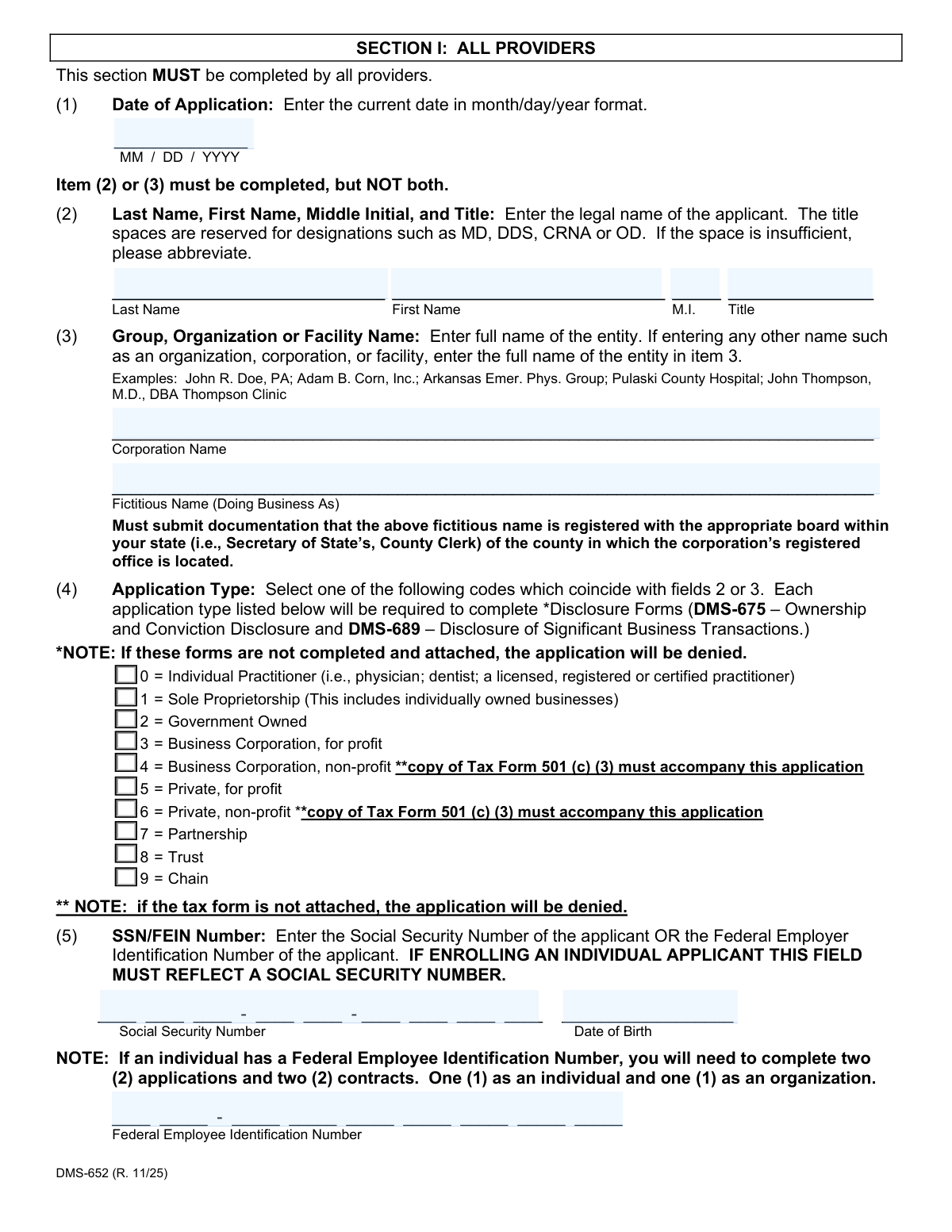
Form DMS-652, the Provider Application, is a mandatory document for healthcare professionals and facilities in Arkansas wishing to participate in the state's Medical Assistance Program (Medicaid). It gathers comprehensive information about the provider, including identity, location, credentials, and affiliations, to ensure compliance with federal and state regulations for program enrollment and renewal. Today, this form can be filled out quickly and accurately using AI-powered services like Instafill.ai, which can also convert non-fillable PDF versions into interactive fillable forms.
Our AI automatically handles information lookup, data retrieval, formatting, and form filling.
It takes less than a minute to fill out DMS-652 using our AI form filling.
Securely upload your data. Information is encrypted in transit and deleted immediately after the form is filled out.
Form specifications
| Form name: | Form DMS-652, Provider Application |
| Number of pages: | 1 |
| Language: | English |
Instafill Demo: How to fill out PDF forms in seconds with AI
How to Fill Out DMS-652 Online for Free in 2026
Are you looking to fill out a DMS-652 form online quickly and accurately? Instafill.ai offers the #1 AI-powered PDF filling software of 2026, allowing you to complete your DMS-652 form in just 37 seconds or less.
Follow these steps to fill out your DMS-652 form online using Instafill.ai:
- 1 Navigate to Instafill.ai and upload or select the DMS-652 Provider Application form.
- 2 Provide your personal or business identification details, such as legal name, SSN or FEIN, and National Provider Identifier (NPI).
- 3 Enter your physical service location address, billing address, and contact information, including a designated email for official updates.
- 4 Input professional credentials, including license numbers, certification details, and DEA numbers, along with their respective expiration dates.
- 5 Complete the sections relevant to your provider type, such as Section II for facilities or Section III for pharmacists.
- 6 Review all auto-filled information for accuracy, then provide an electronic signature and date in the designated fields.
- 7 Download the completed, signed PDF and upload it to the Arkansas Medicaid provider portal as instructed on the form.
Our AI-powered system ensures each field is filled out correctly, reducing errors and saving you time.
Why Choose Instafill.ai for Your Fillable DMS-652 Form?
Speed
Complete your DMS-652 in as little as 37 seconds.
Up-to-Date
Always use the latest 2026 DMS-652 form version.
Cost-effective
No need to hire expensive lawyers.
Accuracy
Our AI performs 10 compliance checks to ensure your form is error-free.
Security
Your personal information is protected with bank-level encryption.
Frequently Asked Questions About Form DMS-652
The DMS-652 form is the Provider Application for the Arkansas Medical Assistance Program. It is used by healthcare providers to apply for, renew, or update their provider agreement with Arkansas Medicaid.
All providers seeking to enter or renew a provider agreement with the Arkansas Medical Assistance Program must submit this application. This includes individual practitioners, groups, organizations, and facilities.
You must submit an electronic application through the provider portal. You can either fill it out directly on the portal or complete the fillable PDF and upload it there.
No, paper applications are generally not accepted and will be returned if submitted for tasks that can be done on the portal. A paper submission is only allowed in rare cases with prior state approval, with the exception of Skilled Nursing Facilities who should continue to submit on paper.
No, you only need to complete the sections applicable to your provider type. All providers must complete Section I and other required forms like the W-9, but Sections II, III, and IV are for facilities, pharmacists, and group affiliations, respectively.
Your application will be denied. The form explicitly states that failure to submit requested information, including required attachments like licenses, certifications, or disclosure forms (DMS-675 and DMS-689), will result in denial.
In this case, you must complete two separate applications and two contracts. One application will be for you as an individual using your Social Security Number, and the second will be for your organization using the FEIN.
This section authorizes a group practice or organization to submit Medicaid claims and receive payments on behalf of an individual provider. The individual provider must sign this section to grant this authorization to the group.
You must download the form to your computer and open it using the Acrobat Reader desktop application. The digital signature field may not appear if you view the PDF within an internet browser window.
It is recommended to use a generic email address that more than one person can access (e.g., [email protected]). This ensures your practice continues to receive important updates even if an individual staff member leaves.
Yes, services like Instafill.ai use AI to help you accurately auto-fill form fields. This can save you significant time and help prevent common errors when completing your application.
Simply upload the DMS-652 PDF to the Instafill.ai platform. The AI will identify the form fields, allowing you to enter your information once and have it populated correctly throughout the document before you save and upload it to the provider portal.
If you have a non-fillable or 'flat' PDF, you can use a service like Instafill.ai. It can convert the document into an interactive, fillable form, enabling you to easily type your information and complete it electronically.
Compliance DMS-652
Validation Checks by Instafill.ai
1
Ensures Exclusive Entry for Individual or Group Name
This validation confirms that either the individual provider name fields (Item 2) or the group/organization name fields (Item 3) are completed, but not both. This is critical to unambiguously identify the applicant as either a person or an entity. If both sections contain data, the system will prompt the user to clear one before proceeding.
2
Validates SSN for Individuals and FEIN for Organizations
This check enforces that an individual applicant (Item 2 filled) must provide a Social Security Number (SSN), while a group or organization (Item 3 filled) must provide a Federal Employer Identification Number (FEIN). This ensures the correct tax identification number is collected based on the applicant's legal structure. An application will be flagged as incomplete if the wrong identifier is used.
3
Validates SSN Format and Corresponding Date of Birth
This check verifies that the Social Security Number in Item 5 is a 9-digit number in the format XXX-XX-XXXX. It also confirms that if an SSN is entered, the associated Date of Birth field is populated with a valid, logical date that is not in the future. This is essential for correctly identifying and verifying individual providers.
4
Conditional Requirement for Non-Profit Tax Documentation
If the applicant selects Application Type 4 or 6 (non-profit), this validation verifies that a copy of Tax Form 501(c)(3) has been attached to the submission. The form explicitly states the application will be denied without this document. This check prevents the submission of an incomplete application that would be automatically rejected.
5
Verifies Service Location is a Physical Address
This validation ensures the address entered in the Service Location (Item 7) is a physical street address and not a P.O. Box, as mandated by the form. A physical location is required for provider verification, site visits, and inclusion in provider directories. If a P.O. Box is detected, the user will be prompted to enter a valid street address.
6
Validates Billing Contact Email Address Format
This check ensures the email address provided for provider manuals and updates (Item 8B) follows the standard '[email protected]' format. A valid email is essential for communicating important program updates, notices of rule making, and other official correspondence. An invalid format would prevent the provider from receiving critical information and could lead to non-compliance.
7
Enforces Conditional Requirement for Certification Details
This validation enforces the rule for Item 11. If the Certification Code is any value other than '5' (Non-applicable), then the Certification Number (Item 12) and Certification End Date (Item 13) fields become mandatory. This ensures that providers claiming a specific certification provide the necessary details and documentation for verification.
8
Ensures Certification End Date is in the Future
This check validates that the Certification End Date (Item 13) is a valid date in MM/DD/YYYY format and is not in the past relative to the application date. An expired certification would make the provider ineligible. This check prevents the submission of applications with invalid credentials, saving processing time.
9
Validates DEA Number Requirement for Specific Provider Types
Based on the Provider Category selected in Item 10, this check makes the DEA Number (Item 15) and its corresponding attachment mandatory for certain provider types, such as Pharmacies and Dental Surgeons. The form explicitly states this requirement, and failure to provide it would result in an incomplete and invalid application for these specialties.
10
Ensures License End Date is in the Future
This check verifies that the License End Date (Item 18) is a valid date in MM/DD/YYYY format and occurs after the application date. Submitting an application with an expired license is not permissible. This validation helps ensure the provider is currently licensed and in good standing with their respective board.
11
Verifies Attachment of Mandatory Disclosure Forms
This validation confirms that the required disclosure forms, DMS-675 (Ownership and Conviction Disclosure) and DMS-689 (Disclosure of Significant Business Transactions), have been attached to the application. The form states that failure to attach these forms will result in denial, making this a critical pre-submission check for all applicant types.
12
Validates Group Affiliation Effective Date is Within 12 Months
This check ensures the 'Effective Date' for a group affiliation in Section IV is no more than 12 months prior to the 'Date of Application' from Section I. This business rule prevents backdating affiliations beyond the allowed one-year period for rendering services under a group ID. An error message will appear if the date is outside this valid range.
13
Ensures 'Total Beds' is a Positive Integer
For applicants completing Section II (Facilities Only), this validation checks that the 'Total Beds' field (Item 21) contains a valid, positive whole number. Text, decimals, or negative numbers would be invalid entries for this field. This ensures data integrity for facility-specific reporting and capacity information.
14
Validates Completeness of Pharmacist/RRT Information
For each pharmacist or registered respiratory therapist listed in Section III, this check ensures that the Name, Social Security Number, and License/Registration Number fields are all completed. Incomplete records for personnel would prevent proper credentialing and verification. The system should flag any row in this section with missing information.
Common Mistakes in Completing DMS-652
Applicants often overlook the note in Section I, Item (4) requiring the attachment of Form DMS-675 (Ownership and Conviction Disclosure) and DMS-689 (Disclosure of Significant Business Transactions). This is a critical error, as the application explicitly states it will be denied if these forms are not completed and attached. To avoid this, create a checklist of all required documents before submission and ensure both disclosure forms are included. AI-powered tools like Instafill.ai can help by identifying required attachments based on form content to prevent such omissions.
A common point of confusion is in Section I, Item (5). The form mandates that an individual practitioner must provide a Social Security Number (SSN). Applicants sometimes mistakenly enter a Federal Employer Identification Number (FEIN) they use for their practice, which leads to processing failure. If an individual also has an FEIN for their business, they must submit two separate applications. Always use your personal SSN when enrolling as an individual practitioner to ensure correct identification and tax reporting.
Applicants frequently enter their license, certification, or DEA numbers (Items 12, 15, 17) but forget to attach a current copy of the actual document as required. The application cannot be verified or approved without this physical proof, leading to significant delays or denial. Before submitting, double-check that a clear, current copy of each required certificate or license is included with your application packet.
In Section I, applicants are instructed to complete either Item (2) for an individual practitioner or Item (3) for a group/organization, but not both. People often fill out both fields, causing ambiguity about the primary entity being enrolled. This leads to processing delays while the enrollment unit seeks clarification. Carefully determine if you are enrolling as an individual or an organization and fill out only the corresponding item to ensure a smooth process.
The form specifically advises using a generic email address (e.g., [email protected]) in Item (8) to ensure continuous communication, yet many applicants provide a personal one (e.g., [email protected]). This creates a risk of missing important Medicaid updates if that individual leaves the practice. Using a shared, role-based email address ensures that vital information regarding manual updates and notices is always received by the practice.
Item (7) for the Service Location address is mandatory and must be a physical location where services are rendered; P.O. Boxes are not permitted in this field. Applicants sometimes enter a P.O. Box out of habit, which will cause the application to be returned for correction. Ensure you provide a complete physical street address for the service location and reserve the P.O. Box for the billing address field (Item 8) if needed.
When selecting an application type for a non-profit organization (Codes 4 or 6 in Item 4), applicants must include a copy of their Tax Form 501(c)(3) determination letter. This is often forgotten, and the form clearly states the application will be denied without it. To prevent this, verify your application type and ensure all conditional documentation, like the 501(c)(3) letter, is attached before submission.
The form has specific signature requirements, particularly for the digital signature which requires downloading the PDF and opening it with the Acrobat Reader desktop application. Applicants who fill the form in a web browser may find the signature field is missing or non-functional. Furthermore, for the group affiliation in Section IV, a stamped or copied signature is explicitly forbidden. Failure to provide a valid original or approved electronic signature will invalidate the section or the entire application.
While applicants usually remember to enter their license, certification, or DEA numbers, they often forget to fill in the corresponding expiration dates in Items (13), (16), and (18). These dates are essential for verifying that the provider's credentials are valid and active. Leaving these fields blank results in an incomplete application and requires follow-up, delaying the enrollment process. Using a form-filling tool like Instafill.ai can help by highlighting required fields, including dates, to ensure nothing is missed.
The form states that electronic submission via the provider portal is the primary method and that paper applications are only for rare, pre-approved exceptions (excluding Skilled Nursing Facilities). Providers often submit a paper copy without seeking prior approval, resulting in the application being returned. Unless you have state approval for a paper submission, you must use the online portal. If the form is a non-fillable PDF, tools like Instafill.ai can convert it to a fillable version for easy completion and upload.
Saved over 80 hours a year
“I was never sure if my IRS forms like W-9 were filled correctly. Now, I can complete the forms accurately without any external help.”
Kevin Martin Green
Your data stays secure with advanced protection from Instafill and our subprocessors




Robust compliance program
Transparent business model
You’re not the product. You always know where your data is and what it is processed for.
ISO 27001, HIPAA, and GDPR
Our subprocesses adhere to multiple compliance standards, including but not limited to ISO 27001, HIPAA, and GDPR.
Security & privacy by design
We consider security and privacy from the initial design phase of any new service or functionality. It’s not an afterthought, it’s built-in, including support for two-factor authentication (2FA) to further protect your account.
Fill out DMS-652 with Instafill.ai
Worried about filling PDFs wrong? Instafill securely fills form-dms-652-provider-application forms, ensuring each field is accurate.
