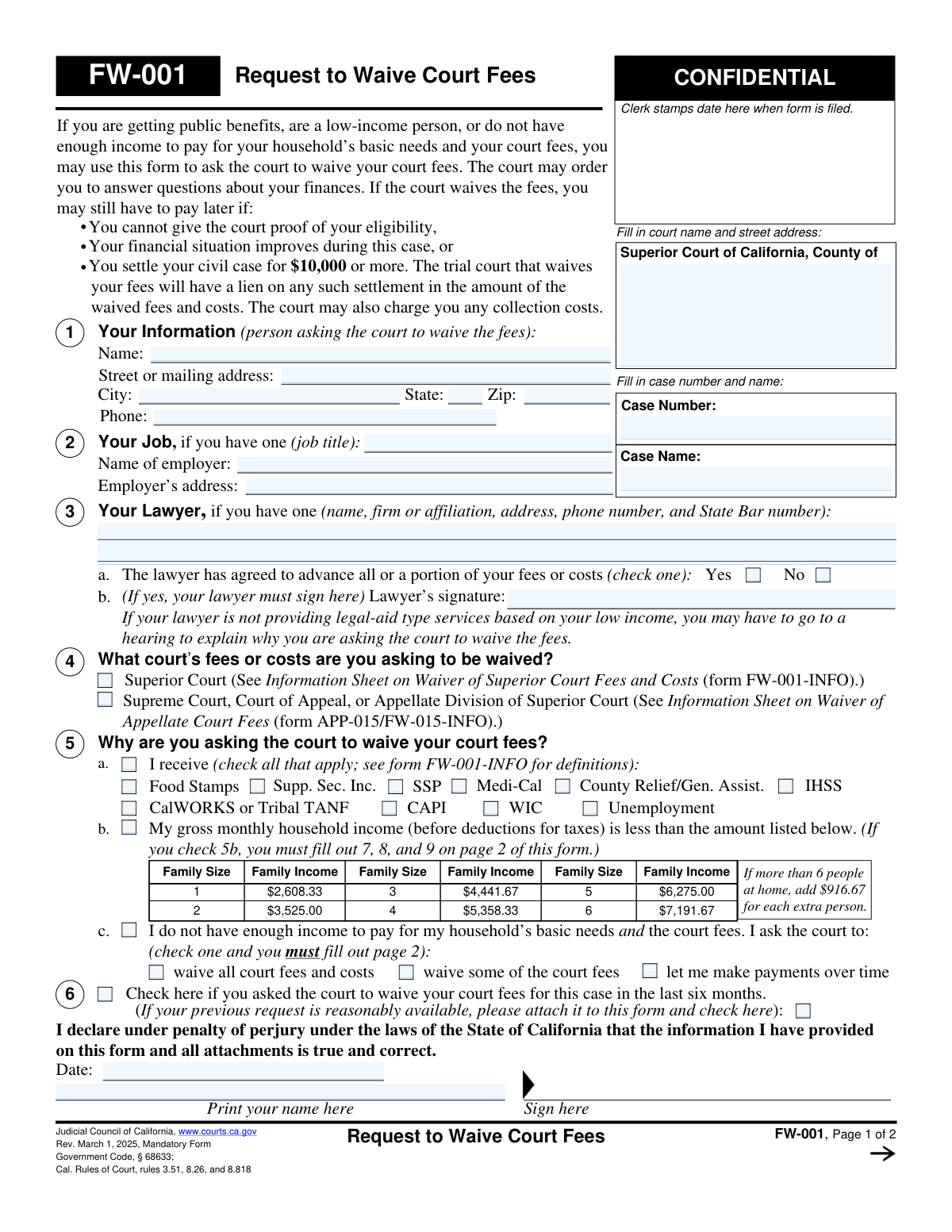
Yes! You can use AI to fill out Form FW-001, Request to Waive Court Fees
Form FW-001, Request to Waive Court Fees, is a legal document submitted to California courts by individuals who cannot afford to pay filing fees and other court costs. Applicants can qualify if they receive public benefits, have a household income below a set threshold, or can demonstrate that paying the fees would create a financial hardship. Today, this form can be filled out quickly and accurately using AI-powered services like Instafill.ai, which can also convert non-fillable PDF versions into interactive fillable forms.
Our AI automatically handles information lookup, data retrieval, formatting, and form filling.
It takes less than a minute to fill out FW-001 using our AI form filling.
Securely upload your data. Information is encrypted in transit and deleted immediately after the form is filled out.
Form specifications
| Form name: | Form FW-001, Request to Waive Court Fees |
| Number of fields: | 133 |
| Number of pages: | 2 |
| Language: | English |
Instafill Demo: How to fill out PDF forms in seconds with AI
How to Fill Out FW-001 Online for Free in 2026
Are you looking to fill out a FW-001 form online quickly and accurately? Instafill.ai offers the #1 AI-powered PDF filling software of 2026, allowing you to complete your FW-001 form in just 37 seconds or less.
Follow these steps to fill out your FW-001 form online using Instafill.ai:
- 1 Navigate to Instafill.ai and upload your FW-001 form or select it from the template library.
- 2 Provide your personal information, case details, and attorney information (if applicable) for the AI to populate the initial sections.
- 3 Select the reason for your fee waiver request, whether it's based on receiving public benefits, low income, or general financial hardship.
- 4 If required, enter your detailed financial information, including income, assets, and monthly expenses, for the AI to accurately complete the financial declaration section.
- 5 Review all the information automatically placed on the form by the AI, ensuring all names, numbers, and checked boxes are correct.
- 6 Electronically sign and date the form in the declaration section to certify the information is true and correct.
- 7 Download the completed, signed Form FW-001, ready for filing with the appropriate California court.
Our AI-powered system ensures each field is filled out correctly, reducing errors and saving you time.
Why Choose Instafill.ai for Your Fillable FW-001 Form?
Speed
Complete your FW-001 in as little as 37 seconds.
Up-to-Date
Always use the latest 2026 FW-001 form version.
Cost-effective
No need to hire expensive lawyers.
Accuracy
Our AI performs 10 compliance checks to ensure your form is error-free.
Security
Your personal information is protected with bank-level encryption.
Frequently Asked Questions About Form FW-001
This form is used to ask a California court to waive your court fees because you cannot afford to pay them. It is for individuals who receive public benefits, have a low income, or cannot meet their household's basic needs and pay court costs.
You may be eligible if you receive public benefits like Medi-Cal or Food Stamps (5a), if your gross monthly household income is below the limits listed on the form (5b), or if you can show that paying the fees would cause financial hardship (5c).
Option 5a is for those receiving public benefits and is the simplest way to qualify. Option 5b is for those whose income is below a specific threshold. Option 5c is for individuals who don't meet the criteria for 5a or 5b but still cannot afford the fees and their basic needs.
You only need to complete page 2 if you are qualifying based on low income (box 5b) or financial hardship (box 5c). If you qualify because you receive public benefits (box 5a), you do not need to fill out page 2.
The court clerk will review your form, and a judge will grant or deny your request. The court might also ask for more information or schedule a hearing to discuss your finances before making a decision.
Yes, the court can require you to pay the fees later if your financial situation improves or if you settle a civil case for $10,000 or more. The court will have a lien on such a settlement for the amount of the waived fees.
You are legally required to notify the court within five days if your financial situation improves. You must use Form FW-010, 'Notice to Court of Improved Financial Situation or Settlement,' to report this change.
If your income is not consistent, check the box in section 7. You should then calculate your average monthly income over the past 12 months and use that average to complete the income sections of the form.
You should list the income of all other people living in your home who either depend on you for support or on whom you depend for support. This includes spouses, partners, children, and other relatives who contribute to or rely on the household finances.
Yes, services like Instafill.ai use AI to help you accurately auto-fill form fields, which saves time and reduces the chance of errors. This can be particularly helpful for completing the detailed financial sections.
You can use a service like Instafill.ai to complete the form online. Simply upload the FW-001 PDF, and the platform will make it an interactive, fillable form that you can type into directly.
If you have a non-fillable or 'flat' PDF, you can upload it to a service like Instafill.ai. The tool can convert the static document into an interactive form that you can easily fill out on your computer.
You must list your lawyer's information in section 3 and indicate whether they have agreed to advance any of your fees. If your lawyer is not a legal aid provider, the court may require a hearing to understand why you are requesting a fee waiver.
Compliance FW-001
Validation Checks by Instafill.ai
1
Exclusive Qualification Basis Selection
This validation ensures that the applicant has selected exactly one of the three main qualification options in section 5: 5a (public benefits), 5b (low income), or 5c (insufficient income). These options are mutually exclusive and determine which other parts of the form are required. If more than one or none are selected, the form is incomplete and the basis for the request is unclear, leading to rejection.
2
Conditional Financial Information Requirement
This check verifies that financial information on page 2 is provided if and only if required by the selection in section 5. If 5a is checked, page 2 must be blank. If 5b is checked, sections 7, 8, and 9 must be complete. If 5c is checked, all of page 2 (sections 7-11) must be complete. This prevents both insufficient and extraneous information from being submitted.
3
Public Benefits Specification
If the applicant checks box 5a, indicating they receive public benefits, this validation ensures at least one of the specific benefit types (e.g., Food Stamps, Medi-Cal, WIC) is also checked. A general claim of receiving benefits is insufficient without specifying the qualifying program. Failure to specify a benefit type will result in an incomplete application.
4
Financial Hardship Request Specification
When an applicant checks box 5c, claiming they do not have enough income for basic needs and court fees, they must also select a specific remedy. This validation confirms that one of the sub-options ('waive all', 'waive some', or 'make payments') is checked. Without this specification, the court does not know what action the applicant is requesting.
5
Attorney Signature for Advanced Fees
This check applies if the applicant has a lawyer. If the 'Yes' box is checked in section 3a, indicating the lawyer has agreed to advance fees, the 'Lawyer's signature' field becomes mandatory. This signature serves as the lawyer's legal confirmation of the arrangement. An absent signature when 'Yes' is checked invalidates the certification.
6
Declaration Date and Signature Completeness
Validates that the applicant has provided a date and signature on page 1. These elements are legally required to declare the information true under penalty of perjury. The date must be a valid, non-future date. An unsigned or undated form is not a valid legal document and will be rejected.
7
Applicant Name Consistency Across Form
This check ensures the applicant's name is consistent across the form. The name entered in Section 1 ('Your Information'), the name in the header of Page 2, and the printed name in the declaration section must all match. This is crucial for preventing ambiguity and confirming the identity of the person making the declaration.
8
Household Income Calculation Accuracy
This validation verifies the mathematical accuracy of the income sections on page 2. It checks that the sum of individual incomes in 8a equals the total in 8b, the sum of household member incomes in 9a equals the total in 9b, and that the final 'Total monthly income and household income' is the correct sum of 8b and 9b. Incorrect calculations can lead to an erroneous assessment of eligibility.
9
Total Monthly Expenses Calculation
This check ensures the 'Total monthly expenses' value at the end of section 11 is the correct sum of all individual expense and deduction lines (11a through 11n). This total is critical for the court to assess financial hardship under option 5c. A miscalculation could misrepresent the applicant's financial situation.
10
Asset Value and Debt Logic
For any assets listed in section 10 (vehicles, real estate, etc.), this validation ensures the 'How Much You Still Owe' amount is not greater than the 'Fair Market Value'. While not impossible, owing more than an asset is worth is a flag for review, but owing a negative amount or having a value less than the debt is a common data entry error. This check maintains the logical integrity of the financial data.
11
Low-Income Threshold Verification
If an applicant checks box 5b, this validation compares their calculated 'Total monthly income and household income' (from page 2) against the income limits provided in the table in section 5b. The check determines family size (1 for the applicant plus the number of people in section 9) and verifies the reported income is below the corresponding threshold. If the income exceeds the limit, the applicant does not qualify under this option.
12
Case Information Completeness
This validation ensures that the 'Case Number' and 'Case Name' fields at the top of the form are filled out. This information is essential for the court clerk to file the request and associate it with the correct legal case. Without it, the form cannot be processed and will be returned to the applicant.
13
Contact Information Format
This check validates that the 'Zip' code and 'Phone' number in Section 1 are in a recognizable format. The ZIP code should be a 5-digit number, and the phone number should follow a standard US format (e.g., 10 digits, possibly with parentheses or hyphens). Correctly formatted contact information is vital in case the court needs to contact the applicant.
14
Numeric Field Integrity
This is a broad validation that checks all fields intended to capture monetary values (e.g., sections 8, 9, 10, and 11) to ensure they contain only valid numeric data. This prevents non-numeric characters from being entered, which would break calculations and make the financial assessment impossible. If non-numeric data is found, the user must correct the entry before submission.
Common Mistakes in Completing FW-001
Applicants often rush through the final steps and overlook the signature and date lines at the bottom of page one. An unsigned form is not a valid legal declaration under penalty of perjury and will be immediately rejected by the court clerk, causing significant delays. Always perform a final review of the entire form, specifically looking for the signature and date fields, before submitting it.
A frequent error is submitting only page one, especially when qualifying based on low income (box 5b) or general financial hardship (box 5c). These options explicitly require you to fill out the detailed financial information on page two. Submitting an incomplete form guarantees denial, forcing you to start the process over and delaying your case.
Applicants often get confused by the three different ways to qualify (5a, 5b, 5c) and may check the wrong box or fail to provide required follow-up information. For example, checking 5b (low income) without filling out page 2, or checking 5a (public benefits) when you don't have proof. This leads to rejection for being incomplete or unsubstantiated. Carefully read the instructions for each option and choose only the one that best fits your situation.
The form asks for 'gross monthly income,' but many people mistakenly enter their net or take-home pay from their paycheck. This understates your income, which can create discrepancies if the court requests pay stubs, potentially harming your credibility. Always refer to the 'gross pay' figure on your pay stub before any taxes or deductions are taken out to ensure your application is accurate.
Section 9 requires listing the income of all persons in the home who you support or who support you, not just your own. Applicants often forget to include a spouse's, partner's, or roommate's income, presenting an incomplete financial picture. This can lead to denial if the court discovers the missing information, so be sure to include all required income sources to ensure your household size and income figures are consistent.
When an applicant has no cash or no money in a bank account, they may leave the fields in Section 10 blank or write 'N/A'. This creates ambiguity for the court reviewer, who may wonder if the information was intentionally omitted, causing the form to be returned for clarification. If a dollar amount is zero, you must write '$0' to make your financial situation clear and prevent processing delays.
An applicant might check box 5b, indicating their income is below the poverty guideline, but then list a total household income on page 2 that is actually above that limit. This direct contradiction will lead to an automatic denial or a mandatory hearing to explain the discrepancy. To avoid this, calculate your total income on page 2 first, then use that total to select the correct option in Section 5 on page 1. AI-powered tools like Instafill.ai can help prevent these errors by performing calculations and cross-field validations automatically.
Failing to correctly and completely fill in the court name, street address, case number, and case name at the top of the form is a common oversight. The clerk cannot file the request without this essential information, leading to rejection or misfiling of your document. Always double-check your other court papers to copy this information exactly as it appears to ensure your request is processed for the correct case.
The top of page two requires you to re-enter your name and case number, but many people forget this step, assuming it's redundant. If the pages of your application get separated during processing and page two is not identified, your financial details will be lost, rendering the application incomplete. To prevent this, always fill out the header on every page that has one. If the form is a non-fillable PDF, a tool like Instafill.ai can convert it to a fillable version, making it easier to complete all required fields.
The form requires you to manually sum up multiple income sources (Section 8 & 9) and a long list of expenses (Section 11). Simple arithmetic errors are very common and can misrepresent your financial situation, potentially leading a judge to question your eligibility. To prevent this, use a calculator and double-check all your totals before submitting. Using an AI form-filling tool like Instafill.ai can eliminate these mistakes by performing all calculations automatically and ensuring accuracy.
Saved over 80 hours a year
“I was never sure if my IRS forms like W-9 were filled correctly. Now, I can complete the forms accurately without any external help.”
Kevin Martin Green
Your data stays secure with advanced protection from Instafill and our subprocessors

Robust compliance program
Transparent business model
You’re not the product. You always know where your data is and what it is processed for.
ISO 27001, HIPAA, and GDPR
Our subprocesses adhere to multiple compliance standards, including but not limited to ISO 27001, HIPAA, and GDPR.
Security & privacy by design
We consider security and privacy from the initial design phase of any new service or functionality. It’s not an afterthought, it’s built-in, including support for two-factor authentication (2FA) to further protect your account.
Fill out FW-001 with Instafill.ai
Worried about filling PDFs wrong? Instafill securely fills form-fw-001-request-to-waive-court-fees-1 forms, ensuring each field is accurate.