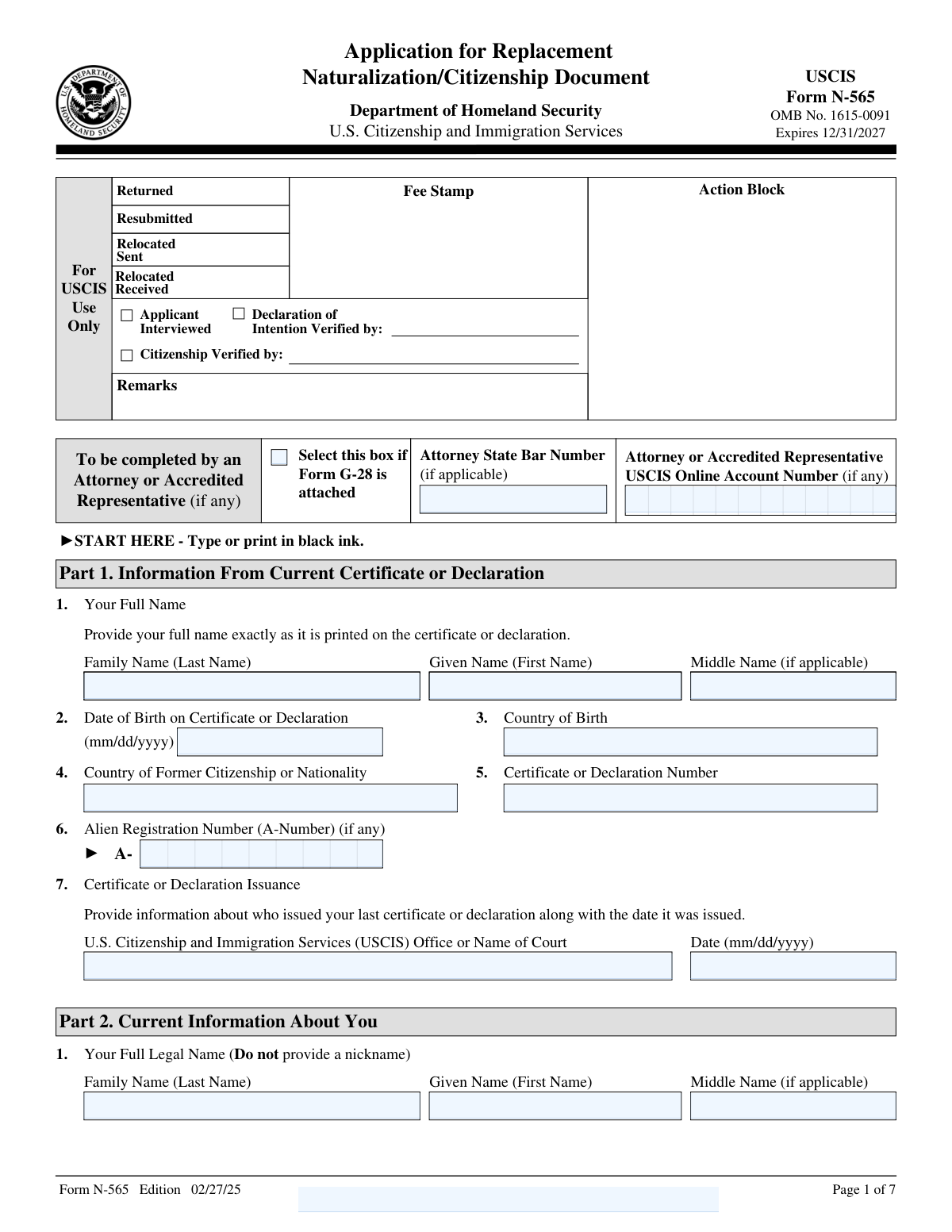
Yes! You can use AI to fill out Form N-565, Application for Replacement Naturalization/Citizenship Document
Form N-565, Application for Replacement Naturalization/Citizenship Document, is a U.S. Citizenship and Immigration Services (USCIS) form used by individuals to apply for a replacement of their citizenship or naturalization documents. This is necessary if the original document was lost, stolen, destroyed, mutilated, or contains incorrect information due to a USCIS error or a legal change (like a name or date of birth change). Today, this form can be filled out quickly and accurately using AI-powered services like Instafill.ai, which can also convert non-fillable PDF versions into interactive fillable forms.
Our AI automatically handles information lookup, data retrieval, formatting, and form filling.
It takes less than a minute to fill out N-565 using our AI form filling.
Securely upload your data. Information is encrypted in transit and deleted immediately after the form is filled out.
Form specifications
| Form name: | Form N-565, Application for Replacement Naturalization/Citizenship Document |
| Number of fields: | 139 |
| Number of pages: | 7 |
| Language: | English |
Instafill Demo: How to fill out PDF forms in seconds with AI
How to Fill Out N-565 Online for Free in 2026
Are you looking to fill out a N-565 form online quickly and accurately? Instafill.ai offers the #1 AI-powered PDF filling software of 2026, allowing you to complete your N-565 form in just 37 seconds or less.
Follow these steps to fill out your N-565 form online using Instafill.ai:
- 1 Navigate to Instafill.ai and upload or select Form N-565.
- 2 Provide your personal information, including details from your current or previous certificate, such as your full name, A-Number, and certificate number.
- 3 Select the type of document you are replacing and the reason for the application (e.g., lost, stolen, mutilated, name change, or correction).
- 4 Complete the relevant sections based on your reason for applying, providing details about the change or error.
- 5 Upload required supporting documents, such as a copy of the original certificate, a police report, or legal documents supporting a name or date of birth change.
- 6 Review all the information populated by the AI for accuracy, provide your signature and date, and download the completed form.
- 7 Submit the completed Form N-565, along with supporting documents and the required fee, to the appropriate USCIS address.
Our AI-powered system ensures each field is filled out correctly, reducing errors and saving you time.
Why Choose Instafill.ai for Your Fillable N-565 Form?
Speed
Complete your N-565 in as little as 37 seconds.
Up-to-Date
Always use the latest 2026 N-565 form version.
Cost-effective
No need to hire expensive lawyers.
Accuracy
Our AI performs 10 compliance checks to ensure your form is error-free.
Security
Your personal information is protected with bank-level encryption.
Frequently Asked Questions About Form N-565
Form N-565, Application for Replacement Naturalization/Citizenship Document, is used to apply for a replacement of your Certificate of Naturalization, Certificate of Citizenship, Declaration of Intention, or Certificate of Repatriation if it was lost, stolen, destroyed, or contains errors.
You should file this form if you are a U.S. citizen whose citizenship or naturalization document needs to be replaced because it was lost, stolen, mutilated, or has an error. You can also use it to reflect a legal change to your name, date of birth, or sex on the document.
In Part 3 of the form, you must select the box indicating your document was lost, stolen, or destroyed and provide a written explanation of the circumstances. You should also attach a police report or a sworn statement if you have one.
You must select the option for a name change in Part 3, complete Part 5, and submit your original certificate along with a copy of the legal document proving the name change, such as a court order or marriage certificate.
If your document has a typographical or clerical error made by USCIS, you can apply for a corrected one by completing Part 4. You must explain the error and attach the original, incorrect certificate with your application.
Yes, you must submit the original document if you are applying for a replacement due to mutilation, a name change, or a correction. The only time you do not submit the original is if it was lost, stolen, or destroyed.
In Part 1, you must provide your name exactly as it is printed on your current certificate. In Part 2, you provide your current full legal name, which may be different due to a legal name change.
This is a special document issued to prove your U.S. citizenship to a foreign government that has requested it. To apply, you must complete Part 8 of the form with details about the foreign official and agency.
The required documents depend on your reason for applying and may include your original certificate, a police report, a court order for a name change, or a marriage certificate. Refer to the specific instructions in Part 3 for your situation.
Yes, services like Instafill.ai use AI to auto-fill form fields accurately and save time. This can help you complete your application more efficiently and with fewer errors.
You can use a service like Instafill.ai to easily complete your form online. Simply upload the N-565 PDF, and the platform will convert it into a smart, fillable form you can complete on any device.
If you have a non-fillable PDF, you can use a service like Instafill.ai to instantly convert it into an interactive, fillable form. This allows you to type your answers directly into the fields, save, and print.
Yes, you can file Form N-565 if your certificate is incorrect because the sex listed does not reflect your biological sex at birth. You will need to complete Part 7 and attach the original certificate and your birth certificate.
Compliance N-565
Validation Checks by Instafill.ai
1
A-Number Format Validation
This check ensures that the Alien Registration Number (A-Number) provided in Part 1 follows the correct format, which is typically the letter 'A' followed by 8 or 9 digits. Validating the format helps prevent data entry errors and ensures the number can be used to locate the applicant's file. If the format is incorrect, the form submission should be flagged for review, as it may indicate a typo or an invalid number.
2
Date Field Format and Plausibility
This validation verifies that all date fields across the form are entered in the required MM/DD/YYYY format and represent a plausible date (e.g., month is between 01-12, day is valid for the given month). It also checks that dates like 'Date of Birth' or 'Certificate Issuance Date' are not in the future. This is crucial for maintaining data integrity and ensuring accurate record-keeping, and failure would result in a request for correction.
3
Exclusive Application Type Selection
In Part 3, Item 1, the applicant must select only one application type from the available options (1.a through 1.e). This validation ensures that one and only one checkbox is selected in this group. Selecting multiple types would create ambiguity in processing the request, so a validation failure must prompt the user to choose a single option before proceeding.
4
Mandatory Explanation for Lost/Stolen/Destroyed Document
This check ensures that if the applicant selects checkbox 2.a in Part 3 ('My certificate or declaration was lost, stolen, or destroyed'), the corresponding explanation field (2.a.(1)) must be filled out. This explanation is required by USCIS to understand the circumstances of the loss. A failure to provide this mandatory explanation will result in an incomplete application and processing delays.
5
Mandatory Explanation for Renounced Citizenship
This validation is triggered by the response to Part 2, Item 5. If the applicant answers 'Yes' to having lost or renounced U.S. citizenship, they must provide a detailed explanation in Part 12. This check verifies that if 'Yes' is selected, Part 12 contains a corresponding entry referencing Part 2, Item 5. This is a critical eligibility check, and failure to provide the explanation would halt the application process.
6
Conditional Completion of Part 4 for USCIS Error
This rule verifies that if the applicant selects checkbox 2.c in Part 3 ('My certificate... is incorrect due to a typographical or clerical error by USCIS'), then Part 4 must be completed. Part 4 is where the applicant specifies the exact error. Failing to complete Part 4 after selecting this option would leave USCIS with no information on what to correct, rendering the application incomplete.
7
Conditional Completion of Part 5 for Name Change
This validation ensures that if an applicant selects checkbox 2.d in Part 3 ('My name has legally changed'), they must complete Part 5. Part 5 gathers the necessary details about the name change, such as the method and date. Without this information, USCIS cannot verify the legal name change, so an incomplete Part 5 would result in the application being rejected or delayed.
8
Applicant Signature Date Validation
This check validates that the 'Date of Signature' in Part 9 is not a future date and is on or after any other event dates listed in the application, such as a legal name change date. This ensures the applicant is certifying the information as it is on the date of signing. An invalid signature date can call the entire attestation into question and lead to rejection.
9
Interpreter Section Completeness
If any field in Part 10 (Interpreter's Information) is filled out, this validation ensures that all required fields in that section, including the interpreter's name, signature, and date, are also complete. This is important for establishing a clear record of who assisted the applicant and to ensure the interpreter's certification is legally sound. An incomplete interpreter section could invalidate the assistance provided.
10
Address Field Logic for US and Foreign Addresses
This validation checks the mailing address in Part 2 for completeness based on the location. If the address is within the United States, the 'State' and 'ZIP Code' fields are mandatory. If the address is outside the U.S., the 'Country' field becomes mandatory. This ensures mail can be successfully delivered and prevents rejections due to an invalid or incomplete address.
11
Contextual Requirement for Additional Information
This rule ensures that if any text is entered into the free-form fields in Part 12 ('Additional Information'), the corresponding 'Page Number', 'Part Number', and 'Item Number' fields must also be filled out. This provides essential context for the adjudicator to understand what the additional information refers to. Submissions with unreferenced additional information can cause confusion and may be disregarded, potentially weakening the application.
12
New Date of Birth Presence and Logic
This check is for Part 6, which is completed if applying for a new certificate due to a date of birth change. It validates that if Part 6 is filled, the 'My new date of birth is' field (Item 2) must be completed. Furthermore, it checks that this new date of birth is different from the one provided in Part 1, Item 2. This ensures the application's purpose is logically consistent and provides the necessary information for the correction.
13
Exclusive Selection for Marital Status
In Part 2, Item 4, the applicant must select their current marital status from a list of mutually exclusive options (Single, Married, Widowed, etc.). This validation ensures that one and only one box is checked. Selecting multiple statuses is a logical impossibility and would require the applicant to correct the entry before the form can be processed.
14
Ensures at Least One Contact Method is Provided
This validation checks that the applicant has provided at least one method of contact in Part 9 (Daytime Telephone, Mobile Telephone, or Email Address). Although the fields are marked '(if any)', it is critical for USCIS to be able to contact the applicant regarding their case. A failure to provide any contact information could result in a warning or delay, as it hinders communication.
Common Mistakes in Completing N-565
Applicants often enter their current legal name in Part 1, which specifically asks for the name exactly as it is printed on the original certificate. This discrepancy can cause confusion and delays in verifying the original document. To avoid this, carefully read the instructions for each part; Part 1 is for the old document's information, and Part 2 is for your current information. AI-powered tools like Instafill.ai can help by guiding users to enter the correct information in the appropriate fields based on the form's specific requirements.
Part 3 presents multiple reasons for a replacement, each with different subsequent steps and evidence requirements. A common error is selecting 'USCIS clerical error' (2.c) for a legal name change, which should be 'My name has legally changed' (2.d). This mistake sends the application down the wrong processing path and leads to requests for different evidence, causing significant delays. Always choose the option that precisely matches your situation and follow the corresponding instructions carefully.
This form requires specific evidence based on the reason for the application, such as a police report for a stolen document, a court order for a name change, or the original certificate for a correction. Applicants frequently forget to include these mandatory attachments, resulting in a Request for Evidence (RFE) or outright denial. Create a checklist based on your selection in Part 3 to ensure all required documents are included with your submission.
When applying for a replacement due to mutilation, a USCIS error, or a legal change (name, DOB, sex), the applicant must submit the original certificate with Form N-565. Many people mistakenly send a copy or forget to include it at all. USCIS needs the original document to invalidate it and issue a new one, so failure to provide it will halt the application process. Always mail the original document as instructed for these specific application types.
In Part 3, Item 2.a.(1), the form requires a detailed explanation of 'when, where, and how' the document was lost, stolen, or destroyed. Applicants often provide a vague, one-sentence answer like 'I lost my certificate.' This is insufficient and can lead to further inquiries. You must provide a detailed narrative of the circumstances to satisfy the requirement and avoid processing delays.
The form consistently specifies the 'mm/dd/yyyy' format for all date fields. Applicants, especially those accustomed to different international formats (dd/mm/yyyy), often make this mistake. An incorrect date format can lead to data entry errors on the USCIS side and potential rejection of the form. To prevent this, double-check all dates before submission. Using a tool like Instafill.ai can automatically format dates correctly, reducing the risk of error.
The signature fields in Parts 9, 10, and 11 explicitly state that the form cannot be signed electronically and the name cannot be typewritten. Applicants sometimes type their name in the signature box out of habit from filling other online forms. A typed name is not a valid signature for this application and will lead to its rejection. You must print the completed form and sign it with a pen in black ink.
Part 2, Item 2 asks for all other names ever used, including maiden names, aliases, and nicknames. Applicants sometimes forget to list all relevant names or believe it is unimportant. This omission can create discrepancies during background checks and identity verification, potentially delaying the application. It is crucial to provide a complete history of all names used to ensure a smooth adjudication process.
When using Part 12 for additional information, it is mandatory to reference the specific Page Number, Part Number, and Item Number the information pertains to. Applicants often write their explanation without these references, leaving the adjudicator to guess where the information belongs. This can lead to the information being overlooked or misinterpreted. Always clearly label any additional information to ensure it is correctly associated with the relevant part of your application.
If your mail is delivered to you through a third party (e.g., a relative, an attorney, or a commercial mail receiving agency), you must fill out the 'In Care Of Name' field in Part 2. Applicants who use such services often leave this field blank, entering only their own name and the address. This can result in important correspondence from USCIS, including the new certificate, being returned as undeliverable, causing extreme delays. If someone else's name must be on the mailing address for you to receive mail, their name must be in this field.
Saved over 80 hours a year
“I was never sure if my IRS forms like W-9 were filled correctly. Now, I can complete the forms accurately without any external help.”
Kevin Martin Green
Your data stays secure with advanced protection from Instafill and our subprocessors

Robust compliance program
Transparent business model
You’re not the product. You always know where your data is and what it is processed for.
ISO 27001, HIPAA, and GDPR
Our subprocesses adhere to multiple compliance standards, including but not limited to ISO 27001, HIPAA, and GDPR.
Security & privacy by design
We consider security and privacy from the initial design phase of any new service or functionality. It’s not an afterthought, it’s built-in, including support for two-factor authentication (2FA) to further protect your account.
Fill out N-565 with Instafill.ai
Worried about filling PDFs wrong? Instafill securely fills form-n-565-application-for-replacement-naturalizationcitizenship-document forms, ensuring each field is accurate.