Yes! You can use AI to fill out Official Form 106I, Schedule I: Your Income
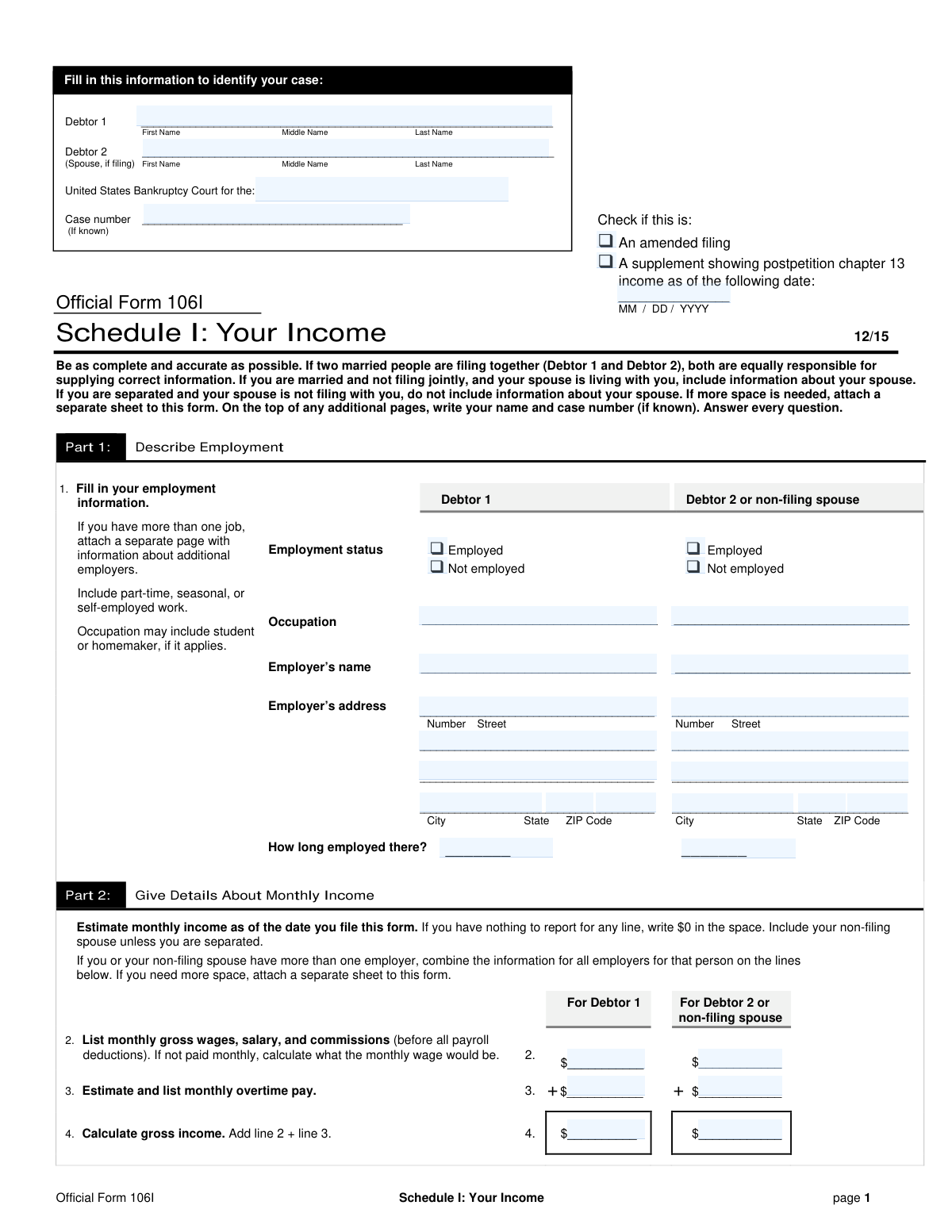
Official Form 106I, Schedule I: Your Income, is a mandatory document in a bankruptcy case that provides the court with a detailed breakdown of the debtor's current monthly income. It requires listing employment details, wages, salaries, government benefits, and any other regular income for the debtor and their spouse. Accurately reporting this financial information is crucial for the court to assess the debtor's financial situation. Today, this form can be filled out quickly and accurately using AI-powered services like Instafill.ai, which can also convert non-fillable PDF versions into interactive fillable forms.
Our AI automatically handles information lookup, data retrieval, formatting, and form filling.
It takes less than a minute to fill out Official Form 106I using our AI form filling.
Securely upload your data. Information is encrypted in transit and deleted immediately after the form is filled out.
Form specifications
| Form name: | Official Form 106I, Schedule I: Your Income |
| Number of pages: | 2 |
| Filled form examples: | Form Official Form 106I Examples |
| Language: | English |
| Categories: | income forms |
Instafill Demo: How to fill out PDF forms in seconds with AI
How to Fill Out Official Form 106I Online for Free in 2026
Are you looking to fill out a OFFICIAL FORM 106I form online quickly and accurately? Instafill.ai offers the #1 AI-powered PDF filling software of 2026, allowing you to complete your OFFICIAL FORM 106I form in just 37 seconds or less.
Follow these steps to fill out your OFFICIAL FORM 106I form online using Instafill.ai:
- 1 Navigate to Instafill.ai and upload or select the Official Form 106I, Schedule I.
- 2 Provide your personal and case identification information, such as name, case number, and court district, in the header section.
- 3 Complete Part 1 by detailing your employment status, occupation, and employer information for yourself and your spouse, if applicable.
- 4 In Part 2, enter all details about your monthly income, including gross wages, overtime, and a breakdown of all payroll deductions like taxes, insurance, and retirement contributions.
- 5 List all other regular income sources, such as net income from a business, interest, dividends, family support, Social Security, and any other government assistance.
- 6 Review the automatically calculated totals for your monthly take-home pay and combined monthly income to ensure accuracy.
- 7 Answer the final question regarding any expected changes to your income in the next year, then securely download or print your completed form.
Our AI-powered system ensures each field is filled out correctly, reducing errors and saving you time.
Why Choose Instafill.ai for Your Fillable Official Form 106I Form?
Speed
Complete your Official Form 106I in as little as 37 seconds.
Up-to-Date
Always use the latest 2026 Official Form 106I form version.
Cost-effective
No need to hire expensive lawyers.
Accuracy
Our AI performs 10 compliance checks to ensure your form is error-free.
Security
Your personal information is protected with bank-level encryption.
Frequently Asked Questions About Form Official Form 106I
This form is used in bankruptcy cases to provide a detailed report of your current monthly income from all sources. It helps the court and other parties understand your financial situation.
Yes, if you are married and living together, you must include your non-filing spouse's income. However, if you are legally separated and not living together, you do not include their information.
You must estimate your average monthly income as of the date you file the form. You can do this by averaging your income over the past several months to arrive at a representative monthly figure.
You should check the 'Not employed' box and can write 'Unemployed,' 'Homemaker,' 'Student,' or another applicable term in the Occupation field.
Gross income is your total earnings before any payroll deductions. Take-home pay is the net amount you receive after all deductions like taxes, insurance, and retirement contributions have been subtracted.
This line is for money you regularly receive from others to help pay household expenses, such as contributions from a roommate, an unmarried partner, or other relatives. Do not include income already listed in lines 2-10.
List your primary employer in Part 1 and attach a separate sheet with the same information for any additional jobs. In Part 2, you should combine the income and deductions from all your jobs on the appropriate lines.
Yes, if you report net income from a rental property or from operating a business on line 8a, you must attach a statement showing the gross receipts, expenses, and net income for each.
On line 13, you must check 'Yes' if you expect an increase or decrease in income within the year after filing. You must also provide a brief explanation for the anticipated change.
This includes any regular government aid you receive, such as cash assistance, and the value of non-cash benefits like food stamps (SNAP) or housing subsidies.
Yes, services like Instafill.ai use AI to accurately auto-fill form fields from your documents, which can save you significant time and help reduce errors.
You can use a service like Instafill.ai to upload the form and fill it out interactively on your computer. This allows you to type directly into the fields, save your progress, and print the completed form.
If you have a flat, non-fillable PDF, you can use a tool like Instafill.ai to instantly convert it into an interactive, fillable form that you can complete and save digitally.
Compliance Official Form 106I
Validation Checks by Instafill.ai
1
Verifies Gross Income Calculation (Line 4)
This check ensures that the value entered in Line 4 for each debtor is the mathematical sum of their monthly gross wages (Line 2) and their monthly overtime pay (Line 3). This is a critical calculation as Gross Income is the foundation for all subsequent net income calculations. If this sum is incorrect, the entire income schedule will be inaccurate, potentially leading to rejection of the filing.
2
Verifies Total Payroll Deductions Calculation (Line 6)
This validation confirms that the value in Line 6 is the correct sum of all individual payroll deduction lines (5a through 5h). Accurate deduction totals are essential for determining the debtor's actual take-home pay. An error here would misrepresent the debtor's net income from employment and impact the overall financial picture.
3
Verifies Monthly Take-Home Pay Calculation (Line 7)
This check validates that the value in Line 7 is the result of subtracting Total Payroll Deductions (Line 6) from Gross Income (Line 4). This calculation determines the debtor's net pay from employment, a key component of their total monthly income. A miscalculation would provide a false picture of the debtor's disposable income.
4
Verifies Total Other Income Calculation (Line 9)
This check ensures that the value in Line 9 correctly sums all sources of non-employment income listed in lines 8a through 8h. This is important for capturing a complete financial profile beyond just wages. Failure to aggregate this income correctly would result in an under-reporting of the debtor's total available funds.
5
Verifies Total Monthly Income Calculation (Line 10)
This validation confirms that the individual monthly income in Line 10 for each debtor is the sum of their take-home pay (Line 7) and their other income (Line 9). It also checks that the final total in Line 10 is the sum of the amounts for Debtor 1 and Debtor 2. An error in this final aggregation would invalidate the entire income summary.
6
Verifies Combined Monthly Income Calculation (Line 12)
This check ensures the value in Line 12, the Combined Monthly Income, is the correct sum of the total from Line 10 and any other regular contributions from Line 11. This final figure is often transferred to other schedules, so its accuracy is paramount. An incorrect value here would cause discrepancies across the entire bankruptcy filing.
7
Ensures Employment Details are Provided When Employed
This check verifies that if the 'Employed' checkbox is selected for a debtor in Part 1, then the 'Occupation', 'Employer’s name', 'Employer’s address', and 'How long employed there?' fields are all filled out. This is necessary to provide a complete employment history as required by the form. If these fields are empty while 'Employed' is checked, the submission is incomplete and lacks critical information for the court.
8
Requires Explanation for 'Other' Income/Deduction Categories
This validation ensures that if a monetary value greater than zero is entered in lines 5h (Other deductions), 8f (Other government assistance), or 8h (Other monthly income), the corresponding 'Specify' text field is not empty. This provides necessary context and transparency for miscellaneous financial items. A missing explanation makes it impossible to verify the legitimacy and nature of these funds.
9
Requires Explanation for Expected Income Changes
If the 'Yes' checkbox is selected for question 13 ('Do you expect an increase or decrease...'), this check ensures the corresponding explanation text box is filled. This information is critical for the trustee and court to understand the debtor's future financial stability. A 'Yes' without an explanation leaves a critical question unanswered and makes the filing incomplete.
10
Validates Mutually Exclusive Employment Status
This check ensures that for each debtor in Part 1, only one of the 'Employed' or 'Not employed' checkboxes is selected. Selecting both is a logical contradiction that makes the debtor's employment status ambiguous. The system should prevent this to ensure data integrity and clarity.
11
Ensures All Monetary Fields Contain a Value
Based on the form's instruction to 'write $0 in the space' for lines with nothing to report, this validation checks that all monetary input fields (lines 2 through 12) contain a numeric value. Blank fields are not permitted as they create ambiguity and can cause calculation errors. This ensures the form is fully completed as instructed.
12
Validates Supplement Date Format and Requirement
This check verifies that if the 'A supplement showing postpetition...' checkbox is selected, the 'Supplement Income Date' field is filled with a valid date in MM/DD/YYYY format. This is essential for correctly time-stamping supplemental income information. An invalid format or a missing date would render the supplemental filing information ambiguous.
13
Validates Employer's ZIP Code Format
This check ensures that the ZIP Code entered for the employer's address in Part 1 is in a valid 5-digit or 9-digit (ZIP+4) format (e.g., 12345 or 12345-6789). Correctly formatted address data is crucial for mail delivery and record-keeping accuracy. An invalid ZIP code could lead to difficulties in verifying employer information.
14
Cross-Validates Employment Status and Income
This check verifies that if a debtor is marked as 'Employed', there is a non-zero value in Line 2 (Monthly Gross Wages). While there can be exceptions, this logical check helps catch potential data entry errors or inconsistencies between Part 1 and Part 2 of the form. A flag should be raised for manual review if an employed debtor shows zero wages.
Common Mistakes in Completing Official Form 106I
Filers often mistakenly enter their take-home pay on line 2 instead of their gross wages before any deductions are taken out. This leads to an understatement of total income, which can cause significant problems with the bankruptcy trustee and potentially jeopardize the case. To avoid this, carefully review your pay stubs for the 'gross pay' amount and use that figure, not the final bank deposit amount.
The form requires monthly income, but many people are paid weekly or bi-weekly. A common error is to simply multiply a weekly paycheck by 4, which underreports annual income and can lead to inaccurate financial disclosures. The correct method is to multiply weekly pay by 52 or bi-weekly pay by 26, and then divide the total by 12 to get an accurate monthly average. AI-powered tools like Instafill.ai can automate these calculations to prevent conversion errors.
This form requires multiple calculations on lines 4, 6, 7, 9, 10, and 12, and simple arithmetic mistakes are very common. An error in an early calculation will cascade through the rest of the form, leading to incorrect totals for take-home pay and combined monthly income. These inaccuracies can delay the case and require filing an amended schedule. Using a tool like Instafill.ai performs all calculations automatically, eliminating the risk of human error.
Line 11 asks for regular contributions to household expenses from others, like an unmarried partner, roommate, or adult child living at home. Filers frequently overlook this, which understates the total household income available to pay expenses. This can misrepresent the debtor's financial situation and affect eligibility, so be sure to include any regular financial help you receive from non-spouse household members.
The form requires the income of a non-filing spouse if you are married and living together, unless you are legally separated. Many filers mistakenly believe that if their spouse is not part of the bankruptcy, their income is irrelevant. This is incorrect, as the spouse's income is crucial for determining the household's ability to pay debts and will result in an incomplete filing.
Filers sometimes focus only on job wages and forget to list other regular income in Section 8, such as Social Security, unemployment benefits, alimony, child support, or pension payments. Failure to disclose all income is a serious omission that can lead to the dismissal of the bankruptcy case or accusations of fraud. Always review lines 8a through 8h carefully and report any applicable income, even if it seems minor.
The instructions state to write '$0' for any line with nothing to report, but people often leave these fields empty. This ambiguity can cause delays as the court may interpret the blank space as missing information rather than a zero value, requiring clarification. To prevent this, diligently enter '$0.00' in every monetary field that does not apply to you. Intelligent form fillers can automatically populate empty monetary fields with a zero value to ensure completeness.
Line 8a specifically requires filers to attach a separate statement detailing gross receipts and expenses for any business or rental property income. People often report the net income figure but forget to provide the mandatory supporting documentation. This omission will result in an incomplete filing, and the trustee will require you to submit the missing statement, causing delays.
Line 13 asks about expected income changes in the next year, which many filers answer 'No' without proper consideration. Failing to disclose a known upcoming event, such as a seasonal layoff, a scheduled raise, or retirement, can be seen as a misrepresentation. This information is vital for assessing the feasibility of a repayment plan, so if you anticipate any change, check 'Yes' and provide a brief, honest explanation.
The form includes lines for 'Other deductions' (5h) and 'Other monthly income' (8h), both of which require a written description. A common mistake is to enter a dollar amount but leave the specification field blank, forcing the trustee to request clarification and delaying the case. Always provide a clear description for any amount entered in an 'Other' category. If the form is a non-fillable PDF, a tool like Instafill.ai can convert it to a smart, fillable version to make entering this information easier.
Saved over 80 hours a year
“I was never sure if my IRS forms like W-9 were filled correctly. Now, I can complete the forms accurately without any external help.”
Kevin Martin Green
Your data stays secure with advanced protection from Instafill and our subprocessors

Robust compliance program
Transparent business model
You’re not the product. You always know where your data is and what it is processed for.
ISO 27001, HIPAA, and GDPR
Our subprocesses adhere to multiple compliance standards, including but not limited to ISO 27001, HIPAA, and GDPR.
Security & privacy by design
We consider security and privacy from the initial design phase of any new service or functionality. It’s not an afterthought, it’s built-in, including support for two-factor authentication (2FA) to further protect your account.
Fill out Official Form 106I with Instafill.ai
Worried about filling PDFs wrong? Instafill securely fills official-form-106i-schedule-i-your-income forms, ensuring each field is accurate.



