Yes! You can use AI to fill out PPQ Form 505, Plant and Plant Product Declaration
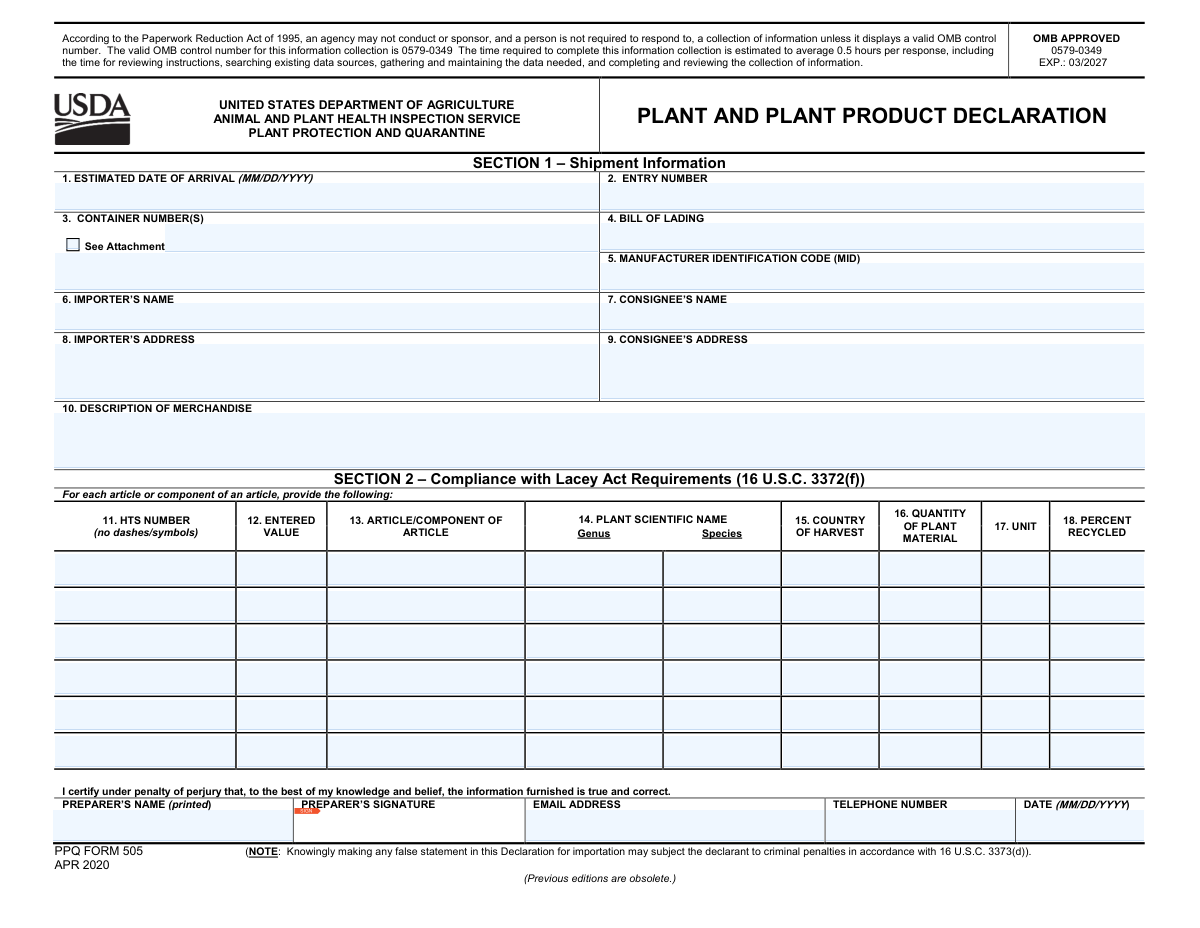
PPQ Form 505, the Plant and Plant Product Declaration, is a mandatory document for importers bringing certain plant products into the U.S. It is used by the USDA's Animal and Plant Health Inspection Service (APHIS) to enforce the Lacey Act, which helps prevent the trade of illegally harvested plants and timber. Completing this form accurately is crucial for legal importation and requires detailed information about the product's scientific name and country of harvest. Today, this form can be filled out quickly and accurately using AI-powered services like Instafill.ai, which can also convert non-fillable PDF versions into interactive fillable forms.
Our AI automatically handles information lookup, data retrieval, formatting, and form filling.
It takes less than a minute to fill out PPQ Form 505 using our AI form filling.
Securely upload your data. Information is encrypted in transit and deleted immediately after the form is filled out.
Form specifications
| Form name: | PPQ Form 505, Plant and Plant Product Declaration |
| Number of fields: | 71 |
| Number of pages: | 1 |
| Filled form examples: | Form PPQ Form 505 Examples |
| Language: | English |
Instafill Demo: How to fill out PDF forms in seconds with AI
How to Fill Out PPQ Form 505 Online for Free in 2026
Are you looking to fill out a PPQ FORM 505 form online quickly and accurately? Instafill.ai offers the #1 AI-powered PDF filling software of 2026, allowing you to complete your PPQ FORM 505 form in just 37 seconds or less.
Follow these steps to fill out your PPQ FORM 505 form online using Instafill.ai:
- 1 Navigate to Instafill.ai and upload your PPQ Form 505, or select it from the available form templates.
- 2 Allow the AI to scan and process the form, identifying all fields for shipment information, importer/consignee details, and product declarations.
- 3 Provide your shipment details, such as arrival date, entry number, and bill of lading. The AI can assist by auto-filling information from your profile.
- 4 Enter the detailed information for each plant product in the table, including the HTS number, scientific name (genus and species), country of harvest, and quantity. Instafill.ai's smart fields ensure data is entered in the correct format.
- 5 Carefully review all the information entered by you and the AI for accuracy, paying close attention to the plant and harvest details to ensure Lacey Act compliance.
- 6 Electronically sign and date the declaration in the preparer's certification section to attest to the accuracy of the information provided.
- 7 Download the completed PPQ Form 505 to have available for CBP at the port of entry and for your records.
Our AI-powered system ensures each field is filled out correctly, reducing errors and saving you time.
Why Choose Instafill.ai for Your Fillable PPQ Form 505 Form?
Speed
Complete your PPQ Form 505 in as little as 37 seconds.
Up-to-Date
Always use the latest 2026 PPQ Form 505 form version.
Cost-effective
No need to hire expensive lawyers.
Accuracy
Our AI performs 10 compliance checks to ensure your form is error-free.
Security
Your personal information is protected with bank-level encryption.
Frequently Asked Questions About Form PPQ Form 505
This form, the Plant and Plant Product Declaration, is used to declare imports of certain plants and plant products to ensure compliance with the Lacey Act, which combats illegal trafficking of wildlife, fish, and plants.
Importers bringing certain plant and plant products into the United States must complete this declaration for their shipments.
The Importer is the company or individual responsible for the product import, while the Consignee is the individual or company who ordered and will ultimately receive the shipment in the U.S.
The HTS number for your merchandise can be found on the U.S. International Trade Commission (USITC) website. You must enter this number without any dashes or symbols.
This is the Latin name (Genus and Species) of the plant, not its common or trade name. If you do not know it, you may need to get this information from the product's manufacturer or supplier.
If the species varies and is unknown, you must list every species that may have been used. For products made before the Lacey Act amendment where the species is indeterminable, you may enter 'special' for Genus and 'pre-amendment' for Species.
No, you must enter the country where the plant was actually harvested from the ground. This is often different from the country of manufacture.
No, this field should only be completed if your imported product is paper or paperboard. For all other products, you can leave this field blank.
You should have a copy available for Customs and Border Protection (CBP) at the port of entry. After the shipment is cleared, you must mail the original signed form to the USDA address listed in the instructions.
No, the form instructions state that if you have filed a Lacey Act declaration electronically, there is no need to also file a paper declaration.
If you need more space to list all your articles, you can use a continuation sheet, PPQ FORM 505B, and make as many copies as necessary.
Yes, services like Instafill.ai use AI to accurately auto-fill form fields from your existing data, which can save you significant time and reduce errors.
You can use a service like Instafill.ai to upload the PDF. The platform makes the form interactive and allows you to fill it out, sign, and download it easily from your browser.
If you have a non-fillable or 'flat' PDF, you can use a tool like Instafill.ai. It can convert the static PDF into an interactive, fillable form that you can complete online.
Compliance PPQ Form 505
Validation Checks by Instafill.ai
1
Entry Number Format Validation
This check ensures the 'Entry Number' in Section 1 conforms to the required U.S. Customs and Border Protection (CBP) format of 'xxx-xxxxxxx-x'. This number is critical for uniquely identifying the shipment within the customs system. If the format is incorrect, the declaration cannot be linked to the corresponding customs entry, leading to processing delays or rejection.
2
Date Format and Logical Consistency
Validates that the 'Estimated Date of Arrival' and the preparer's 'Date' fields are in the correct MM/DD/YYYY format. It also performs a logical check to ensure the arrival date is not an unreasonable date in the past and the certification date is not in the future. This ensures data accuracy and prevents nonsensical entries that would invalidate the declaration's timeline.
3
HTS Number Format
This validation confirms that the 'HTS NUMBER' for each line item consists only of digits and contains no dashes, spaces, or other symbols, as specified in the instructions. The Harmonized Tariff Schedule number is essential for customs classification and duty calculation. An improperly formatted HTS number will cause automated processing to fail and may result in the rejection of the declaration.
4
Unit of Measure Enumeration
This check verifies that the 'UNIT' field for each declared article is one of the specific abbreviations listed in the form instructions (e.g., kg, m3, cm2). Using a non-standard unit makes the 'Quantity' field meaningless and prevents accurate accounting of plant material. Failure to use an approved unit will result in the rejection of the line item or the entire form.
5
Conditional 'Percent Recycled' Validation
This validation enforces the rule that the 'PERCENT RECYCLED' field is only populated if the corresponding 'ARTICLE/COMPONENT' is a paper or paperboard product. If the field is populated, it must be a numeric value between 0 and 100. This prevents irrelevant data from being entered and ensures the recycled content information is captured accurately and only when applicable.
6
Line Item Completeness
For each row in Section 2, if any single field is filled out, this check ensures all other required fields for that article (e.g., HTS Number, Value, Scientific Name, Country of Harvest, Quantity, Unit) are also completed. This prevents partial or incomplete declarations for any given item, which would make the data unusable. An incomplete line item will cause the submission to be flagged as deficient.
7
Plant Scientific Name Special Case
This validation checks the 'PLANT SCIENTIFIC NAME' fields for the special pre-amendment case. If the 'Genus' is entered as 'special', the 'Species' field must be 'pre-amendment'. This rule accommodates older products where the exact species is unknown, and enforcing it ensures data consistency for this specific exception.
8
Entered Value and Quantity Numeric Check
This check ensures that the 'ENTERED VALUE' and 'QUANTITY OF PLANT MATERIAL' fields for each line item contain only positive numeric values. These fields represent financial and physical amounts and cannot be negative or non-numeric. This validation is crucial for data integrity, customs valuation, and quantitative analysis of imported materials.
9
Preparer Email Address Format
This validation verifies that the 'EMAIL ADDRESS' provided by the preparer follows the standard format of '[email protected]'. A valid email address is essential for communication regarding the declaration, including notifications of acceptance, rejection, or requests for more information. An invalid format would prevent APHIS from contacting the preparer, potentially delaying the shipment.
10
Preparer Certification Completeness
Ensures that the 'PREPARER’S NAME', 'PREPARER’S SIGNATURE' (or its digital equivalent), and 'DATE' fields are all filled out. The certification is a legal attestation under penalty of perjury, and its completeness is non-negotiable. A missing name, signature, or date invalidates the entire declaration, leading to immediate rejection.
11
At Least One Article Declared
This validation confirms that if the 'DESCRIPTION OF MERCHANDISE' field is populated, at least one complete line item is filled out in Section 2. The primary purpose of the form is to declare the plant products in a shipment. A form describing merchandise but failing to declare any specific articles is incomplete and will be rejected.
12
Address Field Completeness
This check verifies that the 'Importer's Address' and 'Consignee's Address' fields are not empty and contain sufficient detail to be considered a valid address. These fields are required to properly identify the parties involved in the importation. Incomplete addresses can hinder traceability and compliance efforts, and may cause the declaration to be flagged for manual review.
13
Container Number Attachment Logic
This validation checks the logic between the 'See Attachment' checkbox and the 'CONTAINER NUMBER(S)' field. If the checkbox is ticked, the system should expect an attachment and the text field may be empty. If the checkbox is not ticked and the shipment is in a container, the container number field should be populated. This ensures that container information is not accidentally omitted.
Common Mistakes in Completing PPQ Form 505
Filers often incorrectly enter the country where the product was assembled in the 'Country of Harvest' field (Box 15), instead of where the plant material was originally grown. This mistake violates a key requirement of the Lacey Act and can lead to declaration rejection and shipment delays. To avoid this, carefully trace the origin of the raw plant materials, which may be different from the final product's country of origin.
A frequent error is entering a plant's common name (e.g., 'Oak') in the 'Plant Scientific Name' fields (Box 14) instead of the required Latin Genus and Species (e.g., 'Quercus alba'). This happens due to lack of knowledge or haste, but it makes the declaration invalid as it fails to meet the specific botanical identification requirement. Always use official botanical databases to find the correct Genus and Species for each plant material.
The form specifies exact formats, such as the HTS Number (no dashes) and the Entry Number (xxx-xxxxxxx-x). Applicants often include dashes in the HTS number or enter the Entry Number without the required separators, leading to data processing errors and rejection. To prevent this, double-check the formatting instructions for each field. AI-powered form fillers like Instafill.ai can automatically format these numbers correctly, ensuring compliance.
When a product is made of multiple plant-based components (e.g., a chair with a wooden frame and a paperboard seat), each component must be listed on a separate line. Many filers mistakenly list only the final product, resulting in an incomplete and non-compliant declaration. To avoid this, carefully analyze the product's bill of materials and create a separate line item for each distinct plant-derived material.
The 'Percent Recycled' field (Box 18) is often filled out incorrectly. Filers may enter a percentage for non-paper products or leave it blank for paper and paperboard, both of which are errors. This field is mandatory *only* for paper/paperboard items and must be left blank otherwise, an oversight that can lead to questions from APHIS and potential delays.
The form's instructions provide a specific list of accepted abbreviations for the 'Unit' of measure (Box 17), such as 'kg' and 'm3'. Filers sometimes use unlisted abbreviations (e.g., 'kgs', 'cu m') or units that don't logically match the product. This inconsistency can cause processing errors and rejection, so always refer to the approved list in the instructions.
In Box 10 ('Description of Merchandise'), filers may provide overly simple descriptions like 'wood products' instead of the required detail, such as 'wooden spoons for kitchenware.' This lack of specificity can trigger further inspection and delays. A proper description should clearly identify the product and its intended use to verify the declaration against the physical shipment.
Forgetting to sign the form or providing an illegible signature is a simple but critical error that invalidates the entire declaration. An unsigned or undated form will be immediately rejected, requiring a complete resubmission. Always perform a final review to ensure the certification section is fully and clearly completed with a signature, printed name, and correctly formatted date.
The form explicitly warns against filing a paper declaration if one has already been submitted electronically. Some filers submit both, creating duplicate records that cause confusion, slow down processing, and may lead to flags for discrepancies. Filers must choose one method only—either electronic via the ACE system or a paper form—but not both for the same shipment.
This form is often distributed as a flat, non-fillable PDF, forcing users to print it and fill it out by hand, which leads to illegible handwriting, typos, and calculation errors. This manual process is slow and prone to mistakes. To avoid this, use a service like Instafill.ai, which can convert any non-fillable PDF into an interactive, fillable form, allowing for clean, typed entries and enabling data validation features to catch errors before submission.
Saved over 80 hours a year
“I was never sure if my IRS forms like W-9 were filled correctly. Now, I can complete the forms accurately without any external help.”
Kevin Martin Green
Your data stays secure with advanced protection from Instafill and our subprocessors

Robust compliance program
Transparent business model
You’re not the product. You always know where your data is and what it is processed for.
ISO 27001, HIPAA, and GDPR
Our subprocesses adhere to multiple compliance standards, including but not limited to ISO 27001, HIPAA, and GDPR.
Security & privacy by design
We consider security and privacy from the initial design phase of any new service or functionality. It’s not an afterthought, it’s built-in, including support for two-factor authentication (2FA) to further protect your account.
Fill out PPQ Form 505 with Instafill.ai
Worried about filling PDFs wrong? Instafill securely fills ppq-form-505-plant-and-plant-product-declaration forms, ensuring each field is accurate.



