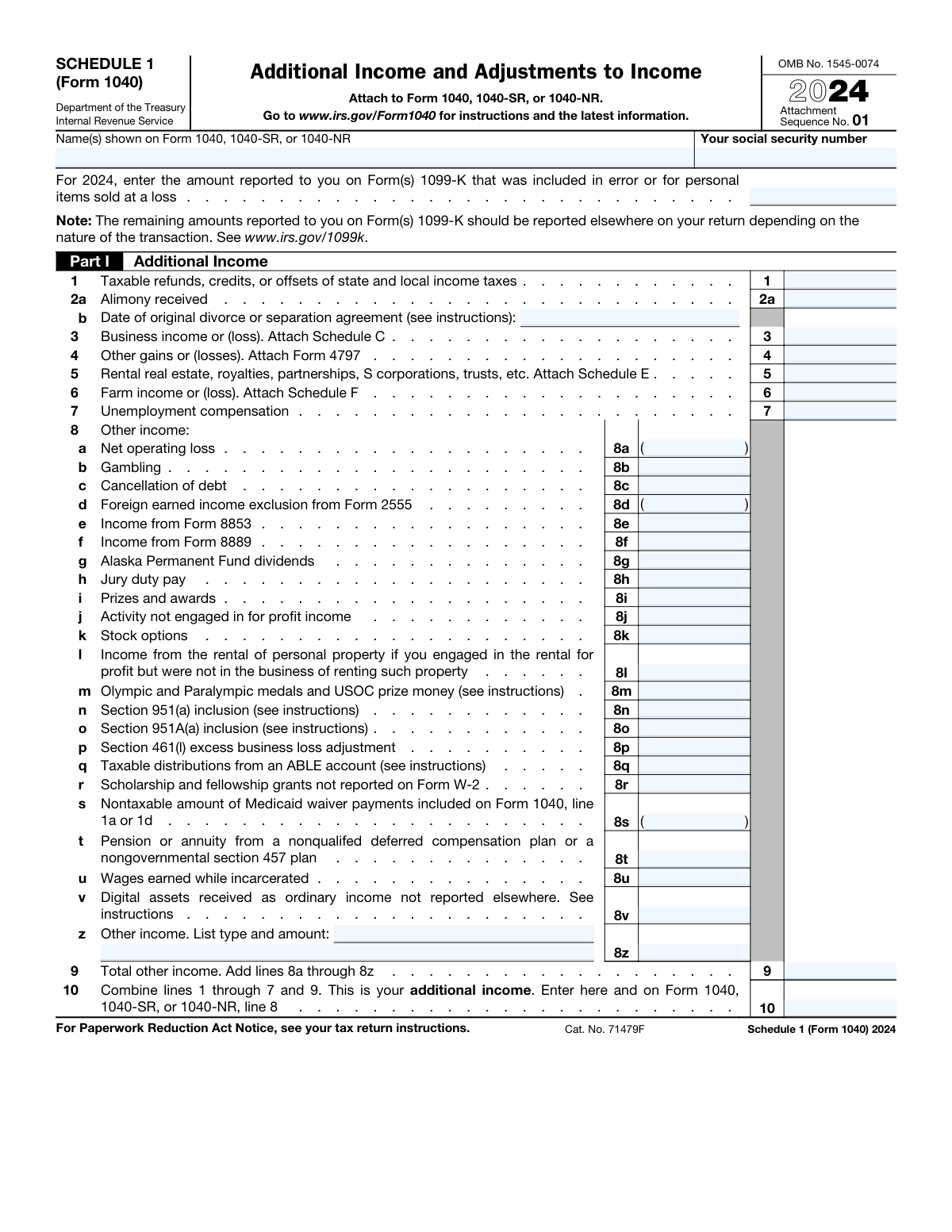
Yes! You can use AI to fill out Schedule 1 (Form 1040), Additional Income and Adjustments to Income
Schedule 1 (Form 1040) is an IRS tax form used by individuals to report certain types of income that aren't listed on the main Form 1040, such as business income, unemployment compensation, or gambling winnings. It is also used to claim specific deductions, known as 'adjustments to income,' like student loan interest or self-employment tax deductions, which can lower your adjusted gross income (AGI). Filing this schedule is crucial for accurately calculating your tax liability if you have any of these financial items. Today, this form can be filled out quickly and accurately using AI-powered services like Instafill.ai, which can also convert non-fillable PDF versions into interactive fillable forms.
Our AI automatically handles information lookup, data retrieval, formatting, and form filling.
It takes less than a minute to fill out Schedule 1 (Form 1040) using our AI form filling.
Securely upload your data. Information is encrypted in transit and deleted immediately after the form is filled out.
Form specifications
| Form name: | Schedule 1 (Form 1040), Additional Income and Adjustments to Income |
| Number of fields: | 69 |
| Number of pages: | 2 |
| Language: | English |
Instafill Demo: How to fill out PDF forms in seconds with AI
How to Fill Out Schedule 1 (Form 1040) Online for Free in 2026
Are you looking to fill out a SCHEDULE 1 (FORM 1040) form online quickly and accurately? Instafill.ai offers the #1 AI-powered PDF filling software of 2026, allowing you to complete your SCHEDULE 1 (FORM 1040) form in just 37 seconds or less.
Follow these steps to fill out your SCHEDULE 1 (FORM 1040) form online using Instafill.ai:
- 1 Navigate to Instafill.ai and upload or select the Schedule 1 (Form 1040).
- 2 Provide your personal identification details, such as your name and Social Security Number, as they appear on your Form 1040.
- 3 Enter all applicable sources of additional income in Part I, referencing documents like Form 1099-K, Schedule C, or unemployment statements.
- 4 Input all relevant adjustments to income in Part II, such as educator expenses, student loan interest, or IRA deductions.
- 5 Allow the AI-powered tool to automatically calculate the totals for Part I (Total Additional Income) and Part II (Total Adjustments to Income).
- 6 Review the completed Schedule 1 for accuracy, then download the final document to attach to your Form 1040, 1040-SR, or 1040-NR.
Our AI-powered system ensures each field is filled out correctly, reducing errors and saving you time.
Why Choose Instafill.ai for Your Fillable Schedule 1 (Form 1040) Form?
Speed
Complete your Schedule 1 (Form 1040) in as little as 37 seconds.
Up-to-Date
Always use the latest 2026 Schedule 1 (Form 1040) form version.
Cost-effective
No need to hire expensive lawyers.
Accuracy
Our AI performs 10 compliance checks to ensure your form is error-free.
Security
Your personal information is protected with bank-level encryption.
Frequently Asked Questions About Form Schedule 1 (Form 1040)
Schedule 1 is an IRS form used to report certain types of additional income, like unemployment or business income, and to claim specific deductions, known as adjustments to income, such as student loan interest or educator expenses.
You must file Schedule 1 if you have any of the income types listed in Part I or are claiming any of the deductions (adjustments) listed in Part II. If all your income and deductions are reported directly on Form 1040, you do not need to file Schedule 1.
Part I is for reporting 'Additional Income' that doesn't appear on the main Form 1040, such as alimony received or business income. Part II is for claiming 'Adjustments to Income,' which are deductions that lower your adjusted gross income (AGI).
You should report the total amount of unemployment compensation you received, which is typically shown on Form 1099-G, on line 7 of Part I.
Eligible educators can deduct up to a certain limit for unreimbursed classroom expenses. You would report this amount on line 11, 'Educator expenses,' in Part II of Schedule 1.
You can deduct the amount of interest you paid on a qualified student loan by entering the total on line 21 of Part II. Your loan servicer should provide you with Form 1098-E, which shows the amount of interest you paid.
You should enter the amount from the Form 1099-K that was for a personal item sold at a loss on the designated line at the very top of Schedule 1. This ensures you are not incorrectly taxed on this transaction.
Self-employed individuals typically report their net business income or loss from Schedule C on line 3. You may also claim deductions in Part II for self-employment tax (line 15), retirement plan contributions (line 16), and health insurance premiums (line 17).
Gambling winnings should be reported as 'Other income' on line 8b in Part I of Schedule 1. Remember that you can deduct gambling losses only up to the amount of your winnings on Schedule A.
Schedule 1 is not a standalone form; it must be attached to your main tax return (Form 1040, 1040-SR, or 1040-NR). The totals from Schedule 1 are carried over to the appropriate lines on your main form.
If you received digital assets like cryptocurrency as ordinary income and it's not reported elsewhere, you should report its value on line 8v, 'Digital assets received as ordinary income not reported elsewhere.'
Yes, services like Instafill.ai use AI to help you accurately auto-fill form fields, which can save time and reduce the chance of errors. This is particularly helpful for detailed tax forms like Schedule 1.
To fill out your form online, upload the Schedule 1 PDF to the Instafill.ai platform. The AI will make the form interactive, allowing you to type your information directly into the fields, save your work, and download the completed document.
If you have a non-fillable or 'flat' PDF, you can use a tool like Instafill.ai to make it interactive. Simply upload the file, and the platform will automatically convert it into a fillable form you can complete on your computer.
Compliance Schedule 1 (Form 1040)
Validation Checks by Instafill.ai
1
Taxpayer SSN Format Validation
This check verifies that the 'Taxpayer Social Security Number' field contains exactly nine digits and no other characters. This is critical for correctly identifying the taxpayer with the IRS and linking the schedule to the main Form 1040. A failure would result in the form being rejected for processing due to an invalid identifier.
2
Alimony Received Date Requirement
This validation ensures that if an amount is entered for '2a Alimony Received', the '2b Original Divorce or Separation Agreement Date' field is not empty. The date is required by the IRS to determine the taxability of the alimony based on when the agreement was executed. If the date is missing, the form is incomplete and may trigger an IRS inquiry or rejection.
3
Alimony Paid Information Completeness
This check confirms that if an amount is entered for '19a Alimony Paid', then both '19b Recipient’s SSN' and '19c Date of Original Divorce or Separation Agreement' are filled out. The IRS requires the recipient's SSN and agreement date to verify the deduction and prevent tax fraud. Failure to provide this information will lead to the disallowance of the alimony deduction.
4
Alimony Recipient SSN Format
This validation verifies that the '19b Recipient’s SSN' is a valid nine-digit number. A correctly formatted SSN is essential for the IRS to cross-reference the alimony payment with the recipient's tax return, where it should be reported as income. An invalid SSN will cause the deduction to be flagged and likely disallowed until corrected.
5
Alimony Deductibility Rule (Post-2018)
This check enforces the tax law change affecting alimony deductions. It verifies that if an amount is entered on '19a Alimony Paid', the date on '19c' must be on or before December 31, 2018. Alimony from agreements after this date is not deductible, so this check prevents filers from claiming an invalid deduction, which would result in underpayment of tax and potential penalties.
6
Total Other Income Calculation (Line 9)
This validation performs a mathematical check to ensure the value on 'Line 9 Total Other Income' is the correct sum of all amounts entered on lines 8a through 8z. This is crucial for ensuring the accuracy of the income being reported on the return. A miscalculation can lead to an incorrect total income, resulting in either overpayment or underpayment of taxes.
7
Total Additional Income Calculation (Line 10)
This check verifies that the amount on 'Line 10 Total Additional Income' correctly equals the sum of lines 1 through 7 and line 9. This is the final calculation for Part I and the total is carried to the main Form 1040, so its accuracy is paramount. An error here directly impacts the Adjusted Gross Income (AGI) calculation and the final tax liability.
8
Business Income Attachment Check
This validation checks that if a non-zero amount is entered for 'Line 3 Business Income or Loss', the corresponding Schedule C is attached or included in the electronic filing. Schedule C provides the detailed breakdown of business income and expenses, and it is mandatory for substantiating the amount on this line. Missing the required schedule will result in an incomplete return and will be rejected by the IRS.
9
Other Income Description Requirement (Line 8z)
This check ensures that if a monetary value is entered in 'Line 8z Other Income Amount', the corresponding description field ('Line 8z Other Income Description') is not left blank. The IRS requires a description to understand the source of the 'other' income being reported. A missing description makes the return incomplete and could trigger a manual review or notice from the IRS.
10
Jury Duty Pay Adjustment Logic
This validation performs a logical comparison between '8h Jury duty pay' (income) and '24a Jury duty pay' (adjustment). The adjustment amount on line 24a, for jury pay given to an employer, cannot exceed the total jury pay income reported on line 8h. This prevents an invalid or overstated deduction, ensuring the taxpayer only deducts the amount they actually turned over.
11
Net Operating Loss (NOL) Value Check
This check validates that the amount entered for '8a Net operating loss' is a negative number or zero. A Net Operating Loss is, by definition, a loss that reduces income, so it must be entered as a negative value to be calculated correctly. Entering a positive number would incorrectly increase total income and lead to an inaccurate tax assessment.
12
Total Adjustments to Income Calculation (Line 26)
This validation confirms that the value on 'Line 26' is the correct sum of lines 11 through 23 and line 25. This is the final calculation for Part II and represents the total adjustments to income that will be entered on Form 1040. An error in this sum will lead to an incorrect Adjusted Gross Income (AGI), affecting the entire tax calculation.
Common Mistakes in Completing Schedule 1 (Form 1040)
Filers often enter a name or Social Security Number on Schedule 1 that does not exactly match the information on their main Form 1040. This can happen due to typos, using a nickname, or name changes not yet updated with the Social Security Administration. This discrepancy causes processing delays and can lead to the IRS rejecting the e-filed return or flagging the paper return for manual review. To avoid this, double-check that the name and SSN at the top of Schedule 1 are identical to what is on page 1 of your Form 1040.
The tax treatment of alimony depends on the date of the divorce or separation agreement. People mistakenly report alimony received as income (Line 2a) or deduct alimony paid (Line 19a) for agreements executed after 2018, which is no longer allowed. This error leads to an incorrect calculation of total income and potential penalties. Always check the date of your original agreement (Lines 2b and 19c) to determine the correct tax treatment before entering any amounts.
Many lines on Schedule 1, such as Line 3 (Business Income), Line 5 (Rental Income), and Line 13 (HSA Deduction), explicitly state to attach another schedule or form (e.g., Schedule C, Schedule E, Form 8889). Filers frequently enter the total from the supporting form but forget to include the form itself with their tax return. This omission results in an incomplete filing, prompting an inquiry from the IRS and delaying any potential refund. Ensure every line item that says 'Attach Form/Schedule' is accompanied by that document.
A common error is to report net gambling winnings on Line 8b by subtracting losses from winnings. The IRS requires you to report your total gross winnings as income on this line. Gambling losses can only be deducted on Schedule A (Itemized Deductions) and only up to the amount of your winnings. This mistake understates your gross income and can lead to an audit and back taxes if discovered. Always report the full amount of winnings from forms like W-2G.
On Line 21, taxpayers often enter the full amount of student loan interest they paid, as shown on Form 1098-E, without considering the limitations. The deduction is capped at $2,500 and is subject to a phase-out based on your modified adjusted gross income (MAGI). Claiming more than you're eligible for results in an incorrect adjustment to income and an underpayment of tax. You must use the worksheet in the Form 1040 instructions to calculate the correct deductible amount.
When deducting alimony paid on Line 19a, it is mandatory to enter the recipient's Social Security Number (SSN) on Line 19b. Many filers leave this field blank, either because they don't have the information or they overlook it. The IRS will disallow the entire alimony deduction if the recipient's SSN is missing, which significantly increases your taxable income. You must make a reasonable effort to obtain the SSN from your former spouse to claim this deduction.
Students often assume all scholarship money is tax-free and fail to report it. However, any portion of a scholarship, fellowship grant, or other grant used for non-qualified expenses like room, board, or travel is considered taxable income. This income must be reported on Line 8r. Overlooking this can lead to an underreporting of income and a notice from the IRS. Carefully review your educational expenses to determine if any part of your grants is taxable.
With the rise of cryptocurrencies, many people are unsure how to report related income. Line 8v is specifically for ordinary income from digital assets, such as rewards from staking, income from mining, or assets received as payment for services. Filers often forget this or incorrectly assume it's all capital gains. Failing to report this income can lead to significant tax liabilities, penalties, and interest. It's crucial to track all digital asset transactions and report them in the correct category.
Simple addition errors are extremely common when calculating the totals on Line 9 (Total other income), Line 10 (Total additional income), Line 25 (Total other adjustments), and Line 26 (Total adjustments). A miscalculation on any of these lines will cause the final numbers on your main Form 1040 to be incorrect, potentially affecting your tax liability or refund amount. To avoid this, carefully re-check your math or use tax software. AI-powered tools like Instafill.ai can also prevent these errors by performing calculations automatically.
Taxpayers often report the entire amount of their state or local tax refund from the prior year on Line 1. However, a refund is only taxable if you itemized deductions on your federal return in the year you paid the tax, and you received a tax benefit from that deduction. If you took the standard deduction, the refund is generally not taxable. This misunderstanding leads to over-reporting income and paying more tax than necessary. You must determine the taxable portion before entering an amount on this line.
On Line 17, self-employed individuals may deduct health insurance premiums, but the rules are complex. A frequent mistake is claiming the deduction when the taxpayer or their spouse was eligible to participate in an employer-subsidized health plan, even if they chose not to enroll. The deduction cannot exceed the net profit from the business. Claiming this deduction incorrectly can lead to its disallowance and an increased tax bill. Ensure you meet all eligibility criteria before taking this adjustment.
Many IRS forms are available online only as flat, non-fillable PDFs, forcing users to print them and fill them out by hand. This manual process is prone to illegible handwriting, calculation mistakes, and formatting errors, which can cause processing delays at the IRS. To prevent these issues, it's better to use a tool that can convert the document into an interactive, fillable form. For instance, Instafill.ai can make any non-fillable PDF fillable, allowing for clean, typed entries and reducing the chance of manual errors.
Saved over 80 hours a year
“I was never sure if my IRS forms like W-9 were filled correctly. Now, I can complete the forms accurately without any external help.”
Kevin Martin Green
Your data stays secure with advanced protection from Instafill and our subprocessors

Robust compliance program
Transparent business model
You’re not the product. You always know where your data is and what it is processed for.
ISO 27001, HIPAA, and GDPR
Our subprocesses adhere to multiple compliance standards, including but not limited to ISO 27001, HIPAA, and GDPR.
Security & privacy by design
We consider security and privacy from the initial design phase of any new service or functionality. It’s not an afterthought, it’s built-in, including support for two-factor authentication (2FA) to further protect your account.
Fill out Schedule 1 (Form 1040) with Instafill.ai
Worried about filling PDFs wrong? Instafill securely fills schedule-1-form-1040-additional-income-and-adjustments-to-income-2 forms, ensuring each field is accurate.