Fill out trust documents
with AI.
Trust documents are essential components of estate planning and financial management, serving as the legal framework for how assets are held, managed, and eventually distributed. These documents are crucial for maintaining privacy, avoiding the lengthy probate process, and ensuring that a grantor's intentions are carried out precisely. By defining the roles and responsibilities of trustees, these forms ensure that financial institutions and legal entities recognize the authority of those managing the trust's assets.
By continuing, you acknowledge Instafill's Privacy Policy and agree to get occasional product update and promotional emails.
About trust documents
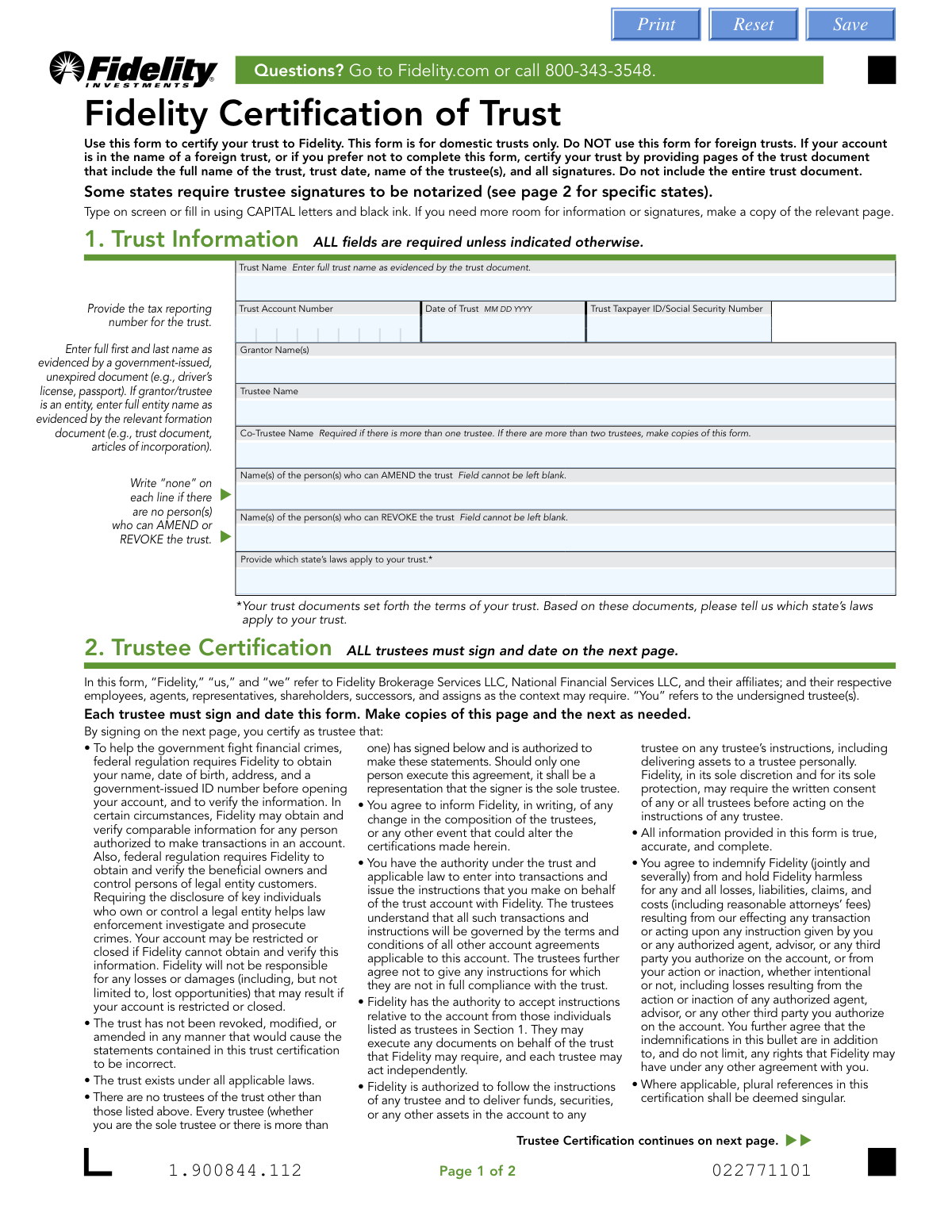
Individuals managing personal wealth, families planning for future generations, and legal professionals typically require these forms when opening brokerage accounts or updating beneficiary information. For example, when working with major financial firms, a Certification of Trust is often used to verify trustee authority without disclosing the private details of the entire trust agreement. Whether you are navigating specific fidelity forms or general estate planning forms, having accurate documentation is vital during life transitions, such as the appointment of a successor trustee or the restructuring of an estate.
Completing these complex legal documents accurately is vital for compliance and asset protection. Tools like Instafill.ai use AI to fill these forms in under 30 seconds, handling data accurately and securely to save you time on administrative tasks.
Every form on this page can be completed without typing. Instafill is form filling software that reads a PDF and fills it for you — including flat and scanned documents that carry no fillable fields at all.
Forms in This Category
The forms in this category have a median Form Complexity Index of 28/100 (Simple), measured across 1 forms by field count, input difficulty, length, conditional logic and structure. See how it is calculated.
| Form Name | Pages | FCI | |
|---|---|---|---|
| 1. | Fidelity Certification of Trust | 1 | Simple 28 |
- Enterprise-grade security & data encryption
- 99%+ accuracy powered by AI
- 1,000+ forms from all industries
- Complete forms in under 60 seconds
How to Choose the Right Form
Managing Your Fidelity Trust Accounts
When navigating trust documents and estate planning forms, the right choice depends on your specific financial institution and the level of privacy you wish to maintain. Currently, this category focuses on streamlining the administrative side of trust management specifically for those with Fidelity accounts.
When to Choose the Fidelity Certification of Trust
The Fidelity Certification of Trust is the essential document for trustees who need to establish or maintain accounts with Fidelity Investments. You should choose this form if you are in any of the following situations:
- Opening a New Account: When you are moving assets into a trust and need to open a brokerage or investment account in the trust's name.
- Updating Trustee Information: If a original trustee has passed away or resigned, and a successor trustee is taking over management of the Fidelity assets.
- Verifying Authority for Transactions: If you need to prove to Fidelity that you have the specific legal power to buy, sell, or withdraw assets without revealing the entire private trust agreement.
Why Use a Certification Form?
While general estate planning forms often include the entire trust indenture, the Fidelity Certification of Trust serves a more practical, day-to-day purpose. It is designed to:
- Protect Your Privacy: It allows you to keep the names of beneficiaries and the specific distribution of assets private, providing Fidelity only with the legal facts they require (such as the trust date and tax ID).
- Simplify Compliance: Because it is a standardized Fidelity form, using it ensures that you are providing exactly the information their legal department needs, reducing the risk of your request being rejected.
If your goal is to manage, update, or verify a trust-held account at Fidelity, this is the correct form to select. Using Instafill.ai to complete this document ensures that your sensitive legal information is formatted correctly and ready for submission.
Form Comparison
| Form | Purpose | Who Files It | Key Information | When to Use |
|---|---|---|---|---|
| Fidelity Certification of Trust | Certifies trust details to Fidelity without sharing the full trust agreement. | Authorized trustees of a domestic trust. | Trust name, date, tax ID, and identity of acting trustees. | Opening or updating a Fidelity account held in the name of a trust. |
Tips for trust documents
Ensure every name listed on the certification matches the original trust instrument exactly. Even minor discrepancies in spelling or middle initials can cause significant processing delays with financial institutions like Fidelity.
When filling out trust certifications, always use the date the trust was originally established rather than the current date. This ensures the financial institution can correctly link the certification to your existing estate planning records.
Carefully review the sections regarding whether trustees can act independently or must act together. Misrepresenting this authority can lead to rejected transactions or legal complications when managing trust assets later on.
AI-powered tools like Instafill.ai can complete these complex forms in under 30 seconds with high accuracy. Your sensitive data stays secure during the process, providing a practical and time-saving solution for managing multiple trust documents.
While a Certification of Trust allows you to omit the full trust document, keep the original instrument nearby for reference. You will need it to accurately cite specific article numbers or sections that define your powers as a trustee.
Confirm whether the trust uses a Social Security number or a separate Employer Identification Number (EIN). Entering the wrong tax ID is a common mistake that can trigger tax reporting issues and account freezes.
Frequently Asked Questions
These documents allow trustees to verify the existence and details of a trust to financial institutions without revealing sensitive private distribution details. It summarizes essential facts like the trust's legal name, its effective date, and the identity of the current trustees authorized to manage the account.
Providing the full trust document can compromise the privacy of beneficiaries and expose specific inheritance terms to third parties. A certification form acts as a legal shorthand, providing only the specific information a financial institution needs to facilitate account management and verify signing authority.
Generally, the currently serving trustees must sign these documents to certify their authority. Depending on the trust's specific terms, you may need signatures from all co-trustees or just one, depending on whether the trust allows for independent or joint action.
You should update your documentation whenever there is a change in trustees, a change to the trust's legal name, or if the trust has been amended in a way that affects account management. Many institutions also require a fresh certification when opening a new account or after a certain number of years have passed.
Yes, AI tools like Instafill.ai can streamline the process by automatically extracting information from your original trust agreement and populating the certification form. This technology ensures that names, dates, and legal descriptions are transferred accurately from your source documents into the required fields.
Using AI-powered services, you can complete complex trust documents in under 30 seconds. These tools analyze your source files to accurately extract data and place it into the correct fields, significantly reducing the time spent on manual data entry and minimizing errors.
Most forms require the formal name of the trust, the date it was executed, the Taxpayer Identification Number (often an EIN or SSN), and the names of all acting trustees. You may also need to specify whether the trust is revocable or irrevocable and list any specific limitations on trustee powers.
Many financial institutions require trust certifications to be signed in the presence of a notary public to verify the identity of the trustees and the authenticity of the document. You should check the specific instructions on the form to see if a notary seal is mandatory for your submission.
Completed and signed forms are typically submitted directly to the institution via their secure online message center, by mail, or in person at a local investor center. Ensure all required signatures and notary seals are clearly visible if you are uploading a scanned copy of the document.
The Grantor (or Settlor) is the person who created the trust and contributed the assets, while the Trustee is the individual or entity responsible for managing those assets. While these roles are often held by the same person in revocable living trusts, they must be identified separately on the form.
Yes, certification forms are designed to accommodate various trust structures, including both revocable and irrevocable entities. You will simply need to indicate the specific type of trust and provide the relevant tax identification information associated with that specific legal structure.
No, the certification is a summary used for administrative purposes with third parties like banks or brokerage firms. It does not replace the original trust agreement, which remains the primary legal document governing the management and eventual distribution of your assets to beneficiaries.
Glossary
- Form Complexity Index
- Instafill’s 0–100 measure of how much effort a form takes to complete, calculated deterministically from the form’s own structure rather than estimated. It combines the number of fillable fields (the largest factor), how difficult those fields are to complete based on their type, the number of pages that contain fields, the amount of conditional “fill-only-if” logic, and how many sections the form is divided into, then adds modifiers for tables and repeating lists, bundled instruction pages, and dense page layouts. A higher score means the form is harder to fill out by hand. The forms in this category have a median Form Complexity Index of 28/100 (Simple). See exactly how it is calculated.
- Trustee
- The individual or organization appointed to manage the assets and follow the instructions outlined in the trust document.
- Grantor
- Also referred to as a settlor or trustor, this is the person who creates the trust and transfers their assets into it.
- Certification of Trust
- A condensed version of a trust agreement that proves the trust exists and identifies the trustees' authority without revealing private details like asset values.
- Successor Trustee
- A person designated to take over the management of the trust if the original trustee becomes incapacitated, dies, or resigns.
- Revocable Trust
- A type of trust that can be changed, updated, or canceled by the grantor at any time during their life.
- Irrevocable Trust
- A trust that generally cannot be modified or terminated once it is created, often used for tax planning or asset protection.
- Beneficiary
- Any person or entity designated to receive assets, income, or other benefits from the trust.
- Trust Agreement
- The full legal document that establishes the trust, sets its rules, and dictates how assets should be distributed to beneficiaries.