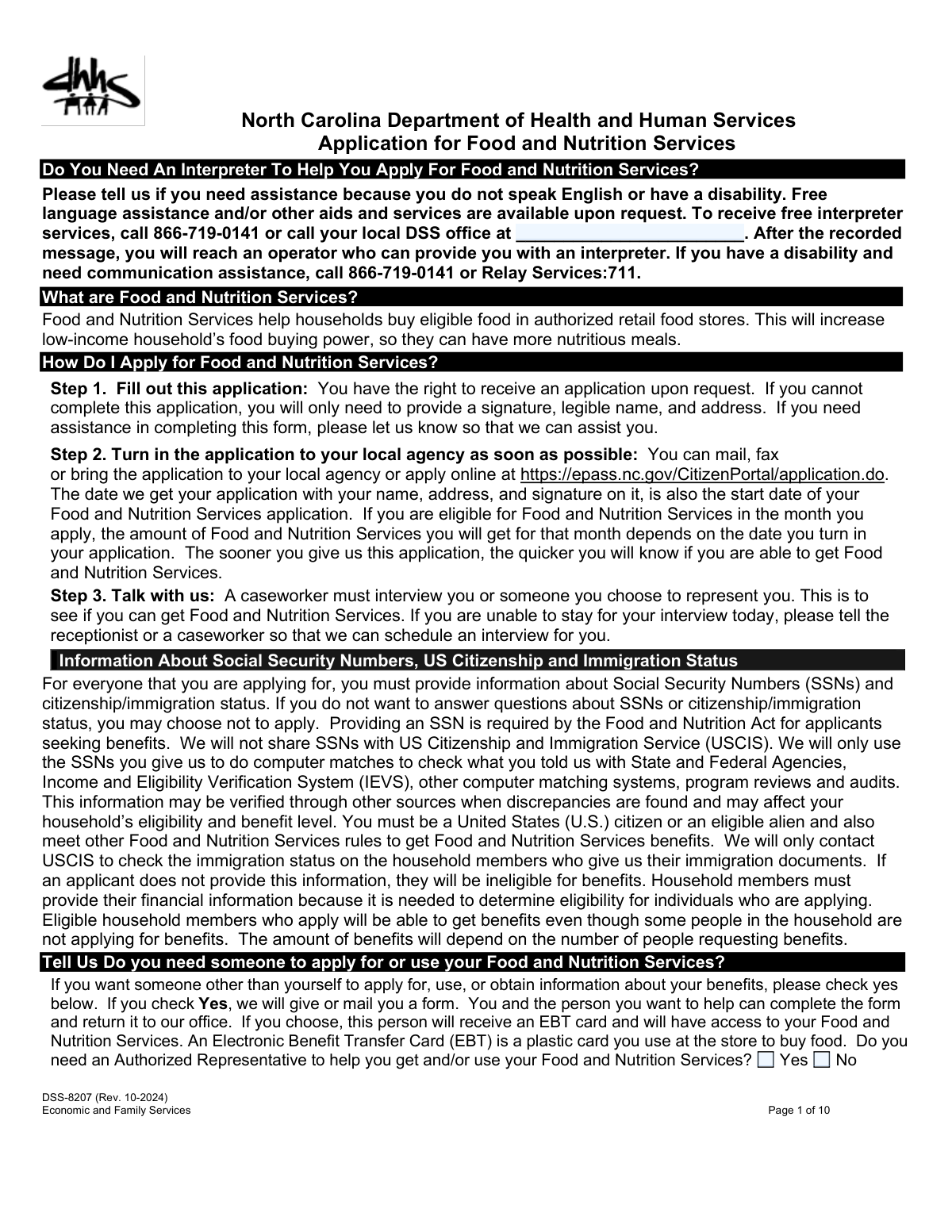
Yes! You can use AI to fill out Application for Food and Nutrition Services (SNAP)
This form is the official application for the Food and Nutrition Services program, also known as SNAP or food stamps. It is a comprehensive document used to collect detailed information about an applicant's household composition, income, financial resources, and living expenses to determine their eligibility for food assistance. Completing this application accurately is the crucial first step for low-income households to receive benefits that help them afford nutritious food, and today this form can be filled out quickly and accurately using AI-powered services like Instafill.ai, which can also convert non-fillable PDF versions into interactive fillable forms.
Our AI automatically handles information lookup, data retrieval, formatting, and form filling.
It takes less than a minute to fill out SNAP Application using our AI form filling.
Securely upload your data. Information is encrypted in transit and deleted immediately after the form is filled out.
Form specifications
| Form name: | Application for Food and Nutrition Services (SNAP) |
| Number of fields: | 601 |
| Number of pages: | 10 |
| Language: | English |
| Categories: | SNAP forms |
Instafill Demo: How to fill out PDF forms in seconds with AI
How to Fill Out SNAP Application Online for Free in 2026
Are you looking to fill out a SNAP APPLICATION form online quickly and accurately? Instafill.ai offers the #1 AI-powered PDF filling software of 2026, allowing you to complete your SNAP APPLICATION form in just 37 seconds or less.
Follow these steps to fill out your SNAP APPLICATION form online using Instafill.ai:
- 1 Navigate to Instafill.ai and upload or select the Application for Food and Nutrition Services form.
- 2 Use the AI assistant to provide personal details for every member of your household, including names, birth dates, and relationship to you.
- 3 Answer the guided questions about your household's financial assets, such as bank accounts, and all sources of income, including employment and other benefits.
- 4 Detail your monthly household expenses, including rent/mortgage, utilities, dependent care costs, and any medical expenses for elderly or disabled members.
- 5 Respond to specific eligibility questions regarding residency, work status, and any previous participation in assistance programs.
- 6 Carefully review all the information pre-filled by the AI for accuracy, then electronically sign and date the application to certify its contents.
Our AI-powered system ensures each field is filled out correctly, reducing errors and saving you time.
Why Choose Instafill.ai for Your Fillable SNAP Application Form?
Speed
Complete your SNAP Application in as little as 37 seconds.
Up-to-Date
Always use the latest 2026 SNAP Application form version.
Cost-effective
No need to hire expensive lawyers.
Accuracy
Our AI performs 10 compliance checks to ensure your form is error-free.
Security
Your personal information is protected with bank-level encryption.
Frequently Asked Questions About Form SNAP Application
This form is an application for Food and Nutrition Services, also known as SNAP or food stamps. These benefits are provided on an Electronic Benefit Transfer (EBT) card to help your household buy food.
You should list everyone who lives and buys and cooks meals with you. The form requires you to provide details for each person, even if they are not applying for benefits themselves.
Expedited Benefits allow you to receive your food assistance more quickly if your household has very low income and cash resources. The first section of the form asks questions about your income, cash on hand, and shelter costs to determine if you qualify.
You should gather proof of income for the last 30 days (like pay stubs), proof of assets (like bank statements), and records of your expenses (like rent receipts and utility bills). Having identification for all household members is also recommended.
Gross income is your total earnings before any taxes or other deductions are taken out. The form requires you to report the gross income for all working members of your household.
The form marks the Social Security Number field as optional. However, providing it for household members who are applying for benefits can help speed up the verification and application process.
Yes, you can apply for benefits even if you are homeless. The form has a section where you can specify your living situation, such as staying in a shelter, a vehicle, or another temporary arrangement.
You should report recurring household expenses like rent or mortgage, property taxes, utilities (electricity, gas, water, phone), and costs for child or dependent adult care. Reporting these expenses can help determine the amount of benefits you may receive.
Yes, the application asks specific questions about certain felony convictions for all household members. You must answer these questions truthfully, as they can impact eligibility for the program.
Assets include things like cash, money in checking and savings accounts, retirement accounts, stocks, bonds, and substantial lottery or gambling winnings. You must report the value of assets owned by anyone in your household.
The form has a dedicated section for self-employment income. You will need to provide the business name, type of business, hours worked, gross monthly income, and any monthly business expenses.
Yes, services like Instafill.ai use AI to auto-fill form fields accurately and save time. This can be particularly helpful for a detailed form like this to ensure all information is entered correctly.
You can upload the form's PDF to the Instafill.ai website. The platform's AI will identify all the fields, allowing you to fill them in quickly and accurately online before you print or submit the completed application.
If you have a non-fillable PDF, you can use a tool like Instafill.ai to make it interactive. The service converts flat PDFs into fillable forms so you can easily type your answers directly into the document.
Compliance SNAP Application
Validation Checks by Instafill.ai
1
Household Member Primary Applicant Completeness
Ensures the first household member listed, who is considered the primary applicant, has their full name and birth date entered. This information is the minimum required to identify the individual submitting the application. An application cannot be initiated without a clearly identified primary applicant, so failure would result in an immediate rejection for incompleteness.
2
Birth Date and Age Consistency
Validates that the 'Age' provided for each household member is mathematically consistent with their 'Birth Date'. The system should calculate the age based on the birth date and flag any significant discrepancies. This check is important for ensuring data accuracy, as eligibility for certain benefits or deductions can be age-dependent (e.g., for children or seniors).
3
Social Security Number Format Validation
Verifies that if a Social Security Number (SSN) is provided, it adheres to the standard 9-digit format (XXX-XX-XXXX or XXXXXXXXX). While the field is optional, submitting an incorrectly formatted number can cause failures in identity verification processes. This validation prevents malformed data from entering the system, which would require manual correction later.
4
Monetary Value Format
Checks that all fields intended to capture financial figures, such as income, asset values, and expense amounts, contain only valid numeric characters. This is critical for the system to perform accurate calculations for eligibility and benefit amounts. Submitting non-numeric text (e.g., 'unknown', 'N/A') in these fields would cause calculation errors and halt the automated assessment.
5
Standardized Date Format
Ensures all date fields throughout the form, including birth dates, employment start/end dates, and the signature date, are in a valid and consistent format (e.g., MM/DD/YYYY). Correctly formatted dates are essential for determining age, eligibility periods, and application timelines. An invalid date format would prevent the system from correctly interpreting critical temporal information, making the application un-processable.
6
Conditional Field Completion for Existing Benefits
Verifies that if the applicant answers 'Yes' to the question 'Does anyone get Food and Nutrition Services...', then the subsequent fields for 'who', 'What County or State', and benefit dates are filled out. This information is mandatory to check for and prevent duplicate benefit issuance, which is illegal. If this conditional logic fails, the application must be flagged for manual review to gather the missing details.
7
Asset Declaration Completeness
Validates that if the applicant checks 'Yes' to 'Does your household own any of the assets listed below', at least one asset type is selected and its corresponding 'Value or Worth' and 'Who Does This Belong To?' fields are completed. A 'Yes' answer without details is an incomplete declaration. This check ensures that all declared assets are properly documented for an accurate resource test.
8
Employment Dates Logic
Checks the logical sequence of employment dates, such as ensuring an 'End Date' in the 'Stopped Working' section is not before the 'Start Date' from the employment history. It also validates that the 'Last date Pay Received' is chronologically consistent with the employment end date. This prevents illogical data entry and ensures the timeline of income changes is accurate for eligibility determination.
9
Pregnancy Due Date Validity
Ensures that if the 'Pregnant' box is checked for a household member, the corresponding 'Due Date' field contains a valid, future date. Household size is a critical factor in benefit calculation, and an expected child changes this number. An invalid or past due date would make the household composition ambiguous and require clarification.
10
Signature Date Presence and Validity
Verifies that the 'Date Signed' field is not empty and contains a date that is on or before the application submission date. The signature date is a legal attestation to the accuracy of the provided information and establishes the official application date. An application without a valid signature date is considered incomplete and cannot be legally processed.
11
Cross-Section Household Member Name Consistency
Validates that any name entered in ownership or recipient fields (e.g., 'Who Gets the Money?', 'Who Does This Belong To?', 'Who Pays the Bill?') corresponds to a name listed in the 'People in your household' section. This ensures all income, assets, and expenses are correctly attributed to a declared household member. Mismatched names would create ambiguity and require manual reconciliation to prevent processing errors.
12
Ensures At Least One Household Member is Applying
Validates that at least one person listed in the household member grid has 'Yes' selected for the 'Applying for Benefits?' question. An application cannot be processed if no one in the household is actually requesting assistance. This check serves as a fundamental gatekeeper to ensure the application has a valid purpose.
13
Conditional Logic for Child Support Payments
Checks that if the applicant answers 'Yes' to paying court-ordered child support, the fields for 'Court Order Number', 'Date Established', and 'Obligated Amount' are completed. This information is necessary to correctly calculate allowable deductions from income. Failing to provide these details when required would lead to an inaccurate income assessment and potentially an incorrect benefit amount.
Common Mistakes in Completing SNAP Application
Applicants often list everyone living under the same roof, such as roommates or boarders, without considering the program's specific definition. For Food and Nutrition Services, a 'household' consists of people who purchase and prepare meals together. Incorrectly including individuals who manage their food separately can complicate the application, potentially leading to an incorrect benefit amount or denial. To avoid this, carefully read the 'Buy & Cook Together' question and only include individuals who meet this specific criteria.
The form specifically asks for 'Gross Pay (Pay Before Taxes),' which is the total amount earned before any deductions. Many applicants mistakenly report their 'net' or take-home pay, which is the amount on their paycheck after taxes and other withholdings. This under-reports income and can cause significant delays, require corrections, and may be flagged for review. Always refer to the 'gross pay' line on your pay stub to ensure you are providing the correct figure.
Applicants often fail to list all their allowable expenses, such as separate property tax bills, homeowner's insurance, HOA dues, or specific utility costs like garbage collection and telephone service. Forgetting to include these costs or providing inaccurate estimates means the agency cannot apply all eligible deductions. This results in a lower benefit amount than the household is actually entitled to. To maximize benefits, gather all recent bills (rent, mortgage, utilities, medical, child care) and list each expense accurately.
The application requires information on every person who lives in the home and shares meals, regardless of whether they are applying for benefits themselves. Applicants sometimes only list the individuals they believe are eligible (like children), omitting other adults. This is considered an incomplete application and will cause significant processing delays, as the agency needs a full picture of the household's composition and total income to determine eligibility. Always list every person who buys and cooks food with you, and use the 'Applying for Benefits? (Yes/No)' field to specify who needs assistance.
The initial questions about monthly income, cash on hand, and shelter costs are critical for determining eligibility for Expedited Benefits, which provides assistance within days. Applicants sometimes skip these questions, assuming they will be covered later in the application. Leaving these fields blank prevents the agency from screening for expedited service, potentially causing a delay of several weeks for a household in urgent need. Always fill out this section completely and accurately, even if the numbers are estimates.
A frequent issue is providing information that contradicts itself between different sections of the form. For example, listing an employer in the 'Earned Income' section but failing to list that person as a household member, or reporting a child support payment expense without listing the child it's for. These discrepancies create confusion and require a caseworker to follow up for clarification, significantly delaying the application's approval. Double-check that all names, income sources, and expenses are consistently reported throughout the entire document.
This form has highly specific categories for different types of income (e.g., SSI, Child Support) and assets (e.g., Checking, Retirement Accounts). A common error is to lump different financial resources together or place them in the wrong category, for example, listing a 401(k) as 'Stocks or Bonds.' Such misclassifications can trigger requests for additional documentation and slow down the approval process. Carefully review each category and report your financial resources in the appropriate fields to ensure accurate and timely processing.
When listing sources of income, such as an employer or a person providing financial support, the form asks for a name, address, and phone number. A common mistake is to provide only a name (e.g., 'Walmart') without the specific location's address or contact details. This incomplete information makes it impossible for the agency to verify the income, which is a required step. To avoid delays, always provide the full, complete contact information for every source of income listed.
This application has separate sections for child support received (as income) and child support paid to someone outside the household (as a deductible expense). Applicants frequently confuse these, for instance, by listing a payment they make in the income section. This critical error can drastically affect the eligibility calculation, leading to a denial or an incorrect benefit amount. Carefully read the section headings to ensure you are entering child support you receive in the 'Other Money' section and payments you make in the 'Household Expenses' section.
If this form is only available as a non-fillable PDF, applicants must print and complete it by hand. This often results in illegible handwriting, crossed-out answers, and information written outside the designated fields, making it difficult for agency staff to process. These issues can lead to data entry errors or rejection of the form. To avoid this, AI-powered tools like Instafill.ai can convert a flat PDF into a fillable version, allowing you to type your answers clearly and ensure the final document is clean and easy to read.
Saved over 80 hours a year
“I was never sure if my IRS forms like W-9 were filled correctly. Now, I can complete the forms accurately without any external help.”
Kevin Martin Green
Your data stays secure with advanced protection from Instafill and our subprocessors

Robust compliance program
Transparent business model
You’re not the product. You always know where your data is and what it is processed for.
ISO 27001, HIPAA, and GDPR
Our subprocesses adhere to multiple compliance standards, including but not limited to ISO 27001, HIPAA, and GDPR.
Security & privacy by design
We consider security and privacy from the initial design phase of any new service or functionality. It’s not an afterthought, it’s built-in, including support for two-factor authentication (2FA) to further protect your account.
Fill out SNAP Application with Instafill.ai
Worried about filling PDFs wrong? Instafill securely fills application-for-food-and-nutrition-services-snap forms, ensuring each field is accurate.