Yes! You can use AI to fill out Farm and Ranch Owners Application

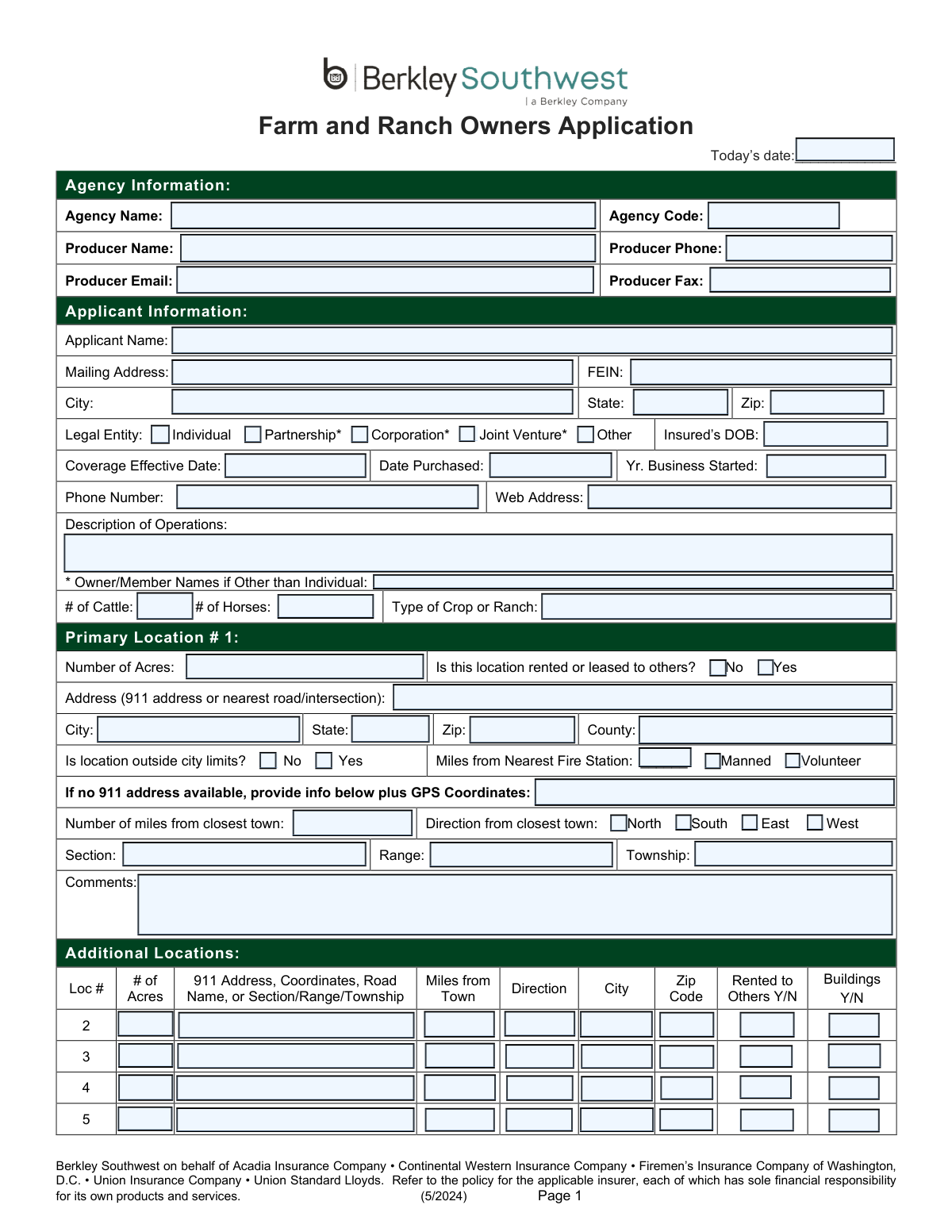
The Farm and Ranch Owners Application is a detailed document used by insurance providers, such as Berkley Southwest, to gather essential information from farm and ranch owners seeking insurance coverage. It collects data on the applicant, property details, operational descriptions, equipment, livestock, and potential liability risks to underwrite a policy and determine appropriate premiums. Today, this form can be filled out quickly and accurately using AI-powered services like Instafill.ai, which can also convert non-fillable PDF versions into interactive fillable forms.
Our AI automatically handles information lookup, data retrieval, formatting, and form filling.
It takes less than a minute to fill out Berkley Southwest Farm and Ranch Application using our AI form filling.
Securely upload your data. Information is encrypted in transit and deleted immediately after the form is filled out.

Form specifications

Form name: Farm and Ranch Owners Application
Number of pages: 8
Language: English
main-image

Instafill Demo: How to fill out PDF forms in seconds with AI

How to Fill Out Berkley Southwest Farm and Ranch Application Online for Free in 2026

Are you looking to fill out a BERKLEY SOUTHWEST FARM AND RANCH APPLICATION form online quickly and accurately? Instafill.ai offers the #1 AI-powered PDF filling software of 2026, allowing you to complete your BERKLEY SOUTHWEST FARM AND RANCH APPLICATION form in just 37 seconds or less.
Follow these steps to fill out your BERKLEY SOUTHWEST FARM AND RANCH APPLICATION form online using Instafill.ai:
  1. 1 Navigate to Instafill.ai and upload or select the Farm and Ranch Owners Application.
  2. 2 Use the AI assistant to automatically populate agency and applicant information, including names, addresses, and contact details.
  3. 3 Describe your farm or ranch operations, including property locations, acreage, types of crops or livestock, and provide details for all physical locations.
  4. 4 Select the required insurance coverages (e.g., Dwellings, Personal Property, Equipment, Liability) and specify desired limits and optional endorsements.
  5. 5 Complete the detailed schedules for dwellings, equipment, barns, and other structures by providing information on construction, age, value, and use.
  6. 6 Answer the general underwriting, property, and liability questions regarding business practices, safety measures, prior claims, and other potential risks.
  7. 7 Review all entered information for accuracy, make any necessary corrections, and then finalize the application for submission to the insurance agency.

Our AI-powered system ensures each field is filled out correctly, reducing errors and saving you time.

Why Choose Instafill.ai for Your Fillable Berkley Southwest Farm and Ranch Application Form?

Speed

Complete your Berkley Southwest Farm and Ranch Application in as little as 37 seconds.

Up-to-Date

Always use the latest 2026 Berkley Southwest Farm and Ranch Application form version.

Cost-effective

No need to hire expensive lawyers.

Accuracy

Our AI performs 10 compliance checks to ensure your form is error-free.

Security

Your personal information is protected with bank-level encryption.

Frequently Asked Questions About Form Berkley Southwest Farm and Ranch Application

This application is used to gather the necessary information to apply for property and liability insurance coverage for your farm or ranch operations through Berkley Southwest and its associated insurance companies.

Any individual or business entity that owns and operates a farm or ranch and is seeking to obtain or renew their insurance policy should complete this application.

If a 911 address is not available, you must provide the property's GPS coordinates or its legal land description, including the Section, Range, and Township numbers.

Use the 'Primary Location #1' section for your main property, and then list any other properties in the 'Additional Locations' table on the first page.

Coverage A is for your dwellings, Coverage C is for household personal property, Coverage E is for farm equipment and livestock, and Coverage G is for barns, silos, and other farm structures.

Yes, you must select the 'Custom Farming' optional endorsement on page 2 and provide the total amount of receipts from that work to ensure you are properly covered.

Actual Cash Value (ACV) covers the depreciated value of your dwelling, while Replacement Cost (RC) covers the cost to rebuild it with similar materials without deducting for depreciation. Replacement Cost generally provides better protection.

You can insure smaller items under 'Miscellaneous Farm Equipment,' but you should list larger, more valuable items like tractors and harvesters individually on the 'Equipment Schedule' on page 4 to ensure they are fully covered.

Yes, you must disclose any 'Agritainment' exposures on page 7. These activities present unique risks and may require additional liability coverage.

You may need to attach schedules for personal property, copies of hold harmless agreements for activities like hunting, or certificates of liability from tenants, depending on your specific operations.

You should submit the completed application to your insurance agent or producer. They will review it and forward it to the insurance company for processing.

Yes, services like Instafill.ai use AI to accurately auto-fill form fields with your saved information, which can save you a significant amount of time and reduce errors.

Simply upload the Farm and Ranch Owners Application PDF to the Instafill.ai platform. Its AI will make all the fields interactive, allowing you to easily type in your information, save your progress, and complete the form online.

If you have a non-fillable or 'flat' PDF, you can use a service like Instafill.ai. It can convert the document into a fully interactive, fillable form that you can complete on your computer.

Compliance Berkley Southwest Farm and Ranch Application
Validation Checks by Instafill.ai

1
FEIN Format Validation
This check ensures the Federal Employer Identification Number (FEIN) is entered in the correct XX-XXXXXXX format. A valid FEIN is crucial for correctly identifying the business entity for legal and tax purposes. If the format is incorrect, the submission should be rejected with an error message prompting the user to enter a valid 9-digit FEIN.
2
Conditional Requirement for Owner/Member Names
This validation verifies that if the 'Legal Entity' is selected as 'Partnership', 'Corporation', 'Joint Venture', or 'Other', the 'Owner/Member Names' field must be completed. This information is essential for underwriting to understand the ownership structure and identify all parties to be insured. A failure to provide these names would result in an incomplete application and prevent proper risk assessment.
3
Logical Date Sequence Validation
This check ensures that the dates provided are chronologically logical: 'Coverage Effective Date' must be on or after 'Today’s date', and both 'Date Purchased' and 'Yr. Business Started' must be before or on the 'Coverage Effective Date'. This prevents data entry errors and ensures the timeline of the business and policy is accurate for underwriting. If the dates are illogical, the form will prompt the user to correct the entries.
4
Dwelling Age and Required Updates
This validation triggers if a dwelling's 'Year Built' is more than 30 years prior to the current date. If so, it confirms that the 'Electrical' and 'Plumbing' update year fields have been filled out. This is a critical risk assessment factor, as outdated systems significantly increase the risk of fire or water damage. Failure to provide update years for older homes will flag the application for manual review or rejection.
5
Primary Location Address Completeness
This check ensures that a valid physical location is provided for the primary property. The form must contain either a complete 'Address (911 address or nearest road/intersection)' OR a complete set of alternate location details (GPS Coordinates, miles/direction from town, Section/Range/Township). This is fundamental for locating the insured property for risk assessment, rating, and claims. An application lacking this information cannot be processed.
6
Custom Farming Endorsement Details
This validation ensures that if the 'Custom Farming' endorsement checkbox is selected, the corresponding 'Amount of Receipts' and 'Custom Farming Description' fields are also completed. This information is necessary for the insurer to understand the scope of the additional risk and to calculate the correct premium for the endorsement. An incomplete entry will prevent the endorsement from being added and may require the producer to follow up for more information.
7
Hunting and Fishing Liability Requirements
This check verifies that if the 'Hunting and Fishing Liability' endorsement is selected, the 'Receipts' amount is provided. The form notes that a copy of a hold harmless agreement is required, so this validation should also flag the submission to ensure this document is attached. This is a high-risk exposure, and failure to provide the required information and documentation will result in the rejection of this specific coverage request.
8
Increased Special Limits Maximums
This validation checks the values entered for the 'Increased Special Limits' endorsement. It ensures that the amounts entered for Jewelry, Silverware, Firearms, Money, and Securities do not exceed the maximum limits specified on the form (e.g., $6,500 for Jewelry). This prevents the applicant from requesting coverage amounts that are not offered. If a value exceeds the maximum, an error message will appear, requiring the user to correct the amount.
9
Producer Contact Information Format
This check validates that the 'Producer Phone' and 'Producer Email' fields are not only present but also adhere to standard formats (e.g., (XXX) XXX-XXXX or XXX-XXX-XXXX for phone, and a valid email structure like [email protected]). Correct contact information is essential for the insurer to communicate with the agency regarding the application. An invalid format would trigger an error, ensuring the data is corrected before submission.
10
Liability Limit Selection Logic
This validation ensures that if 'Coverage H/I – Liability' is selected, exactly one option from the 'Liability Occurrence Limit' choices (e.g., $100,000, $300,000, etc.) is also selected. The occurrence limit is a fundamental component of liability coverage. The form cannot be processed without this selection, as it defines the core of the liability policy's protection.
11
Horse Boarding Conditional Questions
This check activates if the applicant answers 'Yes' to 'Does applicant board, train, or breed horses for others?'. It then verifies that the subsequent questions regarding 'Hold Harmless Agreements' and 'statutory equine warning signs' are answered. This is a significant liability exposure, and the answers are critical for underwriting to determine eligibility and pricing. An incomplete section will halt processing until the required details are provided.
12
Cancellation Explanation Requirement
This validation ensures that if the applicant checks 'Yes' for 'Has coverage ever been cancelled or non-renewed?', the 'Reason' text field must be filled in. An applicant's prior insurance history, especially cancellations, is a major red flag for underwriters. Failure to provide an explanation will render the application incomplete and will likely lead to its rejection pending clarification.
13
Prior Loss Details Completeness
This check verifies that for every 'Claim Date' entered in the 'Prior Losses' section, a corresponding 'Loss Amount' and 'Details' are also provided. Incomplete loss history prevents accurate risk assessment and pricing, as underwriters cannot evaluate the frequency or severity of past claims. The system should prompt the user to complete all fields for each reported loss before allowing submission.
14
Coverage Selection Prerequisite
This validation ensures that at least one of the main coverage checkboxes (Coverage A, C, E, G, or H/I) is selected on page 2. An application cannot be processed without a request for at least one primary line of coverage. If no coverages are selected, the form submission should be blocked with a message indicating that coverage must be chosen.

Common Mistakes in Completing Berkley Southwest Farm and Ranch Application

Providing Incomplete or Ambiguous Location Information

Applicants often fail to provide a complete 911 address, or if unavailable, the full set of alternative details like GPS coordinates or Section/Range/Township details. This happens because they may not have all the information handy or may not understand the terminology. Incomplete location data can delay quoting, prevent accurate risk assessment (e.g., distance to fire station), and could cause issues locating the property during a claim. To avoid this, gather all property deeds and location data before starting; AI-powered tools like Instafill.ai can help by using mapping integrations to automatically find and populate precise GPS coordinates and validate addresses.

Selecting Coverages Without Providing Required Details

A frequent error is checking a box for a specific coverage, such as Coverage A (Dwellings) or Coverage G (Barns), but then failing to complete the corresponding detailed information on pages 3 and 5. This oversight leaves the underwriter with no information to price or even grant the coverage, leading to back-and-forth communication and significant delays. To prevent this, treat the form as a checklist; for every coverage box you tick on page 2, ensure you navigate to and fully complete the referenced page. Smart form-filling tools like Instafill.ai can help by highlighting required sections based on your coverage selections.

Forgetting to Fill in Details for Optional Endorsements

Many applicants select an optional endorsement, like 'Custom Farming' or 'Hunting and Fishing Liability', but forget to fill in the required associated information, such as the 'Amount of Receipts'. Without this data, the endorsement cannot be added to the policy, creating a critical coverage gap. To avoid it, carefully review each selected endorsement and provide the corresponding limit or amount. Using an intelligent form filler like Instafill.ai can prevent this by automatically prompting for required data fields as soon as an endorsement checkbox is selected.

Providing Incomplete Details for Scheduled Farm Equipment

When listing items on the 'Equipment Schedule', people frequently omit crucial details like the serial number, year, make, and model. This happens when the information isn't readily available, but without these specific identifiers, the equipment is not properly scheduled, and coverage may revert to a lower, unscheduled limit or be disputed during a claim. Since this form is a non-fillable PDF, a tool like Instafill.ai can convert it into a fillable version, making it easier to enter and manage detailed schedules for multiple pieces of equipment.

Failing to Disclose High-Risk Activities or Features

Applicants sometimes neglect to mention high-risk exposures like trampolines, swimming pools, 'agritainment' activities (e.g., hayrides, corn mazes), or certain dog breeds. This may be unintentional or an attempt to lower premiums, but it constitutes misrepresentation and can lead to a claim being denied or the policy being voided entirely. Always disclose all activities, features, and animals on the property, no matter how minor they seem, and provide the detailed descriptions requested.

Answering 'Yes' to a Question Without Providing the Required Explanation

The form contains numerous questions that require a detailed description if the answer is 'Yes' (e.g., 'Has coverage ever been cancelled?', 'Are there any unusual hazards present?'). A common mistake is to check 'Yes' but leave the description field blank. This forces the underwriter to halt the process and request the missing information, causing delays. To avoid this, treat the description as a mandatory field whenever you answer 'Yes'; AI form fillers like Instafill.ai can enforce this logic, preventing incomplete submissions.

Incorrectly Identifying the Applicant Name for a Business Entity

When the farm is a partnership or corporation, applicants sometimes list their personal name as the 'Applicant Name' instead of the legal business name, and may forget to list all owners/members. This can cause legal and coverage issues, as the policy must be issued in the name of the legal entity that owns the property. Ensure the 'Applicant Name' exactly matches the legal name on your business formation documents and list all partners or members as required.

Guessing the Age of Roofs and Building Systems

For dwellings and barns older than 30 years, the form asks for the roof age and the year of electrical and plumbing updates. Applicants who don't know the exact dates may guess or leave the fields blank. Inaccurate information can lead to incorrect rating or even ineligibility for certain coverages like Replacement Cost, as the condition of these systems are critical underwriting factors. Review maintenance records or consult with a contractor to provide the most accurate dates possible.

Confusing 'Scheduled Livestock' and 'Animal Collision' Coverages

The form notes that Animal Collision coverage should not be selected if Scheduled Livestock is requested, indicating a common point of confusion. Applicants may select both, thinking they are getting extra protection, which can lead to redundant coverage or processing delays. It's important to understand that Basic and Broad perils for Scheduled Livestock already include collision, so the separate Animal Collision coverage is for unscheduled animals. Carefully read all notes on the form to avoid selecting conflicting or unnecessary coverages.

Omitting or Underreporting Prior Losses

Applicants may be tempted to omit or downplay prior claims in the 'Prior Losses' section, hoping to secure a better premium. However, insurers run claim history reports (like CLUE reports) as a standard part of underwriting, so this information is easily verifiable. Failing to disclose prior losses accurately is considered misrepresentation and can lead to an immediate application denial or the cancellation of a policy that has already been issued. Always provide a complete and honest five-year loss history.
Saved over 80 hours a year

“I was never sure if my IRS forms like W-9 were filled correctly. Now, I can complete the forms accurately without any external help.”

Kevin Martin Green

Your data stays secure with advanced protection from Instafill and our subprocessors

Robust compliance program

Transparent business model

You’re not the product. You always know where your data is and what it is processed for.

ISO 27001, HIPAA, and GDPR

Our subprocesses adhere to multiple compliance standards, including but not limited to ISO 27001, HIPAA, and GDPR.

Security & privacy by design

We consider security and privacy from the initial design phase of any new service or functionality. It’s not an afterthought, it’s built-in, including support for two-factor authentication (2FA) to further protect your account.

Fill out Berkley Southwest Farm and Ranch Application with Instafill.ai

Worried about filling PDFs wrong? Instafill securely fills farm-and-ranch-owners-application forms, ensuring each field is accurate.