Yes! You can use AI to fill out Form 203, Schedule of Reconciling Items

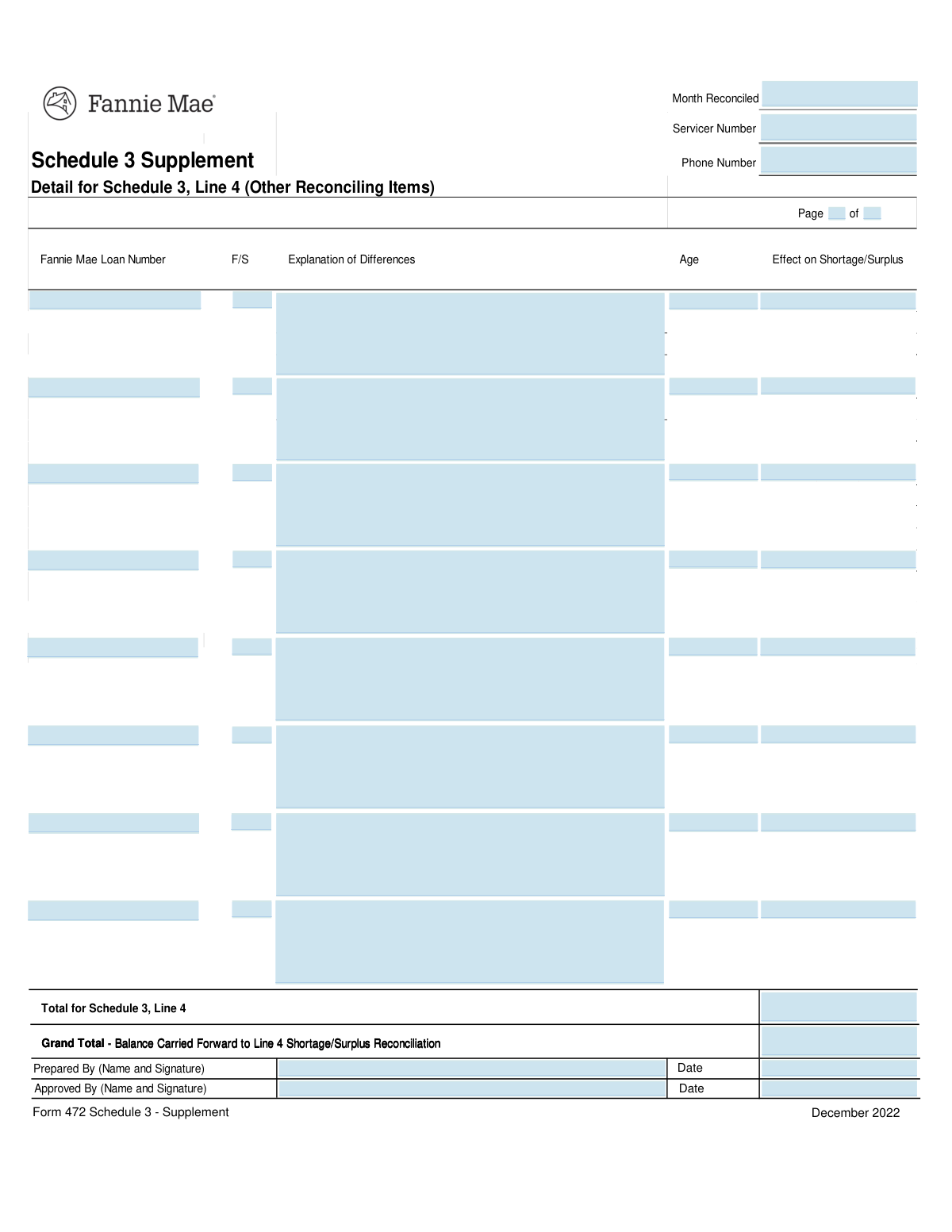
Fannie Mae Form 203, Schedule of Reconciling Items, is a critical document for mortgage servicers to report and explain differences between their records and Fannie Mae's custodial account statements. It ensures financial transparency and proper accounting for loan-related funds, detailing each discrepancy's loan number, age, and financial impact. Today, this form can be filled out quickly and accurately using AI-powered services like Instafill.ai, which can also convert non-fillable PDF versions into interactive fillable forms.
Our AI automatically handles information lookup, data retrieval, formatting, and form filling.
It takes less than a minute to fill out Fannie Mae Form 203 using our AI form filling.
Securely upload your data. Information is encrypted in transit and deleted immediately after the form is filled out.

Form specifications

Form name: Form 203, Schedule of Reconciling Items
Number of fields: 51
Number of pages: 1
Language: English
main-image

Instafill Demo: How to fill out PDF forms in seconds with AI

How to Fill Out Fannie Mae Form 203 Online for Free in 2026

Are you looking to fill out a FANNIE MAE FORM 203 form online quickly and accurately? Instafill.ai offers the #1 AI-powered PDF filling software of 2026, allowing you to complete your FANNIE MAE FORM 203 form in just 37 seconds or less.
Follow these steps to fill out your FANNIE MAE FORM 203 form online using Instafill.ai:
  1. 1 Navigate to Instafill.ai and upload or select Fannie Mae Form 203, Schedule of Reconciling Items.
  2. 2 Enter the reconciliation month, your servicer number, and contact phone number in the designated header fields.
  3. 3 For each reconciling item, input the specific Fannie Mae Loan Number, F/S code, and a detailed explanation of the discrepancy.
  4. 4 Specify the age of each item and its financial 'Effect on Shortage/Surplus' in the corresponding columns.
  5. 5 Calculate and enter the 'Total for Schedule 3, Line 4' and the 'Grand Total - Balance Carried Forward' at the bottom of the form.
  6. 6 Review all entered information for accuracy, then have the preparer and approver provide their names, signatures, and dates.
  7. 7 Securely download, print, or share the completed Form 203 directly from the platform.

Our AI-powered system ensures each field is filled out correctly, reducing errors and saving you time.

Why Choose Instafill.ai for Your Fillable Fannie Mae Form 203 Form?

Speed

Complete your Fannie Mae Form 203 in as little as 37 seconds.

Up-to-Date

Always use the latest 2026 Fannie Mae Form 203 form version.

Cost-effective

No need to hire expensive lawyers.

Accuracy

Our AI performs 10 compliance checks to ensure your form is error-free.

Security

Your personal information is protected with bank-level encryption.

Frequently Asked Questions About Form Fannie Mae Form 203

This form is used to detail and explain specific reconciling items that contribute to a shortage or surplus in a servicer's custodial account for Fannie Mae loans. It provides a breakdown of discrepancies found during the monthly reconciliation process.

This form must be completed by the loan servicer responsible for managing Fannie Mae loans. It is typically prepared by an accounting or servicing professional and then reviewed and approved by a manager.

Your Servicer Number is the unique identification number assigned to your institution by Fannie Mae. It should be available in your company's records or on previous correspondence and reports filed with Fannie Mae.

The 'F/S' column likely requires a specific code related to the type of reconciling item, such as a 'Foreclosure' or 'Short Sale' status code. You should refer to your servicer guide or Fannie Mae's instructions for a list of valid codes.

Your explanation should be clear and concise, but provide enough detail for an auditor to understand the nature of the discrepancy without needing additional research. Include relevant dates, transaction types, and the root cause of the difference.

In the 'Age' column, enter the age of the reconciling item, which is the time elapsed since the discrepancy first occurred. This is typically measured in days or months, as specified by reporting guidelines.

This column requires you to enter the specific dollar amount that the reconciling item contributes to the overall shortage or surplus. Ensure you use a consistent format (e.g., negative numbers for shortages) as required by the main reconciliation report.

If you have more items than can fit on a single page, you should use additional copies of the form. Make sure to number the pages correctly (e.g., 'Page 1 of 2') and ensure your grand totals are calculated correctly across all pages.

This field is the sum of the 'Effect on Shortage/Surplus' for all items listed on the form. This total is then carried forward to Line 4 of the main shortage/surplus reconciliation report to be included in the final calculation.

The 'Approved By' signature must be from a manager or other authorized individual within your organization who has reviewed the prepared form for accuracy and completeness. This person is typically a supervisor to the preparer.

Yes, AI-powered services like Instafill.ai can help you fill out this form more efficiently. These tools can accurately auto-fill fields based on your data, reducing manual entry and saving time.

You can use a service like Instafill.ai to complete this form online. Simply upload the form, and the AI will identify the fields, allowing you to enter your information digitally and then save or print the completed document.

If you have a non-fillable or 'flat' PDF, you can use a tool like Instafill.ai to make it interactive. The service converts the static form into a fillable one, so you can easily type your information directly into the fields.

Compliance Fannie Mae Form 203
Validation Checks by Instafill.ai

1
Month Reconciled is a Valid and Past/Present Date
This check ensures the 'Month Reconciled' field contains a valid month and year format (e.g., MM/YYYY) and is not a future date. It is crucial for accurate record-keeping and auditing to associate the reconciliation with the correct time period. A failed validation would prevent submission and prompt the user to enter a valid, non-future month.
2
Servicer Number Format Validation
This validation verifies that the 'Servicer Number' is a numeric value and conforms to a specific length or pattern expected by the system. This ensures data integrity and allows the form to be correctly associated with a specific servicer in the database. If the format is incorrect, the system cannot process the form, leading to rejection.
3
Phone Number Format Validation
This check ensures the 'Phone Number' field is entered in a standard, recognizable format (e.g., (XXX) XXX-XXXX or XXX-XXX-XXXX). Proper formatting is essential for data consistency and ensures the contact number is usable if follow-up is required. An invalid format would trigger an error, requiring the user to correct the entry before proceeding.
4
Page Number Logical Consistency
This validation checks the two 'Page Number' fields, assuming a 'Page X of Y' structure. It ensures that both are positive integers and that the current page number (X) is less than or equal to the total number of pages (Y). This prevents illogical pagination that could cause confusion or indicate missing pages. A failure would highlight the fields for correction.
5
Fannie Mae Loan Number Format and Existence
This check validates that the 'Fannie Mae Loan Number' in each entered row follows the expected format (e.g., a specific number of digits). It may also cross-reference the number against a database to ensure it is a valid, active loan number. This is critical for linking the reconciliation item to the correct account, and failure would prevent the item from being processed.
6
Reconciling Item Row Completeness
This validation ensures that if a 'Fannie Mae Loan Number' is entered in a row, all other fields in that same row ('F/S', 'Explanation of Differences', 'Age', 'Effect on Shortage/Surplus') are also filled out. This prevents incomplete or partial data entries which are unusable for reconciliation purposes. If a row is incomplete, the user will be prompted to either complete it or clear it.
7
F/S Code Validity
This check verifies that the 'F/S' code entered in each row is one of the predefined, valid codes for reconciling items. Using incorrect codes can lead to misclassification of financial differences and incorrect reporting. The system should reject any entry with an unrecognized code and may provide a list of valid options to the user.
8
Age of Item Format and Logic
This validation ensures the 'Age' field contains a positive number, potentially followed by a unit like 'days' or 'months'. The age of a reconciling item is a key metric for tracking how long issues have been outstanding. An invalid or non-positive value would be flagged for correction to ensure accurate reporting and prioritization.
9
Effect on Shortage/Surplus is a Valid Currency Amount
This check validates that the 'Effect on Shortage/Surplus' field contains a valid numerical or currency value (e.g., 123.45 or -50.00). This field is fundamental to the financial calculation of the form, and non-numeric data would break the summation logic. A failed validation would require the user to input a proper monetary value.
10
Total Calculation Accuracy
This is a crucial cross-field validation that sums all the values from the 'Effect on Shortage/Surplus' fields in each row and compares the result to the value entered in 'Total for Schedule 3, Line 4'. This ensures the summary total is arithmetically correct and reflects the sum of its parts. A mismatch would indicate a calculation error and block submission until corrected.
11
Grand Total Consistency Check
This check verifies that the 'Grand Total - Balance Carried Forward' value matches the 'Total for Schedule 3, Line 4'. This ensures consistency between the calculated total for the page and the final balance being carried forward. A discrepancy could indicate a manual entry error or a misunderstanding of the form's workflow, requiring user review.
12
Prepared By Date is Valid and Logical
This validation ensures the 'Prepared By Date' is a valid date and is not in the future. It also checks that this date is on or after the 'Month Reconciled', ensuring a logical sequence of events. An invalid date would compromise the audit trail of the document, so the system will require a valid date before accepting the form.
13
Approval Date Sequence Validation
This check ensures the 'Approved By Date' is a valid date that occurs on or after the 'Prepared By Date'. This logic is critical for maintaining a proper workflow and audit trail, as a document cannot be approved before it has been prepared. If the approval date is earlier than the preparation date, the form submission will be blocked.
14
Required Signatures and Names are Present
This validation confirms that the 'Prepared By Name and Signature' and 'Approved By Name and Signature' fields are not empty. These fields are essential for accountability and authorization, confirming who performed and reviewed the reconciliation. Missing signatures would render the form invalid for auditing purposes and the system would require them for completion.

Common Mistakes in Completing Fannie Mae Form 203

Incorrect or Transposed Fannie Mae Loan Number

The Fannie Mae Loan Number is a long, unique identifier prone to data entry errors like typos or digit transposition. An incorrect number makes the entire reconciling item untraceable, leading to rejection and requiring manual investigation to find the correct loan. Always double-check the loan number against source documents before submission. AI-powered tools like Instafill.ai can help by auto-populating from a source of truth, reducing manual entry errors.

Insufficient Detail in 'Explanation of Differences'

Users often provide vague or incomplete descriptions like 'timing difference' or 'payment error' in the explanation field. This lack of detail forces the reviewer to request more information, causing significant delays in resolving the discrepancy. To avoid this, provide a clear, concise, and complete explanation that details the 'what', 'why', and 'when' of the difference, allowing for immediate understanding and resolution.

Ambiguous 'Age' of Reconciling Item

The form asks for the item's age in 'days or months,' but users frequently enter a number without specifying the unit (e.g., just '30'). This ambiguity can lead to major misinterpretations, as '30' could mean 30 days or 30 months, drastically changing the item's priority and perceived severity. Always explicitly state the unit (e.g., '30 Days' or '2 Months') to prevent confusion and ensure accurate reporting.

Manual Calculation Errors in Totals

The 'Total for Schedule 3' and 'Grand Total' fields require manual summation of the 'Effect on Shortage/Surplus' column. Simple arithmetic mistakes are very common and can invalidate the entire reconciliation report, requiring resubmission. To prevent this, use a calculator or spreadsheet to sum the values and double-check the result. AI form-filling tools can often perform these calculations automatically, eliminating human error.

Incorrect Sign for 'Effect on Shortage/Surplus'

When entering the financial impact, users may forget to use a negative sign (-) for amounts that decrease a surplus or increase a shortage. This error reverses the financial meaning of the entry and throws off the grand total, making the reconciliation inaccurate. It is crucial to carefully consider whether the item is a debit or a credit to the balance and apply the correct positive or negative sign.

Using Invalid or Missing 'F/S' Codes

The 'F/S' field requires a specific code to categorize the reconciling item, but users may not know the correct code, use an outdated one, or leave it blank. This prevents proper automated processing and reporting, often causing the submission to be flagged for manual review or rejected. Always refer to the most current servicer guide or code list to find the correct 'F/S' code for each item.

Missing Signatures or Approval Dates

A frequent and critical error is forgetting to complete the 'Prepared By' and 'Approved By' signature and date fields. An unsigned or undated form is considered unauthorized and invalid, leading to immediate rejection and processing delays. Before submitting, conduct a final review to ensure all authorization fields are properly signed and dated, with the approval date being on or after the preparation date.

Inconsistent 'Month Reconciled' Format

The 'Month Reconciled' field is often filled out inconsistently, with users entering 'June', '06', '06/24', or 'June 2024'. This lack of a standard format can create data aggregation and filtering issues for the receiving party. For clarity and consistency, use the full month and year (e.g., 'June 2024') unless a specific format is requested.

Forgetting to Complete Page Numbering

When a report spans multiple pages, it is common to forget to fill out the 'Page X of Y' fields. This oversight can lead to confusion if pages are scanned or submitted out of order, and may result in an incomplete review if a page is presumed missing. Always complete the page numbering on every page to ensure the integrity and completeness of the submission.

Mismatch Between Preparer and Approver

For compliance and internal control purposes, the person who prepares the form should not be the same person who approves it. However, individuals sometimes sign in both the 'Prepared By' and 'Approved By' fields, which violates the principle of four-eyes review. This can lead to the form being rejected by audit or compliance departments. Ensure a separate, authorized individual reviews and signs the approval section. If the form is a non-fillable PDF, a tool like Instafill.ai can convert it into a fillable version to easily facilitate digital preparation and approval workflows.
Saved over 80 hours a year

“I was never sure if my IRS forms like W-9 were filled correctly. Now, I can complete the forms accurately without any external help.”

Kevin Martin Green

Your data stays secure with advanced protection from Instafill and our subprocessors

Robust compliance program

Transparent business model

You’re not the product. You always know where your data is and what it is processed for.

ISO 27001, HIPAA, and GDPR

Our subprocesses adhere to multiple compliance standards, including but not limited to ISO 27001, HIPAA, and GDPR.

Security & privacy by design

We consider security and privacy from the initial design phase of any new service or functionality. It’s not an afterthought, it’s built-in, including support for two-factor authentication (2FA) to further protect your account.

Fill out Fannie Mae Form 203 with Instafill.ai

Worried about filling PDFs wrong? Instafill securely fills form-203-schedule-of-reconciling-items forms, ensuring each field is accurate.