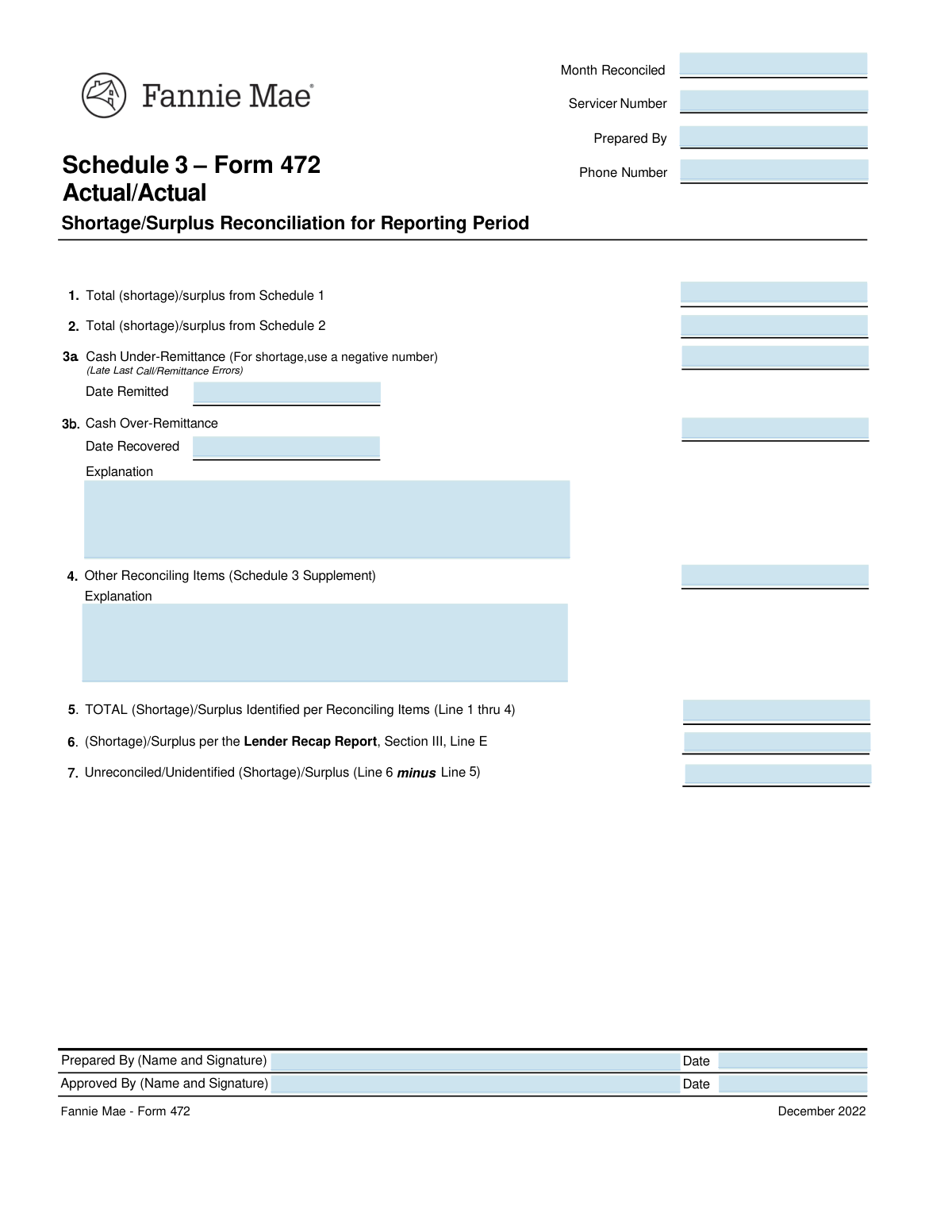
Yes! You can use AI to fill out Form 483, Report of Cash Shortages/Surpluses

Fannie Mae Form 483 is a financial document used by loan servicers to report any cash shortages or surpluses found during the monthly reconciliation of custodial bank accounts for Fannie Mae loans. It is a critical tool for maintaining financial transparency and compliance, providing a detailed breakdown of discrepancies between servicer records and lender reports. Today, this form can be filled out quickly and accurately using AI-powered services like Instafill.ai, which can also convert non-fillable PDF versions into interactive fillable forms.
Our AI automatically handles information lookup, data retrieval, formatting, and form filling.
It takes less than a minute to fill out Fannie Mae Form 483 using our AI form filling.
Securely upload your data. Information is encrypted in transit and deleted immediately after the form is filled out.

Form specifications

Form name: Form 483, Report of Cash Shortages/Surpluses
Number of fields: 20
Number of pages: 2
Language: English
main-image

Instafill Demo: How to fill out PDF forms in seconds with AI

How to Fill Out Fannie Mae Form 483 Online for Free in 2026

Are you looking to fill out a FANNIE MAE FORM 483 form online quickly and accurately? Instafill.ai offers the #1 AI-powered PDF filling software of 2026, allowing you to complete your FANNIE MAE FORM 483 form in just 37 seconds or less.
Follow these steps to fill out your FANNIE MAE FORM 483 form online using Instafill.ai:
  1. 1 Navigate to Instafill.ai and upload your Fannie Mae Form 483 or select it from our template library.
  2. 2 Enter the servicer number, the month being reconciled, and the preparer's contact information.
  3. 3 Input the total shortage or surplus amounts calculated on Schedule 1 and Schedule 2.
  4. 4 Detail any cash under-remittance or over-remittance amounts, including dates and detailed explanations for the discrepancies.
  5. 5 Enter the total for other reconciling items and the shortage/surplus figure from the Lender Recap Report to calculate the final unreconciled amount.
  6. 6 Provide the full names and dates for the person who prepared the form and the person who approved it.
  7. 7 Review all entered information for accuracy before submitting the completed Form 483 to Fannie Mae.

Our AI-powered system ensures each field is filled out correctly, reducing errors and saving you time.

Why Choose Instafill.ai for Your Fillable Fannie Mae Form 483 Form?

Speed

Complete your Fannie Mae Form 483 in as little as 37 seconds.

Up-to-Date

Always use the latest 2026 Fannie Mae Form 483 form version.

Cost-effective

No need to hire expensive lawyers.

Accuracy

Our AI performs 10 compliance checks to ensure your form is error-free.

Security

Your personal information is protected with bank-level encryption.

Frequently Asked Questions About Form Fannie Mae Form 483

This form is used to reconcile financial accounts for a specific month. Its main purpose is to identify, document, and explain any shortages or surpluses found between various financial reports and schedules.

The form should be completed by the person responsible for performing the account reconciliation, as indicated in the 'Prepared By' field. It must then be reviewed and signed by an authorized individual in the 'Approved By' field.

To complete this form, you will need access to Schedule 1, Schedule 2, the Schedule 3 Supplement, and the Lender Recap Report. The required totals from these documents must be transferred to the appropriate fields on this form.

This amount is located in the Lender Recap Report, a separate summary document. You must find the specific value listed in Section III, Line E of that report and enter it here.

When documenting a cash shortage, you should enter the value as a negative number in the 'Cash Under-Remittance Amount' field. A cash surplus or over-remittance should be entered as a positive number.

You are required to fill out the 'Cash Under/Over-Remittance Explanation' field only if you have entered a value in either the 'Cash Under-Remittance Amount' or 'Cash Over-Remittance Amount' fields.

This value is calculated by subtracting the 'Total Shortage/Surplus Identified' (Line 5) from the 'Shortage/Surplus per Lender Recap Report' (Line 6). It represents the final discrepancy that has not yet been accounted for.

The 'Prepared By' section is for the name and contact information of the individual who filled out the form. The 'Approved By' section is for the name of the manager or supervisor who reviewed and confirmed the accuracy of the reconciliation.

Yes, services like Instafill.ai use AI to accurately auto-fill form fields from your saved information, which can save you significant time and help prevent data entry errors.

You can use a service like Instafill.ai to upload the PDF and fill it out directly in your web browser. This allows you to easily type information, save your progress, and share the completed form digitally.

If you have a flat, non-fillable PDF, you can use a tool like Instafill.ai. It can automatically convert the static form into an interactive, fillable one that you can complete and save online.

In this section, you should provide a detailed explanation for any items listed on the Schedule 3 Supplement that contribute to the total reconciling amount. Clearly describe the nature of each item.

No, you only fill in the relevant date. Enter the 'Date Remitted' if you had a cash under-remittance (shortage), and enter the 'Date Recovered' if you had a cash over-remittance (surplus).

Compliance Fannie Mae Form 483
Validation Checks by Instafill.ai

1
Approval Date Chronology Check
This validation ensures the 'Approved By Date' is on or after the 'Prepared By Date'. A form cannot be logically approved before it has been prepared, so this check maintains the chronological integrity of the workflow. If the approval date precedes the preparation date, the system will return an error and require the user to correct the dates before submission.
2
Reconciliation Period Logic Check
This check validates that the 'Prepared By Date' occurs after the end of the month specified in 'Month Reconciled'. This prevents a user from preparing a reconciliation report for a time period that has not yet concluded, ensuring the data being reconciled is complete. A failure would indicate a data entry error and require the user to correct either the 'Month Reconciled' or 'Prepared By Date'.
3
Prepared By Phone Number Format
Verifies that the 'Prepared By Phone Number' field contains a valid, 10-digit phone number. This ensures that contact information is correctly formatted and usable for any necessary follow-up communication. A validation failure would prevent form submission and prompt the user to enter a valid number in a standard format like (XXX) XXX-XXXX.
4
Total Identified Shortage/Surplus Calculation
This check cross-validates that the 'Total Shortage/Surplus Identified' amount correctly equals the sum of its component lines ('Schedule 1', 'Schedule 2', 'Cash Under/Over-Remittance', and 'Other Reconciling Items'). This automated calculation ensures the mathematical accuracy of the summary figures on the form. A mismatch would indicate a calculation error by the preparer and require correction.
5
Unreconciled Amount Calculation
Verifies that the 'Unreconciled/Unidentified Shortage/Surplus' field is the correct result of subtracting the 'Shortage/Surplus per Lender Recap Report' from the 'Total Shortage/Surplus Identified'. This check ensures the final unreconciled balance is calculated correctly, which is a key outcome of the reconciliation process. If the calculation is incorrect, the form will be flagged for review and correction.
6
Remittance Explanation Requirement
This validation ensures the 'Cash Under/Over-Remittance Explanation' field is not empty if either 'Cash Under-Remittance Amount' or 'Cash Over-Remittance Amount' contains a non-zero value. This rule enforces that any financial discrepancies are properly documented for audit and review purposes. If an amount is present without an explanation, the form submission will be blocked until the explanation is provided.
7
Other Items Explanation Requirement
Validates that the 'Other Reconciling Items Explanation' is provided if the 'Total Other Reconciling Items Amount' is not zero. This ensures that all miscellaneous reconciling items that affect the balance are justified with a clear explanation. A failure to provide an explanation for a non-zero amount would halt submission and require the user to add the necessary details.
8
Under-Remittance Conditional Date
This check ensures that the 'Cash Under-Remittance Date Remitted' field is populated only if the 'Cash Under-Remittance Amount' field has a non-zero value. It is illogical to have a remittance date without a corresponding remittance amount. A validation failure would prompt the user to either enter an amount or clear the date field to maintain data consistency.
9
Over-Remittance Conditional Date
This check ensures that the 'Cash Over-Remittance Date Recovered' field is populated only if the 'Cash Over-Remittance Amount' field has a non-zero value. It is illogical to have a recovery date without a corresponding over-remittance amount. A validation failure would prompt the user to either enter an amount or clear the date field.
10
Under-Remittance Amount Signage
Validates that the 'Cash Under-Remittance Amount' is a negative number or zero, as specified in the field instructions. This enforces the business rule that an under-remittance represents a shortage and must be recorded as a negative value. Entering a positive number would be a logical error, and the system should reject it, guiding the user to enter a negative value or zero.
11
Over-Remittance Amount Signage
Validates that the 'Cash Over-Remittance Amount' is a positive number or zero. This enforces the business rule that an over-remittance represents a surplus and must be recorded as a positive value. Entering a negative number would be a logical contradiction, and the system should reject it, guiding the user to enter a positive value or zero.
12
Distinct Preparer and Approver
Checks that the 'Prepared By Name' and 'Approved By Name' are not identical. This enforces the principle of segregation of duties, where one person prepares the report and another independently reviews and approves it for quality control. If the names are the same, the system should flag it as a potential compliance issue and require a different approver.
13
Required Fields Completion
Verifies that all mandatory fields such as 'Month Reconciled', 'Servicer Number', 'Prepared By Name', and 'Prepared By Date' are filled out. This check is crucial for ensuring the form is complete and contains the minimum information required for processing. If any required field is empty, the submission will be rejected with an error message indicating which fields are missing.
14
Valid Date Format
Checks that all date fields are in a valid and consistent format (e.g., MM/DD/YYYY). This standardization is essential for data integrity, reporting, and preventing system errors during processing. An invalid format would trigger an error message prompting the user to correct the entry before the form can be submitted.

Common Mistakes in Completing Fannie Mae Form 483

Incorrectly Formatting Negative Values for Shortages

The form requires shortages, such as the 'Cash Under-Remittance Amount', to be entered as negative numbers. Users often forget the negative sign or use parentheses, which may not be recognized by the system, leading to significant calculation errors in the final reconciliation. To avoid this, always double-check that any amount representing a shortage or deficit is preceded by a minus sign (-). AI-powered tools like Instafill.ai can help by automatically validating numeric formats based on field rules.

Data Transcription Errors from Source Documents

Fields like 'Total Shortage/Surplus from Schedule 1' and 'Shortage/Surplus per Lender Recap Report' require copying values from other documents. It is very common to transpose digits, miss a decimal point, or copy the wrong number entirely, which invalidates the entire reconciliation. To prevent this, carefully verify each transcribed number against the source document before submission. If the form is a non-fillable PDF, tools like Instafill.ai can convert it to a fillable version, reducing the chance of manual entry errors.

Manual Calculation Errors in Summary Fields

Fields like 'Total Shortage/Surplus Identified' and 'Unreconciled/Unidentified Shortage/Surplus' are derived from calculations based on other lines in the form. Manual arithmetic is prone to error, leading to an incorrect final balance that doesn't match the sum of its parts. Using a calculator is essential, and re-calculating before submission is a critical verification step. AI-powered form fillers like Instafill.ai can perform these calculations automatically, eliminating the risk of human error.

Ignoring Conditional Field Requirements

The form has fields that should only be filled if another field has a value, such as providing a 'Cash Under-Remittance Date Remitted' only if an amount is present. A common error is either leaving these required conditional fields blank or filling them in when they should be empty. This results in an incomplete or confusing report, causing it to be rejected. Advanced form-filling tools can highlight or require these fields based on your input in other fields, preventing such omissions.

Providing Vague or Incomplete Explanations

The form requires 'detailed' explanations for reconciling items and cash discrepancies. Submitters often provide unhelpful notes like 'To balance' or 'Misc adjustment,' which fails to provide the necessary audit trail and can trigger further inquiries. A proper explanation should clearly state the root cause, the items involved, and the resolution. Using a tool that converts a flat PDF into a fillable form, like Instafill.ai, makes it easier to type a clear and comprehensive description.

Using Inconsistent or Incorrect Date Formats

Fields like 'Prepared By Date' and 'Approved By Date' can be filled with various formats (e.g., MM/DD/YY, Month DD, YYYY), causing processing delays. It's also common for the 'Approved By Date' to be earlier than the 'Prepared By Date', which is logically impossible. Always use a consistent, unambiguous format like MM/DD/YYYY and ensure the timeline of dates is logical. Instafill.ai can automatically format dates correctly and flag logical inconsistencies.

Entering an Incomplete or Incorrect Servicer Number

The 'Servicer Number' is a primary identifier for the entire report. Omitting this number or entering it with typos can lead to the form being misfiled, delayed, or rejected outright, as it cannot be correctly associated with an account. Always verify this critical number against official documentation. Tools like Instafill.ai can save and auto-populate recurring information like a Servicer Number, ensuring consistency and accuracy across all forms.

Using Initials or Nicknames Instead of Full Names

The 'Prepared By Name' and 'Approved By Name' fields explicitly request a full name for accountability and record-keeping. Submitting initials, a nickname, or an illegible signature without a printed full name can cause compliance issues or make it difficult to contact the correct person for clarification. Always provide the full, legal first and last name as requested. Instafill.ai can store and correctly populate full names from a user profile to prevent this.

Confusing Under-Remittance and Over-Remittance Fields

The form has separate fields for 'Cash Under-Remittance Amount' and 'Cash Over-Remittance Amount'. Users sometimes enter the value in the wrong field or incorrectly apply a negative sign to an over-remittance. This fundamentally misrepresents the cash flow status and leads to incorrect reconciliation totals. Carefully read each field label to ensure surpluses and shortages are reported in their designated locations.

Providing an Ambiguous 'Month Reconciled' Entry

When filling out the 'Month Reconciled' field, users might just write 'June' without specifying the year. This creates ambiguity, especially when reports are reviewed months later. The best practice is to be explicit, using a format like 'June 2024' or '06/2024' to ensure the reporting period is clear and auditable. AI form fillers can help by standardizing this entry or prompting the user for a complete date.
Saved over 80 hours a year

“I was never sure if my IRS forms like W-9 were filled correctly. Now, I can complete the forms accurately without any external help.”

Kevin Martin Green

Your data stays secure with advanced protection from Instafill and our subprocessors

Robust compliance program

Transparent business model

You’re not the product. You always know where your data is and what it is processed for.

ISO 27001, HIPAA, and GDPR

Our subprocesses adhere to multiple compliance standards, including but not limited to ISO 27001, HIPAA, and GDPR.

Security & privacy by design

We consider security and privacy from the initial design phase of any new service or functionality. It’s not an afterthought, it’s built-in, including support for two-factor authentication (2FA) to further protect your account.

Fill out Fannie Mae Form 483 with Instafill.ai

Worried about filling PDFs wrong? Instafill securely fills form-483-report-of-cash-shortagessurpluses forms, ensuring each field is accurate.