Yes! You can use AI to fill out Form ADOPT-203, Declaration Confirming Parentage of Child Conceived Through Assisted Reproduction
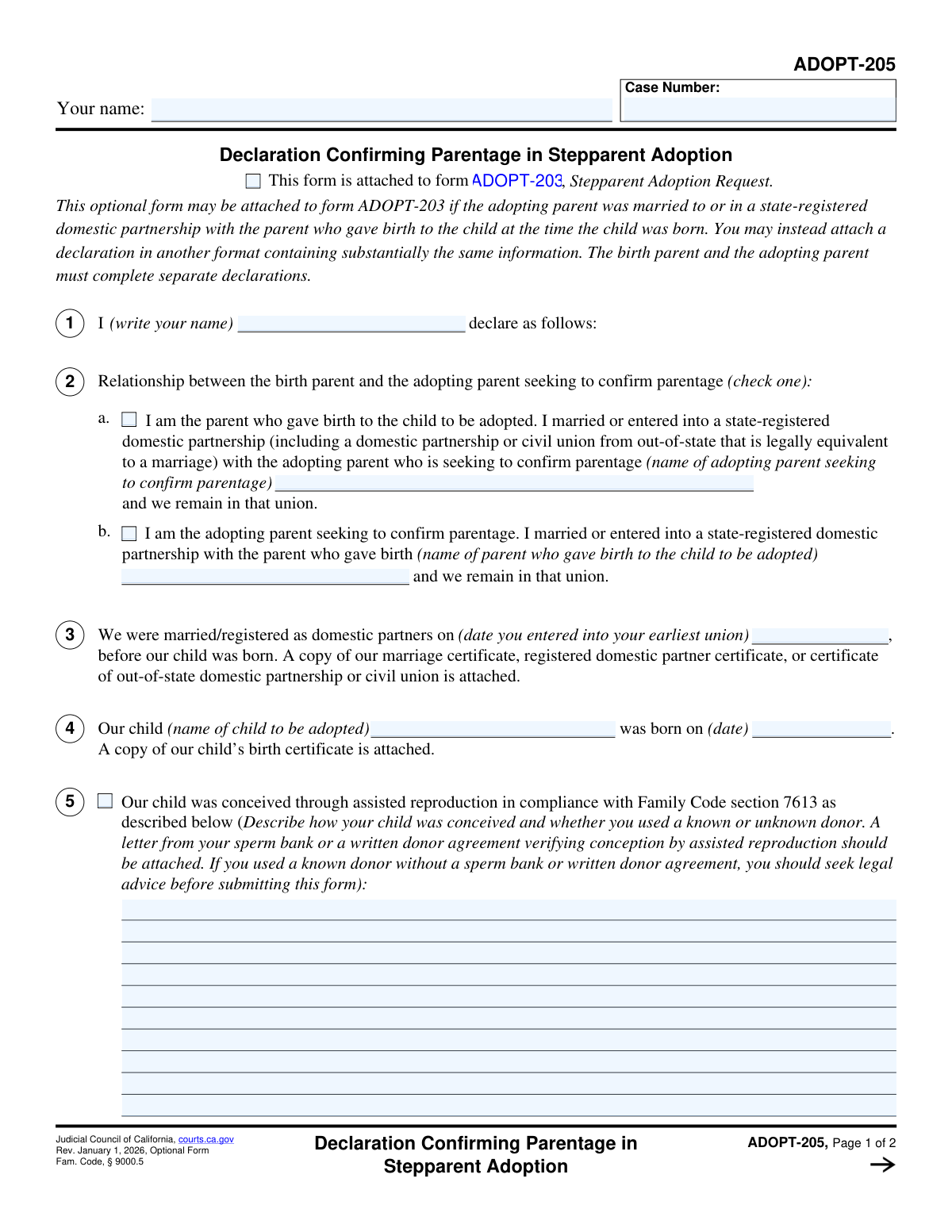
Form ADOPT-203, the Declaration Confirming Parentage of Child Conceived Through Assisted Reproduction, is a crucial legal document for stepparent adoptions in California. It is used by the birth parent and the adopting stepparent to formally declare their parentage when the child was conceived via assisted reproduction, ensuring there are no other legal parental claims. Today, this form can be filled out quickly and accurately using AI-powered services like Instafill.ai, which can also convert non-fillable PDF versions into interactive fillable forms.
Our AI automatically handles information lookup, data retrieval, formatting, and form filling.
It takes less than a minute to fill out ADOPT-203 using our AI form filling.
Securely upload your data. Information is encrypted in transit and deleted immediately after the form is filled out.
Form specifications
| Form name: | Form ADOPT-203, Declaration Confirming Parentage of Child Conceived Through Assisted Reproduction |
| Number of fields: | 23 |
| Number of pages: | 2 |
| Language: | English |
Instafill Demo: How to fill out PDF forms in seconds with AI
How to Fill Out ADOPT-203 Online for Free in 2026
Are you looking to fill out a ADOPT-203 form online quickly and accurately? Instafill.ai offers the #1 AI-powered PDF filling software of 2026, allowing you to complete your ADOPT-203 form in just 37 seconds or less.
Follow these steps to fill out your ADOPT-203 form online using Instafill.ai:
- 1 Navigate to Instafill.ai and upload or select the ADOPT-203 form.
- 2 Enter the case number and your full name in the header and declarant sections.
- 3 Declare your relationship to the child by checking the appropriate box for either the parent who gave birth or the adopting parent.
- 4 Provide the child's full name, date of birth, and details about their conception through assisted reproduction.
- 5 Address the section regarding other potential parents, providing details only if applicable.
- 6 Carefully review all entered information for accuracy and completeness.
- 7 Date and sign the form, then save or print the completed document for submission to the court.
Our AI-powered system ensures each field is filled out correctly, reducing errors and saving you time.
Why Choose Instafill.ai for Your Fillable ADOPT-203 Form?
Speed
Complete your ADOPT-203 in as little as 37 seconds.
Up-to-Date
Always use the latest 2026 ADOPT-203 form version.
Cost-effective
No need to hire expensive lawyers.
Accuracy
Our AI performs 10 compliance checks to ensure your form is error-free.
Security
Your personal information is protected with bank-level encryption.
Frequently Asked Questions About Form ADOPT-203
The ADOPT-203 form is a declaration used to legally establish the parentage of a child in a stepparent adoption. It is typically attached to the main Stepparent Adoption Request to clarify the relationship between the adopting parent and the child.
This form should be completed by either the parent who gave birth to the child or the adopting stepparent. You will check the box that corresponds to your role to indicate who is making the declaration.
The Case Number is assigned by the court when you file your initial adoption petition. You must use this same number on all subsequent documents filed for the case, including this declaration.
You only check one of these boxes to identify who you are. Check 'Parent Who Gave Birth Declaration' if you are the biological parent, and check 'Adopting Parent Declaration' if you are the stepparent seeking to adopt.
If your child was conceived via assisted reproduction, you must check the box and provide a description of the process. This includes stating whether a known or an unknown donor was used.
An 'Other Parent' could be another biological parent, a presumed parent, or a known donor who may have parental rights. If any person besides you and your spouse/partner could be considered a legal parent, you must provide their details here.
This is the date you and your spouse or partner first entered into a legal union. This could be a marriage or a state-registered domestic partnership; use the earliest date if applicable.
This form should be attached to your Stepparent Adoption Request (Form ADOPT-200) and filed with the appropriate court handling your adoption case. Always check your local court's specific filing procedures.
No, only one parent, the 'declarant', needs to complete and sign this specific form. The form itself clarifies whether the declaration is being made by the birth parent or the adopting parent.
Yes, services like Instafill.ai use AI to accurately auto-fill form fields, which can save you time and help prevent common errors. The AI can recognize fields and help you input your information correctly.
You can use a service like Instafill.ai to complete this form online. Simply upload the form to the platform, and its AI will make the fields interactive for you to fill out on your computer.
If you have a non-fillable or 'flat' PDF, you can use a tool like Instafill.ai. It is designed to convert such documents into interactive, fillable forms that you can complete and save digitally.
The 'Declarant Name' is your full legal name. You are the 'declarant' because you are the person making the sworn statements contained in the form.
Compliance ADOPT-203
Validation Checks by Instafill.ai
1
Case Number Format Validation
This check verifies that the 'Case Number' field conforms to the expected format for the jurisdiction (e.g., specific length, prefix, or character types). An invalid case number format can lead to the form being rejected by the court's filing system. If validation fails, the user should be prompted to correct the number to match the required pattern.
2
Case Number Consistency Check
This validation ensures that the value entered in 'Case Number (Form Header)' is identical to the value in 'Case Number (Case Number)'. Mismatched case numbers can cause significant administrative confusion and may result in the document being filed under the wrong case. A failure would require the user to reconcile the two fields.
3
Declarant Name Consistency
This check confirms that the names entered in 'Your Name (Declarant Name)', 'Declarant Name (Declarant Name)', and 'Printed Name of Signatory' are all identical. Consistency is crucial for legally identifying the person making the declaration. A mismatch could call the validity of the entire document into question.
4
Exclusive Relationship Declaration
This validation ensures that only one of the two checkboxes, 'Parent Who Gave Birth Declaration' or 'Adopting Parent Declaration', is selected. The declarant can only have one of these roles in the context of the adoption. Selecting both would represent a logical contradiction, and the form should prevent submission until only one is chosen.
5
Relationship Declaration Completeness
This check verifies that the user has selected at least one of the two primary relationship checkboxes ('Parent Who Gave Birth Declaration' or 'Adopting Parent Declaration'). The declarant's relationship to the child and the other parent is a fundamental piece of information for this form. Failure to select a role would leave the form incomplete and legally insufficient.
6
Conditional Partner Name Requirement
This validation enforces conditional logic: if 'Parent Who Gave Birth Declaration' is checked, the 'Adopting Parent Seeking to Confirm Parentage Name' field must be filled. Similarly, if 'Adopting Parent Declaration' is checked, the 'Parent Who Gave Birth Name' field is required. This ensures the other party to the union is always identified, which is essential for establishing the legal relationship.
7
Date Format Validation
This check ensures that all date fields ('Earliest Union Date', 'Child's Date of Birth', 'Date of Signature') are entered in a valid and recognizable format, such as MM/DD/YYYY. Incorrectly formatted dates can cause data processing errors and may lead to the form being rejected. The system should guide the user to enter a valid date.
8
Logical Date Chronology
This validation checks the logical sequence of dates. It ensures the 'Child's Date of Birth' is on or after the 'Earliest Union Date', and that the 'Date of Signature' is on or after the 'Child's Date of Birth'. This prevents illogical timelines, such as signing a form about a child before they were born, which would invalidate the declaration.
9
Future Date Prevention
This check verifies that the 'Date of Signature' and 'Child's Date of Birth' are not set to a future date. Legal documents must reflect events that have already occurred and be signed on the current day. Allowing future dates would compromise the integrity and legal standing of the form.
10
Conditional Assisted Reproduction Details Requirement
This validation ensures that if the 'Child conceived through assisted reproduction' checkbox is selected, the 'Child Conception Details' text area must not be empty. This information is legally required to clarify parentage, especially concerning donors. Failure to provide this detail when indicated would result in an incomplete and potentially invalid submission.
11
Conditional Other Parents Details Requirement
This check verifies that if the 'Other Parents Exist' checkbox is selected, the 'Other Parents Declaration Details' text area must be filled out. It is legally critical to identify and address the rights of any other potential parents. Submitting the form without these details could lead to serious legal challenges to the adoption later on.
12
Child's Name Completeness
This validation ensures the 'Child's Name' field is not empty and contains what appears to be a full name (e.g., at least two words). The child is the subject of the legal proceeding, and their full, correct legal name is required for the adoption to be valid. An empty or incomplete name would make the form legally meaningless.
Common Mistakes in Completing ADOPT-203
The form requests the declarant's name in multiple locations, such as the header and the signature block. People often introduce slight variations, like including or omitting a middle initial, which can cause clerical confusion and raise questions about the signer's identity. To avoid this, enter your full legal name identically in every field where it is requested, ensuring it matches your government-issued ID.
The form requires the filer to select one of two mutually exclusive roles: 'Parent Who Gave Birth' or 'Adopting Parent'. A common error is checking both boxes, or neither, which makes the declaration legally ambiguous and will likely lead to immediate rejection. Carefully read the descriptions for each role and select the single option that accurately describes your relationship to the child and your partner.
Several checkboxes, such as 'Adopting Parent Declaration' or 'Child conceived through assisted reproduction', trigger a requirement to fill out a subsequent detailed information field. Filers often check the box but then overlook the associated text box, resulting in an incomplete application. To prevent this, pause after checking any box and scan the form for newly required fields; AI-powered tools like Instafill.ai can automatically highlight these dependent fields to ensure they are not missed.
When a child was conceived via assisted reproduction, the form requires a detailed description, including whether a known or unknown donor was used. People may provide vague answers due to privacy concerns or uncertainty, but this information has significant legal implications for terminating parental rights. Omitting these details will result in requests for information and delay the adoption; be precise and explicitly state the donor's status (known or unknown).
The term 'other parents' can be legally broad, and filers may mistakenly fail to check the 'Other Parents Exist' box if they don't believe another person has parental rights. This is a critical error, as failing to notify a person who could potentially claim parentage can jeopardize the entire adoption. If there is any uncertainty, it is crucial to disclose the individual and seek legal advice to avoid severe complications later.
The case number is the primary identifier that links this declaration to your adoption file in the court system. Entering it with typos, using an incorrect format, or omitting it entirely can cause the document to be misfiled or lost, leading to major processing delays. Always copy the case number exactly as it appears on other official court documents for your case.
The child's name must be entered exactly as it appears on their birth certificate or other legal records. Using a nickname, a shortened name, or making a typographical error creates a legal discrepancy that can halt the adoption process until a correction is filed. To avoid this, reference the child's birth certificate directly when filling out the form to ensure the name is transcribed perfectly.
The form requires several dates, such as the 'Earliest Union Date' and 'Child's Date of Birth,' and people often use inconsistent formats (e.g., MM-DD-YYYY vs. DD-MM-YYYY) or write them out (e.g., 'January 1, 2020'). This can lead to data entry errors by court clerks and slow down your case. Always use the standard MM/DD/YYYY format for all dates to ensure clarity and consistency. Using a tool like Instafill.ai can help auto-format dates correctly.
The form contains conditional fields where one parent provides the other's name, such as the 'Adopting Parent Seeking to Confirm Parentage Name'. A filer might mistakenly enter their own name or information in a field intended for their partner. This creates confusion about who is making the declaration and whose information is being provided. Read each field label carefully to ensure you are providing the correct person's information as requested.
This checkbox at the top of the form serves as a crucial instruction for the court clerk, indicating that this document is part of a larger adoption package. Overlooking this simple step is a common mistake that can cause the form to be filed as a standalone document, detaching it from the main request and causing significant confusion and delays. Always perform a final review of all checkboxes before submission.
Saved over 80 hours a year
“I was never sure if my IRS forms like W-9 were filled correctly. Now, I can complete the forms accurately without any external help.”
Kevin Martin Green
Your data stays secure with advanced protection from Instafill and our subprocessors




Robust compliance program
Transparent business model
You’re not the product. You always know where your data is and what it is processed for.
ISO 27001, HIPAA, and GDPR
Our subprocesses adhere to multiple compliance standards, including but not limited to ISO 27001, HIPAA, and GDPR.
Security & privacy by design
We consider security and privacy from the initial design phase of any new service or functionality. It’s not an afterthought, it’s built-in, including support for two-factor authentication (2FA) to further protect your account.
Fill out ADOPT-203 with Instafill.ai
Worried about filling PDFs wrong? Instafill securely fills form-adopt-203-declaration-confirming-parentage-of-child-conceived-through-assisted-reproduction forms, ensuring each field is accurate.
