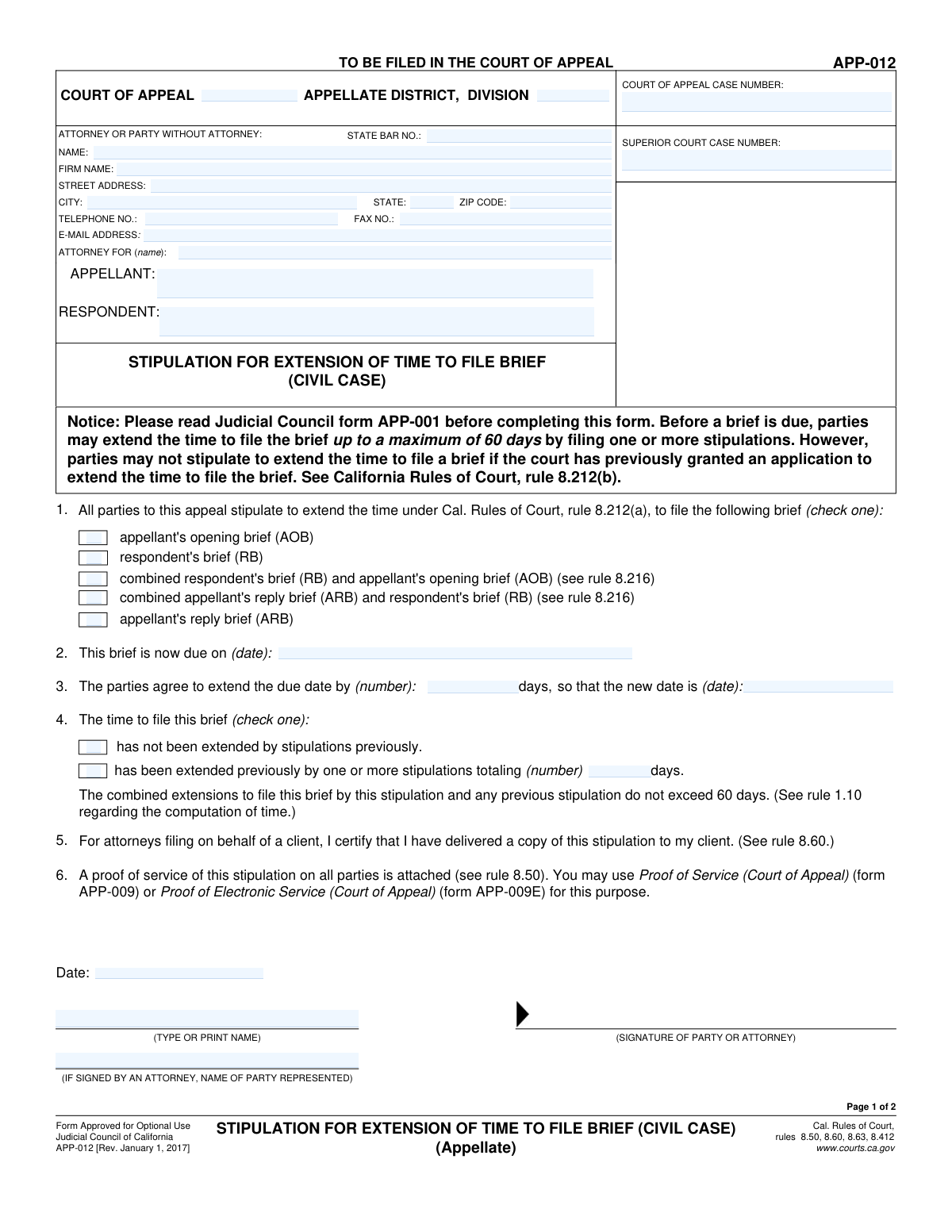
Yes! You can use AI to fill out Form APP-011A, Stipulation to Extend Time to File Brief (Appellate)

Form APP-011A is a formal agreement, or stipulation, between the parties in a California appellate case to extend the deadline for filing a legal brief, such as an Appellant's Opening Brief or a Respondent's Brief. This is important for managing case timelines and allowing attorneys adequate time to prepare their arguments without needing a formal court order for an initial extension. Today, this form can be filled out quickly and accurately using AI-powered services like Instafill.ai, which can also convert non-fillable PDF versions into interactive fillable forms.
Our AI automatically handles information lookup, data retrieval, formatting, and form filling.
It takes less than a minute to fill out APP-011A using our AI form filling.
Securely upload your data. Information is encrypted in transit and deleted immediately after the form is filled out.

Form specifications

Form name: Form APP-011A, Stipulation to Extend Time to File Brief (Appellate)
Number of fields: 46
Number of pages: 2
Language: English
main-image

Instafill Demo: How to fill out PDF forms in seconds with AI

How to Fill Out APP-011A Online for Free in 2026

Are you looking to fill out a APP-011A form online quickly and accurately? Instafill.ai offers the #1 AI-powered PDF filling software of 2026, allowing you to complete your APP-011A form in just 37 seconds or less.
Follow these steps to fill out your APP-011A form online using Instafill.ai:
  1. 1 Navigate to Instafill.ai and upload or select Form APP-011A.
  2. 2 Enter the Court of Appeal and Superior Court case numbers, along with the appellate district and division details.
  3. 3 Provide the information for the attorney or self-represented party filing the stipulation, including name, address, and State Bar number.
  4. 4 Select the type of brief being extended (e.g., AOB, RB), and enter the original due date, the agreed-upon number of extension days, and the resulting new due date.
  5. 5 Indicate whether this is the first extension or if previous stipulations have been filed, providing the total number of prior extension days if applicable.
  6. 6 Review all entered information for accuracy, then have all required parties digitally or physically sign and date the stipulation in the designated signature blocks.
  7. 7 Download, save, or print the completed form for your records and for filing with the appropriate Court of Appeal.

Our AI-powered system ensures each field is filled out correctly, reducing errors and saving you time.

Why Choose Instafill.ai for Your Fillable APP-011A Form?

Speed

Complete your APP-011A in as little as 37 seconds.

Up-to-Date

Always use the latest 2026 APP-011A form version.

Cost-effective

No need to hire expensive lawyers.

Accuracy

Our AI performs 10 compliance checks to ensure your form is error-free.

Security

Your personal information is protected with bank-level encryption.

Frequently Asked Questions About Form APP-011A

This form is a 'Stipulation to Extend Time to File Brief,' used when all parties in a Court of Appeal case agree to extend the deadline for filing a specific legal brief. It formalizes this agreement for the court.

The attorneys for each party involved in the appeal, or the parties themselves if they are not represented by an attorney, must complete and sign the form. This shows their mutual agreement to the time extension.

The Superior Court Case Number is from the original trial court case. The Court of Appeal Case Number is the new number assigned specifically for the appeal, which you must use on all documents filed with the appellate court.

If you are a party representing yourself (pro se), you can leave the 'State Bar Number' field blank. You must still fill in your name, address, and contact information in the 'Attorney or Party Information' section.

AOB stands for Appellant's Opening Brief, RB is the Respondent's Brief, and ARB is the Appellant's Reply Brief. You must check the box for the specific brief for which you are extending the filing deadline.

To find the new due date, add the 'Number of Days to Extend' to the 'Original Due Date'. Be sure to follow court rules regarding how to count days, especially concerning weekends and holidays.

If you have previously filed stipulations to extend time for this same brief, enter the total number of days granted in all prior stipulations. If this is the first extension, check the 'Not Extended Previously' box and leave this field blank.

You cannot use this stipulation form if the other parties do not agree to the extension. Instead, you must file a formal 'Motion for Extension of Time' with the court, providing a reason for your request.

This stipulation must be filed with the clerk of the Court of Appeal for the appellate district handling your case. You must also serve a copy on all other parties involved in the appeal.

The multiple signature blocks are required for the representatives of both the appellant and respondent to sign. These signatures demonstrate their mutual agreement (stipulation) to the time extension.

Yes, services like Instafill.ai use AI to accurately auto-fill form fields from your saved information. This can save you time and help reduce errors when completing legal forms.

To fill this form out online, upload the PDF to Instafill.ai. The platform will make the document interactive, allowing you to type your information directly into the fields, save your progress, and download the completed form.

If you have a non-fillable or 'flat' PDF, you can upload it to a service like Instafill.ai. The tool can convert the document into an interactive, fillable form that you can complete and save electronically.

Compliance APP-011A
Validation Checks by Instafill.ai

1
Ensures New Due Date Calculation is Correct
This check validates that the 'New Due Date' is the result of adding the 'Number of Days to Extend' to the 'Original Due Date'. This is critical for ensuring the legal filing deadline is calculated accurately and agreed upon by all parties. If the calculation is incorrect, the form submission will be rejected to prevent misunderstandings about the new deadline.
2
Exclusive Brief Type Selection
This validation ensures that only one checkbox is selected from the 'Brief Type Selection' section (e.g., AOB, RB, ARB). A stipulation is typically for extending the deadline for a single, specific brief. Allowing multiple selections would create ambiguity about which deadline is being extended, so the submission is blocked until only one option is chosen.
3
Conditional Requirement for Total Previous Extension Days
This check enforces that the 'Total Previous Extension Days' field is filled if and only if the 'Extended Previously' checkbox is selected. This information is crucial for the court to understand the full history of extensions in the case. If 'Extended Previously' is checked but the days are not specified, the form is considered incomplete and will be rejected.
4
Mutually Exclusive Extension History
This validation ensures that a user cannot select both 'Not Extended Previously' and 'Extended Previously' at the same time. These two options are logically contradictory, and selecting both makes the filing's history unclear. The system will require the user to choose only one of these options before the form can be submitted.
5
State Bar Number Format Validation
This check verifies that the 'State Bar Number' field contains only numeric digits and conforms to the expected length for a valid bar number. An accurate bar number is essential for identifying the attorney of record and verifying their standing. An invalid format will trigger an error, prompting the user to correct the entry.
6
Minimum Required Signatures for Stipulation
This validation ensures that at least two signature blocks are completed on the form. A stipulation is a legal agreement between parties, and therefore requires the consent and signature of at least two separate parties (e.g., appellant and respondent). If fewer than two signatures are provided, the form is invalid as an agreement and will be rejected.
7
Consistent Court of Appeal Case Number
This check compares the 'Court of Appeal Case Number' entered in the first field with the value entered in the redundant field later in the form. The values must be identical to ensure there is no data entry error or ambiguity about the case being referenced. A mismatch will halt submission and require the user to correct the discrepancy.
8
Valid Email Address Format
This check ensures the 'Email Address' field contains a value that follows the standard '[email protected]' format. A valid email is required for official communication, service of documents, and notifications from the court. If the format is invalid, the user will be prompted to enter a correctly formatted email address to ensure they can be contacted.
9
Positive Integer for Extension Days
This validation confirms that the 'Number of Days to Extend' is a positive integer greater than zero. A zero, negative, or non-integer value is not logical for an extension request. This check prevents nonsensical data from being submitted and ensures the extension period is clearly defined.
10
Completeness of Filer's Contact Information
This check verifies that the primary filer's name, full address (street, city, state, zip), and telephone number are all provided. This contact information is mandatory for the court record and to ensure the party can be officially contacted. Missing any of these fields will result in a validation failure, blocking submission until the information is complete.
11
Chronological Validity of Signature Date
This validation ensures that the 'Signature Date' entered in any signature block is not a future date. A document cannot be legally signed on a future date. This check maintains the integrity of the document's execution date and prevents invalid submissions.
12
Conditional Requirement for Represented Party Name
This check ensures that if a 'State Bar Number' is provided (indicating the signatory is an attorney), the 'Represented Party Name' field in the same signature block is also filled. It is legally necessary to know which party the attorney is signing on behalf of. Failure to provide the represented party's name will result in an error, as the signature's context is incomplete.
13
ZIP Code Format Validation
This check validates that the 'Zip Code' field contains a 5-digit numeric value. A correct ZIP code is essential for the accurate and timely delivery of physical mail and for verifying the address. An incorrectly formatted ZIP code will trigger an error message asking the user to provide a valid 5-digit code.
14
Mandatory Case Number Fields
This validation ensures that both the 'Court of Appeal Case Number' and 'Superior Court Case Number' fields are filled out. These numbers are the primary identifiers for the case at both the appellate and trial court levels. Without them, the filing cannot be correctly docketed, so the form will be rejected if either is missing.

Common Mistakes in Completing APP-011A

Incorrect or Transposed Case Numbers

Users frequently enter the wrong case number by transposing digits or confusing the 'Court of Appeal Case Number' with the 'Superior Court Case Number'. This is a critical error as it can lead to the document being rejected by the clerk or filed in the wrong case, causing significant delays and potentially jeopardizing the extension. To avoid this, carefully copy the numbers from official court notices and double-check each digit before submission. AI-powered tools like Instafill.ai can help by saving and accurately auto-filling correct case information across multiple documents.

Miscalculating the New Due Date

A frequent mistake is incorrectly calculating the 'New Due Date' based on the 'Original Due Date' and the 'Number of Days to Extend'. Manual calculation can easily lead to off-by-one errors or misinterpretation of calendar days versus court days. An incorrect new due date can result in a missed deadline, as the court may not honor the intended extension period. Always use a calendar to count the days carefully, and verify the calculation before finalizing the form.

Inconsistent Party Name Spelling

The names of the 'Appellant' and 'Respondent' are often misspelled or entered inconsistently across the different sections of the form, such as the header and signature blocks. This happens due to typos or not referencing the official case caption. Such inconsistencies create confusion and can lead to processing delays while the court clerk verifies the correct parties. It is essential to copy the names exactly as they appear on previous court filings to ensure uniformity.

Selecting the Incorrect Brief Type

Filers sometimes check the wrong box in the 'Brief Type Selection' section, for example, requesting an extension for an 'Appellant's Opening Brief (AOB)' when they actually need one for a 'Respondent's Brief (RB)'. This mistake completely invalidates the stipulation for the intended brief, as the agreement will not apply to the correct document. Carefully read each option and select only the one that corresponds to the specific brief for which an extension is being sought.

Contradictory Extension History Information

Users often make logical errors in the 'Extension History' section, such as checking both 'Not Extended Previously' and 'Extended Previously' simultaneously. Another common error is checking 'Extended Previously' but then failing to enter the 'Total Previous Extension Days'. This conflicting information forces the court to seek clarification, delaying the approval of the stipulation. Ensure you select only one option and provide the required details if a previous extension was granted.

Omitting the Represented Party's Name

When an attorney signs the form, they frequently forget to fill in the 'Represented Party Name' field within the signature block. This omission makes it unclear which party has consented to the stipulation, potentially rendering the signature and the agreement invalid. Attorneys must always specify which client (e.g., the Appellant or Respondent) they are signing on behalf of. Form-filling tools like Instafill.ai can help prevent this by flagging conditionally required fields that are left empty.

Submitting with Missing Signatures

Because a stipulation is an agreement, the form requires signatures from all relevant parties, yet it is often submitted with one or more signature blocks left blank. This typically happens when one party fills out the form but fails to circulate it to the opposing counsel for their signature before filing. A stipulation without all required signatures is not a valid agreement and will be rejected by the court, nullifying the requested extension.

Invalid or Incorrect State Bar Number

Entering an incorrect 'State Bar Number' is a common data entry error that can have serious consequences. The number is used to verify the attorney's identity and good standing with the bar. An incorrect number can lead to the filing being rejected or delayed while the clerk's office attempts to identify the attorney. Always verify your state bar number from an official source and enter it without any typos. If the form is a non-fillable PDF, a tool like Instafill.ai can convert it to a fillable version where you can save and reuse validated information like your bar number.

Incomplete Court Identification

Filers, especially those less familiar with appellate procedure, may leave the 'Appellate District' or 'Division' fields blank. This information is crucial for routing the document to the correct panel of judges and administrative staff within the Court of Appeal. Omitting these details guarantees a delay, as the clerk's office must manually determine the correct destination for the filing. This information can be found on any prior correspondence received from the Court of Appeal for the case.

Using an Illogical Signature Date

The 'Signature Date' is sometimes filled with a date that is in the future or a date that precedes the 'Original Due Date' of the brief, creating a logical inconsistency. This can raise questions about the document's authenticity and when the agreement was actually made. The signature date should reflect the actual date the document was signed by that party, which should be on or before the date of filing. Double-checking all dates on the form for chronological sense is a crucial final step.
Saved over 80 hours a year

“I was never sure if my IRS forms like W-9 were filled correctly. Now, I can complete the forms accurately without any external help.”

Kevin Martin Green

Your data stays secure with advanced protection from Instafill and our subprocessors

Robust compliance program

Transparent business model

You’re not the product. You always know where your data is and what it is processed for.

ISO 27001, HIPAA, and GDPR

Our subprocesses adhere to multiple compliance standards, including but not limited to ISO 27001, HIPAA, and GDPR.

Security & privacy by design

We consider security and privacy from the initial design phase of any new service or functionality. It’s not an afterthought, it’s built-in, including support for two-factor authentication (2FA) to further protect your account.

Fill out APP-011A with Instafill.ai

Worried about filling PDFs wrong? Instafill securely fills form-app-011a-stipulation-to-extend-time-to-file-brief-appellate forms, ensuring each field is accurate.