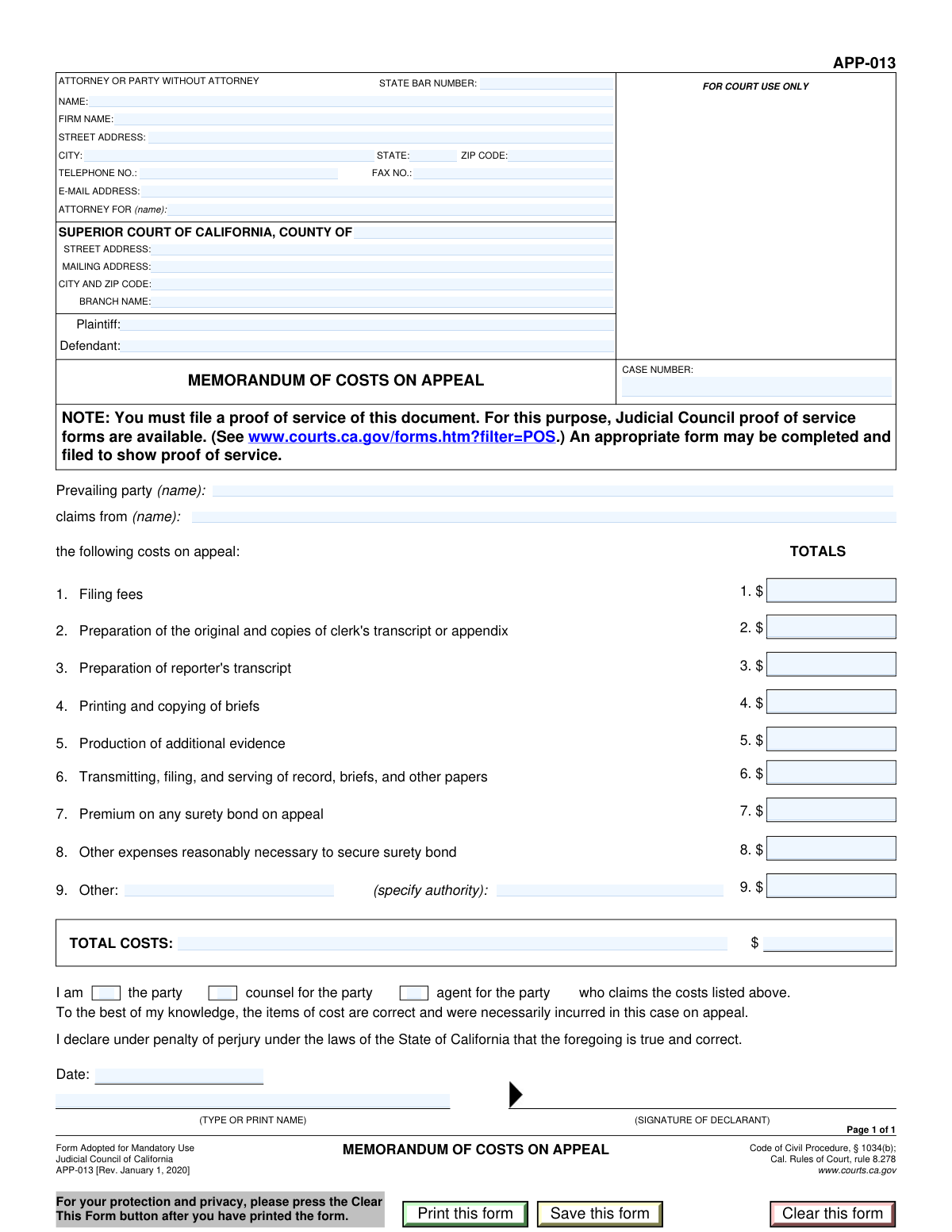
Yes! You can use AI to fill out Form APP-013, Memorandum of Costs on Appeal

Form APP-013, Memorandum of Costs on Appeal, is a crucial legal document filed in the Superior Court of California by the prevailing party after an appeal. Its purpose is to formally itemize and claim reimbursement for allowable costs from the opposing party, such as fees for filing, transcript preparation, and printing legal briefs. Properly completing and timely filing this form is essential to recover the expenses associated with the appeal process. Today, this form can be filled out quickly and accurately using AI-powered services like Instafill.ai, which can also convert non-fillable PDF versions into interactive fillable forms.
Our AI automatically handles information lookup, data retrieval, formatting, and form filling.
It takes less than a minute to fill out APP-013 using our AI form filling.
Securely upload your data. Information is encrypted in transit and deleted immediately after the form is filled out.

Form specifications

Form name: Form APP-013, Memorandum of Costs on Appeal
Number of fields: 42
Number of pages: 1
Language: English
main-image

Instafill Demo: How to fill out PDF forms in seconds with AI

How to Fill Out APP-013 Online for Free in 2026

Are you looking to fill out a APP-013 form online quickly and accurately? Instafill.ai offers the #1 AI-powered PDF filling software of 2026, allowing you to complete your APP-013 form in just 37 seconds or less.
Follow these steps to fill out your APP-013 form online using Instafill.ai:
  1. 1 Navigate to Instafill.ai and upload your Form APP-013, or select it from their template library.
  2. 2 Provide the case number, court details, and your attorney or party information. The AI can help pre-fill this from previous documents.
  3. 3 Clearly identify the plaintiff, defendant, and the prevailing party who is claiming the costs.
  4. 4 Carefully enter all recoverable costs into the itemized list, including filing fees, transcript preparation, printing, and any surety bond premiums. The AI will automatically calculate the total.
  5. 5 Complete the declaration section by indicating your role (party, counsel, or agent) and providing the date.
  6. 6 Review all entered information for accuracy. Once confirmed, you can electronically sign the document directly on the platform.
  7. 7 Download the completed Form APP-013 and file it with the appropriate Superior Court of California according to court rules.

Our AI-powered system ensures each field is filled out correctly, reducing errors and saving you time.

Why Choose Instafill.ai for Your Fillable APP-013 Form?

Speed

Complete your APP-013 in as little as 37 seconds.

Up-to-Date

Always use the latest 2026 APP-013 form version.

Cost-effective

No need to hire expensive lawyers.

Accuracy

Our AI performs 10 compliance checks to ensure your form is error-free.

Security

Your personal information is protected with bank-level encryption.

Frequently Asked Questions About Form APP-013

This form is used by the party who won an appeal (the prevailing party) to claim reimbursement for the costs they incurred during the appeal process from the losing party.

The prevailing party in a California Superior Court appeal, or their attorney, must complete and file this form to request payment for their allowable costs.

You will need your case number, court information, and a detailed breakdown of all costs you are claiming, such as filing fees, transcript preparation costs, and printing expenses.

The Plaintiff and Defendant are the original parties in the lawsuit. The 'Prevailing Party' is the party who won the recent appeal, which could be either the original plaintiff or the defendant.

Enter your own name and contact information in this section. You can leave the 'State Bar Number' and 'Firm Name' fields blank.

If you claim a cost not specifically listed, you must cite the legal authority, such as a specific court rule or statute, that permits you to recover that expense.

While this form doesn't require attachments, you must keep all receipts and invoices. The court or the opposing party may require you to provide proof of your expenses.

You must file the completed form with the clerk of the Superior Court where the case was originally tried, not the court of appeal.

Yes, there are very strict deadlines for filing a memorandum of costs after an appeal. You must consult the California Rules of Court to determine the specific filing deadline for your case.

If the PDF is not interactive, you can use a service like Instafill.ai to convert it into a fillable form. This allows you to easily type your information into the correct fields.

Yes, services like Instafill.ai use AI to help you accurately auto-fill forms with your saved information. This can save you significant time and help prevent errors.

Simply upload the form to the Instafill.ai platform. It will become an interactive, fillable document that you can complete by typing directly into the fields, then save or print.

If you notice a mistake before filing, it is best to correct the error and print a new, clean copy of the form. Avoid submitting a form with handwritten corrections.

Compliance APP-013
Validation Checks by Instafill.ai

1
Ensures Total Costs Amount is the correct sum of all itemized costs
This validation calculates the sum of all fields in the 'Itemized Costs' section (Filing Fees, Clerk's Transcript Prep, etc.) and compares it to the value entered in 'Total Costs Amount'. This is critical for ensuring the financial accuracy of the claim and preventing mathematical errors. If the sum does not match the total, the user will be prompted to correct either the itemized amounts or the total.
2
Verifies that the confirmed total cost amount matches the initial total cost amount
This check compares the 'Total Costs Amount' field with the 'Total Costs Confirmation' field to ensure they are identical. This acts as a safeguard against typographical errors when entering the final claim amount, which is a crucial figure in the document. A mismatch will require the user to re-enter the confirmation amount until it matches the total.
3
Requires 'Other Cost' description and authority if an amount is entered
This validation ensures that if the 'Other Itemized Costs' field contains a monetary value greater than zero, then the 'Other Cost Item Description' and 'Other Cost Item Authority' fields must also be filled. This is important for legal justification, as any miscellaneous costs must be explicitly described and legally substantiated. Failure to provide these details when required will block form submission and prompt the user to complete the necessary fields.
4
Ensures exactly one Declarant Role is selected
This check verifies that the user has selected one and only one option from the 'Declarant Role' checkboxes ('The party,' 'Counsel for the party,' or 'Agent for the party'). Since a person can only sign in one capacity, selecting none or more than one would make the declaration ambiguous and legally invalid. The form should enforce this as a radio button group, and validation will fail if zero or multiple roles are checked.
5
Confirms the Prevailing Party is either the Plaintiff or Defendant
This validation cross-references the 'Prevailing Party Name' with the names entered for 'Plaintiff Name' and 'Defendant Name'. The prevailing party must be one of the primary parties listed in the case information to be valid. This check prevents logical errors and ensures the claim is being made by a recognized party to the litigation, and an error will be raised if the name does not match either the plaintiff or defendant.
6
Validates the Signature Date is a valid, non-future date
This check ensures the 'Signature Date' is entered in a valid format (e.g., MM/DD/YYYY) and is not a date in the future. A document cannot be legally signed on a future date, and this validation prevents such logical impossibilities. It also helps catch simple data entry errors, ensuring the document's timeline is accurate.
7
Validates the Email Address format
This check verifies that the entry in the 'Email Address' field conforms to the standard email format (e.g., [email protected]). This is crucial for ensuring that court notices and communications sent via email are deliverable. An invalid format would lead to communication failures, potentially causing a party to miss important deadlines or information.
8
Requires State Bar Number if declarant is 'Counsel for the party'
This is a conditional validation that checks if the 'State Bar Number' field is filled out when the 'Counsel for the party' role is selected. An attorney signing on behalf of a client must provide their bar number for identification and verification of their standing to practice law. If the role is counsel but the bar number is missing, the form is incomplete and legally deficient.
9
Ensures all itemized cost fields are valid, positive currency amounts
This validation iterates through all cost-related fields (e.g., 'Filing Fees,' 'Surety Bond Premium') and ensures they contain only positive numeric values, formatted correctly as currency. Negative or non-numeric values are invalid for cost items and would cause calculation errors and an incorrect total claim. This check maintains the financial integrity of the form.
10
Validates the Zip Code is in a 5-digit or 9-digit format
This check ensures that both the attorney's and the court's 'Zip Code' fields are entered in a valid U.S. format, either 5 digits (e.g., 90210) or 9 digits with a hyphen (e.g., 90210-1234). Correctly formatted zip codes are essential for accurate mail delivery and location identification. An invalid format could result in returned mail and significant delays.
11
Ensures the Case Number field is not empty
This validation confirms that the 'Case Number' field has been filled in. The case number is the primary identifier for the legal proceeding and is absolutely essential for associating the form with the correct court file. Submitting the form without a case number would make it impossible for the court clerk to process and file it correctly.
12
Verifies the entered County is a valid California county
This check validates the 'County' field against a predefined list of the 58 official counties in California. Since the form is for the Superior Court of California, specifying an incorrect or non-existent county would lead to filing in the wrong jurisdiction or rejection of the document. This ensures the case is directed to the proper judicial venue.
13
Ensures required Attorney or Party contact information is complete
This validation checks that the core contact fields for the filing party or their attorney—specifically 'Name,' 'Street Address,' 'City,' 'State,' and 'Telephone Number'—are not left blank. This information is mandatory for official records and to ensure the court and opposing parties can contact the filer. Incomplete contact information can lead to the rejection of the filing.
14
Ensures the party claiming costs is not the same as the party from whom costs are claimed
This validation checks that the 'Prevailing Party Name' (the claimant) is not the same as the 'Claims From Name' (the opposing party). A party cannot logically claim costs from itself. This check prevents a fundamental logical error in the form that would invalidate the claim and require correction before it can be processed.

Common Mistakes in Completing APP-013

Entering an Incorrect Case or State Bar Number

Filers often make typos when entering the Case Number or their State Bar Number. An incorrect case number can cause the document to be misfiled or rejected, delaying the legal process. An invalid State Bar Number can prevent the court from verifying the attorney's credentials. To avoid this, carefully double-check these numbers against official court documents and State Bar records before submission.

Confusing Individual, Firm, and Represented Party Names

This form requires the attorney's individual name, their firm's name, and the name of the party they represent ('Attorney For Name'). A common error is placing the firm name in the individual name field or forgetting to specify the client's name. This ambiguity can lead to rejection, as it's unclear who is filing the claim and on whose behalf. Read each field label carefully to ensure the correct information is entered in the appropriate box.

Providing Incomplete Court Branch Information

Filers may list the main county courthouse address instead of the specific branch where the case was adjudicated. They might also confuse the physical street address with the mailing address, which can be different for some courts. This error can cause the document to be sent to the wrong location, leading to significant delays or a missed filing deadline. Always verify the exact branch name and its correct addresses on the court's official website.

Reversing the Prevailing and Opposing Parties

The fields 'Prevailing Party Name' and 'Claims From Name' can be misinterpreted, leading filers to reverse the parties. This is a critical error that incorrectly identifies who won the appeal and who is liable for costs, which can lead to immediate rejection of the form. The 'Prevailing Party' is the one claiming costs, and the 'Claims From' party is the one being asked to pay. Review the appeal's judgment to confirm these roles.

Calculation Errors in Total Costs

Manually adding the itemized costs often leads to mathematical errors in the 'Total Costs Amount' field. A further mistake is entering a different figure in the 'Total Costs Confirmation' field, creating a fatal discrepancy. Such errors will cause the clerk to reject the form, requiring a corrected resubmission. Use a calculator to verify the sum and ensure both total cost fields match perfectly.

Failing to Justify 'Other' Itemized Costs

A frequent oversight is entering a value in 'Other Itemized Costs' without completing the required 'Description' and 'Authority' fields. Without a clear explanation and a citation to a rule or statute, these costs are unsubstantiated and will be disallowed by the court. This can result in a significant, unrecoverable financial loss. Always provide a specific description and legal basis for any cost not explicitly listed.

Improper Formatting of Monetary Amounts

Filers often include dollar signs ($), commas, or text (e.g., 'N/A') in cost fields that are designed for plain numerical input. This can cause processing errors in the court's electronic filing system or lead to misinterpretation of the claimed amount. To prevent this, enter only numbers and a decimal point for all monetary values. AI-powered form-filling tools like Instafill.ai can help prevent these errors by automatically validating and formatting data correctly.

Omitting the Declarant Role Checkbox

The declaration is legally insufficient if the filer forgets to check the box indicating their role ('The party', 'Counsel for the party', or 'Agent'). This omission makes it unclear who is attesting to the accuracy of the costs, which can invalidate the entire document. Always review the signature block before signing and check the box that accurately reflects your relationship to the claimant.

Missing or Mismatched Printed Name in Signature Section

A person may sign the document but forget to type their name in the 'Signatory Printed Name' field. An illegible signature without a corresponding printed name makes it impossible for the court to identify the declarant. This can lead to the form being rejected for being improperly executed. Always ensure the printed name is entered and that it clearly identifies the person who is signing the declaration.

Attempting to Fill a Non-Fillable PDF Version

Filers sometimes find a 'flat' or non-fillable version of a PDF and attempt to fill it by hand or with basic text-editing tools. This often results in a messy, misaligned, and unprofessional submission that is difficult for court clerks to process. If you only have a non-fillable PDF, an intelligent document tool like Instafill.ai can convert it into a clean, fillable form, ensuring accuracy and readability.
Saved over 80 hours a year

“I was never sure if my IRS forms like W-9 were filled correctly. Now, I can complete the forms accurately without any external help.”

Kevin Martin Green

Your data stays secure with advanced protection from Instafill and our subprocessors

Robust compliance program

Transparent business model

You’re not the product. You always know where your data is and what it is processed for.

ISO 27001, HIPAA, and GDPR

Our subprocesses adhere to multiple compliance standards, including but not limited to ISO 27001, HIPAA, and GDPR.

Security & privacy by design

We consider security and privacy from the initial design phase of any new service or functionality. It’s not an afterthought, it’s built-in, including support for two-factor authentication (2FA) to further protect your account.

Fill out APP-013 with Instafill.ai

Worried about filling PDFs wrong? Instafill securely fills form-app-013-memorandum-of-costs-on-appeal forms, ensuring each field is accurate.