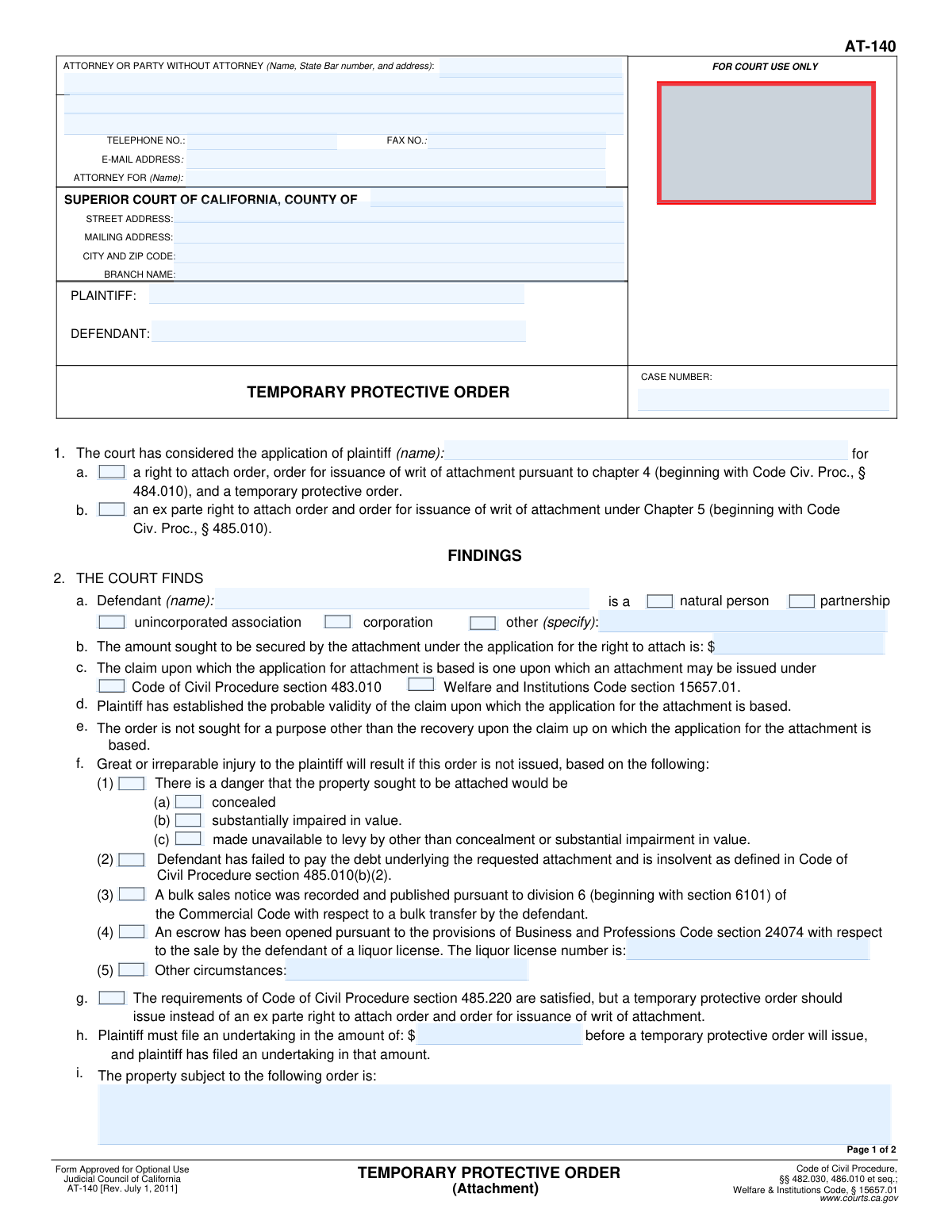
Yes! You can use AI to fill out Form AT-140, Temporary Protective Order
Form AT-140, the Temporary Protective Order (TPO), is a legal document issued by a California Superior Court at the request of a plaintiff in a civil lawsuit. It serves as a crucial pre-judgment remedy, temporarily restricting the defendant's ability to sell, transfer, or hide specific assets, thereby ensuring those assets remain available to satisfy a potential court judgment. This order is granted when there's a risk of irreparable harm to the plaintiff's ability to collect on a future win. Today, this form can be filled out quickly and accurately using AI-powered services like Instafill.ai, which can also convert non-fillable PDF versions into interactive fillable forms.
Our AI automatically handles information lookup, data retrieval, formatting, and form filling.
It takes less than a minute to fill out AT-140 using our AI form filling.
Securely upload your data. Information is encrypted in transit and deleted immediately after the form is filled out.
Form specifications
| Form name: | Form AT-140, Temporary Protective Order |
| Number of fields: | 70 |
| Number of pages: | 2 |
| Language: | English |
Instafill Demo: How to fill out PDF forms in seconds with AI
How to Fill Out AT-140 Online for Free in 2026
Are you looking to fill out a AT-140 form online quickly and accurately? Instafill.ai offers the #1 AI-powered PDF filling software of 2026, allowing you to complete your AT-140 form in just 37 seconds or less.
Follow these steps to fill out your AT-140 form online using Instafill.ai:
- 1 Navigate to Instafill.ai and upload your Form AT-140, or select it from their library of templates.
- 2 Provide the attorney/party information, court details, party names (plaintiff and defendant), and the case number in the header section.
- 3 In the 'Findings' section, check the appropriate boxes to indicate the court's considerations and the legal basis for issuing the order.
- 4 Specify the grounds for finding great or irreparable injury, such as the danger of property being concealed or impaired, and provide any required details.
- 5 Complete the 'Order' section by detailing the required undertaking amount, describing the property subject to the order, and outlining any specific prohibitions on property transfers.
- 6 Enter the order's expiration date and the number of attached pages before the document is dated and signed by a judicial officer.
- 7 Use the AI assistant to review all entered information for accuracy and completeness, then download or print the finalized Form AT-140 for filing.
Our AI-powered system ensures each field is filled out correctly, reducing errors and saving you time.
Why Choose Instafill.ai for Your Fillable AT-140 Form?
Speed
Complete your AT-140 in as little as 37 seconds.
Up-to-Date
Always use the latest 2026 AT-140 form version.
Cost-effective
No need to hire expensive lawyers.
Accuracy
Our AI performs 10 compliance checks to ensure your form is error-free.
Security
Your personal information is protected with bank-level encryption.
Frequently Asked Questions About Form AT-140
This form is a court order, specifically a Temporary Protective Order (TPO), used to prevent a defendant from hiding or disposing of assets while a lawsuit is pending. It is prepared by the plaintiff's attorney for a judge's review and signature to ensure assets are available to satisfy a potential future judgment.
The plaintiff or their attorney typically prepares this form as part of an application for a right to attach order. A judicial officer, such as a judge, then reviews, completes, and signs the form to make it an official and enforceable court order.
A Chapter 4 application is considered after a noticed hearing where the defendant has an opportunity to respond. A Chapter 5 application is for an 'ex parte' order, which is requested urgently and without prior notice to the defendant due to risk of immediate harm.
This is a legal standard requiring you to show that without the order, the defendant is likely to conceal, devalue, or make their property unavailable. The form lists specific grounds, such as the defendant's insolvency, a pending bulk sale of assets, or the sale of a liquor license.
The undertaking is a financial bond that the plaintiff must file with the court. It acts as a security deposit to cover any damages the defendant might suffer if the court later finds the attachment was wrongful.
You must provide the defendant's full name and specify their legal type. This includes checking the box for 'Natural Person' (an individual), 'Corporation', 'Partnership', or specifying another entity type.
The form allows the court to issue specific orders regarding business inventory or farm products. While the defendant may be allowed to transfer this property in the ordinary course of business, the court can restrict how they use the proceeds from those sales.
The order is temporary and will have a specific expiration date that is entered on the form by the court. This date is usually set to coincide with a future court hearing where a more permanent order may be considered.
In this section, you must provide the full name, address, phone number, and email for the person filing the form. If you are an attorney, you must also include your State Bar number and the name of the party you represent.
Yes, services like Instafill.ai use AI to accurately auto-fill form fields from your case data, such as party names, case numbers, and court addresses. This can save significant time and help reduce the chance of errors.
To fill this form online, you can upload it to the Instafill.ai platform. The service will make the document interactive, and its AI can help you populate the required fields with your case information quickly and accurately.
If you have a non-fillable PDF, you can use a service like Instafill.ai to solve this issue. Simply upload your flat PDF, and the platform will automatically convert it into an interactive, fillable form that you can complete online.
The form has a specific section for this situation. You should check the box indicating an escrow has been opened for the sale of a liquor license and provide the license number, as this can be a key reason for the court to grant the protective order.
Compliance AT-140
Validation Checks by Instafill.ai
1
Conditional 'Other Defendant Type' Specification
This check validates that if the 'Other (Specify)' checkbox for the defendant's type is selected, the corresponding 'Other Defendant Type' text field is filled out. It is crucial for the court to have a precise understanding of the defendant's entity type if it does not fall into the standard categories provided. Failure to provide this specification results in an incomplete filing and requires clarification before the court can proceed.
2
Mutually Exclusive Defendant Type Selection
Ensures that only one checkbox is selected from the 'Defendant Type' options (e.g., Natural Person, Partnership, Corporation, Other). A defendant can only be one type of legal entity for the purposes of a single legal action. Selecting multiple types creates ambiguity and would cause the form to be rejected until the filer clarifies the defendant's status.
3
Mutually Exclusive Application Consideration
Verifies that the user has not selected both 'Right to Attach Order (Chapter 4)' and 'Ex Parte Right to Attach Order (Chapter 5)'. These two types of orders follow different legal procedures and have different requirements, making them mutually exclusive. Checking both indicates a critical error in the application that must be corrected before the court can consider the request.
4
Valid Case Number Format and Presence
This validation confirms that the 'Case Number' field is not empty and conforms to the expected format for the jurisdiction's court case numbers. The case number is the primary identifier for the legal proceeding, and its absence or incorrect format would prevent the document from being correctly filed and associated with the proper case. This check prevents significant processing delays and misfiling.
5
Conditional 'Liquor License Number' Entry
This check ensures that if the 'Liquor license sale escrow' box is checked as a ground for irreparable injury, the corresponding 'Liquor License Number' field is populated. The license number is essential for identifying the specific asset in question for the attachment order. Failure to provide it makes the claim unverifiable and the resulting order unenforceable against that asset.
6
Conditional 'Other Circumstances' Description
Validates that if the 'Other circumstances' checkbox under 'Grounds for Irreparable Injury' is selected, the associated text field for explaining these circumstances is filled. The court requires a specific, articulated reason for granting an order based on unique circumstances. An empty description would lead to the rejection of this ground for the order.
7
Valid 'Amount Sought' Numeric Format
This rule validates that the 'Amount Sought' field contains a positive numeric value, formatted correctly as a currency amount. This figure represents the total debt or claim the plaintiff seeks to secure, and it must be a clear, unambiguous value for the court to evaluate. Submitting non-numeric or negative values would render the application invalid.
8
Required Attorney or Party Information
Confirms that essential contact information for the filing party or their attorney is provided, specifically checking that the first line of the address and the telephone number are not empty. This information is vital for the court and opposing parties to send notices and communicate regarding the case. Missing contact details can halt legal proceedings and lead to case dismissal.
9
Logical Date Sequence for Court Orders
Verifies the logical consistency of dates related to the court order, such as the 'Signature Date' and 'Order Expiration Date'. The signature date must not be in the future, and the expiration date must be after the signature date. This prevents the entry of paradoxical or invalid dates that would make the court order nonsensical and unenforceable.
10
Conditional TPO Description for 'Inventory/Farm Products'
This validation ensures that if the 'Inventory or farm products' checkbox is selected within the Temporary Protective Order section, the corresponding 'Inventory/Farm Products Description' text field is completed. The court requires a specific description of the property being restrained to create a legally enforceable order. An omission would make the order too vague to be effective.
11
Required Plaintiff and Defendant Names
This check verifies that the 'Plaintiff Name' and 'Defendant Name' fields are both populated with text. These fields identify the primary parties to the legal action, and their absence makes the document fundamentally incomplete. The form cannot be processed without clearly identifying who is suing whom.
12
Valid 'Number of Pages Attached' Entry
Ensures that the 'Number of Pages Attached' field contains a non-negative integer (0 or greater). This count helps the court clerk verify that the entire document, including all attachments, has been received and processed correctly. An invalid entry could lead to a document being flagged as incomplete.
Common Mistakes in Completing AT-140
Filers often list the main county courthouse address instead of the specific branch handling civil litigation. This happens due to confusion in large counties with multiple court locations. Submitting to the wrong branch will lead to rejection of the filing, causing significant delays and potentially jeopardizing deadlines. Always verify the exact branch name and address for civil filings on the superior court's official website for that county before completing the form.
Users frequently forget to include their State Bar number, provide an incomplete address, or enter a typo in their email or phone number. These errors can delay or prevent crucial communications from the court and opposing counsel, potentially leading to missed hearings or deadlines. To avoid this, carefully proofread all contact information and ensure the State Bar number is included if you are an attorney. AI-powered tools like Instafill.ai can help by saving and accurately auto-filling this recurring information.
People often incorrectly identify the defendant, for example, by selecting 'Corporation' for an LLC (which should be 'Other') or 'Partnership' for an individual's DBA. This mistake can have serious legal consequences, as the rules for attaching assets differ based on the entity type, potentially making the writ unenforceable. Before filling, confirm the defendant's exact legal status through public records, such as the Secretary of State's business search portal, and be sure to specify the entity type if 'Other' is selected.
This form contains many fields that depend on a prior checkbox selection, such as specifying grounds for irreparable injury or providing a liquor license number. A common error is checking a primary box (e.g., 'Liquor license sale escrow') but failing to fill in the required detail (the license number). This renders the selection legally insufficient and will likely cause the court to deny that part of the application. Always review the form to ensure that for every box you check, you also complete any associated text fields or sub-selections.
When describing property to be attached, filers sometimes use overly broad terms like 'defendant's bank accounts' or 'all business assets'. Such descriptions are insufficient for the levying officer (Sheriff) to identify and seize the property, which can make the court's order ineffective. To avoid this, be as specific as possible: list bank names with account numbers (if known), real property addresses or APNs, and detailed descriptions of equipment or inventory. This clarity is essential for the writ to be successfully executed.
The plaintiff is required to post an undertaking (a bond) to cover potential damages if the attachment is found to be wrongful, and this form requires stating the proposed amount. Many filers mistakenly leave this field blank, assuming it will be determined later. An application without a specified undertaking amount is incomplete and will be denied by the court. Always enter the statutory minimum amount (e.g., $10,000 in California) or a higher, justifiable figure.
Filers may accidentally enter a case number, plaintiff/defendant name, or monetary amount on this form that does not match the information on the complaint or other supporting declarations. Clerks and judges check for consistency, and any discrepancy can lead to the filing's rejection or judicial scrutiny that undermines the entire application. To prevent this, meticulously proofread all documents in the filing package together before submission. Using a tool like Instafill.ai can ensure consistency by populating shared data across all forms in a case.
Parties, and sometimes even legal assistants, mistakenly write in the 'Court Use Only' area or fill out the judicial signature and date blocks at the end of the form. This will cause the court clerk to immediately reject the document, forcing the filer to prepare and submit a clean copy, thereby wasting time and risking filing deadlines. Always leave any section marked 'Court Use Only,' 'For Clerk's Use,' or designated for a judicial officer completely blank. If you receive a non-fillable PDF, a tool like Instafill.ai can convert it to a smart, fillable form that helps prevent you from typing in restricted areas.
Several sections of the form, such as 'Defendant Type' and 'Grounds for Irreparable Injury', have an 'Other' option that requires a written specification in an adjacent field. A frequent mistake is to check the 'Other' box but neglect to provide the mandatory explanation. Without the specific details, the court will disregard the selection, which can weaken or invalidate the legal argument for the attachment. If you check an 'Other' box, always provide a clear and concise description in the corresponding text field.
The 'Amount Sought' to be secured by the attachment must be directly based on the primary claim and substantiated in the application's supporting declarations. Filers sometimes incorrectly include other sums like anticipated attorney's fees or punitive damages, which are not typically allowed in the attachment amount. This error can cause the judge to question the entire application's validity or reduce the attachment amount. Ensure the figure entered is calculated precisely according to the relevant Code of Civil Procedure sections and matches the evidence provided.
Saved over 80 hours a year
“I was never sure if my IRS forms like W-9 were filled correctly. Now, I can complete the forms accurately without any external help.”
Kevin Martin Green
Your data stays secure with advanced protection from Instafill and our subprocessors

Robust compliance program
Transparent business model
You’re not the product. You always know where your data is and what it is processed for.
ISO 27001, HIPAA, and GDPR
Our subprocesses adhere to multiple compliance standards, including but not limited to ISO 27001, HIPAA, and GDPR.
Security & privacy by design
We consider security and privacy from the initial design phase of any new service or functionality. It’s not an afterthought, it’s built-in, including support for two-factor authentication (2FA) to further protect your account.
Fill out AT-140 with Instafill.ai
Worried about filling PDFs wrong? Instafill securely fills form-at-140-temporary-protective-order forms, ensuring each field is accurate.