
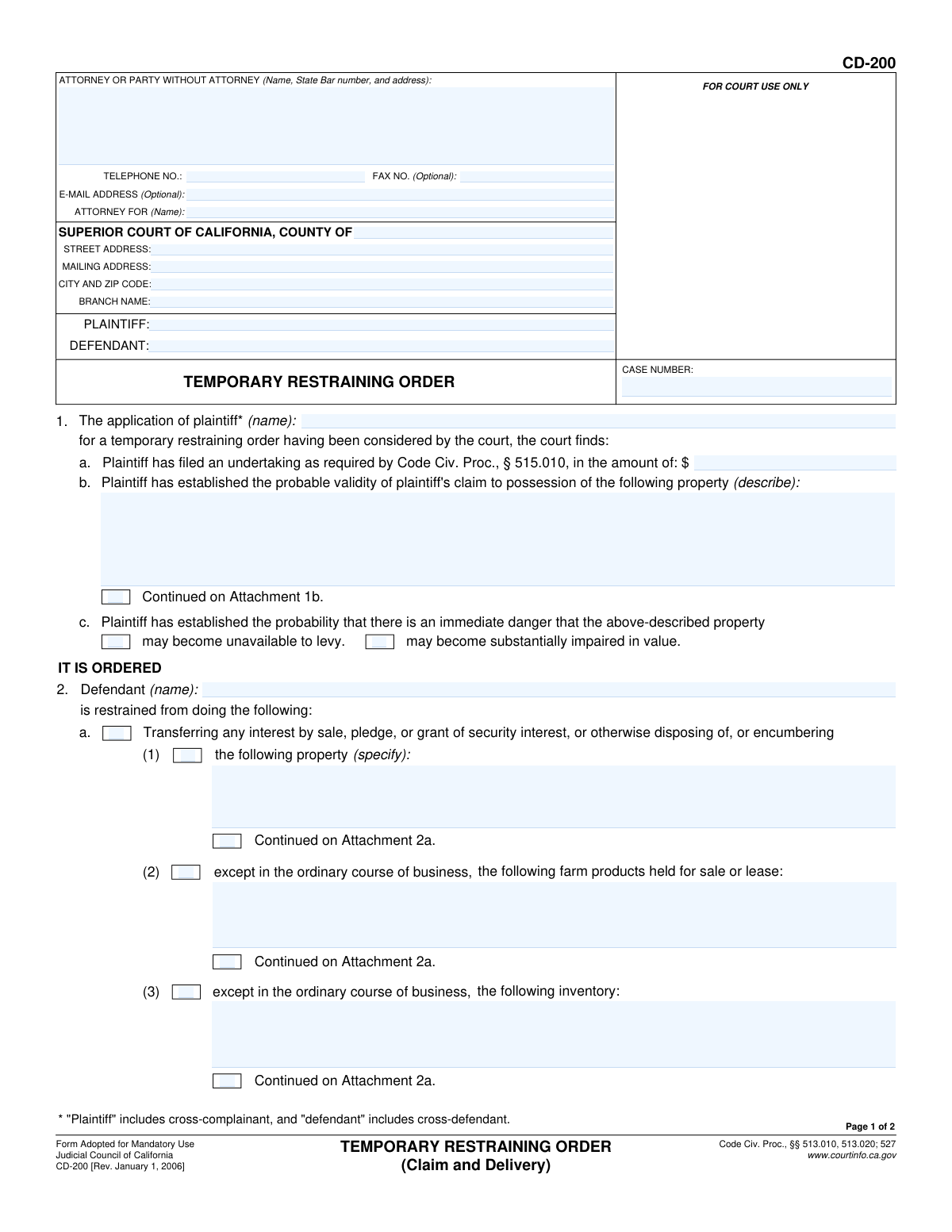
Yes! You can use AI to fill out Form CD-200, Temporary Restraining Order (Claim and Delivery)
Don't type 57 fields by hand. Tell our AI about yourself, or upload a document you already have, and it fills every field in seconds. You check it, then download, print or sign.
The AI does the filling. You just check it.
No typing into boxes, nothing to install.
What this form asks for
The AI fills all of it, from your answers or your documents.
The AI checks your answers before you download
14 checks built for this form, so a wrong date or a missing answer is caught before anyone else sees it.
This check ensures that the 'CASE NUMBER' field is populated on both page 1 and page 2, and that the value is identical in both locations. The case number is the primary identifier for the legal proceeding, and any inconsistency can lead to misfiling or rejection of the document. Failure to provide a consistent case number will halt processing until the discrepancy is corrected.
Validates that the 'PLAINTIFF' and 'DEFENDANT' name fields in the main caption are not empty. These fields are essential for identifying the primary parties to the restraining order. Submitting a form without this information would render the order legally meaningless and unenforceable, so the form will be rejected if they are blank.
Ensures the plaintiff's name entered in the header ('PLAINTIFF') matches the name entered in the body of the order at item 1 ('plaintiff* (name)'). This consistency is crucial for the legal validity and clarity of the order, preventing any ambiguity about who is seeking the order. A mismatch will trigger an error, requiring the user to correct the names to be identical.
Verifies that the defendant's name in the header ('DEFENDANT') is the same as the name specified in the body of the order at item 2 ('Defendant (name)'). This check is critical to ensure the restraining order correctly and unambiguously identifies the person being restrained. If the names do not match, the order could be challenged or deemed invalid.
This validation checks that the value entered for the undertaking amount in item 1a is a valid positive number or currency format. The undertaking amount is a legal requirement (Code Civ. Proc., § 515.010) and must be a specific monetary value. An invalid format, such as text or a negative number, will cause a validation failure, as it does not represent a proper bond amount.
Validates that if the court's finding in item 1b is being utilized, the corresponding property description text field ('describe') is not empty. The order is meaningless without a clear description of the property the plaintiff has a valid claim to. If this section is used, a description is mandatory for the order to be specific and enforceable.
And 8 more checks
- Immediate Danger Selection Requirement
- Conditional Description for Restrained Actions
- Logical Count of Checked Boxes
- Order Expiration Date Validity
- Attachment Count Logic
- Signature Date Presence and Validity
- Email Address Format Validation
- Phone Number Format Validation
Let AI fill out your CD-200
No typing. Every field filled in seconds, checked, ready to sign.
How to Fill Out CD-200 Online for Free in 2026
What the AI walks you through.
- Navigate to Instafill.ai and upload or select the California Form CD-200.
- Enter the case information, including the Superior Court details, county, and case number.
- Provide the full names and addresses for the plaintiff, defendant, and their respective attorneys if applicable.
- Detail the court's findings, including the plaintiff's undertaking amount and a specific description of the property involved in the claim.
- Clearly check the boxes and describe the specific actions the defendant is restrained from, such as transferring interest, concealing the property, or impairing its value.
- Indicate the date after which the order will have no effect and note any attachments.
- Review all entered information for accuracy before the document is presented to the judicial officer for signature and dating.
Common Mistakes in Completing CD-200
The ones the AI is built to catch.
Incomplete Header Information on Subsequent Pages
Vague or Ambiguous Property Descriptions
Mismatched Attachment References
Incorrect Checkbox Tally in Item 2e
Omitting the Undertaking Amount
Confusion in the Attorney/Pro Se Filer Section
Missing Order Expiration Date
Improper Signature Placement
Forgetting to Tally Attached Pages
Using a Non-Fillable PDF Manually
Frequently Asked Questions About CD-200
Is it really free for 7 days?
Can I fill other forms too?
How do I cancel?
How does the AI fill out CD-200?
What happens to my information?
How complex is CD-200 to fill out?
What is the purpose of Form CD-200, the Temporary Restraining Order?
Who fills out this form?
What is the 'undertaking' mentioned in Section 1a?
How long does this Temporary Restraining Order last?
What happens if the defendant violates the restraining order?
How do I describe the property that the order applies to?
What does 'except in the ordinary course of business' mean in Section 2?
What happens after the judge signs Form CD-200?
Can I use AI to help me prepare the application for this order?
How can I fill out the necessary application forms online?
The application form I have is a non-fillable PDF. What should I do?
What is 'Claim and Delivery'?
What are the 'attachments' mentioned on the form?
Get your CD-200 filled out by AI
$0 today. Cancel before Nov 1 and you pay nothing.
Other forms like this one
California court forms: Judicial Council of California Form SC-105, Request for Court Order and Answer (Small Claims), Judicial Council of California Form SC-120, Defendant’s Claim and ORDER to Go to Small Claims Court (Small Claims), Judicial Council of California Form SER-001, Request for Sheriff to Serve Court Papers, Judicial Council of California Form SER-001, Request for Sheriff to Serve Court Papers, Affidavit for Collection of Personal Property California Probate Code Section 13100, Form POS-040, Proof of Service—Civil, Declaration of Facts of Death (California Superior Court), declaration-of-marriage-for-court-proceeding-california-family-law, ADOPT-200, Adoption Request, ADOPT-200, Stepparent Adoption Request, ADOPT-210, Adoption Agreement, ADOPT-310, Contact After Adoption Agreement, Judicial Council of California Form ADOPT-200, Adoption Request, Form ADR-107, Mediation Attendance Sheet, Form ADR-110, Order Appointing Referee, Form ADR-109, Stipulation or Motion for Order Appointing Referee, Form ADR-102, Request for Trial De Novo After Judicial Arbitration, Form ADR-108, Referee's Report (Code Civ. Proc., §§ 638, 639), Form ADR-106, Petition to Confirm, Correct, or Vacate Contractual Arbitration Award, Form ADR-104, Rejection of Award and Request for Trial After Attorney-Client Fee Arbitration
restraining order forms: Form DV-100, Request for Domestic Violence Restraining Order, DV-100, Request for Domestic Violence Restraining Order (Domestic Violence Prevention), Judicial Council of California Form DV-110, Temporary Restraining Order (CLETS-TRO) (Domestic Violence Prevention), Form DV-116, Order on Request to Continue Court Hearing (Temporary Restraining Order) (CLETS-TRO) (Domestic Violence Prevention), Form DV-130, Restraining Order After Hearing (Order of Protection) (Domestic Violence Prevention), Form CH-110, Temporary Restraining Order (CLETS-TCH) (Civil Harassment Prevention), Form CH-120, Response to Request for Civil Harassment Restraining Orders, Form CH-130, Civil Harassment Restraining Order After Hearing (CLETS-CHO), Order on Request to Modify/Terminate Civil Harassment Restraining Order (Civil Harassment Prevention), Form CH-620, Response to Request to Modify/Terminate Civil Harassment Restraining Order (Civil Harassment Prevention), Form CIV-025, Application and Order for Reissuance of Order to Show Cause and Temporary Restraining Order, Form CD-190, Application for Temporary Restraining Order (Claim and Delivery), Order on Request to Continue Hearing (Temporary Restraining Order) (CLETS-TCH) (Civil Harassment Prevention), Form CH-610, Notice of Hearing on Request to Modify/Terminate Civil Harassment Restraining Order (Civil Harassment Prevention), Form CH-700, Request to Renew Restraining Order (Civil Harassment Prevention), Form CH-730, Order Renewing Civil Harassment Restraining Order (CLETS), Form DV-120, Response to Request for Domestic Violence Restraining Order (Domestic Violence Prevention), Form DV-300, Request to Change or End Restraining Order (Domestic Violence Prevention), Form DV-310, Notice of Court Hearing and Temporary Order to Change or End Restraining Order (Domestic Violence Prevention), Form DV-315, Request to Reschedule Hearing to Change or End Restraining Order (Domestic Violence Prevention)
court claim forms: Form SC-100, Plaintiff's Claim and ORDER to Go to Small Claims Court, Judicial Council of California Form SC-105, Request for Court Order and Answer (Small Claims), SC-120, Defendant’s Claim and ORDER to Go to Small Claims Court (Small Claims), SC-105, Request for Court Order and Answer (Small Claims), Judicial Council of California Form SC-120, Defendant’s Claim and ORDER to Go to Small Claims Court (Small Claims), Form SC-100, Plaintiff’s Claim and ORDER to Go to Small Claims Court, Certificate of Service (Civil Court Claim), Form N161, Appellant’s notice (All appeals except small claims track appeals and appeals to the Family Division of the High Court), Plaintiff's Claim and ORDER to Go to Small Claims Court (SC-100), Form N161, Appellant's Notice (All appeals except small claims track appeals and appeals to the Family Division of the High Court), Form SC-100A, Other Plaintiffs or Defendants (Attachment to Plaintiff's Claim and ORDER to Go to Small Claims Court), Form N461: Claim for judicial review, Statement of Small Claim and Notice, Trial Court of Massachusetts, State of Michigan, Form MC 25, Notice of Intent to Escheat Unclaimed Personal Property, Form MC 35, Complaint, Claim and Delivery, Form MC 36, Motion for Possession Pending Judgment, Claim and Delivery, Order of Possession Pending Judgment, Claim and Delivery, Form MC 38, Bond, Claim and Delivery, Form MC 39, Judgment, Claim and Delivery, Form MC 55, Claim of Appeal
Let AI fill out your CD-200
Your trial starts once a card is added. You pay nothing before Nov 1.
Our AI already knows this form, all 57 fields of it. Skip the typing: tell it about yourself, or upload what you have, and it fills the whole form in seconds.
- AI fills every field on both pages, checkboxes included
- No typing into boxes: answer a few questions, or upload a document you already have, an old copy of this form, a photo of a document
- The AI checks the answers; you review and change anything before you download
- Download the finished PDF, print it, or sign it online
- Encrypted, and never used to train AI
Cancel before Nov 1 and you pay nothing.
A card is needed to start the trial. Cancel in two clicks from your account.
Terms · Privacy