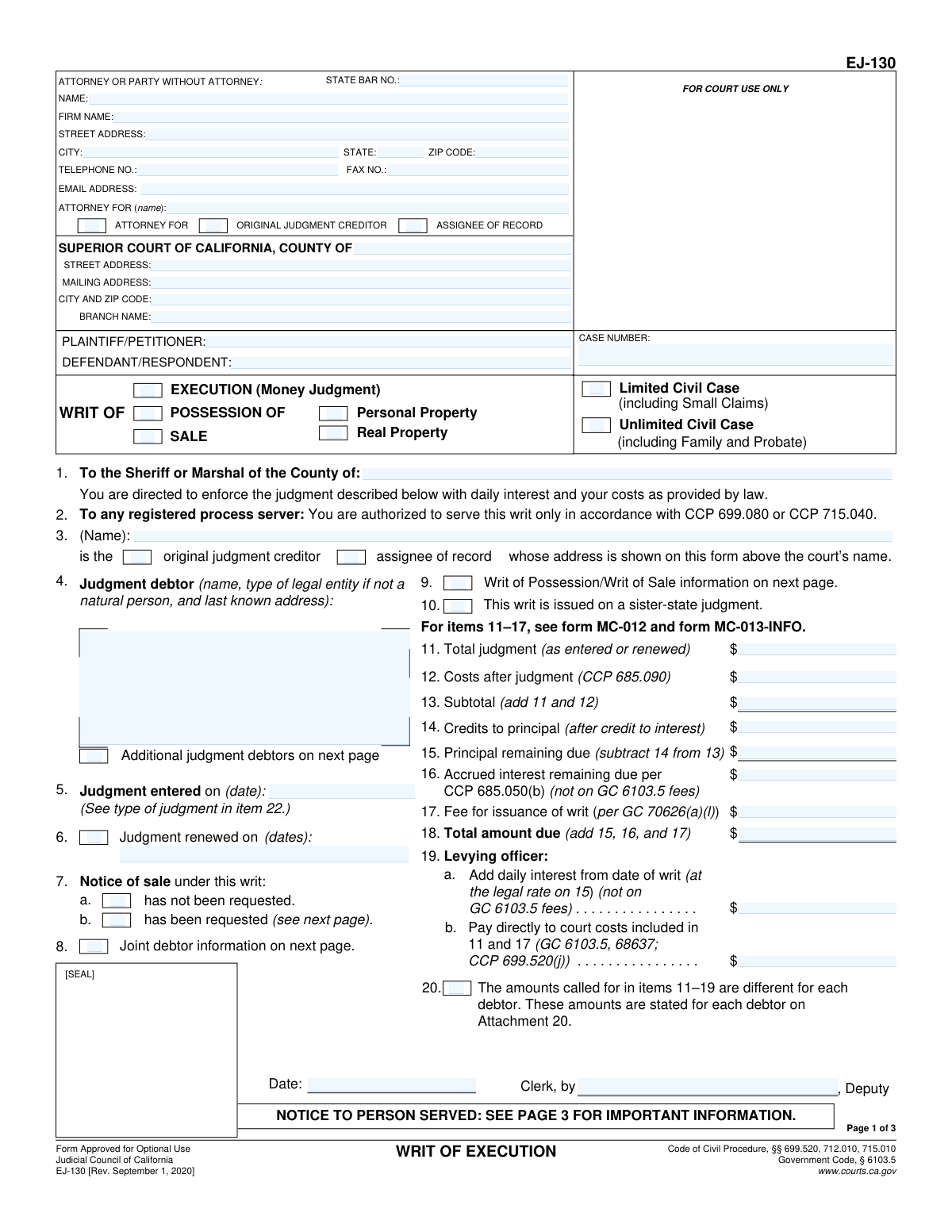
Yes! You can use AI to fill out Form EJ-130, Writ of Execution
Form EJ-130, the Writ of Execution, is a legal document issued by a California court that commands a sheriff or marshal to enforce a judgment. It is used by a judgment creditor to collect a debt by seizing the judgment debtor's assets, such as money or property. This writ is essential for the final step of the legal collection process, turning a court's decision into tangible recovery for the winning party. Today, this form can be filled out quickly and accurately using AI-powered services like Instafill.ai, which can also convert non-fillable PDF versions into interactive fillable forms.
Our AI automatically handles information lookup, data retrieval, formatting, and form filling.
It takes less than a minute to fill out EJ-130 using our AI form filling.
Securely upload your data. Information is encrypted in transit and deleted immediately after the form is filled out.
Form specifications
| Form name: | Form EJ-130, Writ of Execution |
| Number of fields: | 100 |
| Number of pages: | 3 |
| Language: | English |
Instafill Demo: How to fill out PDF forms in seconds with AI
How to Fill Out EJ-130 Online for Free in 2026
Are you looking to fill out a EJ-130 form online quickly and accurately? Instafill.ai offers the #1 AI-powered PDF filling software of 2026, allowing you to complete your EJ-130 form in just 37 seconds or less.
Follow these steps to fill out your EJ-130 form online using Instafill.ai:
- 1 Navigate to Instafill.ai and upload or select the Form EJ-130, Writ of Execution.
- 2 Provide the court and case information, including the county, case number, and the names of the plaintiff and defendant.
- 3 Enter the attorney or party information, specifying who you are representing.
- 4 Input the specific details of the judgment, including the date it was entered, the total amount, post-judgment costs, credits, and accrued interest.
- 5 Specify the type of writ being requested (Execution, Possession, or Sale) and provide details about the judgment debtor and any property involved.
- 6 Review the AI-populated form for accuracy, ensuring all monetary calculations and party details are correct.
- 7 Download, print, and sign the completed Form EJ-130 to be filed with the court clerk for issuance.
Our AI-powered system ensures each field is filled out correctly, reducing errors and saving you time.
Why Choose Instafill.ai for Your Fillable EJ-130 Form?
Speed
Complete your EJ-130 in as little as 37 seconds.
Up-to-Date
Always use the latest 2026 EJ-130 form version.
Cost-effective
No need to hire expensive lawyers.
Accuracy
Our AI performs 10 compliance checks to ensure your form is error-free.
Security
Your personal information is protected with bank-level encryption.
Frequently Asked Questions About Form EJ-130
This form is a court order directed to a sheriff or marshal to enforce a judgment. It can be used to seize a debtor's assets for a money judgment (Writ of Execution), recover property in an eviction (Writ of Possession), or order the sale of property (Writ of Sale).
The judgment creditor, who is the person or entity that won the court case and is owed money or property, or their attorney, completes this form. It is then submitted to the court clerk to be officially issued.
A Writ of Execution is for enforcing a money judgment by seizing assets. A Writ of Possession is used to remove occupants from real property, typically in eviction cases. A Writ of Sale orders specific property to be sold to satisfy the judgment.
Start with the total judgment amount (Item 11), add any post-judgment costs (Item 12), subtract payments received (Item 14), and then add accrued interest (Item 16) and the writ issuance fee (Item 17) to calculate the total due.
The levying officer is the county Sheriff or Marshal responsible for enforcing the writ. You will direct the writ to the levying officer in the county where the debtor or their assets are located.
You must file the completed form with the clerk of the court that issued the judgment. The clerk will sign and seal the form, officially issuing the writ, which you then deliver to the levying officer for enforcement.
This box is checked when the original judgment was awarded in a state other than California. The judgment has been registered in California, allowing it to be enforced here using this writ.
List the primary judgment debtor in Item 4 and check the box for 'Additional judgment debtors on next page.' You will then provide the names and addresses of the other debtors on page 2 of the form.
This section is specifically for a Writ of Possession in an eviction. It provides the levying officer with crucial details about the property and the rights of any occupants, especially if the eviction resulted from a foreclosure.
Yes, services like Instafill.ai use AI to accurately auto-fill form fields from your case information, which saves time and helps reduce errors on complex legal forms.
Simply upload the blank EJ-130 form or your existing case documents to the Instafill.ai platform. The AI will automatically extract and populate the required information, such as party names, case numbers, and judgment amounts, into the correct fields.
Services like Instafill.ai can convert flat, non-fillable PDFs into interactive forms. This allows you to easily type your information directly into the fields online before printing the completed document.
This means a party has formally asked to be notified about the date, time, and location of any sale of the debtor's property. If this box is checked, you must provide the requester's name and address on page 2.
The daily interest is calculated at the legal rate on the principal amount remaining due (Item 15). This amount accrues from the date the writ is issued until the levying officer collects the full amount owed.
Compliance EJ-130
Validation Checks by Instafill.ai
1
Verifies Monetary Calculation Accuracy
This validation checks the arithmetic in the financial section (Items 11-18). It confirms that Item 13 equals the sum of 11 and 12; Item 15 equals Item 13 minus 14; and the final 'Total amount due' in Item 18 is the correct sum of Items 15, 16, and 17. This is critical for ensuring the writ requests the legally correct amount from the debtor. An incorrect calculation could invalidate the writ or lead to legal challenges.
2
Ensures Specific Possession Type is Selected
This check is triggered when the 'POSSESSION OF' box is checked. It validates that one of the sub-options, either 'Personal Property' or 'Real Property', is also selected. This is important because the type of property dictates the legal procedures the levying officer must follow. Failure to specify the property type makes the writ ambiguous and unenforceable.
3
Requires Requester Information for Notice of Sale
If the box for 'Item 7b — Notice of sale has been requested' is checked, this validation ensures that the corresponding fields for the requester's name and address on page 2 (Item 21) are filled out. This is a legal requirement to ensure all interested parties are properly notified of a pending sale of property. Missing this information would prevent legally required notifications from being sent.
4
Validates Presence of Additional Debtor Information
When the 'Additional judgment debtors on next page' box (near Item 4) is checked, this validation confirms that at least one additional debtor's information is entered in the designated section on page 2 (Item 21). This prevents a form from indicating there are more debtors without actually identifying them. An incomplete list could cause confusion and prevent enforcement against the unnamed debtors.
5
Validates Chronological Order of Judgment Dates
This check ensures that any date entered for 'Judgment renewed on (Item 6)' is chronologically after the date entered for 'Judgment entered on (Item 5)'. A judgment cannot be renewed before it is first entered. This logical check prevents data entry errors that would make the legal timeline of the judgment nonsensical and potentially invalid.
6
Enforces Single Case Type Selection
This validation ensures that the user has selected either 'Limited Civil Case' or 'Unlimited Civil Case', but not both. These are mutually exclusive categories that define the court's jurisdiction and procedures. Selecting both would create an ambiguity that needs to be resolved before the form can be processed correctly by the court.
7
Ensures Case Number is Provided
This validation confirms that the 'CASE NUMBER' field is not empty. The case number is the primary identifier for the legal action in the court's system. Without it, the writ cannot be linked to the correct judgment and is therefore completely invalid and cannot be filed or enforced.
8
Validates Format of All Monetary Fields
This check ensures that all fields intended for dollar amounts (Items 11 through 19) contain valid numeric currency values. The values should not contain letters or special characters other than a decimal point. This is essential for accurate financial calculations and to prevent processing errors or misinterpretation of the amounts owed.
9
Validates Attorney's State Bar Number
If an attorney is identified on the form, this validation checks that the 'STATE BAR NO.' field contains a numeric value. State Bar numbers are unique identifiers for licensed attorneys. This check helps verify the attorney's identity and credentials, and ensures the number is in a valid format for record-keeping and verification purposes.
10
Prevents Negative Principal Balance
This validation checks that the 'Principal remaining due (Item 15)' is not a negative number. This is calculated by subtracting credits (Item 14) from the subtotal (Item 13). A negative principal would imply an overpayment, which is highly unusual for a writ of execution and likely indicates a data entry error that must be corrected before issuance.
11
Requires at least one Writ Type to be selected
This validation ensures that at least one of the main writ type checkboxes is selected: 'EXECUTION (Money Judgment)', 'POSSESSION OF', or 'SALE'. The form is useless without specifying the type of action the levying officer is being directed to take. This check prevents the submission of an incomplete and ambiguous request.
12
Enforces Completion of Dependent Unlawful Detainer Fields
This check is triggered if either box 25a(2) ('Prejudgment Claim NOT served') or 25a(3) ('Unlawful detainer resulted from foreclosure') is checked. It validates that the fields in section 25a(4), specifically the 'daily rental value' and 'hearing dates for objections,' are filled. This information is legally required under CCP 1174.3 in these specific scenarios, and its absence would make the writ defective.
13
Ensures Primary Judgment Debtor Information is Complete
This validation verifies that the fields for the primary judgment debtor in Item 4, including name and last known address, are fully completed. The levying officer cannot enforce a judgment without knowing who the debtor is and where they might be located or have assets. Incomplete information makes the writ practically unenforceable.
14
Requires Client Name if Attorney is Listed
If the 'ATTORNEY FOR' checkbox is selected, this validation ensures the 'ATTORNEY FOR (name)' field is filled with the name of the client being represented. This clarifies the relationship between the attorney and the parties in the case, such as the Plaintiff or Original Judgment Creditor. This is important for proper communication and to avoid confusion about who the attorney is acting on behalf of.
Common Mistakes in Completing EJ-130
Users frequently make mathematical errors when completing the financial section (Items 11-18), such as incorrectly adding costs or miscalculating the remaining principal. These errors occur due to the manual nature of the calculations. A miscalculated total can lead to the court clerk rejecting the writ or the levying officer collecting the wrong amount, causing significant delays and potential legal disputes. To avoid this, meticulously double-check all figures before submission; using an AI-powered tool like Instafill.ai can prevent these errors by performing the calculations automatically.
A common mistake is entering an incomplete or incorrect name, address, or legal entity type for the judgment debtor in Item 4. This often happens when working from memory or outdated records. An inaccurate debtor identification makes it impossible for the sheriff or marshal to locate the person or entity, rendering the writ completely unenforceable. Always verify the debtor's full legal name and last known address against the official judgment to ensure accuracy.
Calculating accrued interest (Item 16) and daily interest (Item 19a) is a major point of failure, as people use the wrong interest rate or calculation period. The rules for interest calculation can be complex, leading to honest mistakes that result in an incorrect total demand. This can invalidate the writ or open the door to a challenge from the debtor. It is crucial to use the correct legal interest rate and carefully calculate the accrual period, a task that can be simplified and validated by advanced form-filling software.
Filers often create ambiguity by not fully specifying the type of writ. For example, they might check the box for 'POSSESSION OF' but then fail to select either 'Personal Property' or 'Real Property'. This lack of clarity leaves the levying officer without clear instructions on what to enforce, leading to inaction or rejection of the writ. To prevent this, ensure that for every primary checkbox selected, all corresponding sub-options are also completed to create a clear and legally sufficient directive.
When seeking a Writ of Possession for real property (Item 25), users frequently omit critical dependent information. For instance, they may check box 25a(2) indicating a Prejudgment Claim was not served but then fail to provide the required hearing dates or daily rental value. This incomplete information will cause the court clerk to reject the form, as the writ is missing elements required for its legal execution. Ensure every checkbox selection is followed by filling out all associated data fields.
A simple but frequent error is checking a box that indicates an attachment is included (e.g., 'Attachment 20' for debtor-specific amounts or 'Attachment 25e' for a property description) but then failing to submit the actual attachment. This creates an incomplete filing that the court cannot process, resulting in an automatic rejection and delaying enforcement. Always compile and double-check that all referenced attachments are present with the main form before submission.
Typographical errors in the case number or court information fields are highly common and have serious consequences. A single wrong digit can cause the writ to be filed in the wrong case or rejected outright, halting the enforcement process. This often happens due to simple data entry mistakes. To avoid this, carefully transcribe the case number and court details exactly as they appear on the original judgment. AI tools like Instafill.ai can help prevent this by saving and accurately auto-filling case information across related documents.
In Item 25e, filers must describe the property to be seized or sold, but often provide a description that is too vague, such as 'debtor's car' or 'office equipment'. A levying officer cannot act on a vague description, as they must be able to identify the specific asset without ambiguity. The writ will be returned as unenforceable. To avoid this, provide precise details like a vehicle's VIN, a property's legal description, or serial numbers for electronics.
Judgment creditors are entitled to recover certain costs, such as the fee for the issuance of the writ itself (Item 17) and other costs after judgment (Item 12). Many filers forget to include these amounts in their calculation, meaning they fail to recover money they are legally owed. This results in a financial loss for the creditor. Before filing, review the relevant codes of civil procedure to ensure all allowable costs are included in the total amount due.
This official form is often provided as a flat, non-fillable PDF, leading users to print it and fill it out by hand. Handwriting can be illegible and prone to errors, smudges, and calculation mistakes, increasing the likelihood of rejection by the court clerk. To avoid this, it is best to use a tool like Instafill.ai, which can convert any non-fillable court form into an interactive, fillable version, ensuring all entries are clean, legible, and accurate.
Saved over 80 hours a year
“I was never sure if my IRS forms like W-9 were filled correctly. Now, I can complete the forms accurately without any external help.”
Kevin Martin Green
Your data stays secure with advanced protection from Instafill and our subprocessors

Robust compliance program
Transparent business model
You’re not the product. You always know where your data is and what it is processed for.
ISO 27001, HIPAA, and GDPR
Our subprocesses adhere to multiple compliance standards, including but not limited to ISO 27001, HIPAA, and GDPR.
Security & privacy by design
We consider security and privacy from the initial design phase of any new service or functionality. It’s not an afterthought, it’s built-in, including support for two-factor authentication (2FA) to further protect your account.
Fill out EJ-130 with Instafill.ai
Worried about filling PDFs wrong? Instafill securely fills form-ej-130-writ-of-execution forms, ensuring each field is accurate.