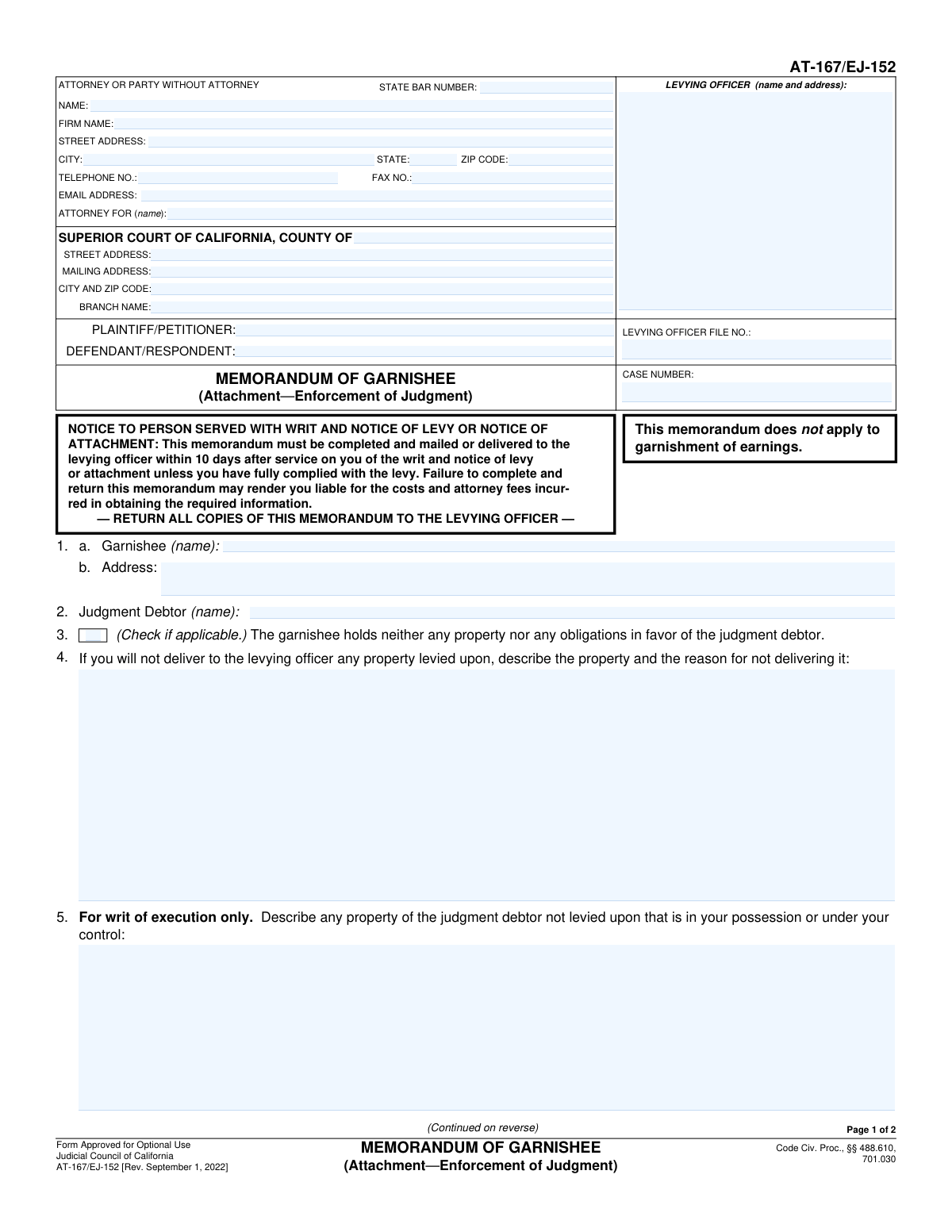
Yes! You can use AI to fill out Form EJ-165, Memorandum of Garnishee
Form EJ-165, Memorandum of Garnishee, is a crucial legal document used in California for the enforcement of judgments. When a creditor attempts to collect a debt, they can serve a writ on a third party (the garnishee) who might be holding assets belonging to the debtor; this form is the garnishee's official response, informing the levying officer about the debtor's property in their possession or explaining why it cannot be delivered. Today, this form can be filled out quickly and accurately using AI-powered services like Instafill.ai, which can also convert non-fillable PDF versions into interactive fillable forms.
Our AI automatically handles information lookup, data retrieval, formatting, and form filling.
It takes less than a minute to fill out EJ-165 using our AI form filling.
Securely upload your data. Information is encrypted in transit and deleted immediately after the form is filled out.
Form specifications
| Form name: | Form EJ-165, Memorandum of Garnishee |
| Number of fields: | 42 |
| Number of pages: | 2 |
| Language: | English |
Instafill Demo: How to fill out PDF forms in seconds with AI
How to Fill Out EJ-165 Online for Free in 2026
Are you looking to fill out a EJ-165 form online quickly and accurately? Instafill.ai offers the #1 AI-powered PDF filling software of 2026, allowing you to complete your EJ-165 form in just 37 seconds or less.
Follow these steps to fill out your EJ-165 form online using Instafill.ai:
- 1 Navigate to Instafill.ai and upload or select the Form EJ-165, Memorandum of Garnishee.
- 2 Provide the court and case information, including the court name, case number, and levying officer details.
- 3 Enter the full information for the attorney or party filing the form, along with the names of the plaintiff and defendant.
- 4 Clearly identify the garnishee (the person or entity filling out the form) and the judgment debtor.
- 5 Complete the main declaration section, indicating whether you hold property for the debtor. If so, describe the property and explain why it is not being delivered to the levying officer.
- 6 Detail any obligations owed to the debtor or any known third-party claims to the property.
- 7 Review all entered information for accuracy, then date and provide the declarant's name before saving or printing the completed form for submission.
Our AI-powered system ensures each field is filled out correctly, reducing errors and saving you time.
Why Choose Instafill.ai for Your Fillable EJ-165 Form?
Speed
Complete your EJ-165 in as little as 37 seconds.
Up-to-Date
Always use the latest 2026 EJ-165 form version.
Cost-effective
No need to hire expensive lawyers.
Accuracy
Our AI performs 10 compliance checks to ensure your form is error-free.
Security
Your personal information is protected with bank-level encryption.
Frequently Asked Questions About Form EJ-165
This form is used by a third party, known as a garnishee, to officially respond to a legal levy. It informs the court and levying officer about any property or money you hold that belongs to a judgment debtor.
A garnishee is a person or entity, such as a bank or employer, that holds assets or owes money to a judgment debtor. If you have been served with a writ of garnishment or execution, you are the garnishee and must complete this form.
If you do not hold any property or owe any obligations to the judgment debtor, you must check the 'No Property Held' box. You still need to complete the case information, sign the declaration, and submit the form to the levying officer.
This information should be printed on the legal documents you received, such as the Writ of Execution or Notice of Levy. The levying officer is the sheriff or marshal who served you the papers.
Use the section 'Property Description and Reason for Non-Delivery' to describe the property and provide a clear, factual reason for not turning it over. This could be due to a pre-existing lien, ownership dispute, or other legal justification.
A 'levied but not due' obligation is a debt you owe the debtor that has been legally seized but is not yet payable, like a future installment payment. A 'non-levied' obligation is any other debt you owe the debtor that was not covered by the specific levy you received.
You must disclose this in the 'Description of Third-Party Claims' section. Provide a description of the claim and include the name and address of the other person or entity, if known.
The completed and signed form must be mailed or delivered to the levying officer whose name and address are listed at the top of the form. It is also good practice to send a copy to the judgment debtor.
Yes, services like Instafill.ai use AI to help you accurately auto-fill form fields from your case documents, which saves time and helps prevent errors.
You can use a service like Instafill.ai to fill the form online. Simply upload a scan or photo of the form, and its AI will make it an interactive, fillable document you can complete on your device.
If you have a non-fillable or 'flat' PDF, you can upload it to a platform like Instafill.ai. It will automatically convert the PDF into an interactive form that you can easily fill out, save, and print.
If you need more space, use separate sheets of paper to provide the additional information. Check the box for 'Total number of pages attached' and write the number of extra pages you are including.
The declaration must be signed by the garnishee or an authorized representative of the garnishee entity (e.g., a payroll manager for an employer or an officer for a bank). By signing, you are declaring under penalty of perjury that the information provided is true and correct.
Compliance EJ-165
Validation Checks by Instafill.ai
1
Case Number Consistency Check
This validation ensures that the 'Case Number' entered in the main section matches the 'Case Number' entered in the 'Case Information' header. Mismatched case numbers can lead to the document being misfiled or rejected, causing significant delays in legal proceedings. If the numbers do not match, the user will be prompted to correct the discrepancy before submission.
2
Conditional Requirement for Property/Obligation Description
This check verifies that if the 'No Property Held' box is left unchecked, at least one of the subsequent description fields (e.g., 'Property Description and Reason for Non-Delivery', 'Unpaid Obligation Description') is filled out. This is crucial for the garnishee to comply with their legal duty to explain what property or obligations they hold for the judgment debtor. Failure to provide this information when required would render the form incomplete and legally insufficient.
3
Contradictory Information for 'No Property Held'
This validation ensures that if the 'No Property Held' box is checked, all fields related to describing property or obligations are left empty. Submitting a form that simultaneously claims no property is held while also describing property is contradictory and will lead to rejection. This check prevents logical inconsistencies and ensures the declaration is clear and unambiguous.
4
Declaration Date Validity
This check validates that the 'Declaration Date' is a real, correctly formatted date and is not set in the future. Legal documents must be accurately dated to be considered valid, as the date establishes when the declaration was made. An invalid or future date would call the document's authenticity into question and likely result in its rejection by the court or levying officer.
5
Attached Pages Count Logic
This validation enforces the logic between the 'Total number of pages attached' checkbox and the corresponding count field. If the checkbox is selected, the 'Total Pages Attached' field must contain a positive integer (e.g., '1' or greater). Conversely, if the box is not checked, the number field should be empty or zero, preventing confusion about attachments.
6
State Bar Number Validation
This check verifies that if the 'Attorney For' field is filled, the 'State Bar Number' field is also completed and follows the expected numerical format. The State Bar number is a unique identifier required for attorneys practicing before the court, and its absence or incorrect format can prevent proper identification of legal counsel. If an attorney is listed, this field is mandatory for the form to be processed correctly.
7
Attorney Email Address Format
This validation ensures the 'Email Address' for the attorney or party is in a valid format (e.g., '[email protected]'). An incorrect email address prevents crucial electronic communication and service of documents from the court and other parties. This check helps guarantee that the provided contact information is functional for official correspondence.
8
Attorney Telephone Number Format
This check validates that the 'Telephone Number' field conforms to a standard 10-digit format, with or without common separators like parentheses or hyphens. A valid phone number is essential for direct communication regarding the case. An improperly formatted number could be unusable, hindering timely contact and potentially delaying proceedings.
9
Court Information Completeness
This validation ensures that all required fields under 'Court Information', including the County, Street Address, and Branch Name, are filled out. This information is critical for identifying the correct legal venue where the document should be filed. Incomplete court details will result in the form being rejected, as it cannot be routed to the proper jurisdiction.
10
Required Party Identification
This check verifies that the names for the 'Plaintiff/Petitioner', 'Defendant/Respondent', and 'Judgment Debtor' are all provided. These fields are fundamental to identifying the core parties involved in the legal action. Omitting any of these names would make the document legally meaningless, as it would be unclear who the action pertains to.
11
Garnishee Information Completeness
This validation ensures that both the 'Garnishee Name' and 'Garnishee Address' fields are completed. The garnishee is the entity to whom this legal document is directed, and their full name and address are essential for proper service and legal effect. Failure to provide complete and accurate garnishee information would render the entire action unenforceable against them.
12
Levying Officer File Number Consistency
This check ensures the 'Levying Officer File Number' is identical in both locations it appears on the form. This number is a key tracking identifier used by the sheriff's or marshal's office to manage the enforcement action. A mismatch could cause confusion, processing errors, and delays in executing the writ.
Common Mistakes in Completing EJ-165
Filers often confuse the court-issued 'Case Number' with the 'Levying Officer File Number' provided by the sheriff or marshal. These are distinct identifiers from different entities, and swapping them will cause the document to be rejected or misfiled. To avoid this, carefully check the original court documents for the case number and the levying officer's correspondence for their specific file number, ensuring each is entered in its designated field.
A frequent error is using abbreviations, nicknames, or incorrect spellings for the Plaintiff, Defendant, or Judgment Debtor. Legal documents require full, accurate legal names as they appear on the official court judgment to be enforceable. Using an incorrect name can render the memorandum invalid and create significant legal ambiguity, potentially requiring the form to be re-filed.
A critical mistake is checking the 'No Property Held' box while also filling out sections that describe property or obligations. This creates a logical contradiction that invalidates the form and requires clarification, delaying the legal process. If the garnishee holds no property or obligations, only that box should be checked; all subsequent descriptive sections must be left blank.
In the free-text sections, filers often provide insufficient detail, using phrases like 'some money' or 'personal belongings'. The form requires a specific description of the property, the amount and terms of any obligation, and a clear reason for non-delivery. Vague answers can be deemed non-compliant, leading to further court orders to compel a more complete response from the garnishee.
The garnishee is required to list any other person or entity known to have a claim on the judgment debtor's property (e.g., a co-owner of a bank account). Omitting this information, including the third party's name and address, is a serious error that can expose the garnishee to legal liability. It is crucial to be thorough and disclose all known competing interests to avoid being held responsible for funds delivered incorrectly.
The 'Garnishee Declaration' section, including the date and the declarant's typed name, functions as a legal signature under penalty of perjury. Forgetting to complete these fields is equivalent to submitting an unsigned document, rendering the entire memorandum legally void. This is a final-check item that must be completed for the form to have any legal effect.
California Superior Courts often have numerous branches within a single county. A common mistake is to list the main county courthouse instead of the specific branch name and address where the case is being heard. This error misroutes the document, causing significant processing delays or even loss of the filing. Always verify the correct branch information from the original case filings.
In the 'Attorney For (Name)' field, filers sometimes mistakenly enter the attorney's own name or the law firm's name. This field must contain the full name of the client (the plaintiff or defendant) that the attorney is representing. This error creates confusion about who is being represented and can be avoided by carefully reading the field label and entering the client's name as it appears in the case caption.
The form requests the 'Case Number' and 'Levying Officer File Number' in multiple locations (e.g., at the top and in the footer). Due to manual entry or copy-paste errors, people sometimes enter conflicting information in these fields. This inconsistency immediately flags the form for rejection, as it's unclear which number is correct. Using a tool like Instafill.ai can prevent this by ensuring data is entered consistently across all relevant fields.
When additional information is required, filers often attach extra pages but forget to check the 'Total number of pages attached' box or fail to enter the correct number in the 'Total Pages Attached' field. This omission can lead to the attached pages being overlooked or separated from the main form, resulting in an incomplete filing. It is essential to indicate both that pages are attached and exactly how many there are. If the form is a non-fillable PDF, a tool like Instafill.ai can convert it to a fillable version to make this process easier.
Saved over 80 hours a year
“I was never sure if my IRS forms like W-9 were filled correctly. Now, I can complete the forms accurately without any external help.”
Kevin Martin Green
Your data stays secure with advanced protection from Instafill and our subprocessors

Robust compliance program
Transparent business model
You’re not the product. You always know where your data is and what it is processed for.
ISO 27001, HIPAA, and GDPR
Our subprocesses adhere to multiple compliance standards, including but not limited to ISO 27001, HIPAA, and GDPR.
Security & privacy by design
We consider security and privacy from the initial design phase of any new service or functionality. It’s not an afterthought, it’s built-in, including support for two-factor authentication (2FA) to further protect your account.
Fill out EJ-165 with Instafill.ai
Worried about filling PDFs wrong? Instafill securely fills form-ej-165-memorandum-of-garnishee forms, ensuring each field is accurate.