Yes! You can use AI to fill out Form EX160, Apply for help with fees

Form EX160, 'Apply for help with fees', is a UK government application used by individuals who cannot afford to pay court or tribunal fees. It allows those with little savings, on a low income, or receiving specific benefits to request a fee reduction or waiver, ensuring access to the justice system. Today, this form can be filled out quickly and accurately using AI-powered services like Instafill.ai, which can also convert non-fillable PDF versions into interactive fillable forms.
Our AI automatically handles information lookup, data retrieval, formatting, and form filling.
It takes less than a minute to fill out EX160 using our AI form filling.
Securely upload your data. Information is encrypted in transit and deleted immediately after the form is filled out.

Form specifications

Form name: Form EX160, Apply for help with fees
Number of fields: 97
Number of pages: 9
Language: English
main-image

Instafill Demo: How to fill out PDF forms in seconds with AI

How to Fill Out EX160 Online for Free in 2026

Are you looking to fill out a EX160 form online quickly and accurately? Instafill.ai offers the #1 AI-powered PDF filling software of 2026, allowing you to complete your EX160 form in just 37 seconds or less.
Follow these steps to fill out your EX160 form online using Instafill.ai:
  1. 1 Navigate to Instafill.ai and upload or select Form EX160, 'Apply for help with fees'.
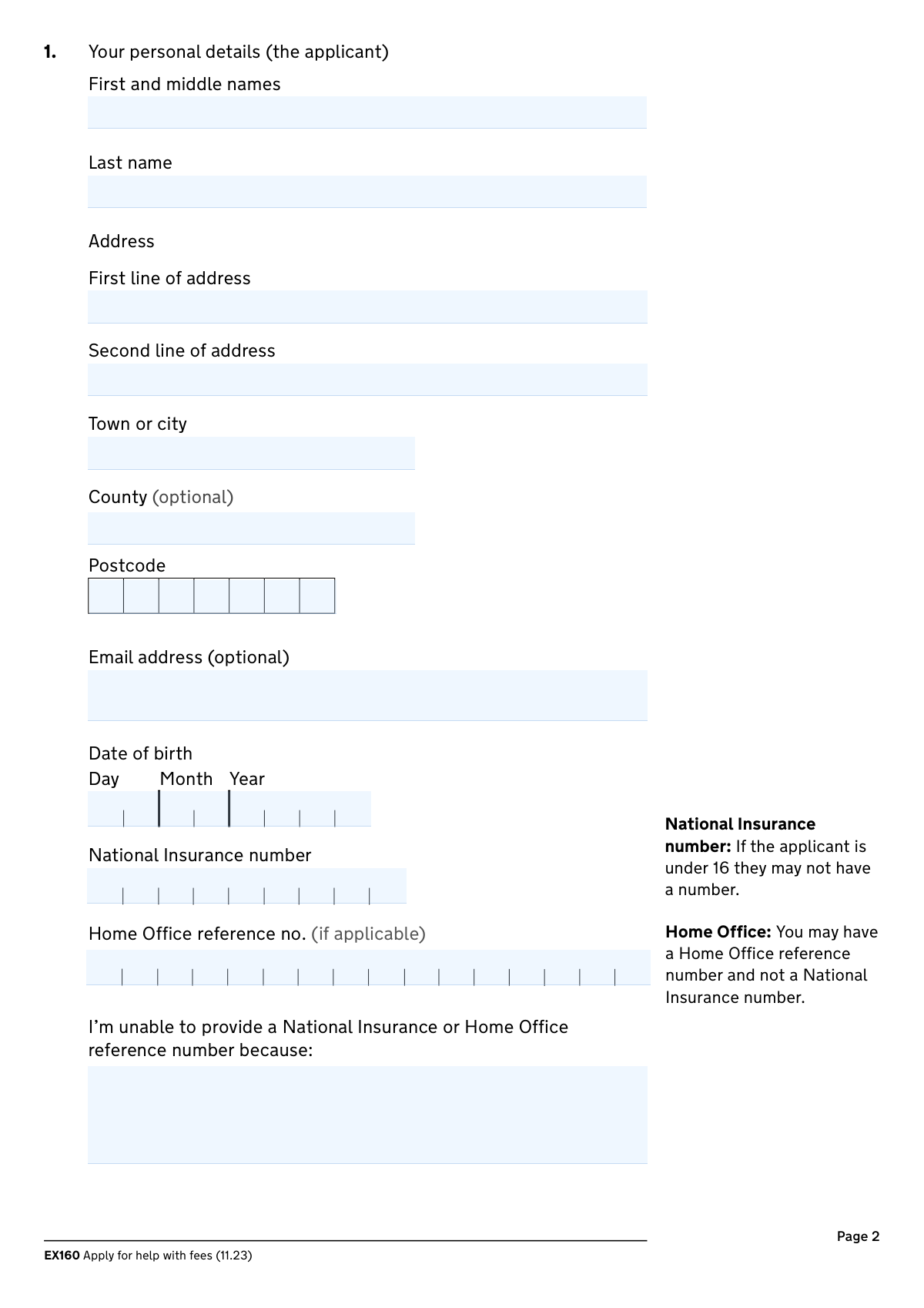
  2. 2 Provide your personal details, including your name, address, date of birth, and National Insurance or Home Office reference number.
  3. 3 Indicate your relationship status and provide your partner's details if you are married or living with someone.
  4. 4 Enter information about the court fee, including the relevant form number, case number, and whether you've already paid it.
  5. 5 Detail your financial situation, including your savings, any qualifying benefits you receive, number of children, and a breakdown of your monthly income.
  6. 6 Carefully read the declaration and statement of truth, then sign and date the form. If a representative is filling it out, they must complete their section.
  7. 7 Review the auto-filled form for accuracy, then download the completed document to submit to the relevant court or tribunal office by post or email.

Our AI-powered system ensures each field is filled out correctly, reducing errors and saving you time.

Why Choose Instafill.ai for Your Fillable EX160 Form?

Speed

Complete your EX160 in as little as 37 seconds.

Up-to-Date

Always use the latest 2026 EX160 form version.

Cost-effective

No need to hire expensive lawyers.

Accuracy

Our AI performs 10 compliance checks to ensure your form is error-free.

Security

Your personal information is protected with bank-level encryption.

Frequently Asked Questions About Form EX160

The EX160 form is used to apply for help with court and tribunal fees. You should fill it out if you have little or no savings and are either on certain benefits or have a low income, which may result in a fee waiver or reduction.

Before you start, make sure you have your National Insurance or Home Office reference number, the court or tribunal form number, and your case number if you have one. You will also need details of your and your partner's income, savings, and investments.

Due to a temporary technical issue, you must send evidence of your benefits, such as a full breakdown letter from the DWP. This document must confirm the benefit you receive and include your assessment date.

Your eligibility is assessed based on your household's financial situation. If you are married or living with a partner, their income, savings, and investments must be included for a complete assessment.

You cannot get help with fees if you or your partner have £16,000 or more in savings and investments. The form has specific questions to determine your eligibility based on your savings amount.

No, you can apply for a refund for a fee paid within the last 3 months. You must fill out the form based on your financial circumstances at the time you paid the fee.

You should report your income from the last calendar month. However, if that amount isn't typical, you are permitted to provide an average of your income over the last 3 months if that figure is lower.

Return the completed form with your main court or tribunal form to the relevant office by post or email. Your application may be rejected if it is received more than 28 days after the date you signed it.

According to the form's guidance, you will not be able to get help with your fees if you have £16,000 or more in savings and investments.

Yes, a legal representative or a litigation friend can complete the application on your behalf. They must use your personal and financial details and indicate their role in the declaration section.

Yes, services like Instafill.ai use AI to help you accurately auto-fill form fields, which can save you time and reduce errors. This is especially useful for complex forms with many details.

Simply upload the EX160 form to the Instafill.ai platform. The AI will identify all the fields, and you can answer simple questions to have your information automatically and accurately placed onto the form.

You can use a service like Instafill.ai to solve this problem. Instafill.ai can convert flat, non-fillable PDFs into interactive, fillable forms that you can complete easily on your computer or mobile device.

You can usually find the form number at the bottom of the first page of the paper form you are submitting to the court or tribunal.

Compliance EX160
Validation Checks by Instafill.ai

1
Conditional Partner Details Requirement
This validation ensures that if the applicant selects 'Married or living with someone' in question 2, all fields in question 3 (Partner’s details) become mandatory. This is crucial for accurately assessing household income and savings. If this validation fails, the user should be prompted to either complete the partner's details or change their relationship status to 'Single'.
2
Savings Ineligibility Trigger
This check verifies the selection made in question 8 regarding savings. If the applicant selects '£16,000 or more', the system should immediately flag the application as ineligible as per the form's guidance. This provides instant feedback to the user, preventing them from wasting time completing an application that will be automatically rejected.
3
Conditional Savings Amount Entry
This validation is triggered if the applicant's savings are 'Between £4,250 and £15,999' (Q8) and they answer 'No' to being 66 or over (Q9). It ensures the specific savings amount field is filled with a numeric value strictly between 4250 and 15999. This is necessary for the fee calculation algorithm and ensures the entered amount is consistent with the selected range.
4
Application Flow Based on Benefits
This check enforces the application's branching logic based on the answer to question 10. If 'Yes' is selected (applicant receives qualifying benefits), the system must validate that questions 11, 12, and 13 (regarding children and income) are skipped and not required. Conversely, if 'No' is selected, those subsequent questions must be marked as mandatory for completion.
5
Refund Date Logic and Recency
This validation applies if the applicant answers 'Yes' to question 4, indicating a fee has already been paid. It checks that the 'Date fee was paid' is a valid, complete date that is not in the future. It also verifies that the date is within the last 3 months of the current date, as specified in the form's guidance for refunds.
6
National Insurance Number and Age Cross-Validation
This check validates the National Insurance (NI) number against the applicant's date of birth. It ensures that if an NI number is provided, it follows the correct format (e.g., two letters, six numbers, one letter). It also confirms that an NI number is not required if the applicant's date of birth indicates they are under 16, as noted on the form.
7
Identifier Exclusivity and Explanation
This validation ensures that either a National Insurance number or a Home Office reference number is provided, but not both. If both of these fields are left empty, the system must make the 'I’m unable to provide...' reason field mandatory. This ensures the processing office understands why a primary identifier is missing.
8
Conditional Probate Case Details
This check ensures that if an applicant answers 'Yes' to question 7 ('Are you paying a fee for a probate case?'), the fields for the deceased's name and date of death become mandatory. The date of death must also be validated to be a real date that occurred in the past. This prevents incomplete submissions for a specific case type.
9
Income Source and Amount Consistency
This validation cross-references the income types ticked in question 12 with the total income amount entered in question 13. If 'None of the above' is ticked in Q12, the amount in Q13 must be zero. If any income sources are ticked in Q12, the amount in Q13 must be a positive number, ensuring logical consistency between the declared sources and the total figure.
10
Conditional Child Count Entry
This validation is triggered by the answer to question 11. If the applicant selects 'Yes' to having children they support, the system must verify that at least one of the two child count fields ('0–13 years' or '14 years and older') contains a non-negative integer greater than zero. This ensures that a 'Yes' response is substantiated with actual numbers.
11
Conditional Legal Representative Details
This check is linked to the signature selection in question 14. If the applicant selects 'Litigation friend' or 'Legal representative', all mandatory fields in question 15 (name, address, firm details) must be completed. This ensures that if the form is completed by a third party, their details are properly captured for correspondence and verification.
12
Declaration and Signature Date Validity
This validation ensures a signature type is selected and the signature date in question 14 is completed. The date must be a valid calendar date that is not in the future. This is critical for establishing the legal validity of the declaration and the timeliness of the application, as it may be rejected if submitted too long after signing.
13
Applicant Date of Birth Validity
This is a fundamental check on the applicant's personal details in question 1. It ensures the 'Date of birth' field is filled with a complete and valid date in DD/MM/YYYY format. The validation must also confirm that the date is in the past and represents a plausible age for an applicant, preventing data entry errors like future dates or typos.
14
Required Applicant Address Fields
This check verifies the completeness of the applicant's address in question 1. It ensures that the 'First line of address', 'Town or city', and 'Postcode' fields are not left empty. A complete and valid address is essential for all correspondence and identity verification with other government departments.

Common Mistakes in Completing EX160

Failing to Submit Required Benefit Evidence

The form's cover page explicitly states a temporary technical problem requires applicants on qualifying benefits to send separate evidence, such as a full breakdown letter from the DWP. Many applicants miss this prominent notice and assume ticking the box in question 10 is sufficient. This mistake leads to an automatic rejection or significant delays as the processing office cannot verify the benefit status without the required documentation.

Reporting Net Income Instead of Gross Income

When reporting income from wages in question 13, the instructions specify using the amount *before* tax and National Insurance are deducted (gross income). A common error is for applicants to enter their take-home pay (net income), as this is the figure they are most familiar with. This under-reporting can be viewed as providing false information, while incorrectly calculating gross pay can lead to an inaccurate assessment and potential denial of help.

Using Current Financials for a Refund Application

If an applicant has already paid the fee and is applying for a refund (question 4), the form requires them to report their financial circumstances from the time the fee was paid, not their current situation. People often overlook this detail and fill out the income and savings sections (questions 8-13) with their present-day figures. This leads to an incorrect assessment and is a frequent reason for refund applications being denied.

Misinterpreting Relationship Status and Omitting Partner's Finances

Applicants often fail to correctly report their relationship status as defined in the guidance for question 2, particularly if they live with a partner but are not married. Some may select 'Single' to avoid the complexity of providing their partner's financial details, but this is considered a false declaration. If 'Married or living with someone' is selected, all partner details and their income/savings must be included throughout the form; failure to do so results in an incomplete and rejected application.

Confusing Qualifying and Non-Qualifying Benefit Types

Question 10 lists very specific 'income-based' or 'guarantee credit' benefits that qualify for automatic help. Applicants frequently do not know the precise type of benefit they receive (e.g., 'Contribution-based JSA' vs. 'Income-based JSA') and select 'Yes' incorrectly. Because the information is checked with the DWP, this discrepancy will be found and will cause the application to be rejected.

Incorrectly Calculating Total Savings and Investments

In question 8, applicants must declare their total savings, which includes assets they might not immediately consider, such as ISAs or the value of second homes. People often only think of their current account balance and mistakenly select a lower savings bracket. This is especially critical as having £16,000 or more automatically disqualifies an applicant, and any miscalculation can lead to rejection.

Including Excluded Benefits as Income

The guidance for question 12 explicitly states that certain benefits, like Personal Independence Payment (PIP), Carer's Allowance, and Housing Benefit, should not be included in the monthly income calculation. However, applicants often list all money they receive, which incorrectly inflates their total income. This can push them over the eligibility threshold and cause their application for help with fees to be wrongly denied.

Missing Signature, Date, or Submitting an Expired Form

A simple but fatal error is forgetting to sign and date the declaration in question 14. An unsigned form is invalid and will be returned immediately. Furthermore, the form states it may be rejected if received more than 28 days after the signature date, so applicants who sign the form but delay sending it risk having their application voided.

Failing to Provide Court Form or Case Numbers

Sections 5 and 6 require the court/tribunal form number and any existing case number to link the fee waiver application to the correct legal proceeding. Applicants often leave these fields blank because they don't have the documents handy or are unsure where to find the information. This omission makes it difficult or impossible for the office to process the application, causing significant delays until the information is provided.

Inconsistent Information Between Sections

Applicants may provide conflicting information, such as indicating they have a partner in question 2 but then failing to enter the partner's income in questions 12 and 13. Another common inconsistency is ticking 'Yes' to receiving benefits in question 10 but then also listing that same benefit as a source of income in question 12. Such contradictions create confusion and can lead to the application being returned for clarification or rejected. AI-powered tools like Instafill.ai can help prevent these errors by using conditional logic to ensure consistency across the form.
Saved over 80 hours a year

“I was never sure if my IRS forms like W-9 were filled correctly. Now, I can complete the forms accurately without any external help.”

Kevin Martin Green

Your data stays secure with advanced protection from Instafill and our subprocessors

Robust compliance program

Transparent business model

You’re not the product. You always know where your data is and what it is processed for.

ISO 27001, HIPAA, and GDPR

Our subprocesses adhere to multiple compliance standards, including but not limited to ISO 27001, HIPAA, and GDPR.

Security & privacy by design

We consider security and privacy from the initial design phase of any new service or functionality. It’s not an afterthought, it’s built-in, including support for two-factor authentication (2FA) to further protect your account.

Fill out EX160 with Instafill.ai

Worried about filling PDFs wrong? Instafill securely fills form-ex160-apply-for-help-with-fees forms, ensuring each field is accurate.