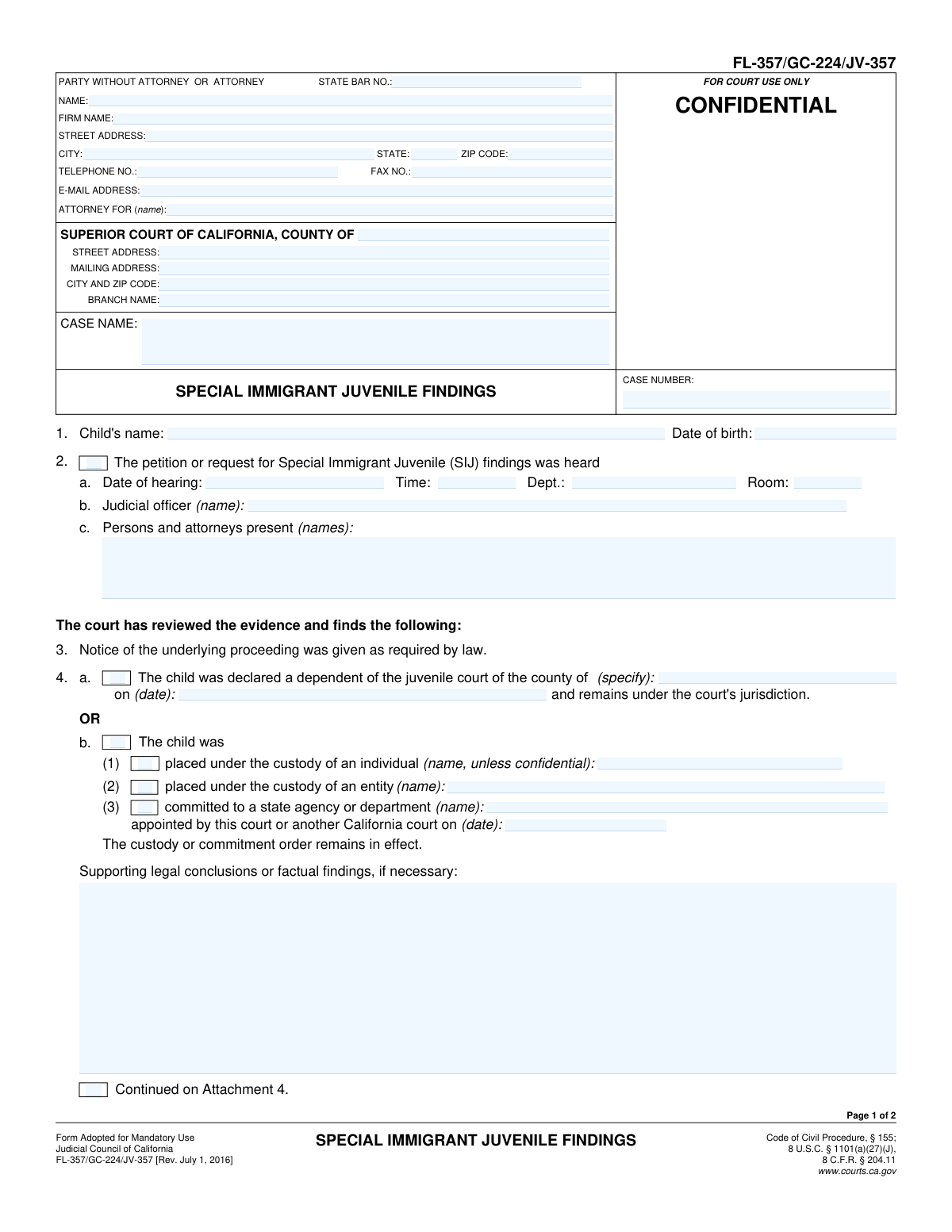
Yes! You can use AI to fill out Form FL-357/GC-224/JV-357, Special Immigrant Juvenile Findings

This form, Special Immigrant Juvenile Findings, is a mandatory California court document used to record a judge's official findings about a minor's eligibility for federal Special Immigrant Juvenile (SIJ) status. It details findings on parental abuse, neglect, or abandonment, and whether it is in the child's best interest to return to their home country. These judicial findings are a prerequisite for the child to apply for SIJ status with U.S. Citizenship and Immigration Services (USCIS). Today this form can be filled out quickly and accurately using AI-powered services like Instafill.ai, which can also convert non-fillable PDF versions into interactive fillable forms.
Our AI automatically handles information lookup, data retrieval, formatting, and form filling.
It takes less than a minute to fill out FL-357/GC-224/JV-357 using our AI form filling.
Securely upload your data. Information is encrypted in transit and deleted immediately after the form is filled out.

Form specifications

Form name: Form FL-357/GC-224/JV-357, Special Immigrant Juvenile Findings
Number of fields: 62
Number of pages: 2
Language: English
main-image

Instafill Demo: How to fill out PDF forms in seconds with AI

How to Fill Out FL-357/GC-224/JV-357 Online for Free in 2026

Are you looking to fill out a FL-357/GC-224/JV-357 form online quickly and accurately? Instafill.ai offers the #1 AI-powered PDF filling software of 2026, allowing you to complete your FL-357/GC-224/JV-357 form in just 37 seconds or less.
Follow these steps to fill out your FL-357/GC-224/JV-357 form online using Instafill.ai:
  1. 1 Navigate to Instafill.ai and upload or select the FL-357/GC-224/JV-357 form.
  2. 2 Enter the court information, including the county, branch, and full address, along with the case name and number.
  3. 3 Provide the child's full name and date of birth.
  4. 4 Input the details of the hearing, including the date, time, judicial officer, and all persons present.
  5. 5 Document the court's findings regarding the child's dependency or custody status, checking the appropriate boxes and providing names or dates as required.
  6. 6 Specify the court's determination on parental reunification, indicating the parent(s) and the legal basis (abuse, neglect, abandonment) making it non-viable.
  7. 7 State the court's conclusion that it is not in the child's best interest to return to their home country and provide the reasons, then review all information for accuracy before the judicial officer signs.

Our AI-powered system ensures each field is filled out correctly, reducing errors and saving you time.

Why Choose Instafill.ai for Your Fillable FL-357/GC-224/JV-357 Form?

Speed

Complete your FL-357/GC-224/JV-357 in as little as 37 seconds.

Up-to-Date

Always use the latest 2026 FL-357/GC-224/JV-357 form version.

Cost-effective

No need to hire expensive lawyers.

Accuracy

Our AI performs 10 compliance checks to ensure your form is error-free.

Security

Your personal information is protected with bank-level encryption.

Frequently Asked Questions About Form FL-357/GC-224/JV-357

This form is used by a California state court to document the specific legal findings required for a child to apply for Special Immigrant Juvenile (SIJ) status with U.S. Citizenship and Immigration Services (USCIS). It is a critical court order needed for the child's immigration case.

This form is an official court order that is completed and signed by a judicial officer (a judge). Typically, the child's attorney prepares a proposed version of the form for the judge to review and sign after a court hearing.

You will need the child's personal details, court case information, and specific facts supporting the case. This includes evidence that reunification with one or both parents is not viable due to abuse, neglect, or abandonment, and that it's in the child's best interest not to return to their home country.

Section 4a is for when the child has been declared a dependent of the juvenile court. Section 4b is used for other cases where the child has been placed in the custody of an individual, entity, or state agency through a guardianship or other court proceeding.

This is a legal finding by the court that the child cannot be safely or appropriately returned to a parent's care. This determination must be based on specific grounds under California law, such as parental abuse, neglect, or abandonment.

You must provide specific reasons why returning the child to their or their parent's country of origin would be detrimental. This can include risks of continued harm, lack of a safe caregiver, dangerous country conditions, or unavailability of necessary medical or educational resources.

Once signed by the judge, you will get a certified copy of the form. This signed order must be submitted to U.S. Citizenship and Immigration Services (USCIS) as a required part of the child's application for SIJ status.

Not automatically. The finding that reunification is 'not viable' is made for the specific purpose of the SIJ immigration application. It does not, by itself, terminate parental rights under California family law, which is a separate legal process.

You should use an attachment if the space provided on the form is insufficient to fully detail the court's factual findings or legal reasoning. Ensure the attachment is clearly labeled with the corresponding section number and case information.

Yes, services like Instafill.ai use AI to help you accurately auto-fill form fields with case information, names, and dates. This can save time and reduce errors when preparing the proposed order for the judge's review.

You can use a service like Instafill.ai to upload the form and fill it out on your computer. This allows you to easily type information into the fields, save your progress, and print a clean, legible document for the court.

If you have a non-fillable or 'flat' PDF, you can use a tool like Instafill.ai. It can convert the non-fillable PDF into an interactive, fillable form that you can complete and save on your computer.

The 'Case Name' is the official title of the court case (e.g., 'In the Matter of [Child's Name]'). The 'Case Number' is the unique identifier assigned by the court to your specific case, which must be included on all documents you file.

Compliance FL-357/GC-224/JV-357
Validation Checks by Instafill.ai

1
Case Number Presence and Format
This check ensures the 'Case Number' field is not empty and conforms to the expected format for California court case numbers. A valid case number is crucial for correctly identifying and filing the document within the court's system. If the case number is missing or malformed, the document could be rejected, delayed, or misfiled.
2
Child's Age Verification for SIJ Eligibility
This validation calculates the child's age based on the 'Date of birth' and the 'Date of hearing' to verify the child is under 21. SIJ status has specific age requirements, and this check ensures the child meets the criteria at the time of the finding. An invalid date or an age outside the eligible range would make the findings invalid for immigration purposes.
3
Logical Hearing Date
This check ensures the 'Date of hearing' in section 2 is a complete and valid date that is not in the future. The form documents findings from a hearing that has already occurred, so a future date is a logical impossibility. An invalid or future date would cause the form to be rejected by the court clerk for being nonsensical.
4
Conditional Hearing Details Completion
This validation verifies that if the checkbox for item 2 ('The petition...was heard') is checked, then the associated fields (Date, Time, Room, Dept., Judicial officer) must be filled. These details are mandatory to create a legal record of the hearing. Submitting the form with the box checked but without the details would result in an incomplete and invalid record.
5
Mutually Exclusive Dependency Findings
This check ensures that in Section 4, either checkbox 4.a ('The child was declared a dependent') or 4.b ('The child was placed under the custody of...') is selected, but not both. These represent distinct legal outcomes that are mutually exclusive. Selecting both would create a legal ambiguity, causing the form to be rejected for clarification.
6
Custody Disposition Detail Requirement
This rule verifies that if checkbox 4.b is selected, one of the sub-options (1, 2, or 3) must also be checked and the corresponding name field must be filled. An order placing a child in custody is not legally sufficient without identifying the specific individual, entity, or agency. Incomplete information here would render the custody order unenforceable.
7
Reunification Parent Selection
This check validates that if Section 5 is used, at least one parent checkbox ('the mother', 'the father', 'the other legal parent') is selected. The finding that reunification is not viable must be specific to at least one parent. Failure to select a parent makes the entire section legally meaningless and incomplete.
8
Reunification Reason Specificity
When a parent is selected in Section 5, this validation confirms that at least one reason (abuse, neglect, abandonment, or a similar basis) is checked. Furthermore, if 'a similar legal basis' is checked, the specification text field must not be empty. The legal basis for the finding must be explicitly stated on the record to be valid.
9
Attorney State Bar Number Format
This check verifies that if a 'State Bar No.' is entered, it consists of a sequence of digits, matching the format for California Bar numbers. This is important for correctly identifying the attorney of record and ensuring they are licensed and in good standing. An incorrect number could cause filing issues or misdirected communications.
10
Chronological Date Consistency
This validation compares multiple dates on the form for logical consistency, ensuring the 'Date of hearing' is not before the child's 'Date of birth' or the 'Date established' for non-reunification (item 5). Chronological errors can undermine the legal validity of the court's findings and the timeline of events. A form with illogical dates would be rejected.
11
Required Court Identification
This check verifies that the 'County (Superior Court)' and 'Case Name' fields are not empty. This information is fundamental for identifying the correct jurisdiction and case to which the document pertains. Missing this core information would result in an immediate rejection of the filing by the court clerk.
12
Child's Core Information Completeness
This check ensures that the 'Child's name' and 'Date of birth' fields in Section 1 are filled out. These are the primary identifiers for the subject of the proceedings. Without this information, the form is fundamentally incomplete and has no legal meaning, as it is unclear who the findings apply to.
13
Best Interest Country Specification
This validation confirms that if Section 6 is used to declare it is not in the child's best interest to be returned, the 'specify country or countries' field is not empty. The finding must be tied to a specific country to be legally sufficient for SIJ purposes. Omitting the country name renders the finding incomplete and invalid.
14
Attachment Checkbox Logic
This check flags a potential issue if an attachment checkbox (e.g., 'Continued on Attachment 5') is checked but the corresponding primary text area is empty. While it cannot verify the attachment itself, it enforces logical data entry. This helps prevent submissions where an attachment is indicated for a section that has no information, which could confuse the reader.

Common Mistakes in Completing FL-357/GC-224/JV-357

Incomplete or Incorrect Court Header Information

Users often rush and leave the top section with the court's address, branch name, case name, and case number incomplete or incorrect. This frequently happens when the filer doesn't have the exact case file information readily available. An incomplete header can lead to the document being rejected by the court clerk or misfiled, causing significant delays in the Special Immigrant Juvenile (SIJ) process. Always verify the exact court branch, address, and case number from a recent court document before filling out the form.

Contradictory or Incomplete Custody/Dependency Findings

In Section 4, filers must select either option 4a (child declared a dependent) OR 4b (child placed in custody/commitment), but not both. A common error is checking both boxes, or checking 4b without selecting one of the required sub-options (1, 2, or 3). This creates a logical contradiction that makes the court's finding unclear and can lead to the form being returned for correction. Carefully read the options and select only the one that accurately reflects the court's order, ensuring all dependent sub-options are also completed.

Insufficient Justification for Non-Reunification in Section 5

Section 5 requires a detailed, factual explanation of why reunification with a parent is not viable. Filers often provide vague, one-sentence answers or simply restate the legal term (e.g., "due to neglect"), which is insufficient for the purposes of a USCIS review. The form must contain specific facts and reasons supporting the conclusion for each parent indicated. To avoid a Request for Evidence (RFE) from USCIS, provide a detailed, parent-specific narrative of the circumstances that prevent reunification.

Omitting Country of Origin in 'Best Interest' Finding

Section 6 is a critical finding for SIJ status, stating it's not in the child's best interest to return to their country of nationality or last habitual residence. A frequent mistake is to write a detailed explanation of the reasons but forget to explicitly name the country or countries in the designated field. This omission makes the finding legally incomplete for immigration purposes and will likely result in an RFE from USCIS. Always explicitly list the specific country or countries to which return is not in the child's best interest.

Mishandling Form Attachments

The form allows for continuations on attachments for several sections, indicated by a checkbox. A common error is to write "See Attachment" in a field but forget to check the corresponding "Continued on Attachment" box, or vice-versa. This disorganization can lead the court or USCIS to believe information is missing, causing processing delays. Always ensure that if you use an attachment, you check the box, label the attachment clearly (e.g., "Attachment 5"), and physically include it with the filing.

Mismatching Case Information on Page 2

The form requires the "CASE NAME" and "CASE NUMBER" to be re-entered at the top of Page 2. People sometimes forget to fill this out or make a typo, creating an inconsistency with Page 1. While it seems minor, this can cause issues if the pages get separated and may lead to clerical rejection for not being properly formatted. It is a simple but crucial step to ensure both pages are identically and accurately identified before submission.

Ignoring Conditional Field Logic

Many fields on this form are conditional and should only be filled out if a specific checkbox is selected. For example, the details for Section 5 are only required if a parent box ('the mother', 'the father') is checked. Users often get confused and either fill in unnecessary information or, more commonly, fail to provide required information after checking a primary box. This leads to an incomplete record and requires correction, delaying the case.

Not Specifying 'Similar Legal Basis' in Section 5

In Section 5, if the reason for non-reunification is not abuse, neglect, or abandonment, there is an option for "a similar legal basis (specify)". A common mistake is to check this box but fail to write in the specific legal basis in the provided space. This leaves the finding incomplete and open to interpretation, which is insufficient for the legal precision required for SIJ findings. If this box is checked, a clear and specific legal basis must be written in the corresponding field to make the finding valid.

Handwriting on a Non-Fillable PDF Version

Parties sometimes find a flat, non-fillable PDF of the form online and are forced to print and fill it out by hand. This often results in illegible handwriting, which can lead to data entry errors by the court clerk or rejection of the form. To ensure clarity and professionalism, it is best to use a fillable version. AI-powered tools like Instafill.ai can convert non-fillable PDFs into fillable ones, preventing legibility issues and allowing for easy editing.

Incorrectly Identifying the Filer

The top-left box is for the person filling out the form, who could be an attorney or a self-represented party. A common point of confusion is when a self-represented party ('Party Without Attorney') mistakenly enters information in the "Attorney For" or "State Bar No." fields. This can cause issues with court notifications and proper service of documents. It's crucial to accurately identify your role and leave fields that do not apply to you blank.
Saved over 80 hours a year

“I was never sure if my IRS forms like W-9 were filled correctly. Now, I can complete the forms accurately without any external help.”

Kevin Martin Green

Your data stays secure with advanced protection from Instafill and our subprocessors

Robust compliance program

Transparent business model

You’re not the product. You always know where your data is and what it is processed for.

ISO 27001, HIPAA, and GDPR

Our subprocesses adhere to multiple compliance standards, including but not limited to ISO 27001, HIPAA, and GDPR.

Security & privacy by design

We consider security and privacy from the initial design phase of any new service or functionality. It’s not an afterthought, it’s built-in, including support for two-factor authentication (2FA) to further protect your account.

Fill out FL-357/GC-224/JV-357 with Instafill.ai

Worried about filling PDFs wrong? Instafill securely fills form-fl-357gc-224jv-357-special-immigrant-juvenile-findings forms, ensuring each field is accurate.