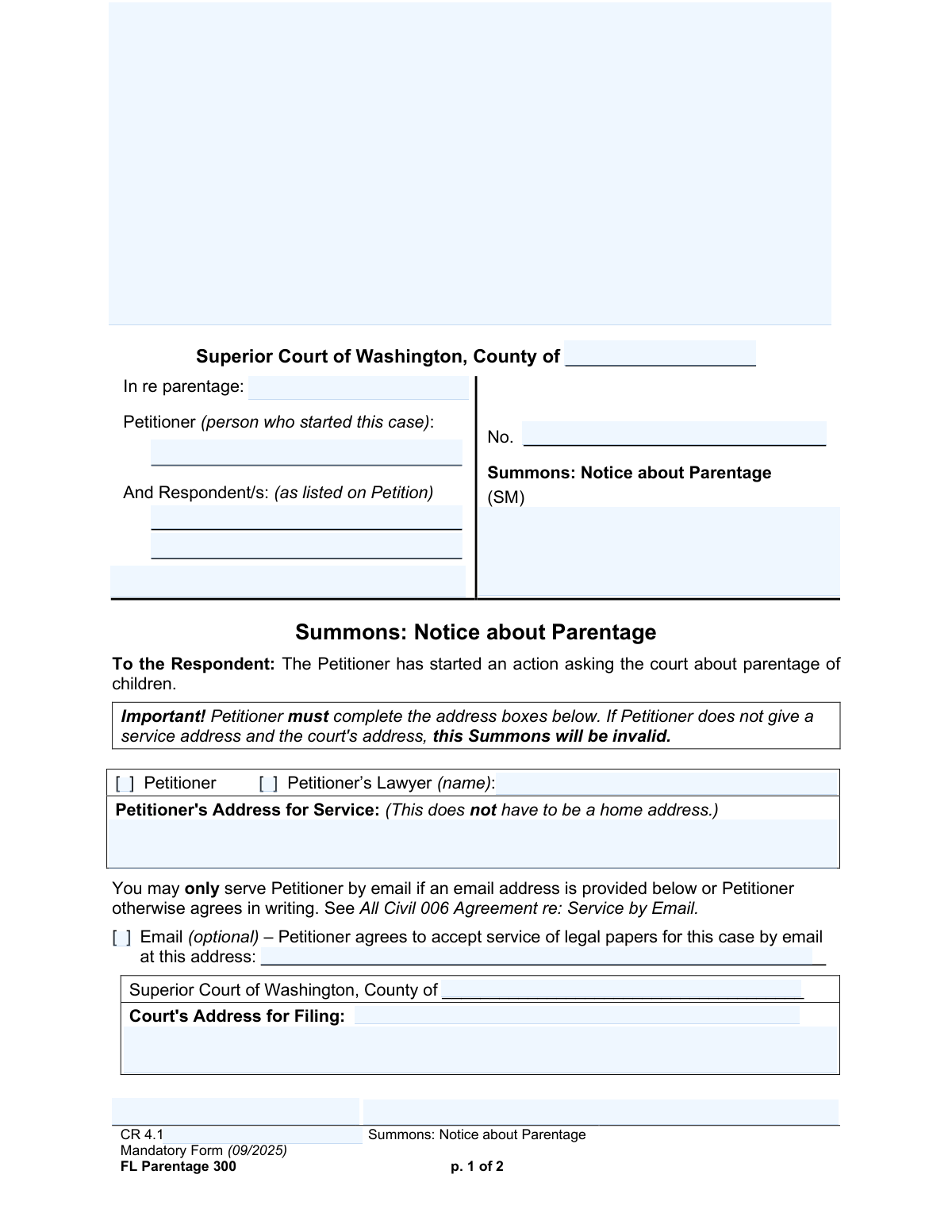
Yes! You can use AI to fill out Form FL Parentage 300, Summons: Notice about Parentage
This form, officially titled 'Summons: Notice about Parentage,' is a legal document issued by the Superior Court of Washington to formally notify a respondent that a petitioner has started a court action regarding the parentage of a child. It is critically important as it outlines the respondent's obligation to reply within a specific deadline (usually 20 or 60 days) to avoid a default judgment. Today, this form can be filled out quickly and accurately using AI-powered services like Instafill.ai, which can also convert non-fillable PDF versions into interactive fillable forms.
Our AI automatically handles information lookup, data retrieval, formatting, and form filling.
It takes less than a minute to fill out FL Parentage 300 using our AI form filling.
Securely upload your data. Information is encrypted in transit and deleted immediately after the form is filled out.
Form specifications
| Form name: | Form FL Parentage 300, Summons: Notice about Parentage |
| Number of pages: | 2 |
| Language: | English |
Instafill Demo: How to fill out PDF forms in seconds with AI
How to Fill Out FL Parentage 300 Online for Free in 2026
Are you looking to fill out a FL PARENTAGE 300 form online quickly and accurately? Instafill.ai offers the #1 AI-powered PDF filling software of 2026, allowing you to complete your FL PARENTAGE 300 form in just 37 seconds or less.
Follow these steps to fill out your FL PARENTAGE 300 form online using Instafill.ai:
- 1 Navigate to Instafill.ai and upload or select the 'FL Parentage 300, Summons: Notice about Parentage' form.
- 2 Provide the court and case details, such as the Superior Court county, case number, and the names of the children involved.
- 3 Enter the full names of the petitioner and the respondent(s) as listed on the petition.
- 4 Input the petitioner's or their lawyer's address for service and indicate if service by email is accepted.
- 5 Use the AI assistant to accurately fill in the court's address for filing.
- 6 Review all auto-filled information for accuracy, then have the petitioner or their lawyer sign and date the form.
- 7 Download the completed summons to serve on the respondent and file with the court clerk.
Our AI-powered system ensures each field is filled out correctly, reducing errors and saving you time.
Why Choose Instafill.ai for Your Fillable FL Parentage 300 Form?
Speed
Complete your FL Parentage 300 in as little as 37 seconds.
Up-to-Date
Always use the latest 2026 FL Parentage 300 form version.
Cost-effective
No need to hire expensive lawyers.
Accuracy
Our AI performs 10 compliance checks to ensure your form is error-free.
Security
Your personal information is protected with bank-level encryption.
Frequently Asked Questions About Form FL Parentage 300
This form is a legal notice, called a Summons, used in Washington State to officially inform you that someone (the Petitioner) has started a court case to establish the legal parents of a child. It explains that you are a party to the case and what you must do next.
The Petitioner, who is the person starting the parentage case, or their lawyer, is responsible for completing and signing this form. The Respondent, who receives the form, does not fill it out but must respond to it using a different form.
You must respond in writing by a specific deadline, which is typically 20 days. You need to complete the 'Response to Petition to Decide Parentage' (form FL Parentage 302), serve a copy on the Petitioner, and file the original with the court.
If you fail to respond by the deadline, the court can issue a 'default judgment,' meaning it may approve the Petitioner's requests without hearing your side of the story. You will also lose the right to be notified about future hearings in the case.
Your Response must be served on the Petitioner within 20 days of the date you were served this Summons. The deadline is extended to 60 days if you were served outside of Washington State or while in a jail, detention, or prison facility.
If there is no case number, the case may not have been filed with the court yet. You must still serve your Response on the Petitioner and can also demand in writing that they file the case with the court within 14 days.
You can download the Response form and other necessary documents from the Washington State Courts' website (www.courts.wa.gov/forms) or Washington LawHelp. You may also be able to get a copy from the Superior Court Clerk’s office.
For the Summons to be valid, the Petitioner must complete the address boxes for both their 'Address for Service' and the 'Court's Address for Filing'. Without this information, the Summons is not legally valid.
While you are not required to have a lawyer, it is strongly recommended that you talk to one to understand your legal rights and options. You are permitted to file and serve your Response without one.
'Serving' means you provide a copy of your Response to the Petitioner at the address listed on the Summons. 'Filing' means you submit your original, signed Response to the clerk of the court at the court address listed on the Summons.
Yes, services like Instafill.ai use AI to help you accurately auto-fill forms like the 'Response to Petition to Decide Parentage'. This can save time and help prevent common errors when completing the documents.
You can upload the PDF of the Response form (FL Parentage 302) to the Instafill.ai website. The AI will make the form fillable online, allowing you to easily type your information and generate a completed document ready for printing and filing.
If you have a non-fillable PDF, you can use a service like Instafill.ai to convert it into an interactive, fillable form. This allows you to easily complete the document on your computer before printing it.
Compliance FL Parentage 300
Validation Checks by Instafill.ai
1
Ensures Petitioner's Service Address is Provided
This check verifies that the 'Petitioner's Address for Service' field is not empty. The form explicitly states that a service address is mandatory for the summons to be valid, as it provides the respondent with a required location to serve their response. Failure to provide this address will render the entire summons invalid and legally unenforceable.
2
Confirms Court's Address for Filing is Complete
This validation ensures that the 'Court's Address for Filing' (both street and city/state/zip components) is fully completed. This address is crucial for the respondent to know where to file their original response with the court. An incomplete or missing court address would prevent the respondent from fulfilling their legal obligations and could lead to the case being mishandled or delayed.
3
Validates Petitioner or Lawyer Representation Selection
This check ensures that exactly one of the two checkboxes, 'Petitioner' or 'Petitioner's Lawyer,' is selected. It also verifies that if the 'Petitioner's Lawyer' box is checked, the 'Petitioner's Lawyer Name' field is filled out. This is important to clearly identify who is representing the petitioner and who should receive legal correspondence, preventing confusion and improper service.
4
Enforces Conditional Email Address Requirement
This validation checks that if the 'Email (optional) – agree to accept service by email' box is checked, the 'Email Address for Service' field must contain a value. Agreeing to email service without providing an address is a logical contradiction and would prevent the agreed-upon method of service from occurring. This ensures that if consent for email service is given, a functional address is available.
5
Validates Format of Optional Email Address
This check verifies that any value entered into the 'Email Address for Service' field conforms to a standard email format (e.g., [email protected]). While the field is optional, providing an incorrectly formatted email address would make electronic service impossible, even if agreed to. This validation prevents failed communication and ensures the integrity of the service agreement.
6
Verifies Completeness of Case Caption Information
This validation ensures that the primary fields in the case caption, including 'Petitioner name,' 'Respondent name (line 1),' and 'County,' are all filled out. This information is essential for identifying the parties and the jurisdiction of the case. An incomplete caption could lead to filing errors, confusion, or the document being rejected by the court clerk.
7
Confirms Presence of Signature and Date
This check verifies that both the 'Signature of Petitioner or lawyer' and the 'Date Signed' fields are completed. An unsigned or undated legal document like a summons is generally considered invalid and lacks legal effect. This validation is critical to ensure the document's authenticity and enforceability.
8
Ensures Printed Name Accompanies Signature
This validation confirms that the 'Printed Name and WSBA No.' field is filled out when the 'Signature of Petitioner or lawyer' field is completed. The printed name clarifies the identity of the signatory, which is especially important if the signature is illegible. For lawyers, the WSBA number is a required professional identifier, and its absence could call the lawyer's authority into question.
9
Validates WSBA Number for Lawyer Signatory
This check is triggered if the 'Petitioner's Lawyer' box is checked. It verifies that a Washington State Bar Association (WSBA) number is present in the 'Printed Name and WSBA No.' field and follows a plausible format (typically numeric). This is a crucial piece of identifying information for an attorney, confirming their standing to practice law in the state.
10
Validates Format of Signature Date
This check ensures that the value entered in the 'Date Signed' field is a valid and plausible date (e.g., MM/DD/YYYY). An incorrectly formatted or nonsensical date can create ambiguity about when the document was executed, which is important for calculating response deadlines and establishing the document's timeline.
11
Verifies County is a Valid Washington County
This validation checks the 'County' field against a predefined list of all 39 official Washington State counties. Filing a case in a non-existent county would be a critical error, leading to immediate rejection by any court system. This check prevents fundamental jurisdictional errors before the form is even submitted.
12
Checks for Plausible Case Number Format
This check verifies that the 'Case number' field, if filled, follows a typical format for Washington Superior Court cases (e.g., YY-C-NNNNN-CC). While the form notes the case may not be filed yet, if a number is present, it should be validated to catch potential typos. An incorrect case number can lead to misfiling and significant delays in the legal process.
13
Ensures Court Clerk Filing Stamp Area is Blank
This validation confirms that the 'Court Clerk Filing Stamp' area is empty. The form explicitly reserves this space for official use by the court clerk to apply a date and time stamp upon filing. Any user-entered data in this area could interfere with the court's official processing and may cause the document to be rejected.
Common Mistakes in Completing FL Parentage 300
Users often enter the wrong county, misspell the names of the petitioner or respondent, or are confused about the case number. An incorrect caption can lead to filing rejections by the court clerk, invalid service, and significant delays in the legal process. It is crucial to copy all information exactly from the main Petition document to ensure consistency and legal validity.
The form explicitly states that the Summons is invalid if the Petitioner's service address is not provided. People may overlook this section or feel hesitant to provide an address, but failure to do so renders the entire document void. This mistake forces the petitioner to restart the service process, wasting time and money.
An unsigned or undated summons is not a legally valid document and will be rejected by the court. This simple oversight is a common reason for failed service, as the respondent is not legally obligated to respond to an invalid form. Always double-check that the petitioner or their lawyer has signed and dated the document in the designated area before serving it.
Petitioners may guess the court's address or use a generic one found online, rather than the specific address for the Superior Court Clerk's filing office. This error misleads the respondent, who may then file their response at the wrong location, causing them to miss their deadline and risk a default judgment. The correct filing address must be verified for the specific county court.
Confusion often arises regarding the case number, especially if the case has not yet been filed with the court. A petitioner might incorrectly invent a number or leave it blank when one has already been assigned. This can cause filing errors and confusion; the case number should be entered exactly as assigned by the court, or left blank if the case has not yet been filed, per the form's instructions.
In legal documents, using nicknames, initials, or misspelled names for the petitioner, respondent, or children is a critical error. It can create ambiguity about the identity of the parties and may be grounds for a legal challenge to dismiss the case for improper service. Always use the full, correct legal names for all individuals as they would appear on a birth certificate or government ID.
The caption includes a line, 'In re parentage:', which is intended for the full name(s) of the child or children at the center of the case. Leaving this blank makes the summons incomplete and can cause confusion or rejection by the court clerk. This information is essential for properly identifying and indexing the case.
A frequent error is checking the box to agree to email service but then forgetting to write in the email address, or entering it with a typo. This creates a legally ambiguous situation where the other party may attempt service by email, which then fails. If opting in, the email address must be provided and carefully proofread for accuracy.
Beyond the signature itself, the form requires the signer to print their name and, if they are a lawyer, their WSBA number. An illegible printed name or a missing WSBA number can cause the court clerk to question the document's authenticity or delay processing. Ensuring this entire section is completed clearly helps prevent administrative hurdles.
The form requires a checkbox selection to indicate if the service address belongs to the petitioner or their lawyer. Checking the wrong box, or forgetting to check either, creates confusion for the respondent about where to send their legal response. This can lead to improper service and procedural delays. AI-powered form filling tools like Instafill.ai can help prevent many of these data entry and formatting errors, and can also convert flat, non-fillable PDFs into interactive forms.
Saved over 80 hours a year
“I was never sure if my IRS forms like W-9 were filled correctly. Now, I can complete the forms accurately without any external help.”
Kevin Martin Green
Your data stays secure with advanced protection from Instafill and our subprocessors
Robust compliance program
Transparent business model
You’re not the product. You always know where your data is and what it is processed for.
ISO 27001, HIPAA, and GDPR
Our subprocesses adhere to multiple compliance standards, including but not limited to ISO 27001, HIPAA, and GDPR.
Security & privacy by design
We consider security and privacy from the initial design phase of any new service or functionality. It’s not an afterthought, it’s built-in, including support for two-factor authentication (2FA) to further protect your account.
Fill out FL Parentage 300 with Instafill.ai
Worried about filling PDFs wrong? Instafill securely fills form-fl-parentage-300-summons-notice-about-parentage forms, ensuring each field is accurate.