
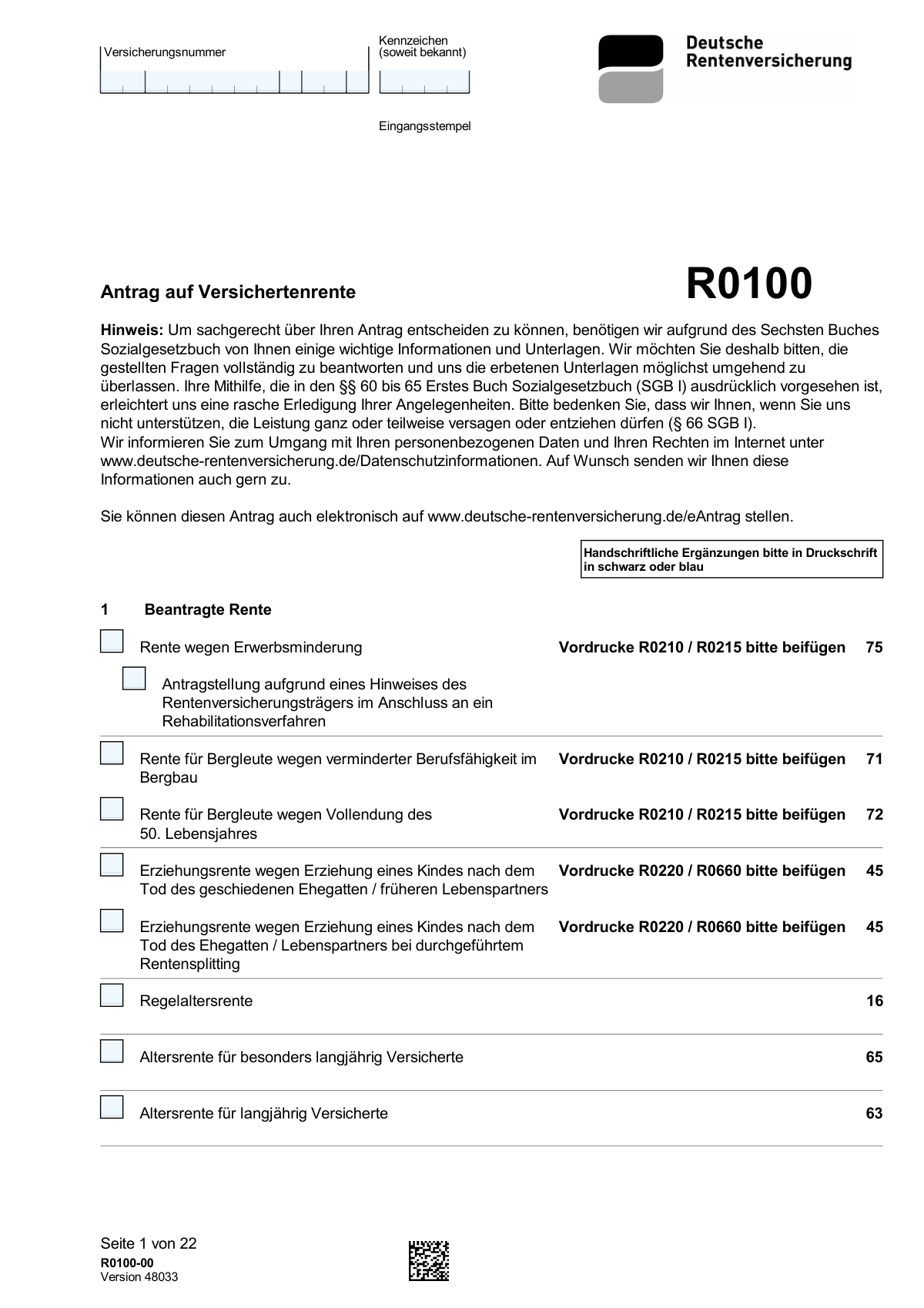
Yes! You can use AI to fill out Form R0100, Antrag auf Versichertenrente
Don't type 453 fields by hand. Tell our AI about yourself, or upload a document you already have, and it fills every field in seconds. You check it, then download, print or sign.
The AI does the filling. You just check it.
No typing into boxes, nothing to install.
What this form asks for
The AI fills all of it, from your answers or your documents.
The AI checks your answers before you download
14 checks built for this form, so a wrong date or a missing answer is caught before anyone else sees it.
This validation ensures the 'Versicherungsnummer' field conforms to the standard 12-digit format of the German pension insurance number, including a valid checksum. This is critical for uniquely and correctly identifying the applicant in the pension system. A failed validation prevents processing as the applicant's records cannot be retrieved, and the user must correct the number.
This check validates that the provided IBAN for German bank accounts starts with 'DE' and is followed by exactly 20 digits, and that the entire number passes the MOD-97 checksum algorithm. This is essential to ensure pension payments are routed to the correct bank account and to prevent payment failures or misdirected funds. If the IBAN is invalid, the payment cannot be set up, and the applicant must provide a correct number.
This validation rule applies to all sections with 'from' ('vom') and 'to' ('bis') date fields, such as employment periods (Ziffer 5.1) or receipt of benefits (Ziffer 10). It verifies that the 'to' date is not earlier than the 'from' date for any given period. This ensures the logical consistency of time-based data and prevents nonsensical entries that would lead to incorrect calculation of insurance periods.
This check ensures the 'Geburtsdatum' (date of birth) in Section 2 is a valid date that occurs in the past and results in a plausible age for a pension applicant (e.g., over 16). This is a fundamental check to establish the applicant's identity and eligibility for any pension type. An invalid or future date would make the application nonsensical and must be corrected before submission.
This validation is triggered if the applicant selects 'Teilrente' (partial pension) in Section 1. It checks that the associated percentage field is filled and that the entered value is a number between 10 and 99.99, as per the form's instruction '(mindestens 10 %)'. This ensures the applicant's choice is valid and can be processed correctly by the pension authority. An invalid entry would halt the process until a valid percentage is provided.
This validation ensures that the applicant has selected at least one pension type from the checkboxes provided in Section 1 (e.g., 'Regelaltersrente', 'Rente wegen Erwerbsminderung'). The entire purpose of the application is to apply for a specific pension, so this choice is mandatory. If no selection is made, the application is incomplete and cannot be processed, requiring the user to specify which benefit they are applying for.
And 8 more checks
- German Tax ID Format
- Cross-Sectional Logic for Disability Pension
- Conditional Mandatory Field for Accident Date
- Child's Birth Date vs. Applicant's Birth Date
- Required Form Attachment Notification
- Representative Information Completeness
- Logical Link for Health Insurer Request
- Conditional Completeness for Immigration Data
Let AI fill out your R0100
No typing. Every field filled in seconds, checked, ready to sign.
How to Fill Out R0100 Online for Free in 2026
What the AI walks you through.
- Navigate to Instafill.ai and upload or select the R0100 'Antrag auf Versichertenrente' form.
- Use the AI assistant to automatically fill in your personal details (Angaben zur Person), including your name, address, date of birth, and insurance number (Versicherungsnummer).
- Select the type of pension you are applying for (e.g., Regelaltersrente, Rente wegen Erwerbsminderung) and provide information on your insurance history, including employment, training, and periods abroad.
- Enter your bank account details (Zahlungsweg) for the pension payments and provide information about your health insurance (Krankenversicherung der Rentner).
- Complete the sections on other income and social benefits (Andere Leistungen), as well as details about children (Angaben zu Kindern), which can impact your pension contributions and amount.
- Carefully review all the information populated by the AI, make any necessary adjustments, then electronically sign and submit the completed application to the Deutsche Rentenversicherung.
Common Mistakes in Completing R0100
The ones the AI is built to catch.
Entering an Incorrect or Incomplete Insurance Number (Versicherungsnummer)
Omitting Former Names (Frühere Namen)
Providing an Incorrect IBAN for Payment
Failing to Declare Gaps in the Insurance Record (Lücken im Versicherungsverlauf)
Ignoring Instructions to Attach Supplementary Forms
Incomplete Disclosure of Other Social Benefits (Andere Leistungen)
Incorrectly Filling Out the Health Insurance Section (KVdR)
Forgetting to Attach Required Evidence (Beweismittel)
Using Illegible Handwriting or Not Using Block Letters
Forgetting to Sign the Application
Entering an Incorrect Tax Identification Number (Steuerliche Identifikationsnummer)
Choosing the Wrong Type of Pension (Beantragte Rente)
Frequently Asked Questions About R0100
Is it really free for 7 days?
Can I fill other forms too?
How do I cancel?
How does the AI fill out R0100?
What happens to my information?
How complex is R0100 to fill out?
What is the purpose of Form R0100?
Who needs to fill out this form?
Can I submit this application online?
What happens if I don't provide all the requested information?
I have worked outside of Germany. Which section is for that?
What are the 'Vordrucke' mentioned throughout the form?
What information do I need for Section 4, 'Zahlungsweg'?
Can someone else fill out this form for me?
I'm applying for a pension for severely disabled persons. What do I need to provide?
What is the purpose of Section 11, 'Krankenversicherung der Rentner (KVdR)'?
Can AI tools help me fill out this form?
How can I use Instafill.ai to complete this form online?
The PDF version of the form I have is not fillable. What can I do?
What should I do if I have gaps in my insurance history that are not listed?
Get your R0100 filled out by AI
$0 today. Cancel before Nov 13 and you pay nothing.
Let AI fill out your R0100
Your trial starts once a card is added. You pay nothing before Nov 13.
Our AI already knows this form, all 453 fields of it. Skip the typing: tell it about yourself, or upload what you have, and it fills the whole form in seconds.
- AI fills every field on all 22 pages, checkboxes included
- No typing into boxes: answer a few questions, or upload a document you already have, an old copy of this form, a photo of a document
- The AI checks the answers; you review and change anything before you download
- Download the finished PDF, print it, or sign it online
- Encrypted, and never used to train AI
Cancel before Nov 13 and you pay nothing.
A card is needed to start the trial. Cancel in two clicks from your account.
Terms · Privacy