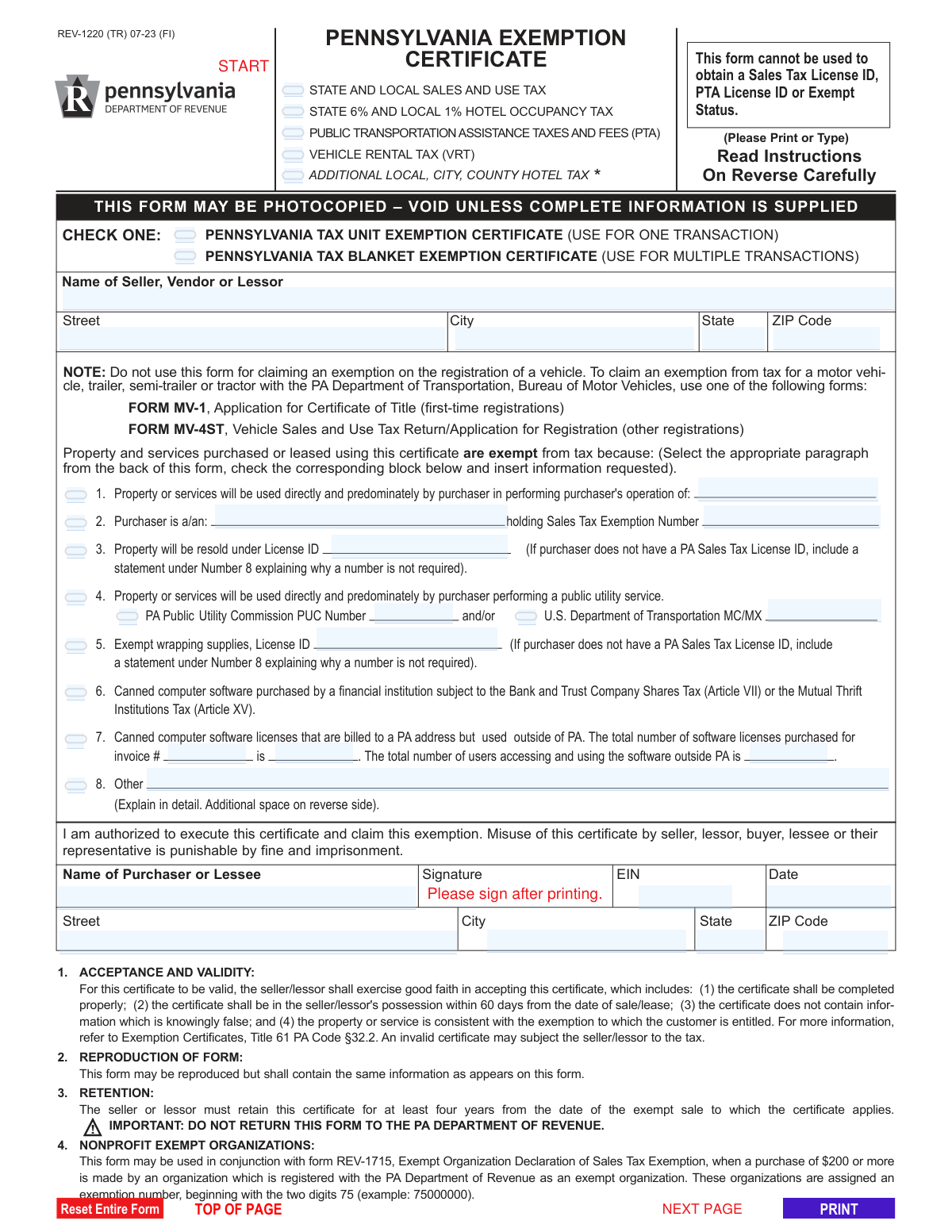
Yes! You can use AI to fill out Form REV-1220, Pennsylvania Exemption Certificate

Form REV-1220 is a Pennsylvania Department of Revenue certificate used by a buyer to claim an exemption from sales and use tax, hotel occupancy tax, and other specific taxes on purchases of tangible personal property or services. It serves as proof for the seller that they are not required to collect tax on a particular transaction because the purchaser qualifies for a specific exemption, such as for resale, use in manufacturing, or purchase by a nonprofit organization. Today, this form can be filled out quickly and accurately using AI-powered services like Instafill.ai, which can also convert non-fillable PDF versions into interactive fillable forms.
Our AI automatically handles information lookup, data retrieval, formatting, and form filling.
It takes less than a minute to fill out REV-1220 using our AI form filling.
Securely upload your data. Information is encrypted in transit and deleted immediately after the form is filled out.

Form specifications

Form name: Form REV-1220, Pennsylvania Exemption Certificate
Number of pages: 2
Language: English
main-image

Instafill Demo: How to fill out PDF forms in seconds with AI

How to Fill Out REV-1220 Online for Free in 2026

Are you looking to fill out a REV-1220 form online quickly and accurately? Instafill.ai offers the #1 AI-powered PDF filling software of 2026, allowing you to complete your REV-1220 form in just 37 seconds or less.
Follow these steps to fill out your REV-1220 form online using Instafill.ai:
  1. 1 Navigate to Instafill.ai and upload your REV-1220 form or select it from their template library.
  2. 2 Provide the seller's, vendor's, or lessor's name and address in the designated fields.
  3. 3 Check the appropriate box to indicate whether the certificate is for a single transaction or a blanket exemption for multiple transactions.
  4. 4 Select the specific reason for the exemption by checking the corresponding box, such as for resale, use by a public utility, or purchase by an exempt organization.
  5. 5 Enter any required supporting information for your claimed exemption, like a Sales Tax License ID, PUC number, or a detailed explanation for 'Other' categories.
  6. 6 Fill in the purchaser's or lessee's full name, address, Employer Identification Number (EIN), and the date.
  7. 7 Review all entered information for accuracy, then use the platform's tools to sign the certificate and download the completed form to provide to the seller.

Our AI-powered system ensures each field is filled out correctly, reducing errors and saving you time.

Why Choose Instafill.ai for Your Fillable REV-1220 Form?

Speed

Complete your REV-1220 in as little as 37 seconds.

Up-to-Date

Always use the latest 2026 REV-1220 form version.

Cost-effective

No need to hire expensive lawyers.

Accuracy

Our AI performs 10 compliance checks to ensure your form is error-free.

Security

Your personal information is protected with bank-level encryption.

Frequently Asked Questions About Form REV-1220

This form is used by a purchaser to claim an exemption from certain Pennsylvania taxes, such as sales tax, hotel occupancy tax, or vehicle rental tax, when buying or leasing property or services.

The purchaser or lessee who is claiming the tax exemption must complete this form and provide it to the seller, vendor, or lessor at the time of the transaction.

A 'Unit' certificate is used for a single, one-time transaction. A 'Blanket' certificate is used for multiple or recurring transactions with the same seller, so you don't have to fill out a new form for every purchase.

You must give the completed form to the seller or lessor for their records. Do not send this form to the PA Department of Revenue.

No, this form cannot be used for claiming an exemption on the registration of a vehicle. You must use Form MV-1 or MV-4ST for motor vehicle exemptions.

You should check the box for Exemption Reason #3, 'Property will be resold,' and enter your PA Sales Tax License ID.

If you are claiming a resale exemption but do not have a PA Sales Tax License ID, you must provide a detailed explanation in Section 8 explaining why a number is not required.

Select the appropriate category under Exemption Reason #2, such as 'Religious Organization' or 'Charitable Organization,' and enter your 75-series sales tax exemption number assigned by the PA Department of Revenue.

The seller or lessor is required to retain this certificate for at least four years from the date of the exempt sale to which it applies.

For the certificate to be valid, it must be completed properly and accepted in good faith by the seller. An invalid certificate may result in the seller being held liable for the uncollected tax.

To claim an exemption from hotel occupancy tax, check box 'H' under Exemption Reason #2 and attach a copy of your official orders or a statement from your supervisor to the certificate.

Yes, services like Instafill.ai use AI to accurately auto-fill form fields, which can save you time and help prevent common errors.

You can use a service like Instafill.ai to fill out the form online. Simply upload the PDF, and the platform will make the fields interactive for you to complete, sign, and download.

If you have a non-fillable or 'flat' PDF, you can upload it to Instafill.ai. The service can convert it into an interactive, fillable form that you can complete on your computer.

Compliance REV-1220
Validation Checks by Instafill.ai

1
Ensures a single Certificate Type is selected
This validation confirms that the user has selected exactly one of the two certificate types: 'UNIT EXEMPTION CERTIFICATE' or 'BLANKET EXEMPTION CERTIFICATE'. It is critical to specify the scope of the exemption (one-time vs. multiple transactions) for correct tax processing by the seller. If neither or both are selected, the form is ambiguous and cannot be processed, leading to rejection.
2
Verifies at least one Exemption Reason is chosen
This check ensures that at least one of the exemption reason checkboxes (1 through 8) is selected. The entire purpose of the form is to declare a reason for tax exemption. A submission without a selected reason is incomplete and provides no basis for the exemption claim, making the certificate invalid.
3
Validates exclusive selection of a primary Exemption Reason
This check ensures that only one primary exemption reason (from checkboxes 1-8) is selected. The form instructs the user to select the 'appropriate paragraph,' implying a single basis for the claim. Allowing multiple selections could create conflicting logic and ambiguity for the seller, potentially leading to an invalid exemption and tax liability.
4
Conditional Requirement for Exemption Reason 2 Fields
If the checkbox for Exemption Reason #2 ('Purchaser is a/an') is selected, this validation ensures that both the 'Purchaser is a/an' text field and the 'Sales Tax Exemption Number' field are completed. These fields are essential to identify the exempt entity and its corresponding state-issued exemption number. Failure to provide this information renders the claim under this reason unverifiable and invalid.
5
Conditional Requirement for Exemption Reason 4 Fields
When the checkbox for Exemption Reason #4 ('Public utility service') is selected, this validation confirms that at least one of the two identification number fields, 'PA Public Utility Commission PUC Number' or 'U.S. Department of Transportation MC/MX', is filled. A public utility claim must be substantiated with a valid regulatory number. Without it, the claim lacks the necessary proof and the exemption cannot be granted.
6
Conditional Requirement for Exemption Reason 7 Fields
If the checkbox for Exemption Reason #7 ('Canned computer software') is selected, this check verifies that the 'Invoice Number', 'Total Software Licenses Purchased', and 'Total Users Accessing Software Outside PA' fields are all filled. This information is required for the seller to correctly apportion the tax. Incomplete data for this reason makes it impossible to calculate the exempt portion of the sale, invalidating the claim.
7
Logical Consistency for Exemption Reason 7 Counts
For Exemption Reason #7, this validation ensures the value in 'Total Users Accessing Software Outside PA' is less than or equal to the value in 'Total Software Licenses Purchased'. It is logically impossible for more users to access the software outside PA than the total number of licenses purchased. An inconsistent entry would indicate a data entry error and must be corrected for the exemption to be calculated properly.
8
Cross-Field Validation for Resale/Wrapping Supplies License ID
If Exemption Reason #3 ('Property will be resold') or #5 ('Exempt wrapping supplies') is checked and the corresponding 'License ID' field is left blank, this validation ensures that the 'Other' explanation field (Reason #8) contains text. The form explicitly requires an explanation if a PA Sales Tax License ID is not provided for these reasons. Failure to provide either the ID or an explanation results in an incomplete and invalid claim.
9
Completeness of Purchaser Information
This check verifies that all fields in the purchaser section ('Name of Purchaser or Lessee', 'EIN', 'Date', 'Street', 'City', 'State', 'ZIP Code') are filled. This information is legally required to identify the party claiming the exemption and to create a valid, auditable record. An incomplete purchaser section makes the certificate void, as the identity of the exempt party is not fully established.
10
Format Validation for Employer Identification Number (EIN)
This validation ensures the 'Employer Identification Number (EIN)' is a 9-digit number, optionally formatted as XX-XXXXXXX. The EIN is a standard federal tax identifier, and an incorrectly formatted number is invalid and will fail verification. This check prevents data entry errors and ensures the entity can be correctly identified in tax records.
11
Format and Validity of Signature Date
This check validates that the 'Date' field in the purchaser section contains a properly formatted, valid date (e.g., MM/DD/YYYY) that is not in the future. An invalid or future date would call the authenticity and timing of the signature into question. A valid signature date is required to prove the certificate was in the seller's possession within the 60-day period required for good faith acceptance.
12
Completeness of Seller Information
This validation ensures the seller's full name and address (Street, City, State, ZIP Code) are provided at the top of the form. This information is crucial for linking the exemption certificate to a specific vendor and transaction. A certificate without seller details is an orphan document that cannot be properly filed or audited, making it invalid for the transaction.
13
Format Validation for ZIP Codes
This check verifies that both the Seller and Purchaser 'ZIP Code' fields contain a valid 5-digit or 9-digit (ZIP+4) numeric format. Correct ZIP codes are essential for address validation, mail delivery, and determining correct local tax jurisdictions. An invalid format can lead to processing errors and returned mail.
14
PA Sales Tax License ID Format Validation
This validation checks that the 'License ID' provided under Exemption Reasons #3 and #5 is an 8-digit number, as specified in the form's instructions. Using the correct format helps ensure the number is a legitimate, state-issued ID. Submitting an incorrectly formatted number may cause the seller's system to reject it, invalidating the exemption claim.

Common Mistakes in Completing REV-1220

Using the Form for Vehicle Registration

A prominent note on the form explicitly states it should not be used for claiming an exemption on a vehicle registration. This mistake occurs when users see a general 'Exemption Certificate' and assume it applies to all purchases, including vehicles. Using this form for a vehicle purchase will lead to its rejection by the PA Department of Transportation, delaying the vehicle's registration and requiring the filer to restart the process with the correct form (MV-1 or MV-4ST).

Selecting the Incorrect Certificate Type (Unit vs. Blanket)

Users often fail to choose between a 'Unit' certificate for a single transaction and a 'Blanket' certificate for multiple transactions. This choice depends on the business relationship with the seller. Selecting 'Unit' for an ongoing purchasing relationship necessitates filling out a new form for every transaction, creating unnecessary administrative work. Conversely, using a 'Blanket' certificate for a one-time purchase can cause confusion for the vendor's record-keeping.

Incomplete Exemption Justification

A frequent error is checking an exemption reason (e.g., Box 2, 3, 4, or 5) but failing to provide the mandatory corresponding information, such as a Sales Tax Exemption Number, PUC Number, or License ID. The form is considered incomplete and invalid without this data, forcing the seller to charge sales tax on the transaction. To avoid this, always fill in all required fields associated with the selected exemption reason.

Missing Explanation When a License ID is Not Provided

For exemptions 3 (Resale) and 5 (Wrapping Supplies), the instructions state that if the purchaser does not have a PA Sales Tax License ID, they must provide an explanation in Box 8. Many filers overlook this and simply leave the License ID field blank, which invalidates the certificate. To prevent this, if you lack a license ID for a valid reason, you must use Box 8 to explain why one is not required for your specific situation.

Confusing Seller and Purchaser Information

The form has separate sections for the 'Name of Seller, Vendor or Lessor' at the top and the 'Name of Purchaser or Lessee' at the bottom. It is a common data entry error to accidentally enter the purchaser's information in the seller's section or vice versa. This mistake makes the certificate invalid as it incorrectly identifies the parties of the transaction, leading to rejection by the seller and potential tax liability.

Providing an EIN Instead of a Sales Tax Exemption Number

When claiming an exemption as a nonprofit or other exempt organization under Box 2, the form requires a specific Sales Tax Exemption Number (often beginning with '75'). A common mistake is to enter the organization's federal Employer Identification Number (EIN) in this field instead. The EIN is a different identifier and is not valid for this purpose, which will cause the seller to reject the certificate.

Forgetting to Sign and Date the Certificate

An unsigned or undated certificate is invalid. This oversight often happens when a form is filled out digitally and printed, or when the filer is in a hurry. The seller cannot legally accept an unsigned certificate, which means they must charge sales tax on the purchase. Always double-check that a valid signature and the current date are in the designated fields before submitting the form.

Misinterpreting 'Direct and Predominant Use'

For Exemption 1, property must be used 'directly and predominately' in an exempt operation like manufacturing or farming. Filers often misinterpret this legal standard and attempt to claim exemptions for items used in administrative, managerial, or other non-operational activities, which are explicitly disallowed. This can lead to the exemption being denied upon audit, resulting in back taxes and penalties.

Vague or Missing Explanation in 'Other' Category

When an exemption reason does not fit categories 1-7, filers must use Box 8 and provide a detailed explanation. A common mistake is to write a vague phrase like 'exempt' or 'tax-exempt purchase' without providing the specific legal or factual basis for the exemption. This lack of detail makes it impossible for the seller to validate the claim in good faith, rendering the certificate useless.

Incorrect Data for Software License Exemption

Exemption 7, for canned software used outside PA, requires three specific pieces of information: the invoice number, the total number of licenses purchased, and the number of users outside PA. Filers often leave one of these fields blank or confuse the numbers, providing incorrect data. An incomplete or inaccurate entry for this exemption will lead to its rejection, as the seller cannot properly document the basis for the tax apportionment.
Saved over 80 hours a year

“I was never sure if my IRS forms like W-9 were filled correctly. Now, I can complete the forms accurately without any external help.”

Kevin Martin Green

Your data stays secure with advanced protection from Instafill and our subprocessors

Robust compliance program

Transparent business model

You’re not the product. You always know where your data is and what it is processed for.

ISO 27001, HIPAA, and GDPR

Our subprocesses adhere to multiple compliance standards, including but not limited to ISO 27001, HIPAA, and GDPR.

Security & privacy by design

We consider security and privacy from the initial design phase of any new service or functionality. It’s not an afterthought, it’s built-in, including support for two-factor authentication (2FA) to further protect your account.

Fill out REV-1220 with Instafill.ai

Worried about filling PDFs wrong? Instafill securely fills form-rev-1220-pennsylvania-exemption-certificate forms, ensuring each field is accurate.