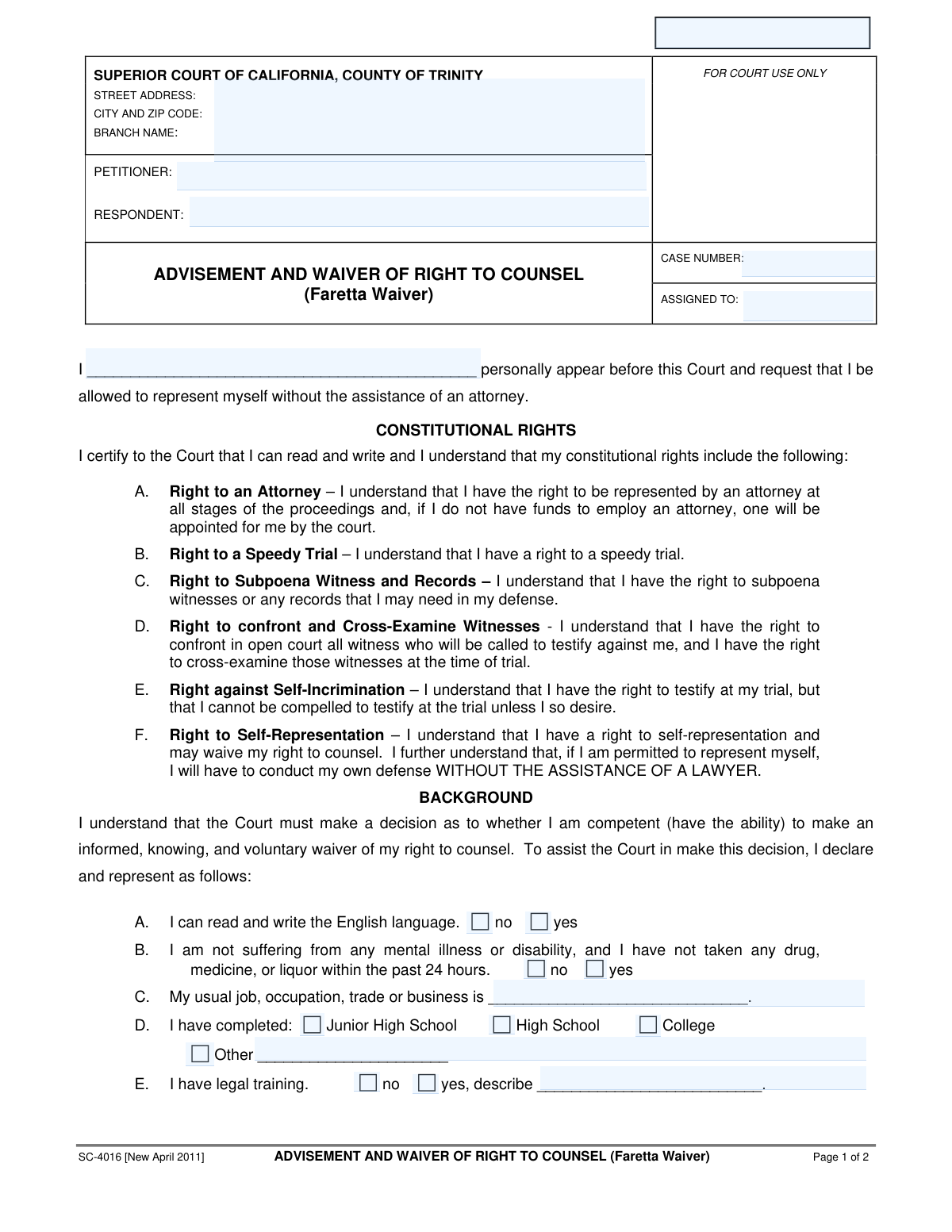
Yes! You can use AI to fill out Form SC-4016, Advisement and Waiver of Right to Counsel (Faretta Waiver)
Form SC-4016 is a legal document used in the Superior Court of California for a defendant to formally waive their constitutional right to an attorney and choose to represent themselves, a process known as a Faretta waiver. The form ensures the individual acknowledges their rights, understands the significant dangers and disadvantages of self-representation, and confirms they are making a knowing, intelligent, and voluntary decision. Today, this form can be filled out quickly and accurately using AI-powered services like Instafill.ai, which can also convert non-fillable PDF versions into interactive fillable forms.
Our AI automatically handles information lookup, data retrieval, formatting, and form filling.
It takes less than a minute to fill out SC-4016 using our AI form filling.
Securely upload your data. Information is encrypted in transit and deleted immediately after the form is filled out.
Form specifications
| Form name: | Form SC-4016, Advisement and Waiver of Right to Counsel (Faretta Waiver) |
| Number of fields: | 36 |
| Number of pages: | 2 |
| Language: | English |
Instafill Demo: How to fill out PDF forms in seconds with AI
How to Fill Out SC-4016 Online for Free in 2026
Are you looking to fill out a SC-4016 form online quickly and accurately? Instafill.ai offers the #1 AI-powered PDF filling software of 2026, allowing you to complete your SC-4016 form in just 37 seconds or less.
Follow these steps to fill out your SC-4016 form online using Instafill.ai:
- 1 Navigate to Instafill.ai and upload or select the SC-4016 Advisement and Waiver of Right to Counsel form.
- 2 Enter the court and case information, including the court address, petitioner and respondent names, and the case number.
- 3 Fill in your personal information, including your name, and answer the background questions about your ability to read/write English, mental state, occupation, education, and legal training.
- 4 Respond to the questions regarding your prior experience with self-representation and your knowledge of the case facts, legal defenses, and potential punishments.
- 5 Carefully read the 'Dangers and Disadvantages to Self-Representation' section to ensure you fully understand the risks involved.
- 6 Review all the information you have provided for accuracy, then digitally sign and date the declaration to formally waive your right to an attorney and choose to represent yourself.
Our AI-powered system ensures each field is filled out correctly, reducing errors and saving you time.
Why Choose Instafill.ai for Your Fillable SC-4016 Form?
Speed
Complete your SC-4016 in as little as 37 seconds.
Up-to-Date
Always use the latest 2026 SC-4016 form version.
Cost-effective
No need to hire expensive lawyers.
Accuracy
Our AI performs 10 compliance checks to ensure your form is error-free.
Security
Your personal information is protected with bank-level encryption.
Frequently Asked Questions About Form SC-4016
This form is used to formally request that the court allow you to represent yourself in a legal case without an attorney. By signing it, you are acknowledging that you understand your right to a lawyer and are voluntarily choosing to give up that right.
Any individual in a court case who wishes to act as their own lawyer, also known as appearing 'in propria persona' or 'pro se', must complete this form. The court uses it to ensure your decision is knowing, intelligent, and voluntary.
Waiving your right to counsel means you are giving up your constitutional right to have a lawyer represent you, including a court-appointed lawyer if you cannot afford one. You will be responsible for handling all aspects of your own legal defense.
The judge must determine if you are competent to make the serious decision to represent yourself. This background information helps the court assess your ability to understand the proceedings and the risks involved in waiving your right to an attorney.
The form warns that you will be held to the same legal standards as an attorney, you must conduct your own investigation, and you may face an experienced opposing lawyer. If you are convicted, you cannot appeal based on the fact that you did not have legal representation.
After you complete and sign the form, you will present it to the judge in your case. The judge will review your answers, may ask you questions in court, and will then decide whether to grant your request to represent yourself.
While you are giving up your right to counsel, courts may allow you to request an attorney later in the proceedings, but this is not guaranteed. The decision is up to the judge and may depend on how far the case has progressed.
You will need your case information (case number, petitioner/respondent names), personal background details like your education and occupation, and be prepared to answer questions about your understanding of the legal process.
You should check 'yes' for legal training and briefly describe the nature of your training in the space provided. For example, you could write 'Paralegal Certificate' or 'Completed one year of law school.'
The Case Number, court address, and party names can be found on any previous documents you have received from the court regarding your case, such as the initial petition or summons.
Yes, services like Instafill.ai use AI to help you accurately auto-fill form fields, which can save time and reduce errors. However, AI cannot provide legal advice or make the decision to represent yourself for you.
You can upload the SC-4016 form to the Instafill.ai platform. The AI will identify the fields, and you can then answer simple questions to have your information automatically and accurately placed into the correct sections of the form.
If you have a non-fillable or 'flat' PDF, you can upload it to a service like Instafill.ai. Their technology can convert the static document into an interactive, fillable form that you can easily complete online.
Compliance SC-4016
Validation Checks by Instafill.ai
1
Case Number Consistency Across Pages
This check verifies that the case number entered on page 1 is identical to the case number entered on page 2. Maintaining consistency is crucial for document integrity and ensures that both pages are correctly associated with the same legal matter. A mismatch could lead to filing errors, administrative delays, or the document being rejected by the court clerk.
2
Declarant Name Completeness
This validation ensures that the name of the person requesting to represent themselves is filled in the main declaration statement on page 1 ('I ___ personally appear...'). This field is fundamental as it identifies the individual who is waiving their right to counsel. Failure to complete this field makes the waiver invalid and the form cannot be processed.
3
Completeness of All Yes/No Questions
This check confirms that every question with a 'yes' or 'no' option (Sections A, B, E, F, G, H, I, J) has been answered. These questions are essential for the court to determine if the waiver is knowing, intelligent, and voluntary. An incomplete form prevents the judge from making a proper assessment and will result in the form being rejected.
4
Conditional Requirement for 'Other' Education
This validation rule ensures that if the 'Other' checkbox is selected in the education section (Section D), the corresponding text field for describing that education is not left empty. This information helps the court assess the declarant's background and comprehension level. An empty description field when 'Other' is checked makes the submission incomplete and requires correction.
5
Conditional Requirement for Legal Training Description
This check verifies that if the declarant indicates they have legal training by selecting 'yes' in Section E, they must provide a description in the associated text field. The nature of the legal training is a critical factor for the court to evaluate the declarant's ability to represent themselves. The form is considered incomplete if the description is missing after a 'yes' response.
6
Conditional Requirement for Prior Case Outcome
This validation ensures that if a user answers 'yes' to having represented themselves in a prior criminal case (Section F), they must also select one of the outcome options ('won my case' or 'lost my case'). This information provides context to the court about the declarant's previous experience with self-representation. The form cannot be submitted if the outcome is not specified after a 'yes' response.
7
Mutually Exclusive Selection for Prior Case Outcome
This check ensures that for prior self-representation (Section F), the user can only select either 'won my case' or 'lost my case,' but not both. These options are mutually exclusive, and selecting both would be a logical contradiction. The system should prevent this by using radio buttons, and this validation serves as a backend check to maintain data integrity.
8
Valid Date Format for Declarant's Signature
This validation confirms that the date entered by the declarant is in a valid format (e.g., MM/DD/YYYY) and represents a real calendar date. An invalid date format can cause processing errors and may lead to the document being rejected by the court. This ensures the official record of when the waiver was signed is accurate and unambiguous.
9
Presence of Declarant's Signature
This check verifies that the signature field for the declarant is not empty, indicating that the person has attested to the declaration. A missing signature renders the entire waiver invalid, as it lacks the legal affirmation required for such a significant decision. The form submission will be blocked until a signature (or its digital equivalent) is provided.
10
Logical Chronology of Signature Dates
This validation compares the declarant's signature date with the judge's signature date in the 'FINDINGS AND ORDER' section. The judge's order must be dated on the same day as or after the declarant signs the waiver, as the judge is ruling on the request made by the declarant. A judge's signature dated before the declarant's would be logically impossible and would invalidate the order.
11
Competency Warning for Mental Health or Substance Use
This is a soft validation or warning flag that is triggered if the user answers 'no' to the statement in Section B, indicating they are suffering from a mental illness or have recently used drugs, medicine, or liquor. This response is a critical alert for the court, as it directly questions the declarant's competency to make a knowing and voluntary waiver. The system should flag this submission for immediate and careful judicial review.
12
Competency Warning for English Literacy
This validation triggers a warning if the declarant indicates they cannot read and write the English language by selecting 'no' in Section A. Since the form and legal proceedings are in English, this raises a significant concern about the declarant's ability to understand their rights. This flag alerts the court to the potential need for an interpreter or further inquiry into the declarant's comprehension.
13
Warning for Lack of Legal Knowledge
This check generates a warning if the declarant answers 'no' to any of the questions regarding their knowledge of the case facts, legal defenses, or punishments (Sections G, H, I, or J). A 'no' answer suggests the waiver may not be 'knowing and intelligent,' which is a constitutional requirement. This flag immediately alerts the judge that further questioning is necessary to ensure the declarant understands what they are giving up.
14
Completeness of Occupation Field
This validation ensures that the field for the declarant's usual job or occupation (Section C) is not left blank. This information provides the court with context about the declarant's background and level of sophistication, which is relevant when assessing their ability to represent themselves. An incomplete field may require the judge to ask for this information in person, delaying proceedings.
Common Mistakes in Completing SC-4016
People often focus on the main questions and overlook the header on the second page, failing to re-enter the Case Name and Case Number. This happens because the fields are repetitive and can be easily missed when turning the page. If the pages are separated during processing or filing, the second page lacks critical identifiers, which can lead to filing delays, rejection, or the document being considered incomplete by the court.
Section B asks the filer to agree with the statement 'I am not suffering from any mental illness...'. A person might mistakenly check 'no' if they are healthy, or 'yes' if they have a condition, misreading the double-negative phrasing. This can lead the court to incorrectly assess the filer's state and question whether the waiver is being made knowingly and voluntarily, potentially leading to the denial of the request to self-represent.
The form requires additional information if 'yes' is checked for certain questions, such as describing legal training (Section E) or the outcome of a prior case (Section F). Filers often check 'yes' but forget to provide the mandatory follow-up details. This renders the form incomplete, forcing the court to halt proceedings to ask for clarification and potentially delaying the case.
The primary declaration begins with 'I _________________ personally appear...'. It is a surprisingly common mistake for individuals to skip over this line, leaving their name out. This is a critical error that invalidates the entire document, as it fails to identify the person who is waiving their rights. The form will be immediately rejected by the court clerk or the judge, requiring the entire process to be restarted.
A person might provide conflicting answers, such as checking 'no' for 'I can read and write the English language' (Section A) but then signing the declaration at the end which states 'I have read this entire form'. Such contradictions immediately raise red flags for the judge regarding the filer's ability to make a knowing and intelligent waiver. This will likely lead to extensive questioning in court and a high probability that the waiver request will be denied.
The form has a signature and date line for the person filing the waiver, followed by a separate 'FINDINGS AND ORDER' section for the judge. Confused by the layout, individuals sometimes sign or write the date in the space reserved for the judge. This error can invalidate the form, as it appears to be improperly executed, and will require the person to fill out and sign a new, clean copy.
When filling in the Petitioner, Respondent, or declarant name fields, people may use a nickname or an abbreviated version of their name out of habit. Legal documents require the full, official legal name as it appears on government identification and other court records. Using an incorrect name can cause filing rejections, create inconsistencies in the case file, and lead to identity verification problems down the line.
The top of the form has fields for the court's street address, city, and branch name. Many filers skip this section, assuming it is 'for court use only' or because they are unsure of the exact details. Leaving this blank can cause the document to be misrouted or delayed, especially in large jurisdictions with multiple courthouse locations. To avoid this, the information should be copied exactly from other case documents or found on the court's official website.
In Section C, when asked for their 'usual job, occupation, trade or business,' individuals may write something overly generic like 'employee' or 'self-employed'. The court uses this information to help assess the person's background, life experience, and general competency. A vague answer is unhelpful and may prompt the judge to ask more detailed questions, prolonging the hearing. A specific title like 'Restaurant Manager' or 'Freelance Graphic Designer' is more appropriate.
Sections G through J ask if the person knows the facts of the case, legal defenses, and potential punishments. A person may check 'yes' to all of these to appear competent, even if they do not fully grasp these complex legal matters. While not a data entry error, this is a common mistake in judgment that undermines the form's purpose. If the judge's follow-up questions reveal a lack of true understanding, the waiver will almost certainly be denied on the grounds that it is not 'knowing and intelligent'.
Saved over 80 hours a year
“I was never sure if my IRS forms like W-9 were filled correctly. Now, I can complete the forms accurately without any external help.”
Kevin Martin Green
Your data stays secure with advanced protection from Instafill and our subprocessors

Robust compliance program
Transparent business model
You’re not the product. You always know where your data is and what it is processed for.
ISO 27001, HIPAA, and GDPR
Our subprocesses adhere to multiple compliance standards, including but not limited to ISO 27001, HIPAA, and GDPR.
Security & privacy by design
We consider security and privacy from the initial design phase of any new service or functionality. It’s not an afterthought, it’s built-in, including support for two-factor authentication (2FA) to further protect your account.
Fill out SC-4016 with Instafill.ai
Worried about filling PDFs wrong? Instafill securely fills form-sc-4016-advisement-and-waiver-of-right-to-counsel-faretta-waiver forms, ensuring each field is accurate.