
Yes! You can use AI to fill out Form SSA-632, Request for Waiver of Overpayment Recovery
Don't type 206 fields by hand. Tell our AI about yourself, or upload a document you already have, and it fills every field in seconds. You check it, then download, print or sign.
The AI does the filling. You just check it.
No typing into boxes, nothing to install.
What this form asks for
The AI fills all of it, from your answers or your documents.
The AI checks your answers before you download
12 checks built for this form, so a wrong date or a missing answer is caught before anyone else sees it.
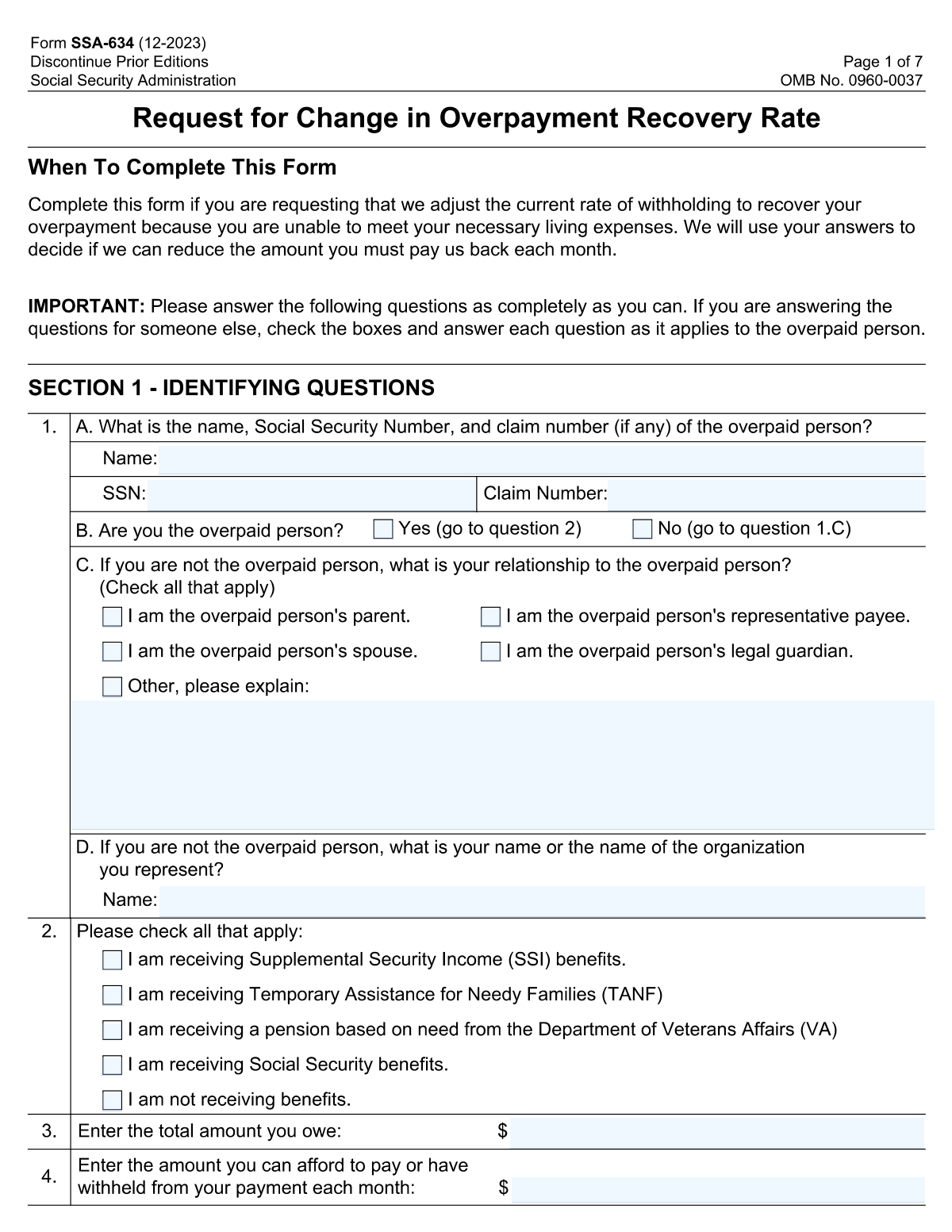
This check ensures the 'Social Security Number (SSN)' field contains exactly nine digits. It is crucial for correctly identifying the overpaid person in Social Security Administration records. If the entry is not a nine-digit number, the form submission will be rejected, and the user will be prompted to correct the format.
This validation confirms that the user has selected either 'Yes — I am the overpaid person' or 'No — I am not the overpaid person', but not both. This selection is fundamental as it dictates which subsequent sections of the form are required. A failure to select exactly one option will halt submission and require the user to make a valid choice.
If the user selects 'No — I am not the overpaid person', this check verifies that a relationship is specified (e.g., parent, spouse) and that the 'Representative or Organization Name' field is filled. This is necessary to identify who is completing the form on behalf of the overpaid person. Failure to provide this information will prevent submission until the required fields are completed.
This check is triggered if the 'Other, please explain:' checkbox is selected in the relationship section. It ensures that the corresponding 'Other Relationship - Explanation' text field is not empty. This validation prevents ambiguous submissions and ensures the nature of the representative's relationship is clearly documented.
This check ensures that if the 'I am not receiving benefits' checkbox is selected, no other benefit type checkboxes (e.g., SSI, TANF, Social Security) are also checked. These options are mutually exclusive and selecting them together creates a logical contradiction. If a conflict is detected, the user must correct their selection to accurately reflect their benefit status.
This validation ensures that the 'Monthly amount you can pay' is a positive numerical value and is less than or equal to the 'Total amount you owe'. This prevents illogical entries, such as offering to pay more per month than the total debt. An invalid entry would trigger an error, asking the user to provide a realistic payment amount.
And 6 more checks
- Ensures Completeness of Financial Account Rows
- Cross-Validates Financial Account Balance Total
- Cross-Validates Financial Account Income Total
- Conditional Requirement for Vehicle Details
- Verifies Total Countable Vehicle Value Calculation
- Requires Overpaid Person's Full Name
Let AI fill out your SSA-632
No typing. Every field filled in seconds, checked, ready to sign.
How to Fill Out SSA-632 Online for Free in 2026
What the AI walks you through.
- Navigate to Instafill.ai and upload your Form SSA-632 or select it from their template library.
- Provide the identification details for the overpaid person, such as their full name, Social Security Number, and claim number.
- Indicate whether you are the overpaid person or are filling out the form on their behalf, specifying your relationship if applicable.
- Use the AI assistant to accurately complete the detailed financial sections, including all sources of income, cash on hand, bank accounts, and other assets.
- Disclose information about any vehicles you own, including their value and any outstanding loans.
- Carefully review all the information pre-filled by the AI to ensure it is correct and complete, then provide your signature and the date.
- Download, print, and submit the completed form to the Social Security Administration as instructed.
Common Mistakes in Completing SSA-632
The ones the AI is built to catch.
Entering an Incorrect SSN or Claim Number
Name Does Not Match Social Security Records
Failing to Disclose All Financial Accounts
Confusing Account Balance with Monthly Income
Incorrectly Identifying the Filer's Role
Inaccurate Vehicle 'Present Value' Estimation
Misinterpreting the 'More Than One Vehicle' Rule
Inaccurate Reporting of Government Benefits
Mathematical Errors in Financial Totals
Leaving Representative Information Blank
Frequently Asked Questions About SSA-632
Is it really free for 7 days?
Can I fill other forms too?
How do I cancel?
How does the AI fill out SSA-632?
What happens to my information?
How complex is SSA-632 to fill out?
What is the purpose of this form?
Who needs to fill out this form?
What is a Social Security Claim Number and where do I find it?
I am filling this form out for my elderly parent. How do I indicate that?
What should I include in the 'Financial Accounts' section?
What if I have more financial accounts than there are rows on the form?
Do I have to list my car as an asset?
How do I determine the 'Present Value' of my vehicle?
What happens after I submit this form?
What kind of information is needed for my bank accounts?
Can I use an AI tool to help me fill out this form?
How can I fill out this form online?
My PDF copy of the form is not fillable. What should I do?
What is the difference between Social Security and SSI benefits in the 'Benefits Receiving' section?
Get your SSA-632 filled out by AI
$0 today. Cancel before Nov 3 and you pay nothing.
Other forms like this one
SSA forms: Form SSA-44, Medicare Income-Related Monthly Adjustment Amount - Life-Changing Event, Form SSA-3368-BK, Disability Report - Adult, Form SSA-16, Application for Disability Benefits, Form SSA-1-BK, Application for Retirement Benefits, Form SSA-2-BK, Application for Spouse's Benefits, Form SSA-827, Authorization to Disclose Information, Form SSA-3820-BK, Disability Report - Child, Form SSA-4-BK, Application for Child's Insurance Benefits, Form SSA-10, Application for Widow's or Widower's Insurance Benefits, Form SSA-3373, Function Report - Adult, Form SSA-8, Application for Lump-Sum Death Payment, Form SSA-10, Widow's or Widower's Benefits, Form SSA-4-BK, Application for Social Security Benefits, Form SSA-454-BK, Continuing Disability Review, Form SSA-5-BK, Application for Mother's or Father's Benefits, Form SSA-8000-BK, Application for Supplemental Security Income (SSI), Form SSA-1042S, Social Security Benefit Statement, Function Report - Adult - Third Party (Form SSA-3380-BK), Dakota County CDA New Admissions Informal Review Request Form (Housing Choice Voucher Program) and HUD Form 5382, Certification of Domestic Violence, Dating Violence, Sexual Assault, or Stalking, and Alternate Documentation, Form SSA-3369-BK, Work History Report
payment forms: Form 5405, Repayment of First-Time Homebuyer Credit, Form 1127, Application for Extension of Time for Payment of Tax Due to Undue Hardship, Form 1099-G, Certain Government Payments, Form 1099-K, Payment Card and Third Party Network Transactions, Form 1099-Q, Payments From Qualified Education Programs, Form SSA-8, Application for Lump-Sum Death Payment, Form 1845-0163, Borrower Defense to Repayment Application, application-and-contract-for-electric-facilities-w, Carer Payment and Carer Allowance – Medical Report (SA431) for a child under 16 years, Income-Driven Repayment (IDR) Plan Request (PAYE, IBR, and ICR) — William D. Ford Federal Direct Loan (Direct Loan) Program and Federal Family Education Loan (FFEL) Programs (OMB No. 1845-0102), Fidelity NetBenefits Distribution - Recurring Payments, Electronic Dividend and Interest Payment Authorization Form, Vanguard Super Apply for a financial hardship payment, Special Tax Notice Regarding Plan Payments, Empower Loan Payment Change Request Form, Empower Retirement Payment Request Form, Empower 401(k) Loan Prepayment Request Form, Special Tax Notice Regarding Plan Payments, Transamerica Automatic Payment Authorization, Excess Withdrawal Request and Form W-4R, Withholding Certificate for Nonperiodic Payments and Eligible Rollover Distributions
overpayment waiver forms: Form SSA-632-BK, Request for Waiver of Overpayment Recovery
Let AI fill out your SSA-632
Your trial starts once a card is added. You pay nothing before Nov 3.
Our AI already knows this form, all 206 fields of it. Skip the typing: tell it about yourself, or upload what you have, and it fills the whole form in seconds.
- AI fills every field on all 6 pages, tables and checkboxes included
- No typing into boxes: answer a few questions, or upload a document you already have, an old copy of this form, a photo of a document
- The AI checks the answers; you review and change anything before you download
- Download the finished PDF, print it, or sign it online
- Encrypted, and never used to train AI
Cancel before Nov 3 and you pay nothing.
A card is needed to start the trial. Cancel in two clicks from your account.
Terms · Privacy