
Yes! You can use AI to fill out Form SY018, Claim for ABSTUDY - Parent(s)/Guardian(s) to provide financial details
Don't type 433 fields by hand. Tell our AI about yourself, or upload a document you already have, and it fills every field in seconds. You check it, then download, print or sign.
The AI does the filling. You just check it.
No typing into boxes, nothing to install.
What this form asks for
The AI fills all of it, from your answers or your documents.
The AI checks your answers before you download
15 checks built for this form, so a wrong date or a missing answer is caught before anyone else sees it.
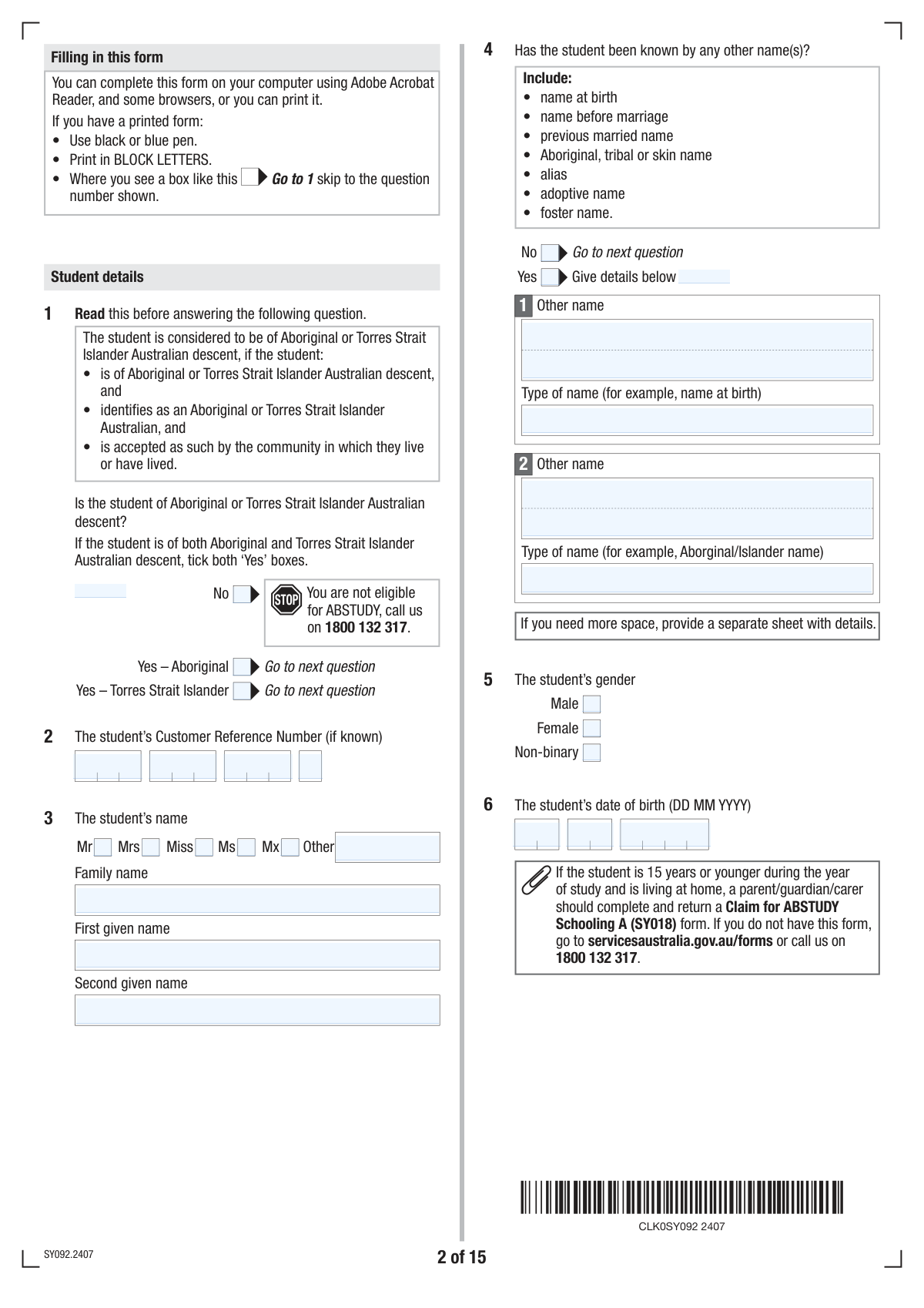
This check ensures that only one of the three options for 'Indigenous Australian Descent Status' ('No', 'Yes - Aboriginal', 'Yes - Torres Strait Islander') is selected. Since these statuses are mutually exclusive, selecting more than one would create contradictory data. If validation fails, the user is prompted to select only one option to ensure data accuracy for reporting and eligibility.
Validates that the 'Date of Birth Day', 'Month', and 'Year' for the student combine to form a real calendar date that is in the past. It also checks that the calculated age is reasonable for a student (e.g., not older than 100). This is critical for determining eligibility for age-related programs and preventing impossible dates like February 30th. A failure would require the user to correct the date.
This check enforces conditional logic for previous names. If the user selects 'Yes' to having been known by other names, the 'Number of Previous Names' field and at least one 'Other Name' block must be filled. Conversely, if 'No' is selected, these subsequent fields must be empty. This prevents incomplete submissions and ensures all declared information is captured.
This validation compares the 'Student Date of Birth' with the 'Parent/Guardian Date of Birth' to ensure a logical age difference exists. It flags any submission where the parent/guardian is not at least 14-16 years older than the student. This is a crucial sanity check to catch significant data entry errors. A failure would trigger a warning asking the user to confirm the dates are correct.
Verifies that if a relationship status such as 'Married', 'Registered relationship', 'De facto', 'Separated', 'Divorced', or 'Widowed' is selected, the corresponding date fields are filled out. The check also ensures the provided date is valid and occurs in the past. This is essential for establishing timelines for eligibility and financial assessments.
Ensures that if 'Yes' is checked for 'Living Away From Home to Study', at least one of the subsequent reasons (e.g., 'Travel 90 mins one way', 'Home conditions make study difficult') is also selected. This validation is important because the reason for living away from home is a key determinant of eligibility for certain benefits. A failure would require the user to provide a justification before proceeding.
And 9 more checks
- Partner Details Dependency
- Tax Lodgement Explanation
- Dependent Children Declaration
- Shared Care Percentage Format
- Australian Postcode Format
- Bank BSB Number Structure
- Tax File Number (TFN) Structure
- Signature Date Logic
- Conditional Income Details
Let AI fill out your SY018
No typing. Every field filled in seconds, checked, ready to sign.
How to Fill Out SY018 Online for Free in 2026
What the AI walks you through.
- Navigate to Instafill.ai and upload your SY018 form, or select it from our library of templates.
- Use the AI assistant to accurately fill in the student's personal information, including their name, date of birth, and Indigenous Australian descent status.
- Provide details about the student's schooling, including the school name, start date, and reasons for living away from home if applicable.
- Enter the personal and relationship details for the parent(s) or guardian(s) and their partner, if any.
- Input comprehensive financial data for the parent(s)/guardian(s) for the required tax years, including taxable income, fringe benefits, superannuation contributions, and maintenance payments.
- List any other dependent children in the family and provide details about rent payments to assess eligibility for Rent Assistance.
- Carefully review all the auto-filled information for accuracy, then e-sign and download the completed SY018 form, ready for submission.
Common Mistakes in Completing SY018
The ones the AI is built to catch.
Ignoring Conditional Logic and Instructions
Incorrect Entry of Segmented ID Numbers (CRN/TFN)
Confusing Base and Current Tax Year Financials
Providing Incomplete 'Previous Names' Information
Contradictory Relationship Status and Partner Details
Entering a Card Number Instead of an Account Number
Inaccurate Reporting of Dependent Children Details
Failing to Include Documents from the Checklist
Misunderstanding 'Living Away From Home' Justification
Missing or Incorrect Signatures and Dates
Frequently Asked Questions About SY018
Is it really free for 7 days?
Can I fill other forms too?
How do I cancel?
How does the AI fill out SY018?
What happens to my information?
How complex is SY018 to fill out?
What is the purpose of this form?
Who needs to complete this form?
What is a Customer Reference Number (CRN) and where can I find it?
What documents do I need to attach to this application?
The form asks for a 'base tax year' and 'current tax year'. What is the difference?
What should I do if my income has recently decreased?
What if I haven't received my Notice of Assessment (NOA) from the ATO yet?
The student needs to live away from home to study. What information is required?
Do I have to provide my Tax File Number (TFN)?
What information do I need for my other dependent children?
Where do I provide my bank details for the payments?
Can I use an AI tool to help me fill out this form?
How can I use Instafill.ai to fill this form out online?
The PDF copy of this form I have isn't fillable. What can I do?
Get your SY018 filled out by AI
$0 today. Cancel before Nov 10 and you pay nothing.
Other forms like this one
financial forms: Form 8938, Statement of Specified Foreign Financial Assets, Form 12.902(b), Family Law Financial Affidavit (Short Form), Form I-361, Affidavit of Financial Support, Form CJA-23, Financial Affidavit, Form 107, Statement of Financial Affairs, SBA Form 413, Personal Financial Statement, Personal Financial Statement (REV 06/2018) – Northwest Federal Credit Union, NSFAS Consent Form (National Student Financial Aid Scheme) – APP2026, International Student Application for Financial Aid 2026-2027 (International Student Application for Financial Assistance 2026-2027), State of Hawaii Department of Commerce and Consumer Affairs (DCCA) Contractors License Board – Application for Contractor's License (Sole Proprietor) (CT-36) with supporting forms (Experience Certificate CT-03, Contractors Financial Statement CT-02, and Chronological History of Projects/Project List), Colorado Judicial Department Form JDF 1111SC (Form 35.2), Sworn Financial Statement, Northwestern University Office of Undergraduate Financial Aid International Applicant Document Upload Cover Sheet, Vanguard Super Apply for a financial hardship payment, Selbstauskunft/ Vermögensaufstellung (Financial Self-Disclosure/Statement of Assets), Selbstauskunft - vertraulich - (Financial Self-Disclosure), Empower Financial Services, Inc. (EFSI) and Empower Advisory Group, LLC (EAG) Form CRS Customer Relationship Summary, Rollover Form (Principal Financial Group), Principal Financial 401(k) Withdrawal Form, Principal Financial Group Pre-Approved Basic Savings Plan - Plus, DoD 7000.14-R, Department of Defense Financial Management Regulation, Volume 12: Special Accounts, Funds and Programs
VA claim forms: Form OWCP-915, Claim for Medical Reimbursement, Form 8862, Information To Claim Certain Credits, Form CA-7, Claim for Compensation, Form CA-5, Claim for Compensation, Form SC-100, Plaintiff's Claim and ORDER to Go to Small Claims Court, Form 20-0995, Decision Review Request: Supplemental Claim, Form 104, List of Creditors 20 Largest Unsecured Claims, Form 941-X (Rev. April 2023), Adjusted Employer’s QUARTERLY Federal Tax Return or Claim for Refund, Judicial Council of California Form SC-104, Proof of Service (Small Claims), Immigration and Refugee Board of Canada (IRB) – Refugee Protection Division (RPD) Basis of Claim Form (for persons claiming refugee protection in Canada) (RPD.02.01), SC-108, Request to Correct or Cancel Judgment and Answer (Small Claims), Judicial Council of California Form SC-105, Request for Court Order and Answer (Small Claims), SC-120, Defendant’s Claim and ORDER to Go to Small Claims Court (Small Claims), Judicial Council of California Form SC-104, Proof of Service (Small Claims), Continental American Insurance Company (CAIC) / Aflac Group Critical Illness Claim Form (with Attending Physician’s Statement, HIPAA Authorization to Obtain Information, and Electronic Funds Transaction Authorization), Judicial Council of California Form SC-108, Request to Correct or Cancel Judgment and Answer (Small Claims), SC-105, Request for Court Order and Answer (Small Claims), Judicial Council of California Form SC-120, Defendant’s Claim and ORDER to Go to Small Claims Court (Small Claims), Small Claim and Notice of Small Claim (ORS 46.425) (OJD Official) (Jan 2026), VA Form 21-4138, Statement in Support of Claim
ETA forms: ETA Form 9061, Work Opportunity Tax Credit Individual Characteristics Form (ICF), Form UD-100, Complaint—Unlawful Detainer, 2420 - Served by Publication/Posting Forcible Detainer - Notice by Posting (CCM 0086), Oregon Practitioner Credentialing Application (including Attachment A: Professional Liability Action Detail), Judicial Council of California Form UD-105, Answer—Unlawful Detainer, Murrieta Police Department Citizen Complaint Form (California Penal Code § 148.6 Advisory Statement), Judicial Council of California Form UD-150, Request/Counter-Request to Set Case for Trial—Unlawful Detainer, Judicial Council of California Form UD-105, Answer—Unlawful Detainer, Louisiana Secretary of State – Notice of Change of Registered Office and/or Change of Registered Agent (Domestic Limited Liability Company) (R.S. 12:1308) (Form SS983, Rev. 01/24), Judicial Council of California Form UD-150, Request/Counter-Request to Set Case for Trial—Unlawful Detainer, TIAA-CREF Funds IRA 60-Day Rollover Request (Retail Class Only), TIAA-CREF Funds IRA Distribution Form (Retail Class Only), TIAA-CREF Funds Beneficiary Designation Form (Retail Class Only), Vanguard Personal Investor – Unregulated Trust details – Account information update, Application Form: Individual Investor | Monthly Liquidity – Retail Hedge Fund, Application Form: Legal Entities | Retail Hedge Fund - Fundrock, Application Form: Individual Investor | Retail Hedge Fund, Fundrock Application Form: Legal Entities | Monthly Liquidity – Retail Hedge Fund, Form C8, Confidential contact details, Judicial Council of California Form UD-100, Complaint—Unlawful Detainer
Let AI fill out your SY018
Your trial starts once a card is added. You pay nothing before Nov 10.
Our AI already knows this form, all 433 fields of it. Skip the typing: tell it about yourself, or upload what you have, and it fills the whole form in seconds.
- AI fills every field on all 25 pages, tables and checkboxes included
- No typing into boxes: answer a few questions, or upload a document you already have, an old copy of this form, a photo of a document
- The AI checks the answers; you review and change anything before you download
- Download the finished PDF, print it, or sign it online
- Encrypted, and never used to train AI
Cancel before Nov 10 and you pay nothing.
A card is needed to start the trial. Cancel in two clicks from your account.
Terms · Privacy