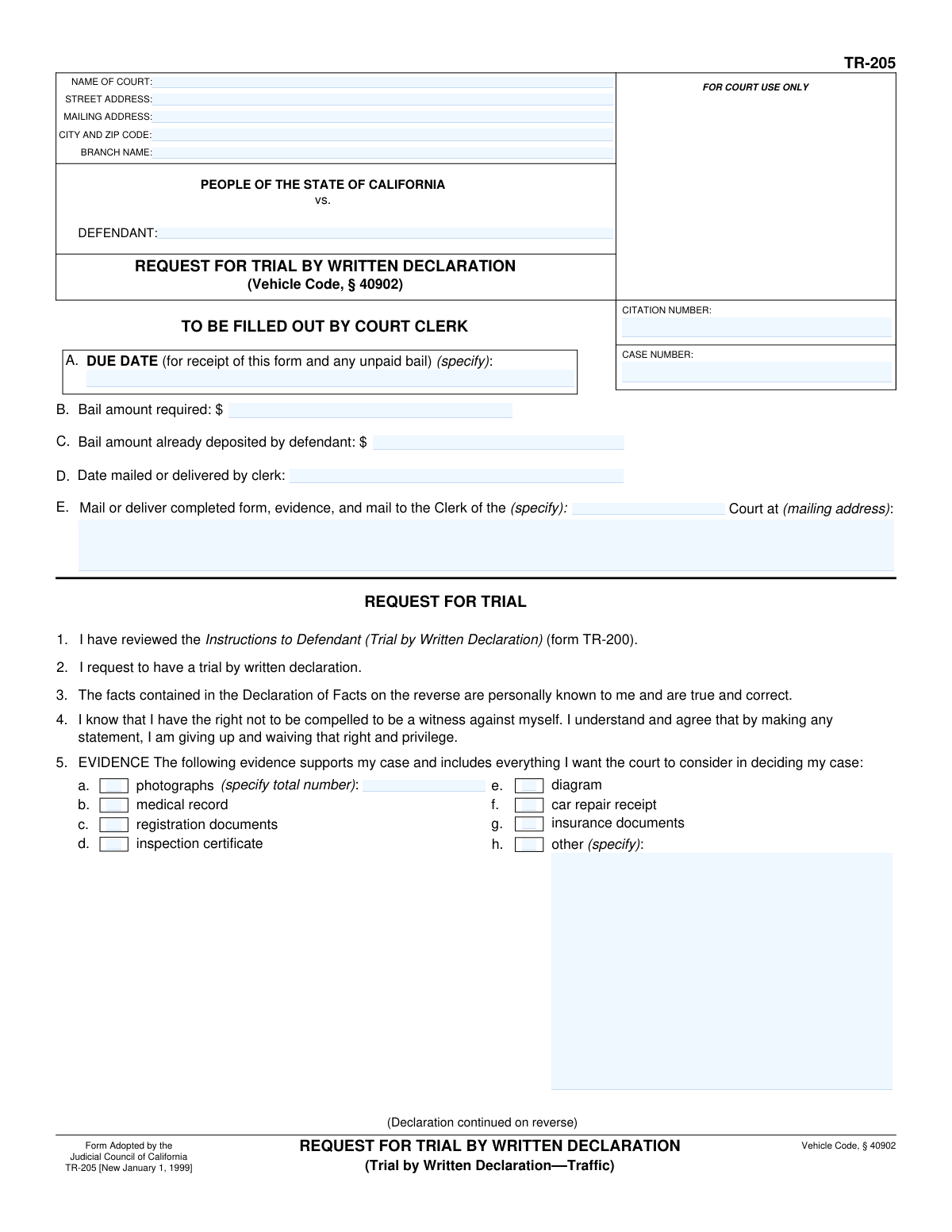
Yes! You can use AI to fill out Form TR-205, Request for Trial by Written Declaration
California Judicial Council Form TR-205, Request for Trial by Written Declaration, allows a defendant to contest a traffic infraction by submitting a written statement and evidence instead of appearing in person. This provides a convenient way to have a trial where a judicial officer reviews the written testimony from both the defendant and the citing officer to make a decision. It is an important option for individuals who cannot easily attend a court hearing. Today, this form can be filled out quickly and accurately using AI-powered services like Instafill.ai, which can also convert non-fillable PDF versions into interactive fillable forms.
Our AI automatically handles information lookup, data retrieval, formatting, and form filling.
It takes less than a minute to fill out TR-205 using our AI form filling.
Securely upload your data. Information is encrypted in transit and deleted immediately after the form is filled out.
Form specifications
| Form name: | Form TR-205, Request for Trial by Written Declaration |
| Number of fields: | 36 |
| Number of pages: | 2 |
| Language: | English |
Instafill Demo: How to fill out PDF forms in seconds with AI
How to Fill Out TR-205 Online for Free in 2026
Are you looking to fill out a TR-205 form online quickly and accurately? Instafill.ai offers the #1 AI-powered PDF filling software of 2026, allowing you to complete your TR-205 form in just 37 seconds or less.
Follow these steps to fill out your TR-205 form online using Instafill.ai:
- 1 Navigate to Instafill.ai and upload your copy of Form TR-205, or select it from the platform's template library.
- 2 Use the AI assistant to accurately input the court and case information, including the citation number, case number, and court branch details from your traffic ticket.
- 3 Provide your personal information as the defendant, ensuring your name and current mailing address are entered correctly.
- 4 Compose your 'Declaration of Facts' in the designated section, clearly stating what happened and how your evidence supports your case.
- 5 Check the appropriate boxes in the 'Evidence' section to indicate all documents, photos, or diagrams you are submitting with your declaration.
- 6 Carefully review the entire form for accuracy, then date and sign the declaration under penalty of perjury.
- 7 Download the completed form, gather all your evidence, and mail the entire package to the court clerk's office before the specified due date.
Our AI-powered system ensures each field is filled out correctly, reducing errors and saving you time.
Why Choose Instafill.ai for Your Fillable TR-205 Form?
Speed
Complete your TR-205 in as little as 37 seconds.
Up-to-Date
Always use the latest 2026 TR-205 form version.
Cost-effective
No need to hire expensive lawyers.
Accuracy
Our AI performs 10 compliance checks to ensure your form is error-free.
Security
Your personal information is protected with bank-level encryption.
Frequently Asked Questions About Form TR-205
The TR-205 form, 'Request for Trial by Written Declaration,' is used to contest a traffic infraction in California by submitting a written statement instead of appearing in court.
Any defendant who has received an eligible traffic citation and wishes to contest it in writing must complete this form. This is an alternative to a traditional in-person court trial.
Yes, you are required to submit the full bail amount for your citation along with this form by the specified due date. If you are found not guilty, the court will refund your bail.
You will need your traffic citation to provide the citation number, case number, and court information. You should also gather any evidence you plan to submit, such as photos or documents.
In this section, you must type or print a clear, factual statement explaining what happened from your perspective. You should also explain how the evidence you are submitting supports your case.
A judicial officer will review your statement and the citing officer's statement, then mail you a verdict. If you are found not guilty, your bail will be refunded.
You must mail or deliver the completed form, all evidence, and the full bail amount to the Clerk of the Court at the mailing address provided by the court in section E of the form.
You can submit evidence like photographs, diagrams, car repair receipts, registration documents, or insurance documents. Make sure to check the corresponding box in item 5 and explain the evidence in your declaration.
If you need more space for your 'Declaration of Facts,' you can use additional pages. Be sure to note the number of pages you have attached in item 7 on the form.
Yes, services like Instafill.ai use AI to help you accurately auto-fill form fields, which saves time and reduces the chance of errors on complex forms like this one.
To fill out the form online, you can upload the TR-205 PDF to Instafill.ai. The platform makes the document interactive, allowing you to type your information directly into the fields before printing for submission.
If you have a non-fillable PDF, you can use a service like Instafill.ai. It can convert flat, non-fillable PDFs into interactive forms that you can easily complete on your computer.
By submitting this form, you waive your right to appear in court, to testify in person, and to cross-examine the officer who issued the citation. You also waive your right against self-incrimination by providing a statement.
Compliance TR-205
Validation Checks by Instafill.ai
1
Case and Defendant Name Consistency Across Pages
This check ensures that the 'CASE NUMBER' and 'DEFENDANT (Name)' fields on page two match the corresponding 'Case Number' and 'Defendant Name' fields on page one. This is crucial for maintaining document integrity and ensuring the declaration is correctly associated with the case file. If the names or numbers do not match, the system should flag the discrepancy to prevent filing errors.
2
Conditional Requirement for 'Other Evidence' Description
This validation rule enforces that if the 'h. other (specify)' checkbox in the 'EVIDENCE' section is checked, the corresponding text field for describing the other evidence must not be empty. This prevents incomplete submissions where the user indicates they have additional evidence but fails to describe it. A failure would prompt the user to either provide a description or uncheck the box.
3
Conditional Requirement for Photograph Count
This check validates that if the 'a. photographs' checkbox is selected, the 'specify total number' field must contain a positive integer. Conversely, if the checkbox is not selected, the number field should be empty or zero. This ensures the court knows exactly how many photographs to expect and prevents ambiguity. An error would occur if the box is checked but the count is missing, or if a count is provided without the box being checked.
4
Logical Date Sequence for Clerk and Due Dates
This validation verifies that the 'Date Mailed or Delivered by Clerk' is on or before the 'DUE DATE'. This is a logical consistency check, as the deadline for the defendant cannot be before the form was even sent by the court. A failure would indicate a data entry error in one of the dates, which could invalidate the form's timeline and must be corrected.
5
Bail Amount Logical Comparison
This check ensures that the 'Bail amount already deposited by defendant' is not greater than the 'Bail amount required'. It is logically impossible for a defendant to have deposited more than the total required bail. If this validation fails, it points to a significant data entry error that must be corrected by the court clerk before processing.
6
Signature Date Chronology
This validation confirms that the signature 'Date' provided by the defendant is on or after the 'Date mailed or delivered by clerk' and on or before the form's 'DUE DATE'. The signature must occur after receiving the form and before the submission deadline. An invalid date would question the declaration's timeliness and validity, requiring the user to correct it.
7
Court Street Address Format - No P.O. Box
This rule validates that the 'Court Street Address' field does not contain 'P.O. Box' or similar variations. The form specifies this field is for the court's physical location, which is necessary for in-person services or record-keeping that distinguishes physical from mailing addresses. If the validation fails, the user is prompted to provide a physical street address.
8
Court City and ZIP Code Structure
This check verifies that the 'Court City and ZIP Code' field adheres to the specified format of a city name, followed by a single space, and then a five-digit ZIP code (e.g., 'Sacramento 95814'). This ensures data consistency and proper formatting for mail and record systems. A failed validation would require the user to correct the entry to match the required structure.
9
Defendant Name Format
This validation checks that the 'Defendant Name' field likely follows the 'Last Name, First Name' format by ensuring it contains at least one comma. This structure is standard for court documents to ensure proper indexing and identification of the defendant. If a comma is missing, the system should issue a warning prompting the user to review and format the name correctly.
10
Bail Amount Numeric Format
This validation ensures that the 'Bail Amount Required' and 'Bail Amount Already Deposited' fields contain only numeric characters and a single decimal point for cents, with no currency symbols ('$') or commas. This is critical for accurate financial calculations and to prevent processing errors in the court's financial system. An invalid format would trigger an error message requiring the user to input a correctly formatted number (e.g., 150.00).
11
Date Field Format (MM/DD/YYYY)
This rule validates that all date fields, such as 'DUE DATE' and 'Date mailed or delivered by clerk', are entered in the strict MM/DD/YYYY format. Enforcing a standard date format is essential for system compatibility, accurate date calculations, and avoiding ambiguity. If a date is entered in any other format, the user will be prompted to correct it before submission.
12
Completeness of Required Court Information
This is a completeness check to ensure that all fields in the 'Court and Case Information' section (e.g., 'Citation Number', 'Case Number', 'Name of Court') are filled out. These fields are fundamental to identifying the specific case and jurisdiction. A submission with any of these fields empty would be un-routable and must be rejected, prompting the user to provide all required information.
Common Mistakes in Completing TR-205
Defendants often transcribe the Citation Number or Case Number incorrectly, omitting letters, or mixing up digits. This happens due to haste or misreading the original ticket. An incorrect number is a critical error, as the court clerk cannot locate the case file, which will lead to the rejection of the declaration and potentially a failure to appear.
The form clearly marks a section 'TO BE FILLED OUT BY COURT CLERK' for details like due dates and bail amounts. Defendants sometimes fill this section out themselves, causing confusion and processing delays. This can lead to the form being returned for correction, risking a missed deadline. Always leave sections designated for court use blank.
The instructions require the defendant's name to be entered as 'Last Name, First Name Middle Initial'. Many people default to the standard 'First Name Last Name' format out of habit. While seemingly minor, this formatting error can slow down clerical processing and data entry at the courthouse, as staff may need to manually correct the entry to match their system's format.
The 'Declaration of Facts' is often filled with emotional complaints about the officer or a vague story, rather than a clear, fact-based rebuttal of the specific violation cited. A judge needs a logical, concise statement explaining why you are not guilty, referencing specific evidence. An ineffective statement significantly reduces the chances of a favorable ruling.
Forgetting to physically sign and date the declaration under penalty of perjury is a common and fatal mistake. An unsigned document is legally invalid and will be rejected outright by the court. This oversight is treated as a failure to submit the request, which can result in the bail being forfeited and the case being closed with a guilty verdict.
Defendants may check boxes for evidence like photos or receipts and attach them, but then fail to explain their significance in the 'Declaration of Facts'. The judge will not make assumptions or connect the dots for you; you must explicitly state what each piece of evidence is and how it proves you are not guilty. For example, state 'The attached photograph (Exhibit A) shows the view from the driver's seat, proving the stop sign was obscured by a tree branch.'
A frequent error is checking a box in the 'EVIDENCE' section (item 5) but failing to attach the corresponding document, or attaching evidence without checking the appropriate box. This discrepancy can lead the judge to disregard the evidence or question the thoroughness of the declaration. Ensure every piece of evidence is checked, attached, and referenced in your statement.
The court provides a strict 'DUE DATE' by which it must receive the completed TR-205 form and any required bail. People often procrastinate or miscalculate mailing times, causing the form to arrive late. A late submission will be rejected, and you will lose your right to a trial by written declaration, likely resulting in a guilty verdict and forfeiture of bail.
Traffic citations can be confusing, leading people to enter the wrong court name, branch, or mailing address. Sending the form to the wrong location will cause significant delays or result in it being lost entirely. Carefully verify the exact court name and mailing address from your official court notice to prevent your declaration from being misdirected.
Although the form states 'Type or print only,' some individuals submit handwritten declarations that are messy and difficult to read. If the judge or clerk cannot easily read your statement, they cannot properly evaluate your defense, which almost guarantees an unfavorable outcome. To avoid this, always type your responses. AI-powered tools like Instafill.ai can convert non-fillable PDFs into fillable versions, making it easy to type directly onto the form for maximum clarity.
Saved over 80 hours a year
“I was never sure if my IRS forms like W-9 were filled correctly. Now, I can complete the forms accurately without any external help.”
Kevin Martin Green
Your data stays secure with advanced protection from Instafill and our subprocessors

Robust compliance program
Transparent business model
You’re not the product. You always know where your data is and what it is processed for.
ISO 27001, HIPAA, and GDPR
Our subprocesses adhere to multiple compliance standards, including but not limited to ISO 27001, HIPAA, and GDPR.
Security & privacy by design
We consider security and privacy from the initial design phase of any new service or functionality. It’s not an afterthought, it’s built-in, including support for two-factor authentication (2FA) to further protect your account.
Fill out TR-205 with Instafill.ai
Worried about filling PDFs wrong? Instafill securely fills form-tr-205-request-for-trial-by-written-declaration forms, ensuring each field is accurate.