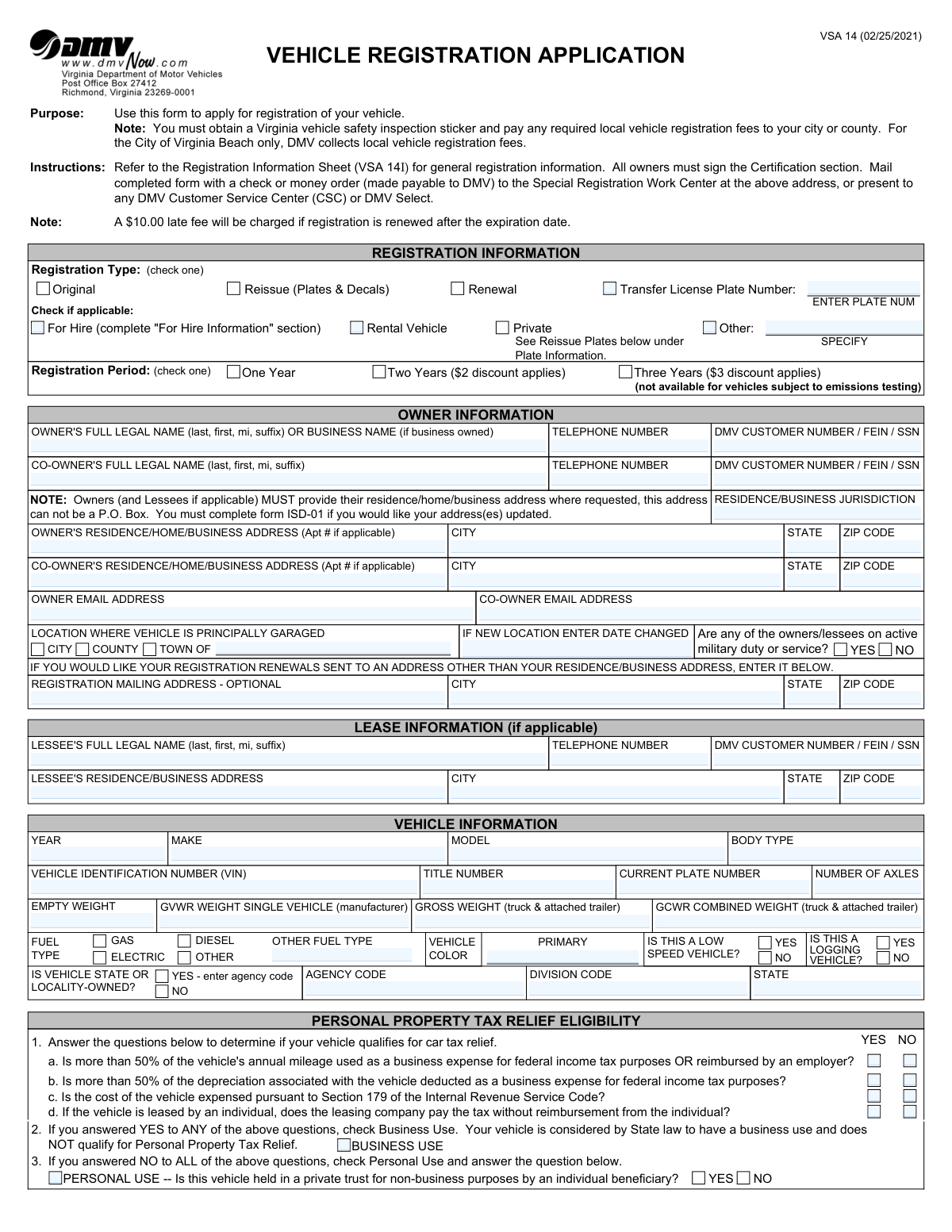
Yes! You can use AI to fill out Form VSA 14, Vehicle Registration Application

Form VSA 14 is a document required by the Virginia DMV for vehicle owners to apply for a new registration, renew an existing one, or transfer plates. It gathers essential details about the owner(s), the vehicle itself, insurance coverage, and how the vehicle will be used to ensure compliance with state laws and proper tax assessment. Today, this form can be filled out quickly and accurately using AI-powered services like Instafill.ai, which can also convert non-fillable PDF versions into interactive fillable forms.
Our AI automatically handles information lookup, data retrieval, formatting, and form filling.
It takes less than a minute to fill out VSA 14 using our AI form filling.
Securely upload your data. Information is encrypted in transit and deleted immediately after the form is filled out.

Form specifications

Form name: Form VSA 14, Vehicle Registration Application
Number of pages: 2
Language: English
main-image

Instafill Demo: How to fill out PDF forms in seconds with AI

How to Fill Out VSA 14 Online for Free in 2026

Are you looking to fill out a VSA 14 form online quickly and accurately? Instafill.ai offers the #1 AI-powered PDF filling software of 2026, allowing you to complete your VSA 14 form in just 37 seconds or less.
Follow these steps to fill out your VSA 14 form online using Instafill.ai:
  1. 1 Navigate to Instafill.ai and upload or select the VSA 14 Vehicle Registration Application.
  2. 2 Provide owner and co-owner details, including full legal names, addresses, and DMV customer numbers or SSN/FEIN.
  3. 3 Enter comprehensive vehicle information such as the VIN, make, model, year, color, and weight details.
  4. 4 Complete the Personal Property Tax Relief section to determine if the vehicle is for personal or business use.
  5. 5 Select the desired registration type (original, renewal, transfer), registration period, and plate options (standard, special, or personalized).
  6. 6 Complete the Insurance Certification section by providing your insurance company's name or opting to pay the uninsured motor vehicle fee.
  7. 7 Review all the information auto-filled by the AI for accuracy, then e-sign and date the certification before submitting the form to the DMV.

Our AI-powered system ensures each field is filled out correctly, reducing errors and saving you time.

Why Choose Instafill.ai for Your Fillable VSA 14 Form?

Speed

Complete your VSA 14 in as little as 37 seconds.

Up-to-Date

Always use the latest 2026 VSA 14 form version.

Cost-effective

No need to hire expensive lawyers.

Accuracy

Our AI performs 10 compliance checks to ensure your form is error-free.

Security

Your personal information is protected with bank-level encryption.

Frequently Asked Questions About Form VSA 14

The VSA 14, or Vehicle Registration Application, is used to apply for a new vehicle registration, renew an existing registration, or request reissued plates and decals in Virginia.

Any individual or business that owns a vehicle and needs to register it, renew its registration, or get new license plates in the Commonwealth of Virginia must complete this form.

Your 'Owner's Residence Address' must be your physical street address and cannot be a P.O. Box. The 'Registration Mailing Address' is an optional field for you to provide a different address, like a P.O. Box, where you'd prefer to receive your registration mail.

If you answer 'NO' to all four questions in the 'Personal Property Tax Relief Eligibility' section regarding business use, your vehicle qualifies for personal use. Answering 'YES' to any of them means your vehicle is considered for business use and does not qualify.

If your vehicle is not insured by a Virginia-licensed company, you must check the box indicating it is uninsured and pay the Uninsured Motor Vehicle (UMV) fee. This fee provides no insurance coverage and you are still legally required to have liability insurance.

You can mail the form with payment to the Special Registration Work Center address on the form, or present it in person at any Virginia DMV Customer Service Center (CSC) or DMV Select location.

Yes, you have the option to register for one, two, or three years, with small discounts for multi-year registrations. Note that the three-year option is not available for vehicles subject to emissions testing.

Yes, you should check the 'YES' box in the 'Location Where Vehicle is Principally Garaged' section if any owner or lessee is on active military duty. This may affect your personal property tax obligations.

In the 'Plate Information' section, check the box for personalized plates and write your desired character combinations in the spaces provided for your 1st, 2nd, 3rd, and 4th choices.

You will need your DMV customer number or SSN, vehicle details like the VIN and title number, your current address, and your insurance company's name or funds for the uninsured motor vehicle fee.

The form notes that a $10.00 late fee will be charged if you renew your registration after the expiration date.

Yes, services like Instafill.ai use AI to auto-fill form fields accurately and save time, helping you complete the application more efficiently and with fewer errors.

You can use a service like Instafill.ai to fill out your form online. Simply upload the VSA 14 PDF, and the platform will make it interactive so you can type in your information and download the completed document.

If you have a non-fillable PDF, you can use Instafill.ai to convert it into an interactive, fillable form. This allows you to easily type your information into the correct fields before printing and submitting it.

Compliance VSA 14
Validation Checks by Instafill.ai

1
VIN Format and Structure Validation
Checks if the Vehicle Identification Number (VIN) is exactly 17 characters long and contains only valid alphanumeric characters, excluding I, O, and Q, as per industry standards. This is crucial for uniquely and accurately identifying the vehicle in state and national databases. An invalid VIN will prevent the registration from being processed and could lead to incorrect vehicle records.
2
Owner/Lessee Address P.O. Box Prohibition
Verifies that the Owner's and Lessee's residence/business address fields are not a P.O. Box, as explicitly prohibited by the form's instructions. A physical address is required for establishing legal jurisdiction for taxation and law enforcement purposes. Submitting a P.O. Box will result in the rejection of the application until a valid physical address is provided.
3
Personal Property Tax Relief Logic
Ensures the 'Business Use' or 'Personal Use' selection is consistent with the answers to the preceding questions (1a-d). If the applicant answers 'YES' to any business-related question, 'Business Use' must be checked; if all answers are 'NO', 'Personal Use' must be checked. This logic is mandated by state law to determine tax eligibility, and an inconsistency will require correction before the vehicle's tax status can be determined.
4
Conditional Requirement for Agency Code
This check verifies that the 'Agency Code' field is filled out if the 'IS VEHICLE STATE OR LOCALITY-OWNED?' box is marked 'YES'. This ensures that government-owned vehicles are properly coded for administrative and fee-exemption purposes. If 'YES' is selected without an agency code, the form is considered incomplete and cannot be processed correctly.
5
Conditional Requirement for 'Other Fuel Type' Specification
Validates that the 'Other Fuel Type' text field contains a value if the 'Fuel Type - Other' checkbox is selected. Conversely, if 'Fuel Type - Other' is checked, the text field must not be empty. This rule prevents ambiguity and ensures that vehicles with non-standard fuel types are correctly documented in the vehicle record.
6
Three-Year Registration Eligibility Check
Checks if the 'Three Years' registration period is selected for a vehicle that is subject to emissions testing, which is explicitly prohibited on the form. This validation requires cross-referencing the vehicle's details and garaging location against state emissions testing requirements. Selecting an invalid registration period will result in a fee miscalculation and rejection of the registration term.
7
Co-Owner Information Completeness
Verifies that if a co-owner's name is provided, all other required co-owner fields (address, city, state, ZIP, and DMV Customer Number/FEIN/SSN) are also completed. This ensures that all legal owners of the vehicle are fully documented in the system. Incomplete co-owner information will prevent the legal addition of the co-owner to the vehicle's registration.
8
Insurance Certification Logic
Ensures that one of the two insurance certification options is selected and that the choice is complete. If the applicant certifies the vehicle is insured, the 'Name of Insurance Company' field must be filled. This is a critical legal declaration, and failure to complete this section correctly will result in immediate rejection of the application.
9
For Hire Section Activation
Validates that if the 'For Hire' checkbox is selected, the applicant must also complete the 'FOR HIRE INFORMATION' section by selecting at least one type of carrier operation. This ensures that vehicles used for commercial purposes are properly classified according to their specific use. Failing to specify the for-hire operation type will result in an incomplete application.
10
Mandatory Signature and Date Validation
Confirms that the 'APPLICANT... SIGNATURE' and 'DATE' fields are completed, as this constitutes a legal certification under penalty of perjury. It also checks that if a co-owner is listed, the 'CO-APPLICANT SIGNATURE' and corresponding 'DATE' fields are also filled. Missing signatures or dates invalidate the entire application.
11
Plate Transfer Number Requirement
This validation ensures that if the applicant checks the box to 'Transfer License Plate Number', they must also provide the actual plate number in the associated text field. This is necessary to link the existing registration to the new vehicle. An application to transfer a plate without specifying the number is incomplete and cannot be processed.
12
Small Trailer Plate Weight Restriction
Verifies that the 'Small size plate' option is selected only for vehicles identified as trailers with a gross weight of 4,000 pounds or less, as stated on the form. This rule enforces the specific eligibility requirements for smaller trailer plates. Selecting this option for an ineligible vehicle will result in an incorrect plate issuance and fee assessment.
13
Personalized Plate Choice Requirement
Ensures that if the applicant checks the box to request personalized plates, they must provide at least their first choice in the '1st choice' field. Requesting a personalized plate without providing any choices is an invalid action. This prevents incomplete requests from being submitted and ensures the application has the necessary information to proceed.
14
Farm Plate Certification Cross-Reference
Validates that if the 'Farm Plate' checkbox is selected, the system also receives the required accompanying 'Farm Vehicle Plate Certification (VSA 131)' form. The VSA 14 form explicitly states this other form is required for farm plates. Without the VSA 131, the eligibility for a farm plate cannot be confirmed, and the registration will be rejected.

Common Mistakes in Completing VSA 14

Using a P.O. Box for a Physical Address

Applicants often enter a P.O. Box for their residence or business address, but the form explicitly states this is not allowed. This occurs because people prefer using a P.O. Box for mail security. Submitting a P.O. Box will lead to form rejection and processing delays. Always provide a complete physical street address for the owner, co-owner, and lessee sections.

Incorrectly Reporting the Principal Garaging Location

The 'Location Where Vehicle Is Principally Garaged' is for tax assessment and is often different from the mailing address. Applicants frequently enter their mailing address by mistake, which can lead to being billed for personal property tax by the wrong city or county. To avoid this, carefully enter the specific city, county, or town where the vehicle is physically kept overnight.

Misinterpreting the Personal Property Tax Relief Section

The questions determining eligibility for tax relief are based on complex IRS rules regarding business use, which many people find confusing. Answering incorrectly can result in either overpaying taxes or improperly claiming relief, which may lead to future penalties and back-taxes. If unsure, consult a tax professional, and double-check that if you answer 'YES' to any question, you select 'Business Use' as instructed.

Entering an Incorrect Vehicle Identification Number (VIN)

The 17-character VIN is long and complex, making it easy to transpose numbers or mix up similar characters like 'O' and '0' or 'I' and '1'. An incorrect VIN is a critical error that will cause the registration to fail validation, as the vehicle cannot be correctly identified. Always double- or triple-check the VIN against the vehicle's title document and the vehicle itself.

Incomplete Insurance Certification

A common mistake is checking the box indicating the vehicle is insured but then forgetting to write the name of the insurance company in the designated field. This omission makes the certification incomplete and can cause the application to be rejected. To prevent this, ensure you write the full, official name of your insurance provider if you certify that the vehicle is insured.

Missing Co-Owner Signature or Information

When a vehicle is jointly owned, both owners must be listed, and both must sign the certification section. It is very common for the second signature to be missed, which immediately invalidates the application. Ensure all co-owner information is complete and that every owner signs and dates the form to avoid automatic rejection.

Confusing Registration Purpose (Original, Renewal, Reissue)

Applicants often get confused between 'Original' (a new registration in Virginia), 'Renewal' (extending an existing registration), and 'Reissue' (getting new plates/decals for a currently registered vehicle). Selecting the wrong purpose can lead to incorrect fees being calculated and processing delays. Carefully read the definitions to select the correct transaction type for your situation.

Incorrectly Formatting Legal Names

The form requires the owner's and lessee's full legal name in 'last, first, mi, suffix' format to match official records. People often write their name in a more casual order (e.g., 'John M. Smith') or use a nickname, causing a data mismatch. This can delay processing or create issues linking the registration to the correct DMV customer record. Always follow the specified format exactly.

Ignoring Conditional Field Requirements

Many selections on this form require you to provide additional information in an adjacent field. For example, checking 'Transfer License Plate Number' requires entering the plate number, or checking 'Special Plate' requires writing the plate type. Failing to provide this follow-up information leaves the application incomplete and can halt the process. AI-powered form fillers like Instafill.ai can help by automatically highlighting these dependent fields.

Failing to Distinguish Between Residence and Mailing Addresses

The form has separate sections for the owner's physical 'Residence/Business Address' and an optional 'Registration Mailing Address'. People sometimes fill out only the mailing address or enter the same P.O. Box in both. This causes an issue because a physical address is legally required, and failing to provide it will result in rejection. Use the mailing address section only if you want renewals sent to a different location than your required physical residence.

Submitting an Unsigned or Undated Application

An unsigned application is legally non-binding and will be immediately rejected by the DMV. This simple oversight is a frequent cause of delay, especially when mailing in a form. Before submitting, always perform a final review to ensure that the applicant and co-applicant (if any) have signed and dated the certification section. Since this form is a non-fillable PDF, tools like Instafill.ai can convert it to a fillable version where signature fields can be clearly marked to prevent this mistake.
Saved over 80 hours a year

“I was never sure if my IRS forms like W-9 were filled correctly. Now, I can complete the forms accurately without any external help.”

Kevin Martin Green

Your data stays secure with advanced protection from Instafill and our subprocessors

Robust compliance program

Transparent business model

You’re not the product. You always know where your data is and what it is processed for.

ISO 27001, HIPAA, and GDPR

Our subprocesses adhere to multiple compliance standards, including but not limited to ISO 27001, HIPAA, and GDPR.

Security & privacy by design

We consider security and privacy from the initial design phase of any new service or functionality. It’s not an afterthought, it’s built-in, including support for two-factor authentication (2FA) to further protect your account.

Fill out VSA 14 with Instafill.ai

Worried about filling PDFs wrong? Instafill securely fills form-vsa-14-vehicle-registration-application forms, ensuring each field is accurate.