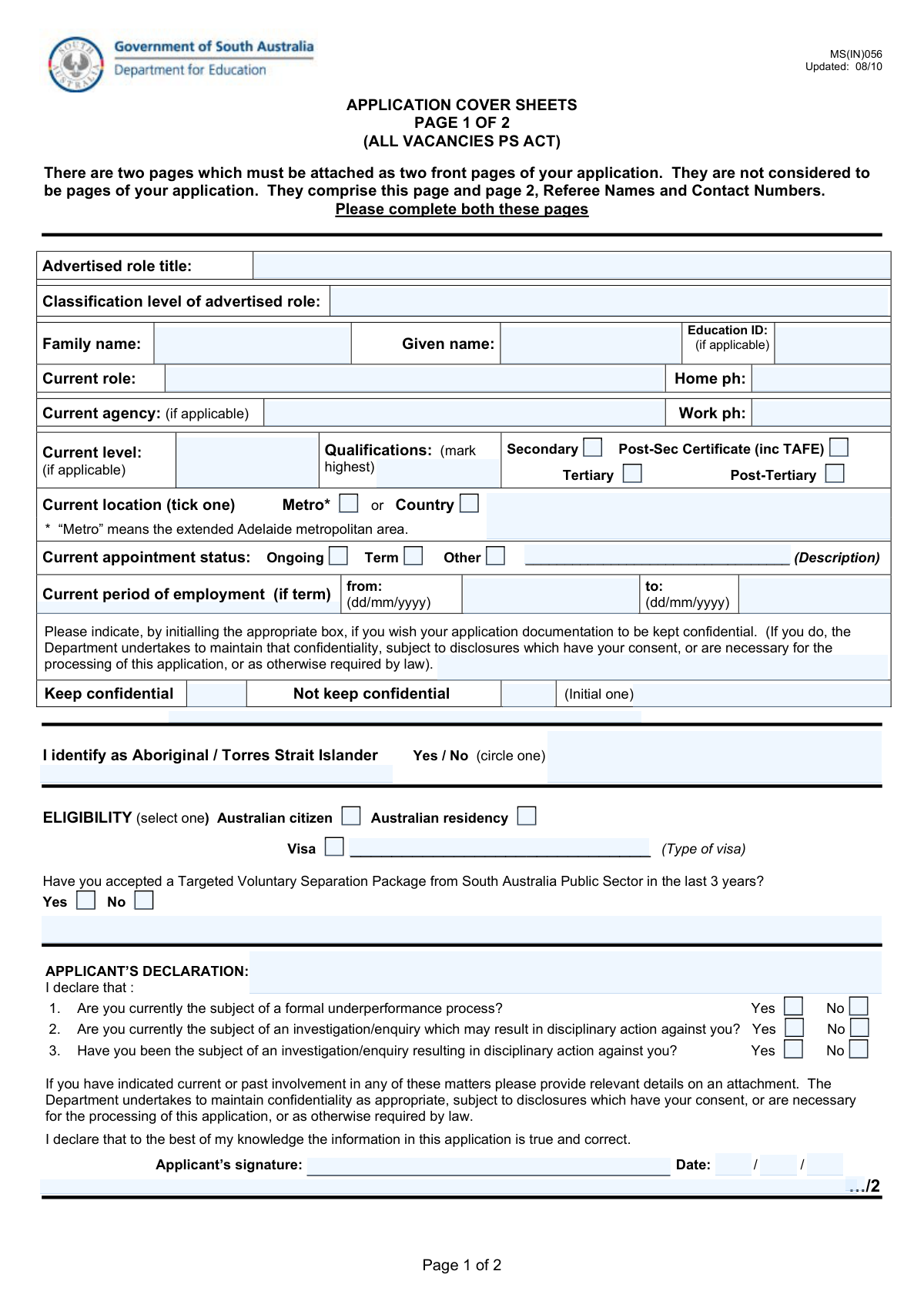
Yes! You can use AI to fill out Generic Data Entry Form

This document is a standard data collection form designed to capture specific information in a structured manner. It is essential for administrative processes, applications, or record-keeping, ensuring that all necessary data is provided consistently. Today, this form can be filled out quickly and accurately using AI-powered services like Instafill.ai, which can also convert non-fillable PDF versions into interactive fillable forms.
Our AI automatically handles information lookup, data retrieval, formatting, and form filling.
It takes less than a minute to fill out Generic Form using our AI form filling.
Securely upload your data. Information is encrypted in transit and deleted immediately after the form is filled out.

Form specifications

Form name: Generic Data Entry Form
Number of fields: 66
Number of pages: 2
Language: English
main-image

Instafill Demo: How to fill out PDF forms in seconds with AI

How to Fill Out Generic Form Online for Free in 2026

Are you looking to fill out a GENERIC FORM form online quickly and accurately? Instafill.ai offers the #1 AI-powered PDF filling software of 2026, allowing you to complete your GENERIC FORM form in just 37 seconds or less.
Follow these steps to fill out your GENERIC FORM form online using Instafill.ai:
  1. 1 Navigate to Instafill.ai and upload your form, or select it from our template library.
  2. 2 Allow the AI to scan the document and identify all the interactive fields, such as text boxes and choice buttons.
  3. 3 Review the AI-suggested information pre-filled from your secure profile or previous documents.
  4. 4 Click on each field to enter or edit information. Select the appropriate options from the choice buttons provided.
  5. 5 Carefully verify all entered data for accuracy and completeness before finalizing the document.
  6. 6 Add a digital signature if required, then download the completed form as a PDF or share it directly.

Our AI-powered system ensures each field is filled out correctly, reducing errors and saving you time.

Why Choose Instafill.ai for Your Fillable Generic Form Form?

Speed

Complete your Generic Form in as little as 37 seconds.

Up-to-Date

Always use the latest 2026 Generic Form form version.

Cost-effective

No need to hire expensive lawyers.

Accuracy

Our AI performs 10 compliance checks to ensure your form is error-free.

Security

Your personal information is protected with bank-level encryption.

Frequently Asked Questions About Form Generic Form

This form is used to collect detailed information for a specific application, registration, or record-keeping process. You should fill it out if you have been instructed to do so by the organization that provided it.

It's best to gather all relevant personal information, contact details, identification numbers, and any other specific documents mentioned in the form's instructions before you begin.

Please enter your information clearly and accurately in the designated text boxes. Ensure all required fields are completed to avoid processing delays.

For questions with choice buttons, select the option that best applies to your situation. Pay close attention to whether you are supposed to 'select one' or 'select all that apply'.

If a question is not applicable to your situation, it is standard practice to write 'N/A' or 'Not Applicable' in the field. This shows that you have reviewed the question and not just skipped it.

If you run out of space, you can attach a separate sheet of paper. Clearly label the attachment with your name and reference the form section and question number you are answering.

Submission instructions, including the mailing address or online portal link, are typically provided with the form. Refer to the cover letter or instruction sheet from the issuing organization.

Processing times vary depending on the receiving organization and the complexity of the form. For an estimated timeframe, please contact the office or agency you are submitting the form to.

Yes, services like Instafill.ai use AI to auto-fill form fields accurately and save time. This can be especially helpful for long forms with many fields.

If you have a non-fillable PDF, you can use a tool like Instafill.ai. It can convert flat PDFs into interactive, fillable forms that you can complete on your computer.

To use Instafill.ai, you just need to upload your form to their website. The AI will automatically detect the fields, allowing you to easily type in your information, save, and print the completed document.

Most official forms require a signature to be considered valid. Look for a designated signature line, which is typically found at the end of the form.

If you are using an online tool like Instafill.ai, you can typically save your progress. If you are filling out a standard PDF, be sure to save the file frequently to your computer.

Compliance Generic Form
Validation Checks by Instafill.ai

1
Validates Social Security Number Format
This check ensures the Social Security Number entered in field 'textbox_0_3_c743651b' adheres to the standard 9-digit format, either as XXXXXXXXX or XXX-XX-XXXX. This is critical for payroll, tax reporting, and identity verification. A failure would prevent the form from being processed for official purposes and require user correction.
2
Ensures Date of Birth is a Valid Date and Plausible Age
This validation verifies that the value in 'textbox_0_4_dfb07b9f' is a real calendar date (e.g., MM/DD/YYYY) and that the calculated age is reasonable for an employment context, for instance, over 16 years old. It prevents data entry errors like typos or invalid dates (e.g., February 30th). If the date is invalid or the person is too young, the submission is flagged for review.
3
Verifies Standard Email Address Format
This check confirms that the email address in 'textbox_0_10_c9c8887d' follows the conventional '[email protected]' structure. Proper email formatting is essential for communication with the applicant or employee. An invalid format would block all email-based correspondence, so the system will reject the entry and prompt for a correction.
4
Validates US ZIP Code Format
This rule checks that the postal code in 'textbox_0_8_78467042' is a valid 5-digit or 9-digit (ZIP+4) format. Correct ZIP codes are necessary for mail delivery and for demographic or location-based analysis. An incorrect format will result in a validation error to ensure address accuracy.
5
Checks for Standard Phone Number Formatting
This validation ensures that the phone number fields, such as 'textbox_0_9_df34f285', contain a recognizable 10-digit phone number, allowing for common formats like (XXX) XXX-XXXX or XXX-XXX-XXXX. This is vital for direct contact with the individual. If the format is not recognized, the user will be asked to re-enter the number.
6
Validates Employer Identification Number (EIN) Format
This check ensures the EIN in field 'textbox_0_12_97a64420' matches the IRS format of XX-XXXXXXX. The EIN is a unique identifier for a business entity, crucial for tax and legal documentation. An incorrectly formatted EIN would cause processing failures with government agencies and must be corrected.
7
Logical Check for Employment Start and End Dates
This validation compares the employment start date ('textbox_0_14_888aa81a') and end date ('textbox_0_15_f65a1e03'). If an end date is provided, it must be on or after the start date. This prevents logical impossibilities in employment history data, ensuring data integrity for reporting and record-keeping.
8
Conditional Requirement for Felony Conviction Explanation
This rule checks if the 'Yes' option ('choicebutton_0_36_e06a1344') for a felony conviction question is selected. If it is, the corresponding explanation text field ('textbox_0_17_39770808') must not be empty. This ensures that required supplementary information is provided for compliance and background check purposes.
9
Logical Check for Work Authorization Status
This validation enforces a logical rule between citizenship and work authorization. If the user indicates they are not a US Citizen by selecting 'No' ('choicebutton_0_33_b580d1ae'), the system must then verify that they have selected 'Yes' for being authorized to work in the US ('choicebutton_0_34_1a541c30'). This is a critical compliance check for employment eligibility.
10
Ensures Salary Field is a Positive Numeric Value
This check validates that the value entered in the salary field ('textbox_0_16_b7556666') is a positive number, allowing for decimals. It prevents non-numeric characters from being entered, which would cause errors in financial calculations and payroll systems. A non-numeric or negative value will trigger an error.
11
Validates State Field is a Standard Abbreviation
This rule ensures the state field ('textbox_0_7_cad5ca79') contains a valid 2-letter US state or territory abbreviation (e.g., CA, NY, TX). Using standardized abbreviations is essential for address validation, mail routing, and data consistency. An invalid entry would be flagged for correction to meet postal standards.
12
Completeness Check for Emergency Contact Information
This validation ensures that if any part of the emergency contact section is filled out (e.g., name in 'textbox_1_0_111d285a'), then all other required fields in that section (e.g., relationship in 'textbox_1_1_b4d1b5d2' and phone number in 'textbox_1_2_abe54f9b') are also complete. This prevents partial, unusable contact information from being saved. A failure would prompt the user to complete the section or clear it entirely.

Common Mistakes in Completing Generic Form

Leaving Required Fields Blank

On a lengthy form with numerous textboxes, it is very common to accidentally overlook a required field. This is one of the most frequent reasons for immediate form rejection, forcing the user to find the error and resubmit. This wastes time and can cause you to miss important deadlines. If the form is a non-fillable PDF, a tool like Instafill.ai can convert it into a fillable version and help highlight required fields to ensure completion.

Incorrect Date Formatting

Users often enter dates in a format different from what the system expects, such as DD/MM/YYYY instead of the standard U.S. format of MM/DD/YYYY. This can lead to data entry errors, incorrect age calculations, or outright rejection of the form. To avoid this, users should carefully check for format instructions like 'MM/DD/YYYY' near the date field. Advanced form fillers like Instafill.ai can automatically detect and apply the correct date format.

Transposing Digits in Numerical IDs

When manually entering long strings of numbers like a Social Security Number, driver's license, or account number, it's easy to transpose digits (e.g., typing 587 instead of 578). This seemingly small mistake can lead to a failed identity check, incorrect record matching, or rejection of the entire application. Double-checking these numbers is essential, and AI form-filling tools can eliminate this risk by accurately entering stored numbers.

Misusing Address Line Fields

A common error is entering the entire address on 'Address Line 1' or incorrectly splitting it. 'Address Line 1' is for the primary street address, while 'Address Line 2' is for apartment, suite, or unit numbers. Placing city, state, or zip code information in these lines can lead to mail being returned and critical correspondence being missed. Instafill.ai helps prevent this by intelligently parsing your address and placing each component in the correct field.

Improper Phone Number Formatting

Phone number fields can be tricky; some require dashes and parentheses, while others require only digits. Entering the number in the wrong format can make it unreadable by the processing system, preventing the organization from contacting the applicant. It's crucial to follow any provided examples, and using a tool like Instafill.ai ensures your phone number is always entered in the correct, validated format.

Using Inconsistent or Incomplete Names

Applicants often use nicknames, initials, or different versions of their name across a form instead of their full legal name. This discrepancy can cause identity verification failures and significant processing delays. To avoid this, use your full legal name as it appears on official documents consistently across all fields. AI-powered tools like Instafill.ai can help by storing your official information and populating forms consistently.

Misinterpreting Choice Button Questions

The form contains numerous choice buttons, likely for Yes/No or multiple-choice questions. Users can easily misread a question or a negatively phrased statement (e.g., 'Are you not a resident?'), leading them to select the opposite of their intended answer. This can result in being incorrectly assessed for eligibility or status, so carefully reading each question is vital.

Using Unofficial Abbreviations

To save time, people often use abbreviations for addresses (e.g., 'St.' for Street, 'Apt.' for Apartment) or employer names. However, many automated systems require full, unabbreviated words for accurate data matching and verification. Using non-standard abbreviations can cause address validation failures or prevent a correct match with an official record.

Entering Outdated Contact Information

Applicants sometimes fill forms using old, auto-filled information from their browser that contains an outdated phone number or email address. If this happens, you may miss critical updates, requests for more information, or the final decision on your application. Always verify that your contact details are current before submitting. Tools like Instafill.ai allow you to manage a central profile, ensuring that the information used to fill forms is always up-to-date.

Inconsistent Capitalization

Users may inconsistently capitalize names and addresses, sometimes using all lowercase, all uppercase, or improper title case (e.g., 'john smith' or 'NEW YORK'). While it may seem minor, this can affect how data is stored and sorted, and in some cases, it can be flagged by automated review systems. For a professional and clean submission, use proper title case (e.g., John Smith, New York).
Saved over 80 hours a year

“I was never sure if my IRS forms like W-9 were filled correctly. Now, I can complete the forms accurately without any external help.”

Kevin Martin Green

Your data stays secure with advanced protection from Instafill and our subprocessors

Robust compliance program

Transparent business model

You’re not the product. You always know where your data is and what it is processed for.

ISO 27001, HIPAA, and GDPR

Our subprocesses adhere to multiple compliance standards, including but not limited to ISO 27001, HIPAA, and GDPR.

Security & privacy by design

We consider security and privacy from the initial design phase of any new service or functionality. It’s not an afterthought, it’s built-in, including support for two-factor authentication (2FA) to further protect your account.

Fill out Generic Form with Instafill.ai

Worried about filling PDFs wrong? Instafill securely fills generic-data-entry-form forms, ensuring each field is accurate.