Yes! You can use AI to fill out Joint Holder Supplement Form

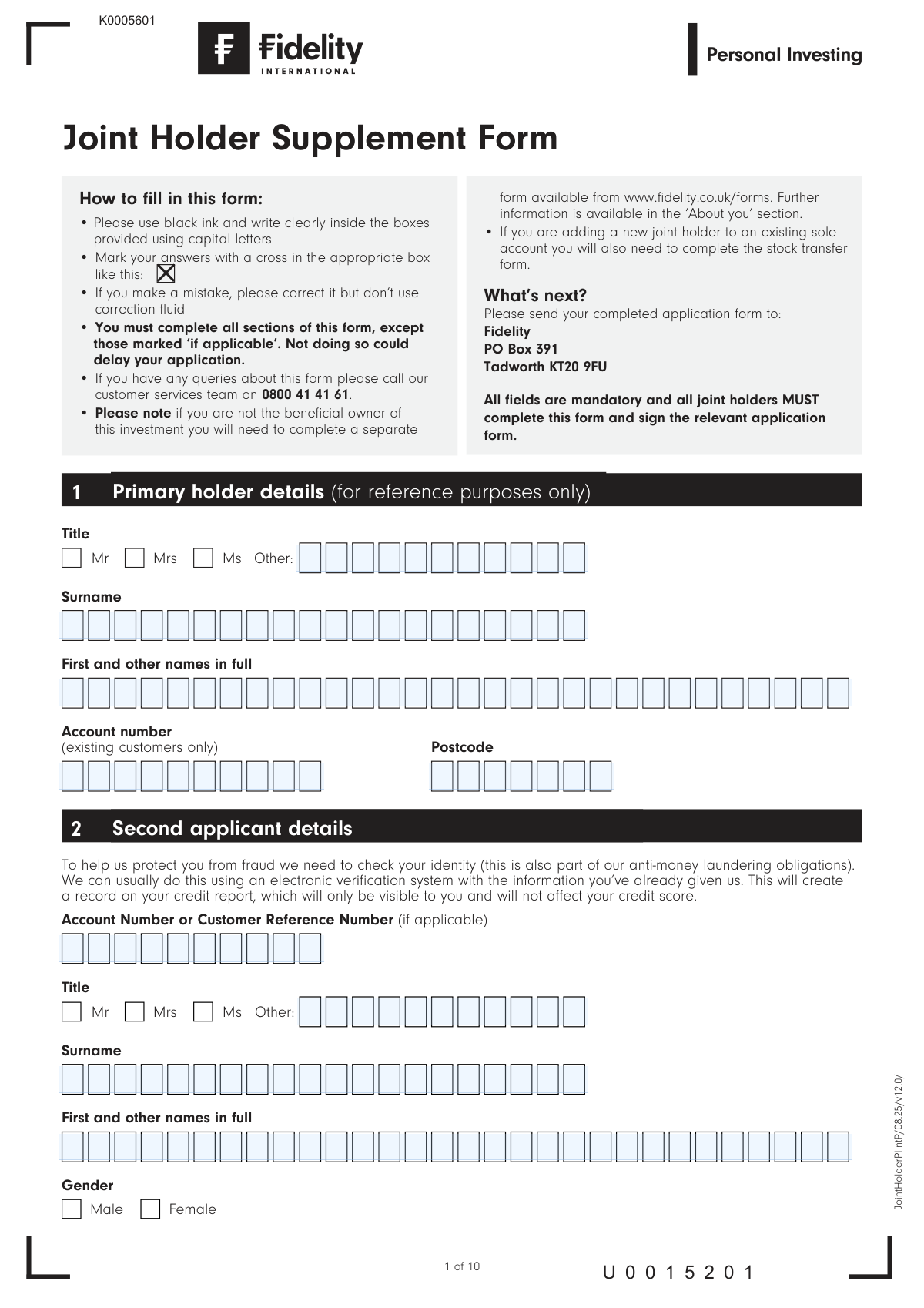
The Joint Holder Supplement Form is a document required by Fidelity to add additional individuals to an investment account, making them joint owners. It gathers essential personal details, contact information, nationality, tax residency, and employment status for each new applicant to meet anti-money laundering and identity verification obligations. This process ensures all account holders are properly documented and authorized. Today, this form can be filled out quickly and accurately using AI-powered services like Instafill.ai, which can also convert non-fillable PDF versions into interactive fillable forms.
Our AI automatically handles information lookup, data retrieval, formatting, and form filling.
It takes less than a minute to fill out JointHolderPIIntP using our AI form filling.
Securely upload your data. Information is encrypted in transit and deleted immediately after the form is filled out.

Form specifications

Form name: Joint Holder Supplement Form
Number of fields: 184
Number of pages: 10
Language: English
main-image

Instafill Demo: How to fill out PDF forms in seconds with AI

How to Fill Out JointHolderPIIntP Online for Free in 2026

Are you looking to fill out a JOINTHOLDERPIINTP form online quickly and accurately? Instafill.ai offers the #1 AI-powered PDF filling software of 2026, allowing you to complete your JOINTHOLDERPIINTP form in just 37 seconds or less.
Follow these steps to fill out your JOINTHOLDERPIINTP form online using Instafill.ai:
  1. 1 Navigate to Instafill.ai and upload or select the Joint Holder Supplement Form.
  2. 2 The AI will scan the form. Review the primary holder's details for reference.
  3. 3 Provide the personal and contact information for the second applicant, including name, address, date of birth, and National Insurance Number.
  4. 4 Complete the nationality, tax residency, and employment status sections for the second applicant, then sign and date.
  5. 5 Repeat the process by filling in all required details for the third and fourth applicants, if applicable, including their personal information and signatures.
  6. 6 Complete the 'Joint holders special renunciation' section if you wish to authorize any single holder to give instructions, ensuring all joint holders sign this specific declaration.
  7. 7 Review all entered information for accuracy, then securely download or print the completed form for submission to Fidelity as instructed.

Our AI-powered system ensures each field is filled out correctly, reducing errors and saving you time.

Why Choose Instafill.ai for Your Fillable JointHolderPIIntP Form?

Speed

Complete your JointHolderPIIntP in as little as 37 seconds.

Up-to-Date

Always use the latest 2026 JointHolderPIIntP form version.

Cost-effective

No need to hire expensive lawyers.

Accuracy

Our AI performs 10 compliance checks to ensure your form is error-free.

Security

Your personal information is protected with bank-level encryption.

Frequently Asked Questions About Form JointHolderPIIntP

This form is used to add one or more joint holders to a new or existing Fidelity investment account. It collects the personal details of each new joint applicant required to open or manage the account.

Each person being added as a joint holder to the account must complete their respective section (e.g., Second applicant, Third applicant). The primary holder's details are for reference only, but all applicants must sign the form.

No, in addition to this Joint Holder Supplement Form, you will also need to complete a stock transfer form. This is mentioned in the 'What's next?' section on the first page.

You will need to provide personal details such as your full name, address, date of birth, nationality, and National Insurance Number. You'll also need to provide information about your tax residency and the source of the investment.

If you have never been issued a National Insurance Number, you should mark the designated box in the form. You do not need to provide a number in this case.

No, the form states that while an electronic verification check will create a record on your credit report, it will only be visible to you and will not affect your credit score.

A 'beneficial owner' is the person who is personally entitled to the assets in the account for their own benefit. If you are holding the assets exclusively for someone else, this form is not suitable and you should complete a Trust form instead.

This is an optional authorization that allows Fidelity to act on instructions given by any single one of the joint holders. For this to be active, all joint holders must sign this specific section.

You should mail your completed and signed application form to: Fidelity, PO Box 391, Tadworth KT20 9FU.

If you make a mistake, you should correct it clearly on the form. However, the instructions specify that you should not use correction fluid.

Yes, services like Instafill.ai use AI to accurately auto-fill form fields with your information, which can save you time and help prevent errors.

You can use a service like Instafill.ai to fill this form online. Simply upload the PDF, and the platform will allow you to fill in the fields, sign, and download the completed document.

If you have a non-fillable or 'flat' PDF, you can use a tool like Instafill.ai. It can convert the document into an interactive, fillable form that you can complete on your computer.

Compliance JointHolderPIIntP
Validation Checks by Instafill.ai

1
Date of Birth Format and Plausibility
This check validates that the Date of Birth is entered in the required DDMMYYYY format and represents a plausible date. It ensures the applicant is over a minimum legal age (e.g., 18 years old) and that the date is not in the future. This is critical for identity verification, anti-fraud measures, and confirming eligibility for financial products. A failed validation would prevent the application from being processed until a valid date is provided.
2
National Insurance Number Exclusivity
This validation ensures that for each applicant, either a National Insurance Number is provided or the 'No National Insurance Number' box is checked, but not both. This prevents contradictory information and ensures compliance with data collection requirements for HMRC. If both are filled or neither is filled, the form submission would be flagged as incomplete and require correction.
3
Address Contains No Prohibited Terms
This check scans the address fields to ensure they do not contain the phrases 'PO Box' or 'Care of' (or 'C/O'). The form explicitly prohibits these for anti-money laundering (AML) and identity verification purposes, which require a physical residential address. If prohibited terms are found, the application will be rejected pending a valid address.
4
Address Jurisdiction and Crown Employee Logic
This validation checks the relationship between the applicant's address and their Crown Employee status. If the provided address is outside of the UK, the 'Crown employee' checkbox must be marked as 'X'. An application with a non-UK address where the applicant is not a Crown Employee (or their spouse) is ineligible and will be rejected.
5
Nationality Declaration Consistency
This check ensures that exactly one of the three nationality status options ('UK National only', 'National of Non-UK countries only', 'UK National and National of one or more other countries') is selected. It also validates that if either of the latter two options are chosen, at least one corresponding 'Nationality' field is filled in. This is essential for meeting regulatory reporting requirements (like CRS/FATCA) and will halt processing if the logic is inconsistent.
6
Beneficial Owner Confirmation
This validation confirms that the applicant has selected option 'a' in the 'Confirmation of Beneficial Owner' section, indicating they are acting for their own benefit. The form explicitly states that if option 'b' applies, the form is unsuitable. An application with option 'b' selected must be automatically flagged for rejection and the applicant redirected to the correct process (e.g., Trust forms).
7
Source of Investment 'Other' Specification
This check verifies that if the 'Other' checkbox is selected in the 'Source of this investment' section, the adjacent text field to specify the source is not empty. This is a mandatory requirement for AML regulations to understand the origin of funds. Failure to provide a specification when 'Other' is selected will result in the application being marked as incomplete.
8
Foreign Tax Residency Completeness
This validation triggers if an applicant indicates they are a tax resident in a country other than the UK. It ensures that for each foreign country listed, either a 'tax identifier' is provided or the 'I do not hold a tax identifier' box is checked. Missing this information would violate international tax reporting standards and cause the application to be paused until the data is supplied.
9
Mandatory Signature Presence for Each Applicant
This check ensures that a signature is present for every applicant whose details are provided on the form (i.e., Second, Third, and Fourth applicants). A missing signature invalidates that applicant's consent and declarations, making the entire joint application void. The system must verify that if an applicant's section is filled, their corresponding signature block is also signed.
10
Date Signed Validity
This validation confirms that the 'Date signed' field contains a valid, non-future date. It also cross-references this date against the applicant's date of birth to ensure they were of legal age when signing. An invalid or future-dated signature would render the legal declaration invalid and block the application's progress.
11
Email Address Format Validation
This check ensures the provided email address adheres to a standard format (e.g., [email protected]). This is crucial for successful electronic communication, delivery of documents, and potentially for online account activation or two-factor authentication. An invalid email format would lead to communication failures and should be corrected before submission.
12
Primary Account Holder Cross-Reference
This validation checks that the 'Account number' and 'Postcode' provided in Section 1 for the primary holder match an existing account in the database. This is a critical step to ensure the new joint holders are being added to the correct existing account. A mismatch would indicate a data entry error and could lead to a serious processing mistake if not caught.
13
Applicant Section Sequential Completeness
This check ensures that applicant sections are filled sequentially. For example, if the 'Third applicant details' section contains any data, the 'Second applicant details' section must be fully completed. This maintains the logical integrity of the application and prevents a scenario where a 'Fourth applicant' is added without a 'Second' or 'Third'. A gap in the sequence would flag the form for review.
14
Title and 'Other' Field Logic
This validation ensures that if the 'Other' option is selected for an applicant's title, the corresponding text field to specify the title is filled in. Conversely, if a standard title (Mr, Mrs, Ms) is chosen, the 'Other' text field should be empty. This maintains data cleanliness and ensures the applicant's title is recorded correctly, preventing ambiguity in official correspondence.

Common Mistakes in Completing JointHolderPIIntP

Incorrectly Declaring Nationality Status

The nationality section has three mutually exclusive options: 'UK National only', 'National of Non-UK countries only', and 'UK National and National of one or more other countries'. Applicants often get confused and may tick multiple boxes or tick a box that requires listing other countries but then fail to do so. This error, stemming from the section's complexity, leads to compliance checks failing and requires the firm to contact the applicant for clarification, delaying the account opening. To avoid this, carefully read all three options before selecting the single one that applies to you and ensure you list all nationalities if required.

Providing an Invalid Residential Address

The form explicitly states that 'Care of' and 'PO Box' addresses are not acceptable for anti-money laundering and identity verification purposes. Applicants sometimes provide these out of habit or because it is their primary mailing address, not realizing it will cause an automatic rejection. This results in the application being returned and the process having to start over. Always provide a full physical residential address (House number/name, Street, etc.) as requested to ensure successful electronic verification.

Using an Incorrect Date of Birth Format

The form specifies the date of birth format as DDMMYYYY, but people frequently default to other formats like DD/MM/YY or the American MM/DD/YYYY. This data entry error can cause automated identity checks to fail or lead to incorrect personal data being stored, which can cause significant issues later. To prevent this, applicants should enter the date as a continuous string of eight digits in the correct order (e.g., 01081985 for August 1st, 1985). AI-powered form fillers like Instafill.ai can automatically format dates correctly to prevent these mistakes.

Misunderstanding the 'Beneficial Owner' Declaration

This section is a critical legal declaration that many people misunderstand. Applicants who are holding assets on behalf of someone else (e.g., as a trustee or informal nominee) might incorrectly check box (a) 'I am personally entitled to the assets'. This constitutes a false declaration and can have serious legal and compliance consequences. If you are not the ultimate owner who will benefit from the assets, you must not use this form. It is crucial to understand this distinction and select the correct option or obtain the appropriate 'Trust form' as directed.

Incomplete or Missing Tax Residency Information

Applicants who are tax residents in more than one country are required to provide details and a Tax Identifier Number (TIN) for each country. A common mistake is leaving this section blank if they don't know their TIN. This leads to an incomplete application, as the firm has regulatory obligations to collect this data. If you are a resident for tax purposes in another country but do not have a tax identifier, you must tick the specific box provided for that scenario instead of leaving the fields empty.

Missing Signatures for the 'Special Renunciation'

Section 5, the 'Joint Holders Special Renunciation', is an optional but powerful authorization that allows any single account holder to give instructions. For this to be activated, all joint holders must sign in this specific section. Applicants often miss this section or misunderstand its purpose, resulting in either the authorization failing to be applied or, conversely, signing it without realizing they are giving up the right to require joint authorization for transactions. It is separate from the final application signature and must be completed by all parties if desired.

Using Correction Fluid or Illegible Handwriting

The instructions on the first page explicitly state to use black ink, write in capital letters, and avoid correction fluid. Despite this, applicants often use blue ink, write illegibly, or try to fix mistakes with correction tape, which can obscure information. This forces manual review and data entry, increasing the chance of errors and significantly delaying the application. Since this is a non-fillable PDF, using a tool like Instafill.ai can convert it into a fillable version, ensuring all entries are clear, legible, and correctly formatted, preventing physical entry errors.

Forgetting to Complete Sections for All Applicants

This form allows for up to four joint holders, with dedicated sections for the second, third, and fourth applicants. When three or four people are applying together, it is common for one of the sections to be accidentally missed or left incomplete. This guarantees the application will be rejected for being incomplete. To avoid this, the primary applicant should ensure that every joint holder has fully completed their respective section (Section 2, 3, or 4) before the form is submitted.

Confusing the Two Different Signature Sections

The form contains two distinct signature areas: one in Section 5 for the 'Special Renunciation' and another on the final page for the overall application. Applicants are often confused and may sign only one of the two, believing they have completed the form. Signing only Section 5 could unintentionally activate the renunciation without validating the main application, while signing only the final page leaves the application incomplete if the renunciation was intended. All applicants must sign the final page, and they must also all sign in Section 5 if they wish to enable single-instruction authority.

Providing an Incomplete Driving Licence Number

The form requests the driving licence number 'if applicable' and specifies it is '18 characters as shown on your photocard'. Many applicants either miscount the characters or only provide the main string of digits, omitting the final two characters which are often separated slightly. This partial information is insufficient for electronic identity verification systems, leading to a failed check. If you choose to provide this information, you must enter the entire 18-character sequence exactly as it appears on the licence to ensure it can be used for verification.
Saved over 80 hours a year

“I was never sure if my IRS forms like W-9 were filled correctly. Now, I can complete the forms accurately without any external help.”

Kevin Martin Green

Your data stays secure with advanced protection from Instafill and our subprocessors

Robust compliance program

Transparent business model

You’re not the product. You always know where your data is and what it is processed for.

ISO 27001, HIPAA, and GDPR

Our subprocesses adhere to multiple compliance standards, including but not limited to ISO 27001, HIPAA, and GDPR.

Security & privacy by design

We consider security and privacy from the initial design phase of any new service or functionality. It’s not an afterthought, it’s built-in, including support for two-factor authentication (2FA) to further protect your account.

Fill out JointHolderPIIntP with Instafill.ai

Worried about filling PDFs wrong? Instafill securely fills joint-holder-supplement-form forms, ensuring each field is accurate.