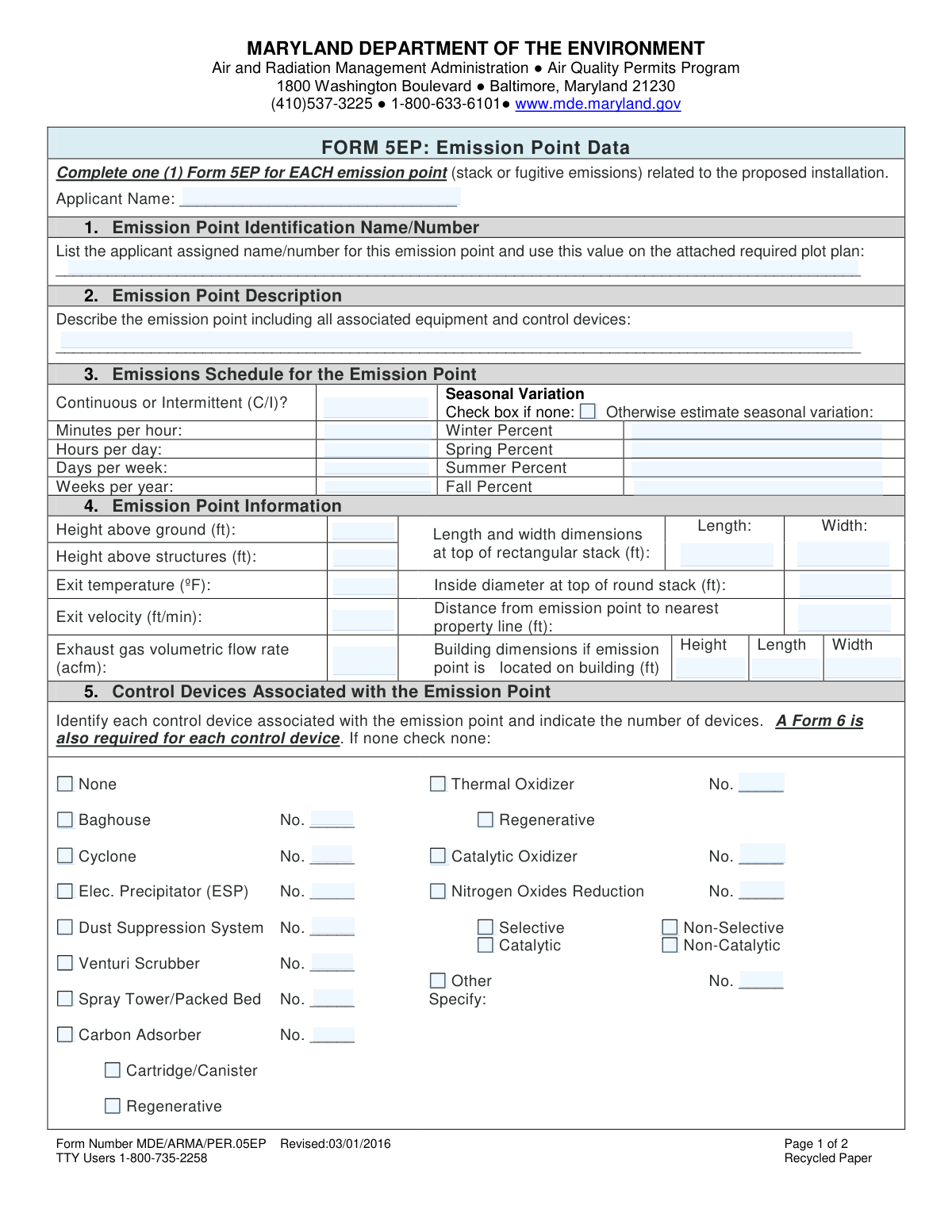
Yes! You can use AI to fill out Maryland Department of the Environment Form 5EP, Emission Point Data

Form 5EP, Emission Point Data, is a technical document required by the Maryland Department of the Environment (MDE) for facilities seeking air quality permits. Applicants must submit a separate form for each emission source, detailing its physical characteristics, operating schedule, control devices, and estimated pollutant emissions. This data is essential for the MDE to assess environmental impact and ensure regulatory compliance. Today, this form can be filled out quickly and accurately using AI-powered services like Instafill.ai, which can also convert non-fillable PDF versions into interactive fillable forms.
Our AI automatically handles information lookup, data retrieval, formatting, and form filling.
It takes less than a minute to fill out Form 5EP using our AI form filling.
Securely upload your data. Information is encrypted in transit and deleted immediately after the form is filled out.

Form specifications

Form name: Maryland Department of the Environment Form 5EP, Emission Point Data
Number of fields: 175
Number of pages: 2
Language: English
main-image

Instafill Demo: How to fill out PDF forms in seconds with AI

How to Fill Out Form 5EP Online for Free in 2026

Are you looking to fill out a FORM 5EP form online quickly and accurately? Instafill.ai offers the #1 AI-powered PDF filling software of 2026, allowing you to complete your FORM 5EP form in just 37 seconds or less.
Follow these steps to fill out your FORM 5EP form online using Instafill.ai:
  1. 1 Navigate to Instafill.ai and upload or select the Maryland Form 5EP.
  2. 2 Use the AI assistant to enter the applicant's name and the unique identification name/number for the emission point.
  3. 3 Input the emission point's physical information, such as stack height, diameter, exit temperature, and location details.
  4. 4 Provide the emissions schedule, including hours of operation and any seasonal variations, and identify all associated control devices.
  5. 5 Enter the estimated emissions data for criteria pollutants, greenhouse gases (GHG), and any specific hazardous air pollutants (HAP) in the corresponding tables.
  6. 6 Review all the information populated by the AI for completeness and accuracy, making any necessary edits.
  7. 7 Securely download, print, or e-submit your completed Form 5EP for your permit application.

Our AI-powered system ensures each field is filled out correctly, reducing errors and saving you time.

Why Choose Instafill.ai for Your Fillable Form 5EP Form?

Speed

Complete your Form 5EP in as little as 37 seconds.

Up-to-Date

Always use the latest 2026 Form 5EP form version.

Cost-effective

No need to hire expensive lawyers.

Accuracy

Our AI performs 10 compliance checks to ensure your form is error-free.

Security

Your personal information is protected with bank-level encryption.

Frequently Asked Questions About Form Form 5EP

Form 5EP is used to provide detailed data for a single emission point, like a stack or fugitive emission source, as part of an air quality permit application in Maryland. You must complete a separate Form 5EP for each individual emission point related to your proposed installation.

Yes, the instructions state that you must complete one full Form 5EP for each individual emission point at your facility. This includes every stack, vent, or source of fugitive emissions associated with your project.

'At Design Capacity' refers to the maximum possible emissions your equipment can produce when running at its full potential. 'At Projected Operations' refers to the emissions you expect to generate under your normal, day-to-day operating conditions.

In Section 5, which covers control devices, you should simply check the 'None' box. If you do have control devices, you must identify them on this form and also complete a separate Form 6 for each device.

If your operations and emissions do not change with the seasons, you should check the box labeled 'Check box if none' for seasonal variation. You can then leave the percentage fields for Winter, Spring, Summer, and Fall blank.

Yes, you must provide a plot plan that clearly shows the location of the emission point, using the same identification name/number you list in Section 1. Additionally, if you have control devices, a Form 6 is required for each one.

You only need to provide the building's height, length, and width if the emission point you are reporting is located on or attached to that building. This information is used for air dispersion modeling.

This is an identifier that you assign to the emission point for your own tracking purposes. It should be a unique name or number, like 'Stack-01' or 'Boiler Vent', that you will also use to label this point on the required plot plan.

The form notes that you can 'Attach additional sheets as necessary.' If you need to report more HAPs than the space allows, create a supplementary page with the same table format and attach it to your submission.

This form is part of a larger air quality permit application package. It should be submitted along with all other required forms to the Maryland Department of the Environment's Air and Radiation Management Administration at the address listed on the form.

Yes, AI-powered services like Instafill.ai can help you complete this form more efficiently. These tools can accurately auto-fill fields based on your provided information, saving you time and reducing the risk of errors.

Simply upload the Form 5EP PDF to the Instafill.ai platform. The service will convert it into a fillable format, and you can then use its AI capabilities to help populate the required fields with your facility's data before downloading the completed form.

You can use a service like Instafill.ai to make it interactive. Upload the flat, non-fillable PDF, and the platform will automatically convert it into a fillable form that you can complete and save online.

Compliance Form 5EP
Validation Checks by Instafill.ai

1
Ensures Applicant Name is Provided
This check verifies that the 'Applicant Name' field is not empty. The applicant's name is a fundamental piece of information required for identifying the responsible party and processing the permit application. If this field is left blank, the submission cannot be correctly filed or associated with the legal entity, leading to processing delays or rejection.
2
Validates Operating Schedule Time Units
This validation ensures that the values entered in the 'Emissions Schedule' section are within logical and physical limits. It checks that 'Minutes per hour' is not greater than 60, 'Hours per day' is not greater than 24, 'Days per week' is not greater than 7, and 'Weeks per year' is not greater than 52. This prevents data entry errors and ensures that emission calculations based on this schedule are realistic.
3
Verifies Seasonal Variation Percentage Sum
This check ensures that if the 'No seasonal variation' box is unchecked, the sum of the 'Winter Percent', 'Spring Percent', 'Summer Percent', and 'Fall Percent' fields equals 100%. This is critical for accurate annual emission modeling and reporting. A failure indicates a miscalculation or incomplete data, which would skew environmental impact assessments.
4
Enforces Mutually Exclusive Seasonal Variation Data
This validation confirms that if the 'No seasonal variation' checkbox is checked, the four seasonal percentage fields are left empty. Conversely, if any seasonal percentage is provided, the 'No seasonal variation' box must be unchecked. This prevents contradictory data entry and ensures clarity on the nature of the emissions schedule.
5
Validates Exclusive Stack Dimension Entry
This check ensures that data is entered for either rectangular stack dimensions (length and width) or the round stack dimension (inside diameter), but not for both simultaneously. An emission point can only have one physical stack shape. Submitting both would indicate a data entry error and create ambiguity for air dispersion modeling.
6
Checks for Contradictory Control Device Information
This validation verifies that if the 'None' checkbox is selected in the 'Control Devices' section, no other control device types are checked. Selecting 'None' and another device is a direct contradiction that makes it impossible to determine the actual equipment configuration. This check ensures the submitted data is logical and unambiguous.
7
Requires Count for Selected Control Devices
This check ensures that if a specific control device (e.g., Baghouse, Cyclone) is checked, the corresponding 'No.' field for the number of units is filled with an integer greater than zero. This is important for accurately inventorying pollution control equipment and assessing its capacity. Missing counts result in an incomplete application.
8
Compares Projected Emissions to Design Capacity
For each pollutant, this validation ensures that the 'At Projected Operations (lb/hr)' value is less than or equal to the 'At Design Capacity (lb/hr)' value. An emission point cannot be projected to emit more than its maximum possible rate. A failure indicates a likely data entry or calculation error that must be corrected.
9
Validates PM2.5 Emissions Relative to PM10
This check verifies that the reported emissions for PM2.5 (fine particulate matter) are less than or equal to the emissions for PM10 (coarse particulate matter) for all corresponding data points (design capacity and projected operations). Since PM2.5 is a subset of PM10, its value can never be larger. This validation catches common data entry or measurement errors.
10
Cross-Checks Projected Daily Emissions Calculation
This validation performs a consistency check to see if the 'Projected Operations (lb/day)' value is reasonably close to the result of multiplying 'Projected Operations (lb/hr)' by 'Hours per day'. This helps detect significant mathematical errors in the applicant's calculations. A large discrepancy would require review and correction to ensure emission totals are accurate.
11
Cross-Checks Projected Annual Emissions Calculation
This validation checks if the 'Projected Operations (ton/yr)' value is mathematically consistent with the other schedule and rate data (e.g., (lb/day * days/week * weeks/year) / 2000). This is a critical check to ensure the long-term emission estimates, which determine regulatory status and fees, are calculated correctly. Failure indicates a significant error in the annual emissions summary.
12
Verifies Total GHG as a Sum of Components
This check ensures that the 'Total GHG (as CO2e)' value is greater than or equal to the sum of the individual greenhouse gases (CO2, CH4, N2O, etc.). A more advanced version would calculate the CO2 equivalent using global warming potentials (GWP), but this basic check ensures the total is not erroneously smaller than its parts. This is crucial for accurate climate impact reporting.
13
Ensures HAP Name is Provided for HAP Emissions
This validation confirms that if any emission data (lb/hr, lb/day, etc.) is entered in a row within the Hazardous Air Pollutants (HAP) table, the corresponding 'Pollutant Name' field for that row must also be filled. This prevents the submission of anonymous emission data, which would be useless for risk assessment and compliance tracking. All reported emissions must be identified.
14
Validates Format of 'Continuous or Intermittent' Field
This check ensures the 'Continuous or Intermittent (C/I)' field contains only a single character, either 'C' or 'I'. This enforces the form's specific data format requirement and prevents ambiguous or invalid entries like 'Continuous' or 'inter'. Standardized data is essential for automated processing and analysis.

Common Mistakes in Completing Form 5EP

Inconsistent Emission Rate Calculations

Applicants often make mathematical errors when converting hourly emission rates to daily and annual totals. For example, the 'ton/yr' value may not correctly correspond to the 'lb/hr' rate multiplied by the operating schedule provided in Section 3. This occurs due to manual calculation mistakes or using incorrect conversion factors (e.g., 2,000 lbs/ton). These inconsistencies lead to application rejection or lengthy clarification requests from the agency, delaying the permit process. To avoid this, double-check all calculations and ensure a clear, consistent link between the operating schedule and all reported emission rates.

Unit Conversion Errors in Stack Parameters

In Section 4, applicants frequently enter values in the wrong units, such as providing a stack diameter in inches instead of the required feet, or temperature in Celsius instead of Fahrenheit. This is a common data entry mistake that drastically skews air dispersion modeling results, potentially leading to an invalid permit assessment. Always verify that all physical parameters match the units specified in the form (ft, °F, ft/min). AI-powered tools like Instafill.ai can help by flagging values that are outside a typical range, preventing such errors.

Vague Emission Point Description

Providing a generic description like 'Heater' or 'Vent' in Section 2 is a frequent mistake. Regulators need a detailed description to understand the process, such as 'Natural-gas-fired thermal-oil heater (~7.2 MMBtu/hr)'. An ambiguous description forces the permit reviewer to issue a request for additional information, halting the review process. To prevent delays, be as specific as possible, including the equipment type, fuel source, and rated capacity.

Confusing 'Design Capacity' with 'Projected Operations'

Applicants often list the same emission rates for both 'At Design Capacity' and 'At Projected Operations' in Section 6, even when their typical operations are well below the maximum capacity. This happens when they misunderstand the distinction, potentially resulting in unnecessarily strict permit limits based on maximum potential rather than realistic emissions. It is crucial to provide accurate, distinct estimates for both scenarios to ensure the permit reflects actual operating conditions. This can also impact future operational flexibility.

Incorrectly Reporting Seasonal Variation

In Section 3, applicants may check the 'none' box for seasonal variation while also entering percentages in the seasonal fields, creating a contradiction. Another common error is providing seasonal percentages that do not add up to 100%. This indicates a misunderstanding of the data requirement and leads to questions about the accuracy of the entire emissions schedule. Before submitting, ensure that if seasonal variation exists, the percentages are accurate and sum to 100%; otherwise, only check the 'none' box.

Inconsistent Emission Point ID

The 'Emission Point Identification Name/Number' in Section 1 must exactly match the identifier used on the mandatory plot plan attachment. Applicants sometimes use an internal code on the form but a different label on the drawing, causing confusion and making it impossible for the reviewer to correlate the data with the physical site layout. This discrepancy can lead to the application being deemed incomplete. Always use one consistent, unique identifier for each emission point across all application documents.

Omitting Building Dimensions for Rooftop Units

When an emission point is located on a building, applicants often forget to fill in the building's height, length, and width in Section 4. This information is not optional; it is critical for air dispersion modeling to assess the effects of building downwash on pollutant concentrations. Omitting these dimensions will result in an information request and delay the technical review. If the emission point is on or near a structure, those dimensions must be provided.

Incorrect Calculation of Total GHG (CO2e)

A significant error in Section 6 is the incorrect calculation of 'Total GHG (as CO2e)'. Applicants may simply sum the mass of CO2, CH4, and N2O, forgetting to multiply methane (CH4) and nitrous oxide (N2O) by their respective Global Warming Potentials (GWPs) before summing. This leads to a substantial underestimation of the total climate impact and can trigger compliance issues. Ensure you use the correct, current GWP values for each greenhouse gas to calculate the CO2 equivalent (CO2e) accurately.

Incomplete Control Device Information

In Section 5, it is common for applicants to check the box for a control device (e.g., 'Baghouse') but neglect to enter the number of units in the adjacent 'No. _____' field. This leaves the reviewer uncertain if there is one device or multiple. This small omission renders the section incomplete and requires follow-up. To avoid this, ensure that for every control device checked, the corresponding number of units is also specified.

Failing to Report Known Hazardous Air Pollutants (HAPs)

Applicants frequently leave the Hazardous Air Pollutants (HAP) table in Section 6 blank, assuming there are none. However, many common combustion processes, like burning natural gas, generate small but reportable quantities of HAPs such as formaldehyde. This omission often stems from a lack of awareness of the byproducts of their specific process. Failing to report known HAPs is a serious error that can lead to permit invalidation and enforcement action. It is essential to consult emission factor databases (like EPA's AP-42) to identify and quantify all applicable HAPs.
Saved over 80 hours a year

“I was never sure if my IRS forms like W-9 were filled correctly. Now, I can complete the forms accurately without any external help.”

Kevin Martin Green

Your data stays secure with advanced protection from Instafill and our subprocessors

Robust compliance program

Transparent business model

You’re not the product. You always know where your data is and what it is processed for.

ISO 27001, HIPAA, and GDPR

Our subprocesses adhere to multiple compliance standards, including but not limited to ISO 27001, HIPAA, and GDPR.

Security & privacy by design

We consider security and privacy from the initial design phase of any new service or functionality. It’s not an afterthought, it’s built-in, including support for two-factor authentication (2FA) to further protect your account.

Fill out Form 5EP with Instafill.ai

Worried about filling PDFs wrong? Instafill securely fills maryland-department-of-the-environment-form-5ep-emission-point-data forms, ensuring each field is accurate.