Yes! You can use AI to fill out NDIS Access Request Form
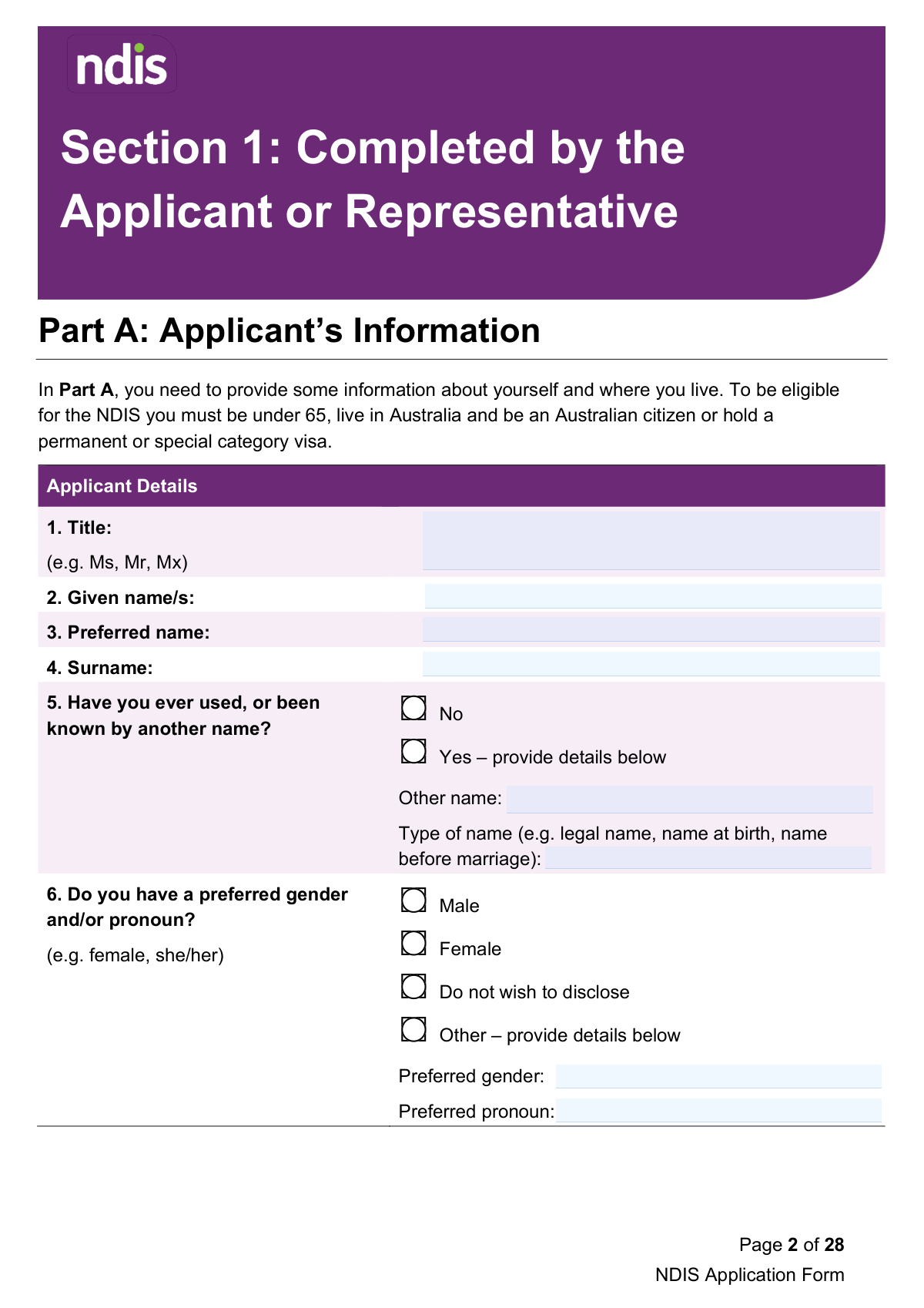
The NDIS Access Request Form is the official application used to determine an individual's eligibility for the National Disability Insurance Scheme (NDIS) in Australia. This comprehensive document gathers essential information about the applicant's identity, residency, disability, and its impact on their functional capacity, requiring input from both the applicant and their treating professional. Today, this form can be filled out quickly and accurately using AI-powered services like Instafill.ai, which can also convert non-fillable PDF versions into interactive fillable forms.
Our AI automatically handles information lookup, data retrieval, formatting, and form filling.
It takes less than a minute to fill out NDIS Access Request Form using our AI form filling.
Securely upload your data. Information is encrypted in transit and deleted immediately after the form is filled out.
Form specifications
| Form name: | NDIS Access Request Form |
| Number of fields: | 291 |
| Number of pages: | 26 |
| Language: | English |
Instafill Demo: How to fill out PDF forms in seconds with AI
How to Fill Out NDIS Access Request Form Online for Free in 2026
Are you looking to fill out a NDIS ACCESS REQUEST FORM form online quickly and accurately? Instafill.ai offers the #1 AI-powered PDF filling software of 2026, allowing you to complete your NDIS ACCESS REQUEST FORM form in just 37 seconds or less.
Follow these steps to fill out your NDIS ACCESS REQUEST FORM form online using Instafill.ai:
- 1 Navigate to Instafill.ai and upload the NDIS Access Request Form, or select it from our library of official documents.
- 2 Allow the AI to scan the document and identify all the required fields for both the applicant and the treating professional.
- 3 Complete Section 1 by providing your personal details, contact preferences, and disability overview, with the AI assistant helping to ensure accuracy.
- 4 Address the privacy and consent declarations in Part B, and gather necessary supporting documents like proof of age, residency, and disability evidence.
- 5 Securely share Section 2 of the form with your treating professional for them to complete their part, including evidence of disability and functional capacity.
- 6 Review the entire completed form, including the professional's section, and apply your digital signature in Part F.
- 7 Download the final, completed form and submit it to the NDIA via email, mail, or in person as per the instructions on the form.
Our AI-powered system ensures each field is filled out correctly, reducing errors and saving you time.
Why Choose Instafill.ai for Your Fillable NDIS Access Request Form Form?
Speed
Complete your NDIS Access Request Form in as little as 37 seconds.
Up-to-Date
Always use the latest 2026 NDIS Access Request Form form version.
Cost-effective
No need to hire expensive lawyers.
Accuracy
Our AI performs 10 compliance checks to ensure your form is error-free.
Security
Your personal information is protected with bank-level encryption.
Frequently Asked Questions About Form NDIS Access Request Form
This form is used to apply for the National Disability Insurance Scheme (NDIS). It gathers essential information about you, your disability, and its impact on your daily life to help the NDIA determine your eligibility for the scheme.
The form is split into two sections. Section 1 should be completed by you (the applicant) or your representative, and Section 2 must be completed by your treating professional, such as a GP, psychologist, or other specialist.
You must attach evidence of your age, Australian residence, and citizenship or visa status. You also need to provide evidence of your disability and how it affects your functional capacity, either through existing reports or by having your doctor complete Section 2.
You can return your completed form and evidence by emailing it to [email protected], mailing it to GPO Box 700, Canberra, ACT 2601, or by taking it to your local NDIA office in person.
For children younger than 9 with a disability or developmental delay, it is recommended that you first contact your local early childhood partner. They will guide you on the best pathway before you complete this application form.
Part D should be completed if you are a parent of an applicant under 18, a legal guardian, or another legally authorised representative. You do not need to complete this section if you are just helping the applicant fill out the form with their consent.
You can either attach existing medical reports and assessments you already have or ask your treating professional to fill out Section 2 of this form. Both methods aim to provide the NDIA with the necessary evidence about your disability, its permanence, and its impact on your life.
Giving consent allows the NDIA to verify your age and residence details directly with Centrelink using your Customer Reference Number (CRN). This can speed up the process as you won't need to provide separate copies of documents like your birth certificate or utility bills.
Yes, you must declare in Part E if your disability was caused by an accident or event and if you have sought or received compensation. This information is crucial as it may affect your eligibility for the NDIS.
Yes, services like Instafill.ai use AI to help you accurately auto-fill form fields, which can save you time and reduce errors. This is particularly useful for a detailed, multi-section form like the NDIS Access Request.
To fill this form using Instafill.ai, you can upload the PDF to the platform. The AI will make the form interactive, and you can answer simple questions to have your information automatically and accurately placed in the correct fields.
If your PDF is not fillable, you can use a service like Instafill.ai to convert the flat document into an interactive, fillable form. This allows you to easily type your information, sign digitally, and prepare the form for submission.
Your treating professional must detail your disability, its permanence, treatments, and its impact on your functional capacity in areas like mobility, communication, and self-care. It is a good idea to book a longer appointment with them to ensure they have enough time to complete it thoroughly.
Compliance NDIS Access Request Form
Validation Checks by Instafill.ai
1
Applicant Age Eligibility Check
This validation calculates the applicant's age based on the 'Date of Birth' provided in Section 1, Part A, Question 7. It verifies that the applicant is under 65 years old at the time of submission, which is a primary eligibility requirement for the NDIS. If the applicant is 65 or older, the form submission should be flagged for review or rejected, as they do not meet the age criteria for access.
2
Residency and Citizenship Logic
This check enforces the logical relationship between citizenship (Section 1, Q11) and visa status (Section 1, Q12). If the applicant selects 'Yes' for being an Australian citizen, the visa question (Q12) should be disabled or hidden. If 'No' is selected, Q12 becomes mandatory to determine residency eligibility. This is crucial to ensure the applicant is an Australian citizen, a permanent resident, or holds a special category visa as required for NDIS access.
3
Conditional Representative Section (Part D)
This validation ensures that Part D (Parent, Legal Guardian or Representative) is completed if required. It triggers if the applicant's date of birth indicates they are under 18, or if the applicant selects 'Contact my representative' in Part C, Question 2. Failure to complete Part D under these conditions would result in an incomplete application, preventing the NDIA from communicating with the correct legal authority or designated contact.
4
Customer Reference Number (CRN) Format
This check validates the format of the Centrelink Customer Reference Number (CRN) in Section 1, Part B, Question 2, if the applicant consents to its use. It ensures the CRN follows the standard format (typically 9 digits and one letter). An invalid format would prevent the system from automatically verifying age and residence with Centrelink, causing delays and requiring manual follow-up for document submission.
5
Contact Method and Detail Completeness
This validation ensures that for every selected contact method in Part C (e.g., 'Mobile phone', 'Email'), the corresponding detail field is filled out. It also performs a basic format check, such as ensuring an email address contains an '@' symbol. This is vital for ensuring the NDIA can successfully communicate with the applicant or their representative; failure would lead to communication breakdowns and application delays.
6
Compensation Claim Logical Flow
This check verifies the logical sequence of questions regarding compensation in Section 1, Part E. If 'Yes' is selected for a disability caused by an accident (Q3), then an answer for seeking compensation (Q4) becomes mandatory. If 'Yes' is selected for Q4, then an answer for the claim's finalization status (Q5) is required. This ensures a complete record of any compensation that might affect NDIS funding is captured.
7
Compensation Date Chronology
This validation checks for logical consistency between dates related to a compensation claim in Section 1, Part E. The 'date of the accident/event' (Q3) must occur before or on the 'date the claim was finalised' (Q5). Both dates must be in the past and before the application submission date. This prevents illogical or erroneous date entries and ensures the timeline of events is accurate for assessment.
8
Treating Professional Signature Requirement
This check confirms that Section 2, Part G, has been completed, including the Treating Professional's signature, full name, and date. The form explicitly states it cannot be processed without this endorsement, making it a critical validation. An incomplete Part G would render the professional evidence invalid, halting the entire eligibility assessment until a properly completed section is provided.
9
Functional Capacity Age-Based Rules
This validation cross-references the applicant's age (from Section 1, Q7) with the requirements in Section 2, Part E. It ensures the 'Self-Care' functional capacity section is not marked as required for applicants aged 0-2, and the 'Self-Management' section is not required for applicants younger than 9. This enforces the form's specific business rules, preventing unnecessary data entry for the treating professional and ensuring the assessment is age-appropriate.
10
Mandatory Main Disability Field
This validation ensures that the 'main disability' field is completed by both the applicant (Section 1, Part E, Q1) and the treating professional (Section 2, Part B, Q1). This information is the fundamental basis for the access request and is essential for the NDIA to begin its assessment. A missing main disability would result in an immediate rejection for incompleteness, as the core reason for the application is unknown.
11
Conditional Assessment Details in Part D
This check is triggered in Section 2, Part D if the treating professional indicates that existing assessments have been completed. If the 'Yes' box is ticked, the system must verify that details (Date and Result) for at least one specific assessment type have been entered. This prevents a 'Yes' answer without any supporting data, ensuring that the provided information is complete and actionable.
12
Applicant/Representative Signature and Declaration
This validation confirms that the signature, full name, and date fields in Section 1, Part F are all completed. This section represents the applicant's legal declaration that the information is true and that they consent to the terms. An unsigned form is legally incomplete and cannot be processed, as it lacks the necessary certification and consent from the applicant or their legal representative.
13
Conditional Postal Address Fields
This check ensures that if the applicant selects 'No' for 'Is your postal address the same as your home address?' (Section 1, Q14), the subsequent postal address fields (Number/Street/PO Box, Suburb, State, Postcode) become mandatory. This is crucial for ensuring the NDIA has a correct mailing address for sending important correspondence. Failure to capture this would risk sensitive documents being lost or sent to the wrong location.
14
Conditional 'Other Name' Fields
This validation ensures that if an applicant checks 'Yes' to having been known by another name (Section 1, Q5), the 'Other name' and 'Type of name' fields are mandatory. This is important for identity verification and cross-referencing records, such as those from Centrelink or medical professionals. Incomplete information could lead to difficulties in verifying identity and processing the application.
Common Mistakes in Completing NDIS Access Request Form
Applicants often forget to attach crucial evidence for age, residency, disability, and representative authority as specified in Attachments A and B. This happens because the requirements are spread throughout the form and can be complex, such as needing specific utility bills or guardianship orders. Without this evidence, the NDIA cannot process the application, leading to significant delays or an automatic withdrawal of the request. To avoid this, create a checklist based on Attachment A and B before submission, and use tools like Instafill.ai to manage and attach all necessary documents digitally.
A common error is for someone who is merely assisting the applicant to fill out Part D, which is only for those with parental responsibility or legal authority. Conversely, a legal representative might complete the section but fail to attach the required proof of their authority, such as guardianship papers or written consent. This can invalidate the application or cause major processing delays while the NDIA seeks clarification. Ensure you only complete Part D if you have legal standing and always attach the official documents proving your authority to act on the applicant's behalf.
In Section 2, Part E, treating professionals sometimes provide generic statements like 'has difficulty with mobility' instead of specific, real-world examples as requested. The form requires a detailed account of what the applicant can and cannot do in daily life across six key domains. Vague information prevents the NDIA from accurately assessing if the applicant's disability causes 'substantially reduced functional capacity,' a key eligibility criterion, which can lead to rejection. The professional should describe specific activities, such as 'cannot stand for more than 2 minutes to prepare a meal,' to clearly demonstrate the impact.
In Part B, applicants may consent for the NDIA to verify their age and residence via Centrelink but fail to ensure their name and address on the form exactly match their Centrelink record. The form explicitly notes this requirement, but it's easily overlooked. A mismatch will cause the automated verification to fail, forcing the NDIA to request manual document submission and delaying the application. Before submitting, double-check that the details in Part A match your Centrelink records precisely.
The applicant is responsible for ensuring their Treating Professional completes all relevant parts of Section 2, including the final signature in Part G. It's common for this section to be returned with missing details on treatments or without the mandatory signature. An unsigned or incomplete professional section is invalid and will halt the application process until a fully completed version is submitted. Applicants should review Section 2 with their professional to ensure every required field and the signature is complete before submission.
In Section 2, Part D, a treating professional may tick 'Yes' to indicate that an assessment like a CANS or Vineland-II has been completed but then fail to attach a copy of the report. This forces the NDIA to pause the application and issue a request for more information, delaying the eligibility decision. Simply stating that an assessment exists is not sufficient; the NDIA needs the full report to review the results. To prevent this, ensure that for every assessment checked 'Yes' in Part D, a corresponding copy of the full report is included with the submission.
Attachment B specifies that Australian citizens born on or after August 20, 1986, must provide extra documentation beyond a birth certificate to prove citizenship, such as a parent's citizenship proof. This is a specific and easily missed requirement that stems from a change in Australian citizenship law. Forgetting this additional proof will lead to the application being deemed incomplete, causing delays until the correct documents are provided. Carefully review Attachment B for all residency and citizenship evidence requirements that apply to your specific circumstances.
This form is often available as a flat PDF that cannot be typed into directly, leading to handwritten submissions that can be illegible. Unclear writing can cause data entry errors or force the NDIA to request clarification, significantly slowing down the assessment process. To avoid this, use a tool like Instafill.ai, which can convert a non-fillable PDF into an interactive, fillable form. This ensures all your answers are clear, legible, and correctly formatted, preventing unnecessary delays.
Both the applicant (Part F) and the Treating Professional (Part G) must sign and date their respective declaration sections. A missing signature is one of the most common errors, yet it completely invalidates that section and can halt the entire application. This oversight often happens due to the form's length. Always perform a final check of pages 12 and 25 to ensure both required signatures and dates are present before submitting.
In Section 2, Part E, after describing the impact on a functional domain like 'Mobility,' the professional must also specify the 'type and frequency of assistance required' in Question 2. A common mistake is to describe the impact but leave the assistance details blank. This leaves the NDIA without a clear picture of the support required, weakening the application. The professional must detail the specific help needed for each affected domain, such as 'Assistance from one person for all transfers, daily'.
Saved over 80 hours a year
“I was never sure if my IRS forms like W-9 were filled correctly. Now, I can complete the forms accurately without any external help.”
Kevin Martin Green
Your data stays secure with advanced protection from Instafill and our subprocessors

Robust compliance program
Transparent business model
You’re not the product. You always know where your data is and what it is processed for.
ISO 27001, HIPAA, and GDPR
Our subprocesses adhere to multiple compliance standards, including but not limited to ISO 27001, HIPAA, and GDPR.
Security & privacy by design
We consider security and privacy from the initial design phase of any new service or functionality. It’s not an afterthought, it’s built-in, including support for two-factor authentication (2FA) to further protect your account.
Fill out NDIS Access Request Form with Instafill.ai
Worried about filling PDFs wrong? Instafill securely fills ndis-access-request-form forms, ensuring each field is accurate.