Yes! You can use AI to fill out New Jersey Judiciary Economic Mediation Results Form For Mediation of Economic Aspects of Family Law Cases

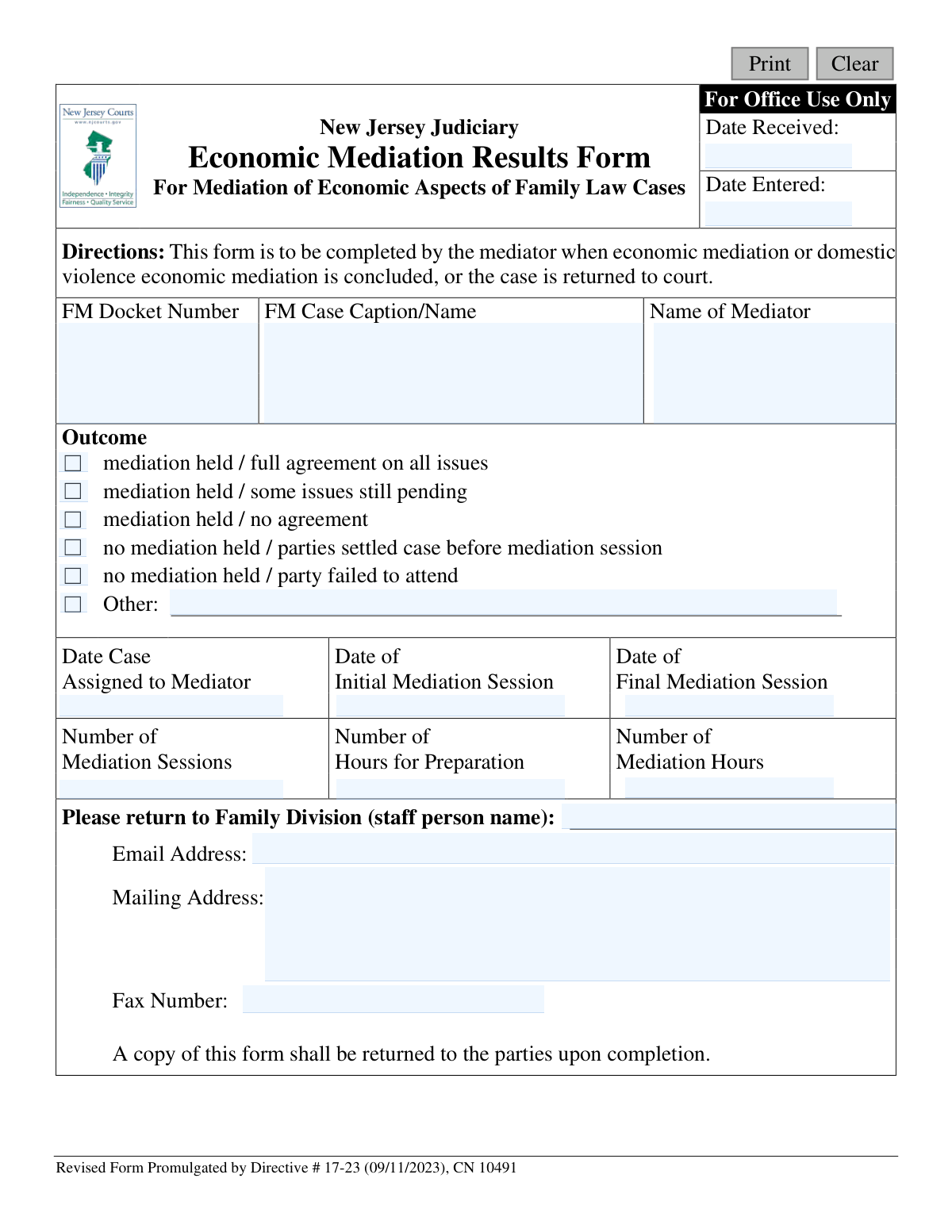
This form, officially known as the New Jersey Judiciary Economic Mediation Results Form, is a document completed by a mediator to inform the court about the conclusion of economic mediation in family law disputes. It details whether an agreement was reached, the number of sessions held, and the time spent, providing the court with a summary of the mediation process. Today, this form can be filled out quickly and accurately using AI-powered services like Instafill.ai, which can also convert non-fillable PDF versions into interactive fillable forms.
CN 10491 is part of the family court forms, family law forms and New Jersey forms categories on Instafill.
Our AI automatically handles information lookup, data retrieval, formatting, and form filling.
It takes less than a minute to fill out CN 10491 using our AI form filling.
Securely upload your data. Information is encrypted in transit and deleted immediately after the form is filled out.

Form specifications

Form name: New Jersey Judiciary Economic Mediation Results Form For Mediation of Economic Aspects of Family Law Cases
Number of fields: 24
Number of pages: 1
Language: English
main-image

Instafill Demo: How to fill out PDF forms in seconds with AI

How to Fill Out CN 10491 Online for Free in 2026

Are you looking to fill out a CN 10491 form online quickly and accurately? Instafill.ai offers the #1 AI-powered PDF filling software of 2026, allowing you to complete your CN 10491 form in just 37 seconds or less.
Follow these steps to fill out your CN 10491 form online using Instafill.ai:
  1. 1 Navigate to Instafill.ai and upload or select the Economic Mediation Results Form (CN 10491).
  2. 2 Provide the FM Docket Number and the Case Caption/Name in the designated fields.
  3. 3 Enter your name as the mediator and the date the case was assigned to you.
  4. 4 Select the checkbox that best describes the outcome of the mediation (e.g., full agreement, no agreement, etc.).
  5. 5 Input the dates of the initial and final mediation sessions, along with the total number of sessions and hours spent on preparation and mediation.
  6. 6 Review all the information auto-filled by the AI to ensure accuracy and completeness.
  7. 7 Download the completed form to return to the designated Family Division staff person and provide a copy to the parties involved.

Our AI-powered system ensures each field is filled out correctly, reducing errors and saving you time.

Why Choose Instafill.ai for Your Fillable CN 10491 Form?

Speed

Complete your CN 10491 in as little as 37 seconds.

Up-to-Date

Always use the latest 2026 CN 10491 form version.

Cost-effective

No need to hire expensive lawyers.

Accuracy

Our AI performs 10 compliance checks to ensure your form is error-free.

Security

Your personal information is protected with bank-level encryption.

Frequently Asked Questions About Form CN 10491

This form is used by a mediator to officially report the outcome of economic mediation in New Jersey Family Law cases to the court. It summarizes whether an agreement was reached and provides key details about the mediation process.

The assigned mediator is responsible for completing and submitting this form. It should be filled out once the mediation is concluded or the case is being returned to the court.

The form should be completed and submitted as soon as the economic mediation process is finished. This applies whether a full, partial, or no agreement was reached, or if the mediation did not occur for a specified reason.

The completed form must be sent to the Family Division staff person whose name and contact information are listed in the return section of the form. You can use the provided email, mailing address, or fax number.

Yes, the instructions at the bottom of the form state that a copy of the completed form must be returned to the parties upon completion.

'Preparation Hours' is the time you spent reviewing case files and preparing for the sessions. 'Mediation Hours' is the total time spent in active mediation sessions with the parties.

If a party did not attend, you should check the box for 'no mediation held / party failed to attend.' This accurately informs the court why the mediation could not proceed.

In that scenario, you should check the box labeled 'no mediation held / parties settled case before mediation session' to correctly report the case status to the court.

You will need the FM Docket Number, the case name, dates of assignment and mediation sessions, and a record of your preparation and mediation hours. You also need the return contact information for the Family Division.

To report a partial agreement, check the box for 'mediation held / some issues still pending.' This communicates to the court that progress was made but further action is needed on the remaining issues.

Yes, services like Instafill.ai use AI to help you accurately auto-fill form fields with your saved information, which can save time and reduce the chance of errors.

You can use a service like Instafill.ai to upload the PDF form and fill it out digitally. The platform allows you to easily type in information, check boxes, and then save or print the completed document.

If you have a non-fillable or 'flat' PDF, you can upload it to a service like Instafill.ai. Their technology can convert the document into an interactive, fillable form that you can complete on your computer.

Compliance CN 10491
Validation Checks by Instafill.ai

1
FM Docket Number Format Validation
Verifies the 'FM Docket Number' field follows the standard New Jersey Judiciary format, which typically starts with 'FM' followed by numeric codes for county, year, and case sequence. This validation is crucial for ensuring the form can be automatically and accurately associated with the correct case file in the court's system. An incorrect format would cause filing errors and require manual intervention.
2
Case Identification Completeness
Ensures that the 'FM Docket Number', 'Case Caption/Name', and 'Name of Mediator' fields are all populated. These three fields are the primary identifiers for the mediation event. If any of this information is missing, the form cannot be correctly filed or attributed, making the reported results useless for the court record.
3
Exclusive Outcome Selection
Validates that exactly one checkbox from the 'Outcome' section is selected. The form is designed to report a single, definitive outcome for the mediation. Allowing multiple or no selections would create ambiguity and render the report inconclusive, requiring follow-up with the mediator to clarify the result.
4
Required Explanation for 'Other' Outcome
Checks that if the 'Other' outcome checkbox is selected, the corresponding text field is filled with an explanation. This is necessary to understand non-standard outcomes that are not covered by the predefined options. An empty explanation for an 'Other' selection makes the data incomplete and uninterpretable.
5
Chronological Date Sequence
Verifies that the key dates are in a logical order: 'Date Case Assigned to Mediator' must be on or before the 'Date of Initial Mediation Session', which must be on or before the 'Date of Final Mediation Session'. This check prevents data entry errors and ensures the timeline of the mediation process is recorded accurately. An illogical sequence would invalidate the timeline of events.
6
Historical Dates Validation
Ensures that all date fields ('Date Case Assigned', 'Initial Mediation Session', 'Final Mediation Session') contain dates that are in the past or the present day. Since this form reports on events that have already occurred, a future date is a logical impossibility and indicates a clear data entry error. The system should reject submissions with future dates.
7
Session and Hour Consistency with Outcome
This check ensures that if an outcome of 'mediation held' is selected, the 'Number of Mediation Sessions' and 'Number of Mediation Hours' are greater than zero. Conversely, if a 'no mediation held' outcome is selected, these fields should be zero. This maintains logical consistency between the reported outcome and the associated effort metrics.
8
Initial Session Date Requirement
Validates that if any of the 'mediation held' outcomes are selected, the 'Date of Initial Mediation Session' field is populated. This date is a critical data point for tracking the case timeline when a mediation has actually occurred. Failure to provide this date when a mediation was held would result in an incomplete and less useful record.
9
Non-Negative Numeric Values for Hours and Sessions
Ensures that the values entered for 'Number of Mediation Sessions', 'Number of Hours for Preparation', and 'Number of Mediation Hours' are valid, non-negative numbers. Negative values are logically impossible for these fields and must be rejected. This check preserves the integrity of the quantitative data being collected for reporting and analysis.
10
Session and Mediation Hour Correlation
Verifies that if the 'Number of Mediation Sessions' is greater than zero, the 'Number of Mediation Hours' must also be greater than zero. It is logically inconsistent to have conducted one or more sessions that lasted for a total of zero hours. This check helps catch potential data entry mistakes and ensures the reported metrics are plausible.
11
Return Contact Email Format
Checks that the 'Email Address' provided for the Family Division staff person follows a standard email format (e.g., [email protected]). This is important to ensure that any automated systems or court staff can successfully send notifications or copies related to the form. An invalid format would lead to communication failures and processing delays.
12
Required Return Staff Person Name
Ensures the 'Family Division (staff person name)' field is filled out before submission. This name is critical for directing the completed form to the correct individual within the court system for processing. Without this name, the form could be misrouted or significantly delayed, impeding the progress of the case.
13
Office Use Date Logic
This validation is performed by office staff or the system upon receipt, not by the mediator. It checks that the 'Date Entered' is on or after the 'Date Received'. This ensures the internal processing timeline is logical and accurately reflects when the form was received versus when it was entered into the case management system.

Common Mistakes in Completing CN 10491

Incorrect or Incomplete Docket Number

Mediators may accidentally transpose numbers, omit the 'FM' prefix, or leave the docket number blank. An incorrect docket number is a critical error as it is the primary identifier for the case, leading to filing delays, misfiling of the report, and difficulty in tracking case progress. To prevent this, mediators should double-check the number against official court documents before submission. AI-powered tools like Instafill.ai can help by validating the format and cross-referencing case data to ensure accuracy.

Using an Abbreviated or Incorrect Case Caption

Instead of the full, official case name (e.g., 'Smith v. Smith'), mediators might use informal abbreviations or misspell the parties' names. This creates ambiguity and can cause confusion for court clerks trying to match the report to the correct case file. Always use the complete and accurate case caption as it appears on the court order assigning the case to mediation.

Ambiguous or Contradictory Outcome Reporting

A common error is selecting multiple, conflicting outcome checkboxes (e.g., 'full agreement' and 'no agreement') or checking 'Other' without providing a required explanation in the text field. This makes the form's primary purpose—reporting the outcome—unclear and requires the court to follow up for clarification, delaying case closure or the next steps. Mediators must select only one outcome and provide a concise description if 'Other' is chosen.

Inconsistent or Illogical Dates

Mistakes include entering a final mediation date that is earlier than the initial session date, or filling in session dates when the selected outcome is 'no mediation held'. Such logical inconsistencies create confusion and cast doubt on the accuracy of the entire report, often requiring correction and resubmission. Using a form-filling tool can help by implementing validation rules to flag illogical date entries before submission.

Incorrect Formatting for Dates and Numbers

Mediators may enter dates in a non-standard format (e.g., DD-MM-YYYY) or write out numbers as words (e.g., 'three' instead of '3') in the sessions and hours fields. This creates extra work for court staff who must manually correct the data for entry into the system, increasing the risk of transcription errors. AI tools like Instafill.ai can automatically format dates and numbers correctly, ensuring consistency and preventing data entry problems.

Filling in the 'For Office Use Only' Section

Some individuals have a tendency to fill every box on a form and mistakenly enter information in the 'Date Received' or 'Date Entered' fields. This section is reserved for court administrative staff to stamp and track the document's processing. Writing in this area can interfere with court procedures and may require a clean copy of the form to be submitted.

Omitting the Mediator's Name

In a rush to complete the form, the mediator might forget to enter their own name in the designated field. This omission is problematic as it prevents the court from knowing who conducted the mediation, which is essential for accountability, record-keeping, and sometimes payment processing. It is a simple but crucial piece of information that should always be verified before submission.

Failing to Provide Copies to the Parties

The form explicitly states, 'A copy of this form shall be returned to the parties upon completion,' but this step is easily overlooked. Failure to provide copies can lead to communication breakdowns, as parties may be unaware of what was reported to the court, potentially causing future disputes. Mediators should integrate this step into their case-closing checklist.

Illegible Handwriting on a Printed Form

When the PDF form is printed and filled out by hand, poor handwriting can make critical information like names, dates, and numbers unreadable. This is equivalent to submitting an incomplete form and forces court staff to guess the information or contact the mediator for clarification, causing delays. To avoid this, it's best to fill the form electronically; tools like Instafill.ai can even make non-fillable PDFs fillable, ensuring all entries are clear and legible.

Incorrect Return Destination Information

The form directs the mediator to return it to a specific Family Division staff person, but mediators may mistakenly leave these fields blank or enter their own contact information. This error can cause the form to be lost or significantly delayed in reaching the correct court personnel responsible for the case. Mediators must carefully enter the name, email, and address of the designated court contact provided in their assignment materials.
Saved over 80 hours a year

“I was never sure if my IRS forms like W-9 were filled correctly. Now, I can complete the forms accurately without any external help.”

Kevin Martin Green

Your data stays secure with advanced protection from Instafill and our subprocessors

Robust compliance program

Transparent business model

You’re not the product. You always know where your data is and what it is processed for.

ISO 27001, HIPAA, and GDPR

Our subprocesses adhere to multiple compliance standards, including but not limited to ISO 27001, HIPAA, and GDPR.

Security & privacy by design

We consider security and privacy from the initial design phase of any new service or functionality. It’s not an afterthought, it’s built-in, including support for two-factor authentication (2FA) to further protect your account.

Fill out CN 10491 with Instafill.ai

Worried about filling PDFs wrong? Instafill securely fills new-jersey-judiciary-economic-mediation-results-form-for-mediation-of-economic-aspects-of-family-law-cases forms, ensuring each field is accurate.

Related forms by category

family court forms Form 12.995(c), Safety-Focused Parenting Plan, Florida Supreme Court Approved Family Law Form 12.901(b)(3), Petition for Dissolution of Marriage with No Dependent or Minor Child(ren) or Property (02/18), Form N161, Appellant’s notice (All appeals except small claims track appeals and appeals to the Family Division of the High Court), Form N161, Appellant's Notice (All appeals except small claims track appeals and appeals to the Family Division of the High Court), Florida Supreme Court Approved Family Law Form 12.915, Designation of Current Mailing and E-mail Address, declaration-of-marriage-for-court-proceeding-california-family-law, Florida Supreme Court Approved Family Law Form 12.902(d), Uniform Child Custody Jurisdiction and Enforcement Act (UCCJEA) Affidavit, Florida Supreme Court Approved Family Law Form 12.941(a), Petition for Enforcement of Out-of-State Custody Decree and for Order to Pick Up Minor Child(ren), Florida Supreme Court Approved Family Law Form 12.970(a), Petition for Temporary Custody by Extended Family, Adoption Request (Stepparent), Florida Family Law Rules of Procedure Form 12.900(b), Notice of and Consent to Limited Appearance, Florida Family Law Rules of Procedure Form 12.900(d), Termination of Limited Appearance, Florida Family Law Rules of Procedure Form 12.900(e), Acknowledgment of Assistance by Attorney, Florida Family Law Rules of Procedure Form 12.900(g), Agreement Limiting Representation, Florida Family Law Rules of Procedure Form 12.900(h), Notice of Related Cases, Florida Family Law Rules of Procedure Form 12.901(a), Joint Petition for Simplified Dissolution of Marriage, Form 12.902(b), Family Law Financial Affidavit (Short Form), Florida Family Law Rules of Procedure Form 12.902(c), Family Law Financial Affidavit (Long Form), Florida Family Law Rules of Procedure Form 12.902(e), Child Support Guidelines Worksheet, Florida Supreme Court Approved Family Law Form 12.902(f)(1), Marital Settlement Agreement for Dissolution of Marriage with Dependent or Minor Child(ren) · + 51 more →
family law forms Form 12.902(b), Family Law Financial Affidavit (Short Form), Florida Supreme Court Approved Family Law Form 12.901(b)(3), Petition for Dissolution of Marriage with No Dependent or Minor Child(ren) or Property (02/18), Form FL-170, Declaration for Default or Uncontested Dissolution or Legal Separation (Family Law), Form FL-100, Petition—Marriage/Domestic Partnership (Family Law), Florida Supreme Court Approved Family Law Form 12.915, Designation of Current Mailing and E-mail Address, declaration-of-marriage-for-court-proceeding-california-family-law, Florida Supreme Court Approved Family Law Form 12.902(d), Uniform Child Custody Jurisdiction and Enforcement Act (UCCJEA) Affidavit, Florida Family Law Rules of Procedure Form 12.910(a), Summons: Personal Service on an Individual, Florida Supreme Court Approved Family Law Form 12.941(a), Petition for Enforcement of Out-of-State Custody Decree and for Order to Pick Up Minor Child(ren), Florida Supreme Court Approved Family Law Form 12.970(a), Petition for Temporary Custody by Extended Family, Form FL-110, Summons (Family Law), Form FL-120, Response—Marriage/Domestic Partnership (Family Law), ADOPT-200, Adoption Request, ADOPT-200, Stepparent Adoption Request, ADOPT-210, Adoption Agreement, ADOPT-310, Contact After Adoption Agreement, Adoption Assistance Program Nonrecurring Adoption Expense Agreement and Claim, Adoption Request (Stepparent), Adoption and Safe Families Act (ASFA) Survey, Florida Family Law Rules of Procedure Form 12.900(b), Notice of and Consent to Limited Appearance · + 55 more →
New Jersey forms State of New Jersey Alternate Benefit Program Withdrawal Request Acknowledgement Receipt, Horizon Blue Cross Blue Shield of New Jersey Applied Behavior Analysis Supplemental Information Form, State of New Jersey Application for Employment (Form DPF-663), New Jersey Judiciary Plea Form (Plea 01), Supplemental Plea Form for Certain Sexual Offenses: Megan’s Law/Parole Supervision for Life/Community Supervision for Life (Plea 05), Financial Questionnaire to Establish Indigency, New Jersey Judiciary Resource Family Information Form, Foreclosure Case Information Statement (FCIS) - Appendix XII-B2, New Jersey Judiciary Records Request Form, Superior Court of New Jersey, Application for Appeal and Order, FL Certification of Requested Background Checks for Kinship Legal Guardianship, Certification of Caregiver as to Knowledge of Identity and/or Location of Parents, FL Order Judgment for Kinship Legal Guardianship, New Jersey Judiciary Certification of Repair and Plea of Guilty, Uniform Summary Support Order (USSO), New Jersey Judiciary Volunteer Application (CN 10293), Application to Take the New Jersey Court Interpreter Oral Examination, New Jersey Judiciary Attorney Fee Arbitration Request, Order to Show Cause with Temporary Restraints Pursuant to Rule 4:52, Tax Court of New Jersey, State Tax Complaint · + 158 more →