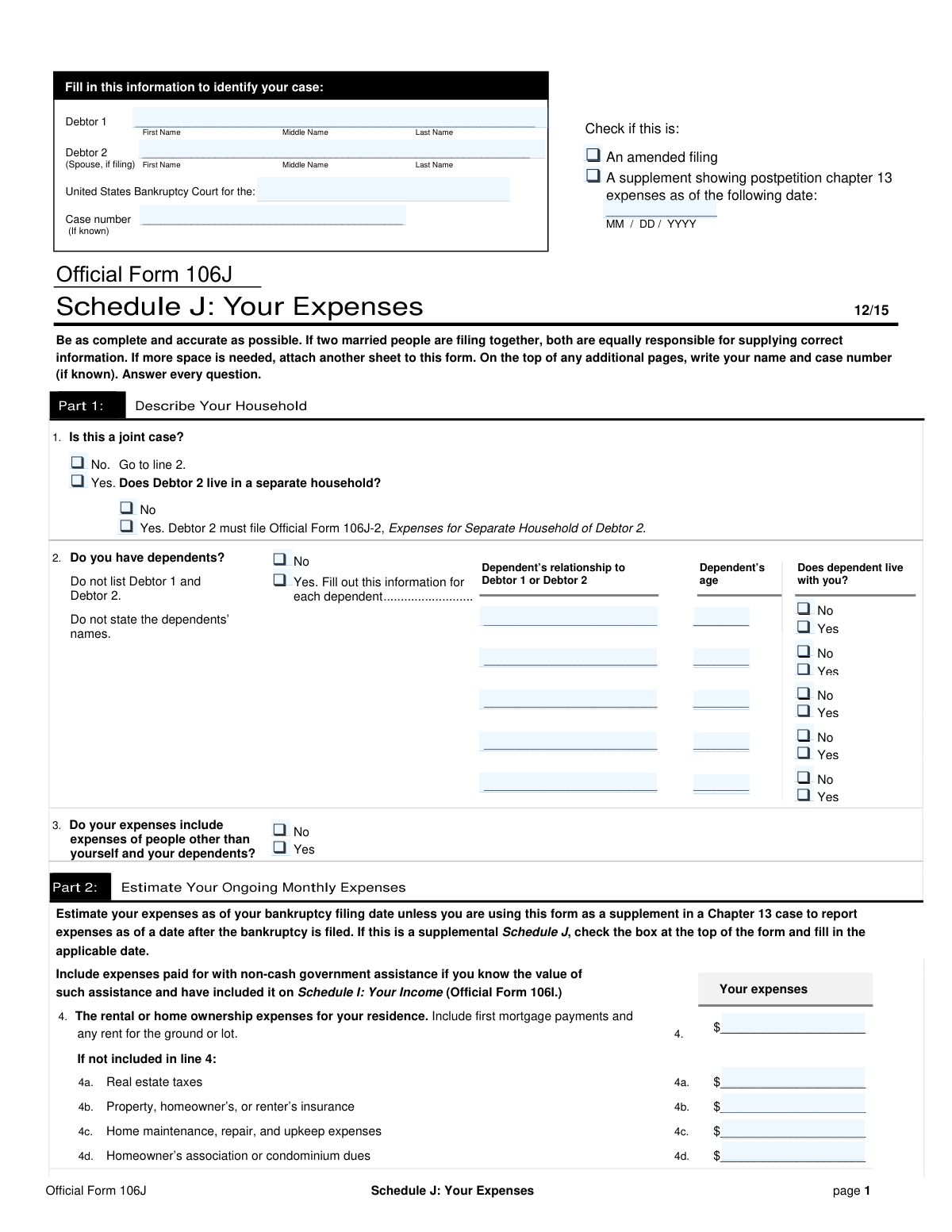
Yes! You can use AI to fill out Official Form 106J, Schedule J: Your Expenses

Official Form 106J, also known as Schedule J: Your Expenses, is a mandatory component of a personal bankruptcy filing in the United States. It requires the debtor to provide a comprehensive and accurate breakdown of their average monthly expenses, including housing, utilities, food, transportation, and healthcare. This information is critical for the bankruptcy court and trustee to evaluate the debtor's financial standing and calculate disposable income. Today, this form can be filled out quickly and accurately using AI-powered services like Instafill.ai, which can also convert non-fillable PDF versions into interactive fillable forms.
Our AI automatically handles information lookup, data retrieval, formatting, and form filling.
It takes less than a minute to fill out Form 106J using our AI form filling.
Securely upload your data. Information is encrypted in transit and deleted immediately after the form is filled out.

Form specifications

Form name: Official Form 106J, Schedule J: Your Expenses
Number of fields: 92
Number of pages: 3
Language: English
main-image

Instafill Demo: How to fill out PDF forms in seconds with AI

How to Fill Out Form 106J Online for Free in 2026

Are you looking to fill out a FORM 106J form online quickly and accurately? Instafill.ai offers the #1 AI-powered PDF filling software of 2026, allowing you to complete your FORM 106J form in just 37 seconds or less.
Follow these steps to fill out your FORM 106J form online using Instafill.ai:
  1. 1 Navigate to Instafill.ai and upload or select the Official Form 106J, Schedule J.
  2. 2 Provide your personal and case information, including debtor names and the bankruptcy case number, letting the AI place it in the correct fields.
  3. 3 Detail your dependents and household information, answering guided questions about relationships, ages, and living arrangements.
  4. 4 Enter your monthly expenses category by category, such as housing, utilities, food, and transportation, using the smart fields to accurately itemize each cost.
  5. 5 List all other payments, including insurance, taxes, installment loans, and support payments, in the designated sections.
  6. 6 Review the automatically calculated totals for your monthly expenses and net income, which the AI verifies for accuracy.
  7. 7 Securely sign the form electronically and download the completed Schedule J, ready for filing with the bankruptcy court.

Our AI-powered system ensures each field is filled out correctly, reducing errors and saving you time.

Why Choose Instafill.ai for Your Fillable Form 106J Form?

Speed

Complete your Form 106J in as little as 37 seconds.

Up-to-Date

Always use the latest 2026 Form 106J form version.

Cost-effective

No need to hire expensive lawyers.

Accuracy

Our AI performs 10 compliance checks to ensure your form is error-free.

Security

Your personal information is protected with bank-level encryption.

Frequently Asked Questions About Form Form 106J

This form is used to detail your average monthly expenses as part of a bankruptcy filing. It helps the court understand your financial situation by calculating your total monthly expenses and net income.

Debtor 1 is the primary individual filing for bankruptcy. Debtor 2 is the spouse of Debtor 1, and their name is included only if you are filing a joint case together.

Check 'Yes' for a joint case and also check 'Yes' that Debtor 2 lives in a separate household. Debtor 2 must complete a separate expense form (Form 106J-2), and their total expenses will be added to this form.

Enter the total payment amount in the 'Monthly rent or mortgage payment' field. You should leave the separate fields for real estate taxes and property insurance blank if those costs are already included in your main mortgage payment.

The 'Transportation' field is for operating costs like gas, public transit, and routine maintenance. The 'Vehicle Payment' field is for your fixed monthly car loan or lease payment.

An amended filing is a corrected version of a form you have already submitted. You should check this box if you need to update information or fix errors on your original expense schedule.

You should list these payments under 'Other Support Payments Amount'. Use the corresponding description field to explain who you are supporting and the purpose of the payments.

The form has space to list five dependents. If you have more, list the first five on the form and attach a separate sheet with the required information for all additional dependents.

In the section asking about expected changes to your expenses, simply check the 'No' box. You only need to provide a written explanation if you check 'Yes'.

Yes, services like Instafill.ai use AI to accurately auto-fill form fields using your saved information. This can help you complete complex forms faster and with fewer errors.

Upload the form to the Instafill.ai platform. Its AI will identify the fields and automatically populate them with your data, which you can then review and finalize online.

You can use a service like Instafill.ai, which is designed to convert flat, non-fillable PDFs into interactive forms. This allows you to type your answers directly into the fields on your computer.

Payments for a home equity loan or a second mortgage on your primary residence should be entered in the 'Additional mortgage payments (residence)' field.

Compliance Form 106J
Validation Checks by Instafill.ai

1
Joint Case and Debtor 2 Name Consistency
This validation ensures that if the user checks 'Joint case – Yes', the 'Debtor 2 Name' field must be filled out. Conversely, if 'Joint case – No' is selected, the 'Debtor 2 Name' field should be empty or disabled. This is critical for case identification and ensures the filing accurately reflects whether it is a joint or individual petition. A failure would trigger an error prompting the user to either provide the Debtor 2 name or change the joint case status.
2
Dependent Information Conditional Requirement
This check verifies that if the user selects 'Yes (have dependents)', they must provide the information for at least the first dependent (relationship and age). If 'No (no dependents)' is selected, all dependent information fields should be cleared and disabled. This prevents incomplete submissions where dependents are declared but not detailed. If validation fails, the user will be prompted to enter the required dependent details.
3
Dependent Age Validity
This validation ensures that any value entered into a 'Dependent Age' field is a valid, non-negative integer. It prevents users from entering text, symbols, or negative numbers, which would be invalid data. This is important for accurate demographic and eligibility reporting. An invalid entry would result in an error message asking the user to enter a valid whole number for the age.
4
Supplement Effective Date Requirement
This check ensures that the 'Supplement Effective Date' field is mandatory and contains a valid date if the 'A supplement showing postpetition chapter 13 expenses' box is checked. The date is crucial for defining the time period the supplemental filing covers. If the box is checked but the date is missing or invalid, the form cannot be submitted until a valid date is provided.
5
Conditional 'Other' Expense Description
This validation rule applies to all 'Other' expense categories, such as 'Utilities - Other', 'Other Insurance Type', and 'Other Installment/Lease Payment Description'. It verifies that if an amount greater than zero is entered in the corresponding amount field, the description field must not be empty. This ensures that all miscellaneous expenses are properly explained and justified. A failure would prompt the user to provide a description for the entered amount.
6
Total Monthly Expenses Calculation (Line 22a)
This check validates that the value entered in 'Line 22a Total Monthly Expenses' is the correct sum of all individual expense lines from 4 through 21. This is a critical calculation that forms the basis for the debtor's total expenses. If the user-entered total does not match the calculated sum, an error will be displayed, prompting a correction to ensure the financial summary is accurate.
7
Debtor 2 Separate Household Expense Logic (Line 22b)
This validation ensures that the 'Line 22b Debtor 2 Monthly Expenses' field is only enabled and accepts input if 'Debtor 2 lives in a separate household – Yes' is selected. This prevents erroneous data entry for Debtor 2's expenses when they share a household with Debtor 1. If the condition is not met, this field should be disabled and have a value of zero for subsequent calculations.
8
Total Monthly Expenses Calculation (Line 22c)
This validation confirms that the value in 'Line 22c Total Monthly Expenses' correctly equals the sum of 'Line 22a' and 'Line 22b'. This represents the absolute total monthly expenses for the filing household(s). An incorrect sum would lead to a flawed net income calculation, so the system must flag any discrepancy and require correction before proceeding.
9
Monthly Net Income Calculation (Line 23c)
This check verifies that the 'Line 23c Monthly Net Income' is correctly calculated by subtracting the total monthly expenses ('Line 22c') from the combined monthly income ('Line 23a'). This final calculation is one of the most important figures on the form, determining the debtor's disposable income. If the calculation is incorrect, the system will show an error and prevent submission until the figures are reconciled.
10
Expected Expense Change Explanation Requirement
This validation ensures that if the user checks 'Yes' for 'Expected Expense Change Within Next Year', the corresponding 'Explanation' text field must be filled out. This explanation is required by the court to understand future financial changes that could impact the bankruptcy case. If 'Yes' is selected and the explanation is empty, the user will be blocked from submitting the form until a reason is provided.
11
Debtor 1 Name Completeness
This check ensures that the 'Debtor 1 Full Name' field is not empty and contains more than just a single initial or word. It should prompt the user to enter their full legal name, including first and last names, as this is the primary identifier for the entire filing. Incomplete or missing names can lead to filing rejection or legal complications, so this field must be properly validated for completeness.
12
Joint Case and Separate Household Logic
This validation ensures that the options for 'Debtor 2 lives in a separate household' are only presented and required if 'Joint case – Yes' has been selected. If the filing is not a joint case, these questions are irrelevant and should be hidden or disabled. This prevents user confusion and ensures that data is only collected when logically necessary for the case type.
13
Numeric Field Format Validation
This check verifies that all fields intended to capture monetary amounts (e.g., 'Monthly rent or mortgage payment', 'Food and Housekeeping Supplies') contain only valid, non-negative numeric characters and a single decimal point. This prevents the entry of text or symbols that would cause calculation errors throughout the form. An invalid entry would trigger an immediate error, ensuring data integrity for all financial calculations.

Common Mistakes in Completing Form 106J

Using Incorrect or Incomplete Debtor Names

Filers often use nicknames, initials, or omit middle names instead of their full legal name. This creates discrepancies with other legal documents and can cause delays or rejection of the filing. Always use the full legal name as it appears on government-issued identification like a driver's license or passport to ensure consistency.

Double-Counting Housing Expenses

A frequent error is listing the total mortgage payment (which often includes taxes and insurance in escrow) and then entering taxes and insurance again in their separate fields. This inflates expenses and will be flagged by the trustee, requiring correction and potentially jeopardizing the case. Review your mortgage statement to see what is included in your payment and only list expenses separately if you pay them directly.

Including Car Payments in General Transportation Costs

The form explicitly asks for transportation costs *excluding* car payments, yet many people include them in this section. Car loan or lease payments have their own dedicated fields and including them here results in double-counting. This error leads to an inaccurate expense report that must be amended, so be sure to list only gas, public transit, and maintenance in the general transportation field.

Mathematical Errors in Expense Totals

Manually calculating the total monthly expenses (Line 22) and net income (Line 23) often leads to arithmetic errors. An incorrect total invalidates the entire financial summary, undermining credibility and forcing delays for correction and refiling. To prevent this, use a calculator to double-check all additions and subtractions, or use a tool like Instafill.ai which can perform these calculations automatically and without error.

Incorrectly Transferring Data from Other Schedules

This form requires copying figures from other documents, like income from Schedule I or a spouse's expenses from Form 106J-2. Manually transcribing these numbers is highly prone to typos or using figures from an outdated draft. Such inconsistencies are a major red flag for trustees and can halt the case, so it's critical to triple-check any transferred numbers for accuracy.

Misinterpreting Joint Filing vs. Separate Household

The questions about a joint case and whether Debtor 2 lives in a separate household can be confusing. Filers may answer the 'separate household' question even when not in a joint case, or fail to provide the required separate expense form (106J-2) when they should. This leads to an incorrect calculation of total household expenses, so carefully follow the form's logic: only address the separate household status if you have first checked 'Joint case – Yes'.

Listing 'Other' Expenses Without a Description

The form provides several 'Other' expense fields that require both an amount and a description. Filers often enter a dollar value but forget to specify what the expense is for, using vague terms like 'miscellaneous' or leaving it blank. Without a clear justification, the trustee is likely to disallow the expense, so always provide a specific description for any amount entered in an 'Other' category.

Failing to Disclose Known Future Expense Changes

The form asks if you expect expenses to change in the next year, which many filers overlook or answer 'No' incorrectly. Failing to disclose a known, significant change (like a car being paid off or a child leaving home) can be viewed as acting in bad faith. This can lead to objections from the trustee, so be sure to report any anticipated changes and provide a clear explanation.

Incomplete or Inconsistent Dependent Information

When listing dependents, it's easy to rush and miss a field, such as the dependent's age or whether they live with you. Each piece of information is required to justify certain expense levels. Incomplete entries can lead to those expenses being questioned or disallowed, affecting your disposable income calculation, so methodically fill out all fields for each dependent listed.

Misclassifying Insurance Premiums

Filers may get confused about where to list different insurance payments, incorrectly putting auto insurance in the 'Other' category or lumping health insurance with housing costs. The form has specific, separate lines for Homeowner's/Renter's, Life, Health, and Vehicle insurance. Using the correct fields creates a clear financial picture and avoids requests for clarification that can slow the process.

Incorrectly Handling Amended or Supplemental Filings

The checkboxes for 'An amended filing' or 'A supplement' are often misused. Filers might check them on an initial filing by mistake or forget to check them when submitting a correction, causing administrative confusion. These should only be checked when you are intentionally updating a previously submitted form, and if so, you must include all required dates and information.

Struggling with Non-Fillable PDF Forms

Often, official forms are only available as flat, non-fillable PDFs, forcing filers to print them and fill them out by hand. This leads to illegible handwriting, calculation errors, and an unprofessional appearance that can cause processing delays. AI-powered tools like Instafill.ai can convert these non-fillable PDFs into interactive, fillable forms, ensuring clarity, accuracy, and easy electronic submission.
Saved over 80 hours a year

“I was never sure if my IRS forms like W-9 were filled correctly. Now, I can complete the forms accurately without any external help.”

Kevin Martin Green

Your data stays secure with advanced protection from Instafill and our subprocessors

Robust compliance program

Transparent business model

You’re not the product. You always know where your data is and what it is processed for.

ISO 27001, HIPAA, and GDPR

Our subprocesses adhere to multiple compliance standards, including but not limited to ISO 27001, HIPAA, and GDPR.

Security & privacy by design

We consider security and privacy from the initial design phase of any new service or functionality. It’s not an afterthought, it’s built-in, including support for two-factor authentication (2FA) to further protect your account.

Fill out Form 106J with Instafill.ai

Worried about filling PDFs wrong? Instafill securely fills official-form-106j-schedule-j-your-expenses-1 forms, ensuring each field is accurate.