Yes! You can use AI to fill out Official Form 206Sum, Summary of Assets and Liabilities for Non-Individuals
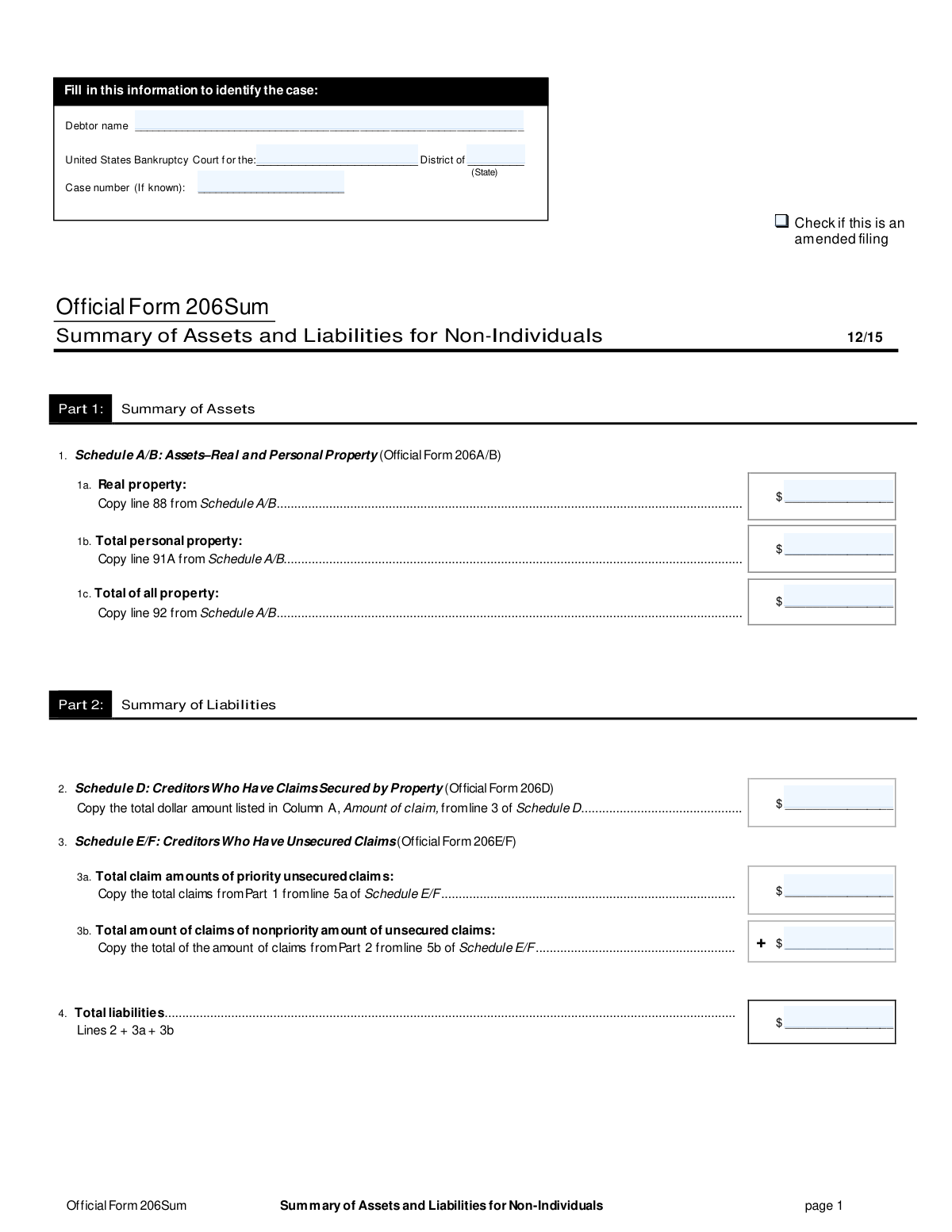
Official Form 206Sum, the Summary of Assets and Liabilities for Non-Individuals, is a crucial document in bankruptcy proceedings. It provides the court with a high-level overview of the debtor's financial situation by consolidating totals from other detailed schedules like A/B, D, and E/F. Today, this form can be filled out quickly and accurately using AI-powered services like Instafill.ai, which can also convert non-fillable PDF versions into interactive fillable forms.
Our AI automatically handles information lookup, data retrieval, formatting, and form filling.
It takes less than a minute to fill out Official Form 206Sum using our AI form filling.
Securely upload your data. Information is encrypted in transit and deleted immediately after the form is filled out.
Form specifications
| Form name: | Official Form 206Sum, Summary of Assets and Liabilities for Non-Individuals |
| Number of pages: | 1 |
| Filled form examples: | Form Official Form 206Sum Examples |
| Language: | English |
Instafill Demo: How to fill out PDF forms in seconds with AI
How to Fill Out Official Form 206Sum Online for Free in 2026
Are you looking to fill out a OFFICIAL FORM 206SUM form online quickly and accurately? Instafill.ai offers the #1 AI-powered PDF filling software of 2026, allowing you to complete your OFFICIAL FORM 206SUM form in just 37 seconds or less.
Follow these steps to fill out your OFFICIAL FORM 206SUM form online using Instafill.ai:
- 1 Navigate to Instafill.ai and upload your PDF or select Official Form 206Sum from the template library.
- 2 Provide the debtor's name, court district, and case number in the designated fields.
- 3 Use the AI assistant to automatically pull the total real and personal property values from your completed Schedule A/B.
- 4 Transfer the total amount of secured claims from Schedule D as prompted by the tool.
- 5 Input the total amounts for priority and nonpriority unsecured claims from Schedule E/F.
- 6 Review the automatically calculated totals for all property and liabilities to ensure accuracy.
- 7 Finalize the document, e-sign if required, and download the completed form for filing.
Our AI-powered system ensures each field is filled out correctly, reducing errors and saving you time.
Why Choose Instafill.ai for Your Fillable Official Form 206Sum Form?
Speed
Complete your Official Form 206Sum in as little as 37 seconds.
Up-to-Date
Always use the latest 2026 Official Form 206Sum form version.
Cost-effective
No need to hire expensive lawyers.
Accuracy
Our AI performs 10 compliance checks to ensure your form is error-free.
Security
Your personal information is protected with bank-level encryption.
Frequently Asked Questions About Form Official Form 206Sum
Form 206Sum, the Summary of Assets and Liabilities for Non-Individuals, provides a high-level overview of a business's financial situation in a bankruptcy case. It summarizes the detailed information found in other schedules.
This form must be filed by non-individual debtors, such as corporations, partnerships, or LLCs, that are filing for bankruptcy. It is not for individual debtors.
Yes, this is a summary form that pulls information from other documents. You must complete Schedule A/B (Assets), Schedule D (Secured Claims), and Schedule E/F (Unsecured Claims) before you can fill out Form 206Sum.
The values for the Summary of Assets section are copied directly from your completed Schedule A/B. For example, the 'Real property' value on line 1a comes from line 88 of Schedule A/B.
You must copy the total claim amounts from your completed liability schedules. The total for secured claims comes from Schedule D, while the totals for priority and nonpriority unsecured claims come from Schedule E/F.
Yes, you must calculate this total yourself. Simply add the amounts you entered on line 2, line 3a, and line 3b to get the total liabilities.
You should only check the 'amended filing' box if you are filing a corrected or updated version of a Form 206Sum that you have already submitted to the court.
If your business has no real property, you should enter '$0' or 'zero' on line 1a, 'Real property'.
The court assigns a case number when the bankruptcy case is first filed. If you are submitting this form as part of your initial petition, you can leave the case number field blank.
Yes, services like Instafill.ai use AI to accurately auto-fill form fields from your other completed schedules, which can save time and help prevent transcription errors.
You can use a service like Instafill.ai to upload the PDF. The platform will make it an interactive, fillable form that you can complete online and then download or print.
If you have a non-fillable or 'flat' PDF, you can use a tool like Instafill.ai. It can convert the static document into an interactive, fillable form online for easy completion.
Compliance Official Form 206Sum
Validation Checks by Instafill.ai
1
Debtor Name Completeness
This check ensures the 'Debtor name' field is not left blank. The debtor's name is a fundamental identifier for the entire legal filing, and its absence would make the form invalid and unprocessable. If this validation fails, the form submission should be rejected with an error message prompting the user to provide the debtor's full legal name.
2
Court Information Completeness
This validation verifies that both the specific court district (e.g., 'Southern District of New York') and the corresponding state are provided. This information is critical for routing the document to the correct jurisdiction for legal processing. A failure would result in the form being misfiled or rejected, delaying the bankruptcy case.
3
Case Number Format for Known Cases
This check validates that if a 'Case number' is provided, it adheres to the standard format used by U.S. Bankruptcy Courts (e.g., YY-NNNNN). An incorrectly formatted case number can lead to association with the wrong case or failure to link the document to the correct file. The validation should trigger an error if the format is incorrect, guiding the user to enter a valid number.
4
Amended Filing Requires Case Number
This is a logical consistency check that ensures if the 'Amended Filing' checkbox is selected, the 'Case number' field must be filled out. An amended filing, by definition, modifies a pre-existing case, which must have a case number. If the box is checked but the number is missing, the submission should be blocked until the case number is provided.
5
Valid Numeric Format for Asset Values
This validation ensures that the values entered for 'Real property' (1a), 'Total personal property' (1b), and 'Total of all property' (1c) are valid, non-negative currency amounts. The system should reject any entries containing text, special characters (other than currency symbols or decimal points), or negative numbers. This is crucial for accurate financial calculations and legal declarations.
6
Valid Numeric Format for Liability Values
This check verifies that the values for 'Secured claims' (2), 'Priority unsecured claims' (3a), and 'Nonpriority unsecured claims' (3b) are valid, non-negative currency amounts. Accurate liability reporting is essential for the bankruptcy process. The validation prevents data entry errors like typos or negative values, which would render the financial summary incorrect.
7
Completeness of All Monetary Fields
This validation confirms that all monetary fields on the form are filled in, even if the value is zero. Leaving a field blank can be ambiguous, as it could mean the value is zero or that the information was omitted by mistake. Requiring an explicit entry (e.g., '$0.00') ensures clarity and completeness of the financial summary.
8
Internal Asset Summary Calculation
This check verifies that the value in 'Total of all property' (line 1c) is exactly equal to the sum of 'Real property' (line 1a) and 'Total personal property' (line 1b). This is a critical internal consistency check to ensure the summary is mathematically sound before it is filed. A mismatch indicates a data entry or calculation error that must be corrected.
9
Total Liabilities Calculation
This validation confirms that the 'Total liabilities' amount in line 4 is the correct sum of Secured Claims (line 2), Priority Unsecured Claims (line 3a), and Nonpriority Unsecured Claims (line 3b), as explicitly instructed on the form. This is a mandatory arithmetic check to ensure the final liability total is accurate. If the calculation is incorrect, the form is considered erroneous and must be fixed before submission.
10
Cross-Schedule Consistency for Total Assets
This check verifies that the value entered in 'Total of all property' (line 1c) matches the value from line 92 on the source document, Schedule A/B. This ensures that the summary form accurately reflects the detailed information provided elsewhere in the filing. A discrepancy could lead to legal challenges or rejection of the filing for being inconsistent.
11
Cross-Schedule Consistency for Secured Claims
This validation ensures the amount for 'Secured Claims' (line 2) on this summary form is identical to the total amount from line 3 of Schedule D. This cross-reference check is vital for maintaining consistency across the entire bankruptcy petition. If the values do not match, it suggests an error in transcribing the data, which undermines the integrity of the filing.
12
Cross-Schedule Consistency for Unsecured Claims
This check verifies that the amounts for 'Priority unsecured claims' (line 3a) and 'Nonpriority amount of unsecured claims' (line 3b) match the totals from lines 5a and 5b of Schedule E/F, respectively. This ensures the summary accurately represents the detailed unsecured creditor information. Failure to match these values would create a significant inconsistency in the debtor's financial reporting.
Common Mistakes in Completing Official Form 206Sum
This form requires manually copying figures from Schedules A/B, D, and E/F. Filers often make typos, transpose digits, or copy from the wrong line, leading to an inaccurate financial summary. These errors can cause the court to question the entire filing, leading to delays and required amendments. To prevent this, meticulously double-check each number against its source line on the corresponding schedule before finalizing the form.
Line 4 requires the filer to manually add the totals from lines 2, 3a, and 3b. Simple arithmetic mistakes are common and result in an incorrect total liability figure, a critical data point for the case. An incorrect total can lead to the form's rejection and undermines the credibility of the financial disclosure. Use a calculator and verify the sum twice; AI-powered form fillers like Instafill.ai can perform these calculations automatically to eliminate human error.
The debtor's name must be the full, official legal name of the non-individual entity and must be identical across all bankruptcy documents. Using abbreviations, trade names, or slight variations causes confusion and can delay the case as the court struggles to link documents. Always use the complete and correct registered name of the entity as it appears on official formation documents.
Filers sometimes forget to enter the court district, state, and case number (if known) at the top of the form. This information is essential for the court clerk to correctly file the document with the associated case. Missing identifiers can lead to the form being rejected, misfiled, or returned, delaying the entire bankruptcy proceeding.
If this form is being submitted to correct a previously filed version, the 'amended filing' box must be checked. Overlooking this small but crucial step means the court will not recognize it as a superseding document, leading to confusion between the old and new versions. This can create serious discrepancies in the official record and may require further clarification or refiling.
When a category has no value, such as no real property assets, filers may leave the corresponding line blank. However, a blank field is ambiguous and can be interpreted as an incomplete form, prompting rejection or a request for information. To avoid this, always enter '0' or '0.00' to clearly and affirmatively state that the value for that category is zero.
The form pulls data from multiple schedules, and it's easy to get confused and copy a number from the wrong source. For example, a filer might accidentally enter the secured claims total (from Schedule D) into the real property field (from Schedule A/B). This completely skews the financial summary and will almost certainly lead to the form being rejected, requiring a corrected amendment.
This summary form is entirely dependent on the data in other schedules. If a source schedule like Schedule A/B or E/F is amended, this summary form must also be updated and refiled to reflect the new totals. Filing a summary that doesn't match the latest versions of the underlying schedules creates a major inconsistency in the case file, causing delays and potential legal challenges.
Filers often include dollar signs ($) and commas (,) in numerical fields out of habit. While this may seem helpful, court electronic filing systems often require numbers to be entered without any special characters or formatting. Submitting improperly formatted data can cause the e-filing system to reject the document or misinterpret the values. AI-powered tools like Instafill.ai can help by automatically validating and formatting data to meet court requirements.
This form is often available as a non-fillable PDF, leading people to print and handwrite the information. This can result in illegible numbers or text that is hard for court staff to read and process, leading to data entry errors or rejection. To ensure clarity, it is best to use a tool that can convert the document into a fillable version. For instance, Instafill.ai can make flat PDFs fillable, ensuring all entries are typed, legible, and perfectly aligned.
Saved over 80 hours a year
“I was never sure if my IRS forms like W-9 were filled correctly. Now, I can complete the forms accurately without any external help.”
Kevin Martin Green
Your data stays secure with advanced protection from Instafill and our subprocessors

Robust compliance program
Transparent business model
You’re not the product. You always know where your data is and what it is processed for.
ISO 27001, HIPAA, and GDPR
Our subprocesses adhere to multiple compliance standards, including but not limited to ISO 27001, HIPAA, and GDPR.
Security & privacy by design
We consider security and privacy from the initial design phase of any new service or functionality. It’s not an afterthought, it’s built-in, including support for two-factor authentication (2FA) to further protect your account.
Fill out Official Form 206Sum with Instafill.ai
Worried about filling PDFs wrong? Instafill securely fills official-form-206sum-summary-of-assets-and-liabilities-for-non-individuals forms, ensuring each field is accurate.



