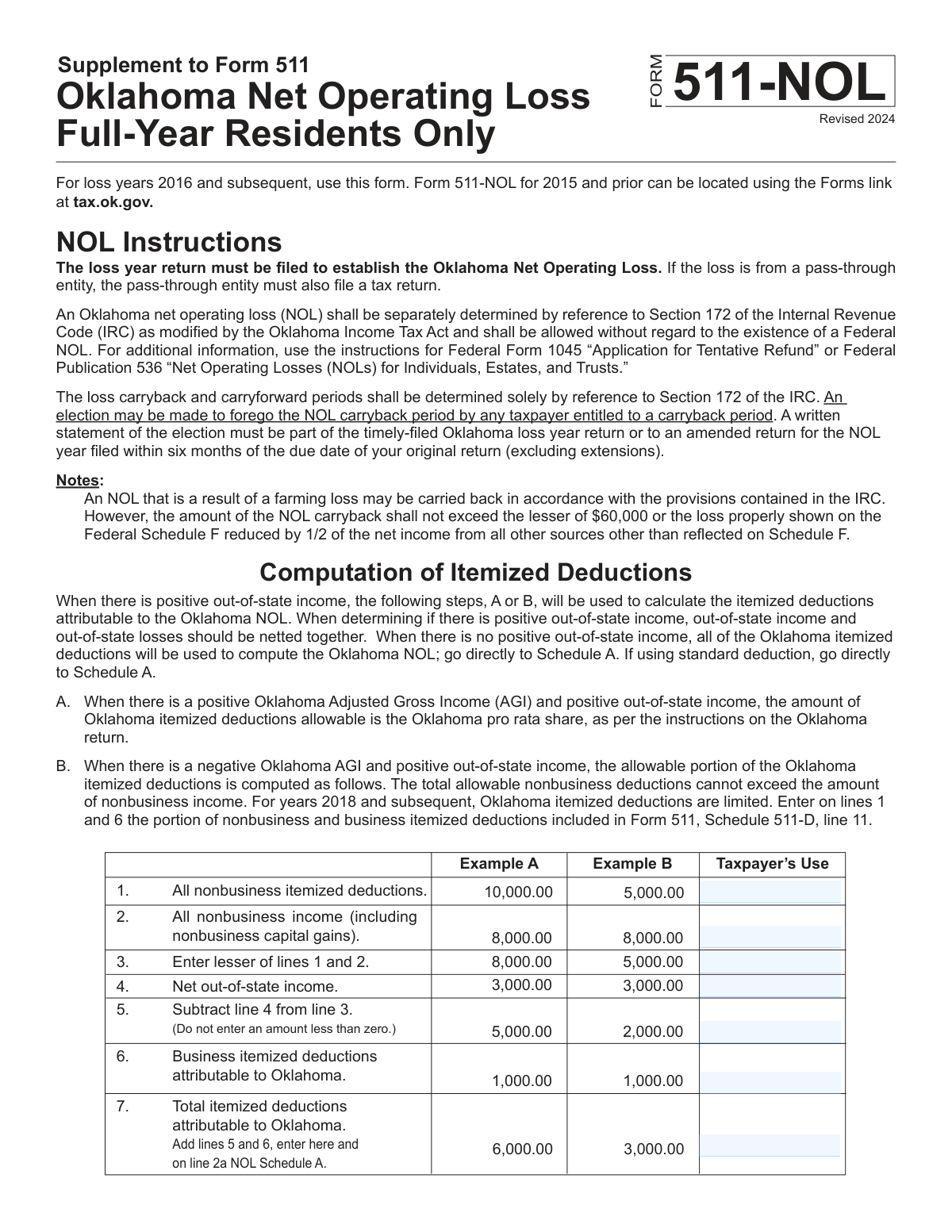
Yes! You can use AI to fill out Oklahoma Schedule 511-C, Net Operating Loss (NOL) Computation

Oklahoma Schedule 511-C is a state tax form for calculating a net operating loss (NOL) specific to Oklahoma. This calculation is important as it allows taxpayers to use a business loss from one year to reduce taxable income in other years, potentially lowering their overall tax burden. The form requires detailed adjustments for business and nonbusiness income, deductions, and capital gains. Today, this form can be filled out quickly and accurately using AI-powered services like Instafill.ai, which can also convert non-fillable PDF versions into interactive fillable forms.
Our AI automatically handles information lookup, data retrieval, formatting, and form filling.
It takes less than a minute to fill out Schedule 511-C using our AI form filling.
Securely upload your data. Information is encrypted in transit and deleted immediately after the form is filled out.

Form specifications

Form name: Oklahoma Schedule 511-C, Net Operating Loss (NOL) Computation
Number of fields: 62
Number of pages: 3
Language: English
main-image

Instafill Demo: How to fill out PDF forms in seconds with AI

How to Fill Out Schedule 511-C Online for Free in 2026

Are you looking to fill out a SCHEDULE 511-C form online quickly and accurately? Instafill.ai offers the #1 AI-powered PDF filling software of 2026, allowing you to complete your SCHEDULE 511-C form in just 37 seconds or less.
Follow these steps to fill out your SCHEDULE 511-C form online using Instafill.ai:
  1. 1 Navigate to Instafill.ai and upload your Oklahoma Schedule 511-C or select it from the platform's form library.
  2. 2 Provide your personal information, including your name, Social Security Number, and the relevant tax year in the header section.
  3. 3 Enter your Oklahoma Adjusted Gross Income (AGI) from Form 511 and your deduction amounts as prompted by the AI assistant.
  4. 4 Input the required figures for nonbusiness and business income, deductions, and capital gains/losses. The AI will guide you through each specific line item from your financial records.
  5. 5 Allow the AI to perform the complex calculations, such as adding and subtracting lines and determining the correct adjustments, to compute your final NOL.
  6. 6 Carefully review the auto-populated Schedule 511-C for accuracy, ensuring all data from your primary tax documents has been correctly entered.
  7. 7 Download, print, or e-file your completed form. Instafill.ai provides a secure, finalized document ready for submission to the Oklahoma Tax Commission.

Our AI-powered system ensures each field is filled out correctly, reducing errors and saving you time.

Why Choose Instafill.ai for Your Fillable Schedule 511-C Form?

Speed

Complete your Schedule 511-C in as little as 37 seconds.

Up-to-Date

Always use the latest 2026 Schedule 511-C form version.

Cost-effective

No need to hire expensive lawyers.

Accuracy

Our AI performs 10 compliance checks to ensure your form is error-free.

Security

Your personal information is protected with bank-level encryption.

Frequently Asked Questions About Form Schedule 511-C

This form is used to calculate your Oklahoma Net Operating Loss (NOL), which occurs when your allowable deductions exceed your income for the tax year. This calculation determines the amount of loss you can carry to other tax years to reduce your tax liability.

You should complete this schedule if your calculations on your main tax return show a potential loss. Specifically, if the amount on line 3 of this form is a negative number, you must complete the rest of the schedule to determine your official NOL.

If the amount on Line 3, which combines your Oklahoma AGI and deductions, is zero or more, you do not have a Net Operating Loss. You should stop and do not need to complete the remainder of the schedule.

You will need information from several other forms, including your Oklahoma AGI from Form 511, adjustments from Schedule 511-C, and details on capital gains and losses from Federal Schedule D and Oklahoma Schedules 511-A and 511-B.

The Oklahoma Adjusted Gross Income (AGI) amount required for Line 1 should be taken directly from line 7 of your Oklahoma Resident Income Tax Return, Form 511.

You need to total all nonbusiness deductions from lines 2a and 2b, plus any Oklahoma nonbusiness deductions from Schedule 511-A and any Federal nonbusiness adjustments from your federal return. Be careful not to include business-related expenses here.

Line 6 is for the excess of nonbusiness capital losses over gains, while Line 7 is for the excess of nonbusiness capital gains over losses. You will only fill in one of these lines, not both, depending on whether you had a net capital loss or gain from nonbusiness activities.

This schedule is a supporting document used to calculate your NOL. You should attach the completed schedule to your Oklahoma income tax return (Form 511) for the year you are reporting the loss.

Yes, services like Instafill.ai use AI to help you accurately fill out forms like this one. It can auto-fill fields based on your data, perform calculations, and help reduce errors, saving you significant time.

You can use Instafill.ai to easily complete this form online. Simply upload the form to the platform, and it will become an interactive, fillable document that you can complete and save from your web browser.

If you have a non-fillable or 'flat' PDF, you can use a service like Instafill.ai to instantly convert it into an interactive, fillable form. This allows you to type your information directly into the correct fields without needing to print and write by hand.

The 'Intervening Year' field is used when you carry an NOL from a past year to a future year. You must calculate how much of the NOL was used up in the years between the loss year and the current year to ensure the remaining NOL is applied correctly.

Compliance Schedule 511-C
Validation Checks by Instafill.ai

1
Validates Social Security Number Format
This check ensures the 'Taxpayer Social Security Number' field contains a valid nine-digit number, which may be formatted as XXXXXXXXX or XXX-XX-XXXX. An invalid SSN is a primary cause for rejection by tax authorities, as it is the main taxpayer identifier. If the format is incorrect, the submission should be blocked until the user corrects the entry.
2
Ensures Tax Year is a Valid Year
This validation confirms that the 'Tax Year' field contains a four-digit number (YYYY) representing a plausible tax year, for example, not in the distant future or too far in the past. This is crucial for correctly processing the Net Operating Loss for the intended period. An invalid year would lead to misapplication of the NOL and requires user correction.
3
Verifies NOL Schedule Continuation Logic
This check validates the form's primary logical branch based on 'Combine lines 1 and 2c (line 3)'. If this value is zero or greater, the form instructions state not to complete the remainder of the schedule. This check ensures that fields from Line 4 through Line 26 are empty or zero if Line 3 is non-negative, preventing unnecessary and incorrect calculations. Failure indicates a fundamental misunderstanding of the form's flow.
4
Confirms Row 3 is the Lesser of Rows 1 and 2
This validation verifies that the value entered in 'Row 3 - Lesser of lines 1 and 2' is mathematically correct. The value must be equal to the smaller of the amounts from 'Row 1' and 'Row 2'. Incorrectly calculating this value will cause all subsequent calculations in this section to be wrong, leading to an incorrect deduction amount.
5
Validates Row 5 Subtraction with Zero Floor
This check ensures that 'Row 5 - Subtract line 4 from line 3' is calculated correctly as the value of Row 3 minus Row 4. Crucially, it also enforces the rule that if the result is negative, the value must be entered as zero. This prevents negative numbers from improperly propagating through the form's calculations.
6
Verifies Row 7 is the Sum of Rows 5 and 6
This validation confirms that 'Row 7 - Total itemized deductions attributable to Oklahoma' is the correct sum of 'Line 5' and 'Line 6'. This field represents a subtotal that is critical for the overall NOL calculation. If the sum is incorrect, the final deduction amount will be wrong, potentially leading to an audit or rejection of the filing.
7
Verifies Line 2c is the Sum of Lines 2a and 2b
This check validates that 'Add lines 2a and 2b (line 2c)' correctly represents the sum of the NOL deduction (line 2a) and total adjustments (line 2b). This sum is a key component in determining if the taxpayer has a loss and needs to continue the form. An error here invalidates the primary continuation logic of the entire schedule.
8
Validates Line 12 Conditional Subtraction and Cap
This is a complex validation for 'Line 12'. It checks that if Line 10 is larger than Line 8, the value is their difference, but it also enforces the cap that this value cannot be more than the amount on Line 7. If Line 10 is not larger than Line 8, the value must be zero. This multi-step rule is critical for correctly calculating adjustments and is a common source of user error.
9
Ensures Mutual Exclusivity of Difference Fields
This check verifies that only one of 'Line 6 - Difference (line 4 minus line 5)' or 'Line 7 - Difference (line 5 minus line 4)' can have a value greater than zero. By definition, if Line 4 > Line 5, Line 6 will be positive and Line 7 will be zero, and vice-versa. Having values in both fields is a logical impossibility and indicates a calculation error that must be corrected.
10
Validates Final Combined Total Calculation
This validation ensures the 'Combined Total of Lines 3, 11, 19, 23, 24, and 25' is the correct arithmetic sum of those specific lines. This field represents the final calculated Oklahoma Net Operating Loss, the single most important figure on this schedule. An incorrect total invalidates the entire form and will result in an incorrect tax filing.
11
Ensures All Monetary Fields are Numeric
This is a general check across all fields expecting a dollar amount (e.g., Line 1, Oklahoma AGI). It ensures that the values entered are valid numbers and do not contain letters or special symbols. This prevents calculation errors and ensures data integrity for processing. Non-numeric entries should be flagged immediately.
12
Verifies Completeness of Taxpayer Identification
This check ensures that the essential taxpayer identification fields, including 'First Name', 'Last Name', and 'Taxpayer Social Security Number', are not empty. Without this basic information, the form cannot be associated with the correct taxpayer account. The submission should be blocked until all required identification fields are completed.

Common Mistakes in Completing Schedule 511-C

Manual Calculation Errors on Dependent Lines

This form requires numerous calculations like 'Subtract Line 4 from Line 3' (Line 5) or 'Add lines 2a and 2b' (Line 2c). A simple arithmetic mistake on one line cascades through the rest of the form, rendering the final NOL figure incorrect. This can lead to an inaccurate tax liability, a rejected filing, or a notice from the tax authority. Using tax software or an AI-powered tool like Instafill.ai, which performs these calculations automatically, eliminates this risk.

Ignoring Conditional Logic and 'Enter 0' Rules

Many lines (e.g., Line 6, 11, 16) require the filer to compare two other lines and enter a value only if a specific condition is met, otherwise entering '0'. Taxpayers often perform the calculation regardless of the condition or leave the field blank instead of entering '0'. This leads to incorrect totals and can invalidate the form's logic, causing rejection. Automated form-fillers can enforce these rules, preventing this common error.

Transcription Errors from Referenced Tax Forms

This schedule requires pulling specific figures from other state and federal forms, such as 'Oklahoma AGI from Form 511' or losses from 'Federal Schedule D'. It's very common for taxpayers to accidentally copy a number from the wrong line, use a total from a different year's return, or make a simple typo during transcription. This single error can invalidate the entire NOL calculation, requiring correction and refiling.

Misclassifying Business vs. Nonbusiness Items

The form strictly separates business and nonbusiness items, such as 'Oklahoma nonbusiness capital losses' (Line 4) versus 'Oklahoma business capital losses' (Line 13). Taxpayers often struggle to correctly categorize their income, capital gains, and deductions according to complex tax rules. Misclassification leads to incorrect inputs on critical lines and an erroneous NOL amount, potentially triggering an audit or further review.

Incorrectly Continuing or Stopping the Form

Line 3 provides a critical checkpoint: 'if this result is zero or more, do not complete the remainder of the schedule.' Filers may miscalculate this line and either stop prematurely when they have a valid loss, or waste time completing the rest of the form when they don't qualify. Following this instruction correctly is essential for a valid and efficient filing.

Improper Handling of Negative Results

Several lines, such as Line 5 and Line 20, explicitly state to enter '0' if the result of a subtraction is zero or less. Filers often mistakenly enter the actual negative value, which disrupts the flow of subsequent calculations that depend on a non-negative input. This causes significant errors in the final NOL figure and can lead to the form being rejected.

Incomplete Calculation of Aggregate Amounts

Fields like Line 8, 'Oklahoma nonbusiness deductions', require aggregating amounts from multiple sources, including other schedules and federal adjustments. Taxpayers frequently miss one of the components, such as forgetting to include 'any Federal nonbusiness adjustment from the Federal return.' This incomplete total directly impacts the final NOL calculation, resulting in an under- or over-statement of the loss.

Incorrect Taxpayer Name or SSN

A mismatch between the name and Social Security Number (SSN) provided on this form and the information on file with the tax agency is a frequent cause for rejection. This often happens due to typos, using a nickname instead of a legal name, or name changes that haven't been updated. AI-powered tools like Instafill.ai can help by storing and consistently auto-filling the correct, validated information across all tax documents.

Using the Incorrect Tax Year

The form requires the specific tax year for which the Net Operating Loss is being calculated, not the year the form is being filled out. Filers sometimes enter the current calendar year by mistake, which can lead to the NOL being applied to the wrong period. This causes significant processing delays and often requires filing an amended return to correct.

Errors from Manually Filling a Flat PDF

Complex forms like this are often available only as non-fillable PDFs, forcing manual completion by hand or with basic text box tools. This process is prone to illegible handwriting, misaligned entries, and a high likelihood of the calculation errors mentioned previously. Tools like Instafill.ai can convert a flat PDF into an interactive, fillable version, enabling clean digital entry, automatic calculations, and data validation to prevent these issues.
Saved over 80 hours a year

“I was never sure if my IRS forms like W-9 were filled correctly. Now, I can complete the forms accurately without any external help.”

Kevin Martin Green

Your data stays secure with advanced protection from Instafill and our subprocessors

Robust compliance program

Transparent business model

You’re not the product. You always know where your data is and what it is processed for.

ISO 27001, HIPAA, and GDPR

Our subprocesses adhere to multiple compliance standards, including but not limited to ISO 27001, HIPAA, and GDPR.

Security & privacy by design

We consider security and privacy from the initial design phase of any new service or functionality. It’s not an afterthought, it’s built-in, including support for two-factor authentication (2FA) to further protect your account.

Fill out Schedule 511-C with Instafill.ai

Worried about filling PDFs wrong? Instafill securely fills oklahoma-schedule-511-c-net-operating-loss-nol-computation forms, ensuring each field is accurate.