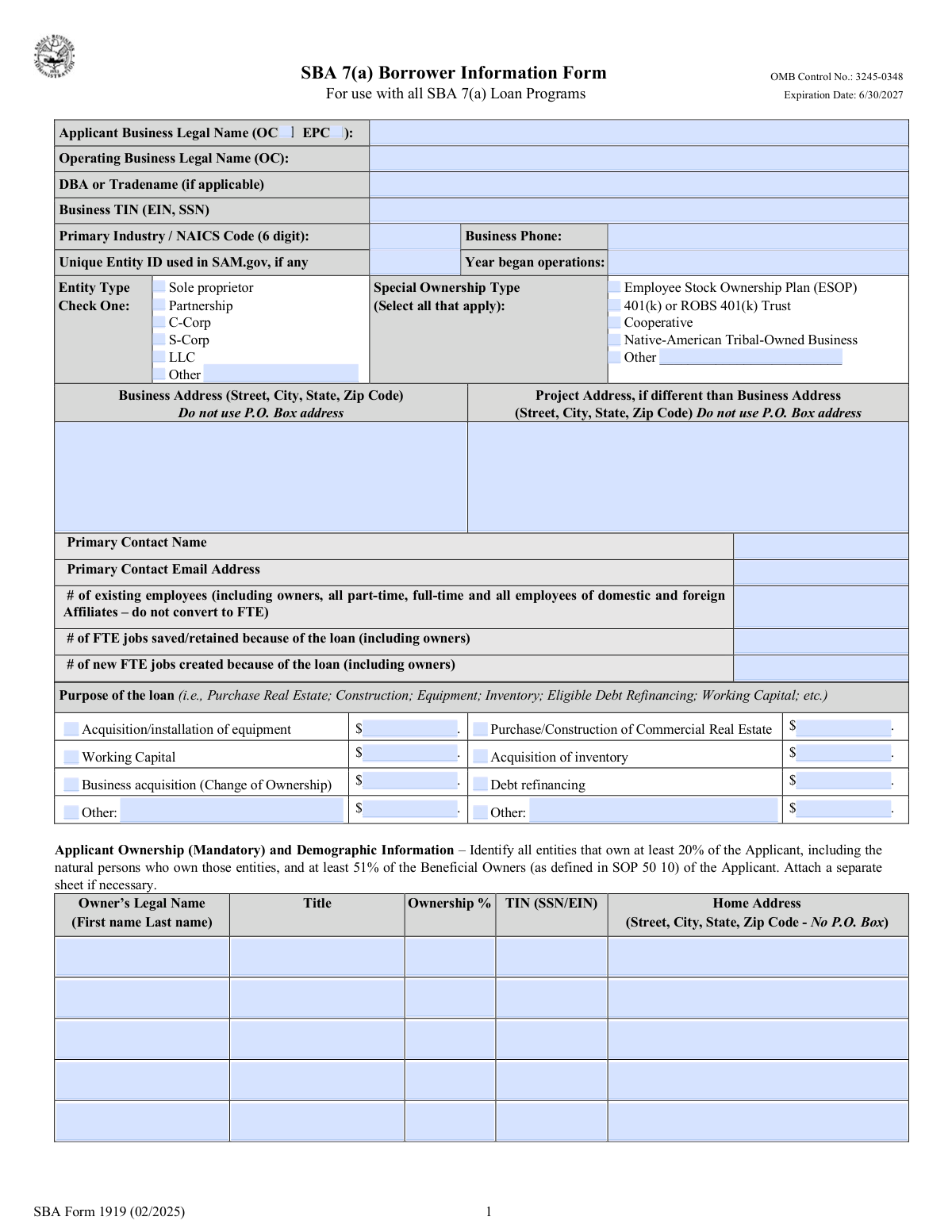
Yes! You can use AI to fill out SBA Form 1919, Borrower Information Form

SBA Form 1919, the Borrower Information Form, is a mandatory document for businesses seeking loans through the SBA's 7(a) and 504 programs. It provides the SBA and the lender with detailed information about the business, its principals, the requested loan's purpose, and the applicant's eligibility. Completing this form accurately is crucial for the loan approval process as it screens for compliance with federal regulations. Today, this form can be filled out quickly and accurately using AI-powered services like Instafill.ai, which can also convert non-fillable PDF versions into interactive fillable forms.
Our AI automatically handles information lookup, data retrieval, formatting, and form filling.
It takes less than a minute to fill out SBA Form 1919 using our AI form filling.
Securely upload your data. Information is encrypted in transit and deleted immediately after the form is filled out.

Form specifications

Form name: SBA Form 1919, Borrower Information Form
Number of fields: 126
Number of pages: 4
Language: English
main-image

Instafill Demo: How to fill out PDF forms in seconds with AI

How to Fill Out SBA Form 1919 Online for Free in 2026

Are you looking to fill out a SBA FORM 1919 form online quickly and accurately? Instafill.ai offers the #1 AI-powered PDF filling software of 2026, allowing you to complete your SBA FORM 1919 form in just 37 seconds or less.
Follow these steps to fill out your SBA FORM 1919 form online using Instafill.ai:
  1. 1 Navigate to Instafill.ai and upload your SBA Form 1919, or select it from the template library.
  2. 2 Provide your business's legal and operating names, TIN/EIN, entity type, and contact information in the 'Applicant Business Details' section.
  3. 3 Detail the loan's purpose in the 'Loan Purpose and Employment Impact' section, specifying amounts for equipment, real estate, working capital, or other needs.
  4. 4 Enter the personal and ownership details for each principal owner in the 'Ownership Information' section, including their demographic data.
  5. 5 Carefully answer all 'Eligibility and Compliance Questions,' which cover topics like debarment, previous federal loans, criminal history, and potential conflicts of interest.
  6. 6 Review all the information auto-filled by the AI for accuracy, then electronically sign and date the form in the designated fields to certify your application.
  7. 7 Download your completed, signed SBA Form 1919 and submit it to your lender as part of your loan package.

Our AI-powered system ensures each field is filled out correctly, reducing errors and saving you time.

Why Choose Instafill.ai for Your Fillable SBA Form 1919 Form?

Speed

Complete your SBA Form 1919 in as little as 37 seconds.

Up-to-Date

Always use the latest 2026 SBA Form 1919 form version.

Cost-effective

No need to hire expensive lawyers.

Accuracy

Our AI performs 10 compliance checks to ensure your form is error-free.

Security

Your personal information is protected with bank-level encryption.

Frequently Asked Questions About Form SBA Form 1919

This form is used to apply for a business loan. It gathers essential details about your business entity, its owners, the intended use of the loan funds, and your eligibility.

The 'Applicant Business Legal Name' is the name registered on official documents, while the 'Operating Business Legal Name' is used if your business operates under a different legal name. If they are the same, enter the same name in both fields.

You can find your North American Industry Classification System (NAICS) code, which categorizes your business's primary activity, on the U.S. Census Bureau website. It is a required field for this application.

A SAM.gov Unique Entity ID is not always mandatory. You should enter it if your business has one, but you can typically leave the field blank if you do not.

You must include the total number of all employees, which includes the owners as well as all full-time and part-time employees of your business and any domestic or foreign affiliates.

You must provide detailed personal and financial information for all individuals with an ownership stake in the applicant business. The form provides space to list up to five owners.

No, providing this demographic information is voluntary. Each category includes a 'Not Disclosed' option that you can select if you prefer not to provide the information.

You must answer 'Yes' to Question 2 if you are currently delinquent on any federal loan, including student loans. Be prepared to provide further explanation, as this can impact your loan eligibility.

If your loan purpose is not an option like 'Working Capital' or 'Equipment', check the 'Other' box. You will then need to provide a brief description of the purpose and the amount requested for it.

You must disclose if the applicant business, any of its owners, or any affiliated businesses are currently involved in any legal action. This includes lawsuits, bankruptcies, and even divorce proceedings.

An authorized representative of the applicant business must sign the form. This person must also print their name and official title, certifying that all information provided is true and accurate.

Yes, services like Instafill.ai use AI to accurately auto-fill form fields with your saved information. This can save you significant time and help reduce errors on complex applications.

You can use a service like Instafill.ai to upload the PDF and complete it online. The platform allows you to easily type information, check boxes, and add a legally binding electronic signature.

If you have a flat, non-fillable PDF, you can upload it to a platform like Instafill.ai. The service can convert the document into an interactive, fillable form that you can complete on your computer or mobile device.

Compliance SBA Form 1919
Validation Checks by Instafill.ai

1
Total Ownership Percentage Summation
Checks that the sum of all 'Ownership Percentage' fields for all listed owners equals exactly 100%. This is critical for verifying the complete ownership structure of the business and ensuring all equity is accounted for. If the total is not 100%, the form is considered incomplete and cannot be processed, as it indicates missing or inaccurate owner information.
2
Conditional 'Other Entity Type' Specification
Validates that if the 'Other (Entity Type)' checkbox is selected, the corresponding 'Entity Type — Other (specify)' text field is not empty. This ensures that when a non-standard entity type is chosen, the applicant provides the necessary details for proper classification. A failure would prompt the user to either specify the entity type or select one of the standard options.
3
Business Taxpayer ID Number (TIN) Format
Ensures the 'Business TIN (EIN or SSN)' field contains a valid 9-digit number, formatted as either XXXXXXXXX or XX-XXXXXXX. This validation is essential for tax reporting, identity verification, and cross-referencing with government databases. An invalid format would prevent the system from correctly identifying the business entity.
4
Year Business Began Operations is in the Past
Verifies that the 'Year Business Began Operations' is a valid four-digit year and is not in the future. This check prevents data entry errors and ensures the business has a history of operations, which is a fundamental eligibility requirement for many loan programs. An invalid or future year would require correction before submission.
5
Mutually Exclusive Entity Type Selection
This check ensures that only one checkbox for business entity type (Sole proprietor, Partnership, C-Corp, S-Corp, LLC, Other) is selected. Selecting multiple entity types is a logical contradiction and would make it impossible to determine the business's legal structure. The validation forces the user to choose the single, correct classification for the applicant business.
6
Loan Purpose and Amount Consistency
This validation rule checks that for every 'Loan Purpose' checkbox selected (e.g., 'Acquisition/installation of equipment'), the corresponding amount field (e.g., 'Equipment acquisition amount') is filled with a numeric value greater than zero. This ensures that the requested loan funds are properly allocated and justified. If a purpose is selected without an amount, the user is prompted to provide the dollar value or deselect the purpose.
7
Retained Jobs Logical Cap
This validation compares the 'FTE jobs saved/retained' field against the 'Number of Existing Employees' field. The number of jobs retained cannot be greater than the total number of existing employees. This check prevents logical inconsistencies and ensures the employment impact data is credible and accurate for reporting and evaluation purposes.
8
Address P.O. Box Prohibition
Scans the 'Business Address' and all 'Owner Home Address' fields to ensure they do not contain 'P.O. Box' or similar variations. Physical addresses are required for verification, compliance, and legal purposes, as P.O. boxes do not establish a physical presence. If a P.O. Box is detected, the user must provide a valid street address.
9
Primary Contact Email Address Format
Verifies that the value entered in the 'Primary Contact Email Address' field conforms to a standard email format (e.g., [email protected]). This is crucial for ensuring that all application-related correspondence can be successfully delivered to the primary contact. An invalid email format would block communication and delay the application process.
10
Conditional Export Information Requirement
This check ensures that if the applicant answers 'Yes' to 'Question 5' regarding exports, then the 'Estimated Total Export Sales' and 'Principal Export Country 1' fields must be completed. This information is required for assessing eligibility for specific export-related loan programs and for federal reporting. Failure to provide these details when required will result in an incomplete application.
11
Exclusive Yes/No Answer Selection
For each of the numbered eligibility questions (e.g., Question 1, Question 2, etc.), this validation ensures that exactly one of the corresponding 'Yes' or 'No' checkboxes is selected. Answering both or neither for a single question creates ambiguity and makes the application ineligible for automated review. The user must provide a definitive 'Yes' or 'No' for each question.
12
Signature Date Format and Validity
This validation checks that the 'Date' field in the final signature block is entered in the MM/DD/YYYY format and represents a valid, non-future date. A correctly formatted and valid date is legally required to establish when the certification was made. An invalid format or a future date would render the signature and certification invalid.
13
NAICS Code Structural Validation
This check verifies that the 'Primary Industry / NAICS Code' field contains a numeric value that is between two and six digits long, consistent with the structure of North American Industry Classification System codes. While not a full validation against the official NAICS list, it prevents basic data entry errors like entering text or an incorrectly formatted number. This ensures the data is structured correctly for industry analysis and reporting.
14
Sole Proprietor TIN Consistency
This validation checks that if the 'Sole proprietor' entity type is selected and only one owner is listed, the 'Business TIN' matches the 'Owner 1 - TIN'. For a sole proprietorship, the business is legally indistinct from the owner, and the same tax ID (often the owner's SSN) is frequently used for both. This cross-field check ensures logical consistency and correct identification of the legal entity.

Common Mistakes in Completing SBA Form 1919

Using Incorrect Business Name (Legal vs. DBA)

Applicants often confuse their 'Doing Business As' (DBA) or trade name with the official 'Applicant Business Legal Name'. The legal name is the one registered with the state and IRS, and using a DBA in this field can cause verification failures and processing delays. To avoid this, refer to your business formation documents or tax filings to confirm the exact legal name. AI-powered tools like Instafill.ai can help by storing and correctly populating the distinct legal, operating, and trade names for your business.

Inaccurate Ownership Percentage Calculation

A frequent error occurs when the ownership percentages listed for all owners do not sum to exactly 100%. This often happens with complex ownership structures or simple mathematical oversights. An incorrect total will immediately flag the application for manual review and correction, significantly delaying the process. Always double-check that the percentages for all individuals and entities listed in the 'Ownership Information' section add up precisely to 100% before submitting.

Mismatch in Loan Purpose and Amount Fields

Applicants commonly check a box for a specific loan purpose, such as 'Acquisition of inventory', but then forget to enter the corresponding dollar amount in the adjacent field. Conversely, they might enter an amount without checking the box. This creates an incomplete and ambiguous request, forcing the lender to halt the application and request clarification. To prevent this, carefully review the 'Loan Purpose' section to ensure every checked purpose has a specific amount and that the sum of these amounts matches your total loan request.

Entering an Invalid or Incorrect NAICS Code

Many business owners are unfamiliar with the North American Industry Classification System (NAICS) and either guess their code or leave the field blank. An incorrect NAICS code can lead to the misclassification of your business, potentially affecting eligibility for industry-specific programs or loan terms. Before filling out the form, use the free NAICS search tool on the U.S. Census Bureau website to find the precise code that describes your primary business activity.

Misunderstanding Critical Eligibility Questions

The 'Eligibility and Compliance Questions' are written in dense, legal language, leading applicants to misinterpret them. Answering 'Yes' or 'No' incorrectly to questions about debarment, federal loan history, or criminal background can lead to automatic disqualification or, worse, legal penalties for making a false statement to the government. It is crucial to read each question slowly and thoroughly, and if you are even slightly unsure of the meaning, you should consult with a legal or financial advisor.

Providing a P.O. Box for a Physical Address

The form explicitly states not to use a P.O. Box for the 'Business Address' or 'Project Address' fields, yet it remains a common mistake. These fields are used to verify the physical location of the business operations, which a P.O. Box cannot do. Submitting a P.O. Box will result in the application being returned or rejected for failing to meet a basic requirement. Always provide the full street address, including the city, state, and ZIP code, where the business is physically located.

Using Incorrect Business or Personal TINs

A simple typo or confusion between a personal Social Security Number (SSN) and a business's Employer Identification Number (EIN) is a critical error. The 'Business TIN' and 'Owner's TIN' fields are used for verification with the IRS, and any mismatch will cause the application to fail this check. This can halt the entire process and require resubmission. Always cross-reference these numbers with official tax documents before entry, and use tools like Instafill.ai to securely store and accurately autofill this sensitive information, reducing the risk of typos.

Failing to Provide Required Details for 'Yes' Answers

Many questions in the 'Eligibility and Compliance' section, such as those about other business ownership or export activities, require additional details if answered 'Yes'. Applicants frequently check 'Yes' but neglect to provide the mandatory follow-up information in the specified fields. This renders the application incomplete and guarantees a delay as the processor must request the missing data. To avoid this, make it a habit to scan your form for every 'Yes' answer and confirm you have completed all corresponding explanatory fields.

Incorrect Calculation of FTE Employees

When asked for the 'Number of Existing Employees' or 'FTE jobs saved/created', applicants often provide a simple headcount rather than calculating Full-Time Equivalents (FTEs). An FTE is a standardized measure based on hours worked, and failing to calculate it correctly misrepresents the business's size and the loan's employment impact. This can affect how the application is evaluated. You should follow the specific SBA or lender guidelines for calculating FTEs, which typically involves summing all employee hours and dividing by a standard number (e.g., 40 hours/week).

Misidentifying Business Entity Type

Applicants often struggle to correctly identify their business structure, for example, confusing a single-member LLC with a Sole Proprietorship, or not knowing if their LLC is taxed as an S-Corp. Selecting the wrong entity type (e.g., C-Corp, S-Corp, LLC) has significant legal and tax implications and can cause a mismatch with state and federal records. Always refer to your official business formation and registration documents to ensure you check the correct box. If the form is a non-fillable PDF, a tool like Instafill.ai can convert it to a fillable version and help pre-populate this data from your saved business profile.
Saved over 80 hours a year

“I was never sure if my IRS forms like W-9 were filled correctly. Now, I can complete the forms accurately without any external help.”

Kevin Martin Green

Your data stays secure with advanced protection from Instafill and our subprocessors

Robust compliance program

Transparent business model

You’re not the product. You always know where your data is and what it is processed for.

ISO 27001, HIPAA, and GDPR

Our subprocesses adhere to multiple compliance standards, including but not limited to ISO 27001, HIPAA, and GDPR.

Security & privacy by design

We consider security and privacy from the initial design phase of any new service or functionality. It’s not an afterthought, it’s built-in, including support for two-factor authentication (2FA) to further protect your account.

Fill out SBA Form 1919 with Instafill.ai

Worried about filling PDFs wrong? Instafill securely fills sba-form-1919-borrower-information-form forms, ensuring each field is accurate.